Texturing exportation problems (Solved!)

How to create models in XSI and other 3D applications and make them work in Battlefront 1 & 2. Post models, tips for application usage and share anything XSI, 3DMax, SketchUp, etc.

Moderator: Moderators

Post Reply
User avatar
AgentSmith_#27
Rebel Warrant Officer
Posts: 302
Joined: Thu Feb 11, 2010 3:10 pm
Projects :: No Projects I am ready to unveil
Games I'm Playing :: SWBF2-MW2-Madden 08
xbox live or psn: No gamertag set
Location: Zeroeditor
Contact:

Texturing exportation problems (Solved!)

Post by AgentSmith_#27 »

Well, I have been trying to learn how to model in XSI, using the Basic Modeling in XSI tutorial, I've been kind of 50-50 on if I can get it to result in a working msh file, and I'm 0-100 on if I can get textures to show up in the msh viewer. (They are in the same location and all that, I've worked with custom objects before, just not my own) So my predicament is I really can't make myself move on to the rocket in that tut until I know I've got the door deal down good (with exporting right) and I've tried using what I can find in any guide to XSI or exporting with mshex, with no luck.

I apply the texture just like it says in the tutorial, then I freeze both transforms, and I know I've got the export settings for Mshex correct too.

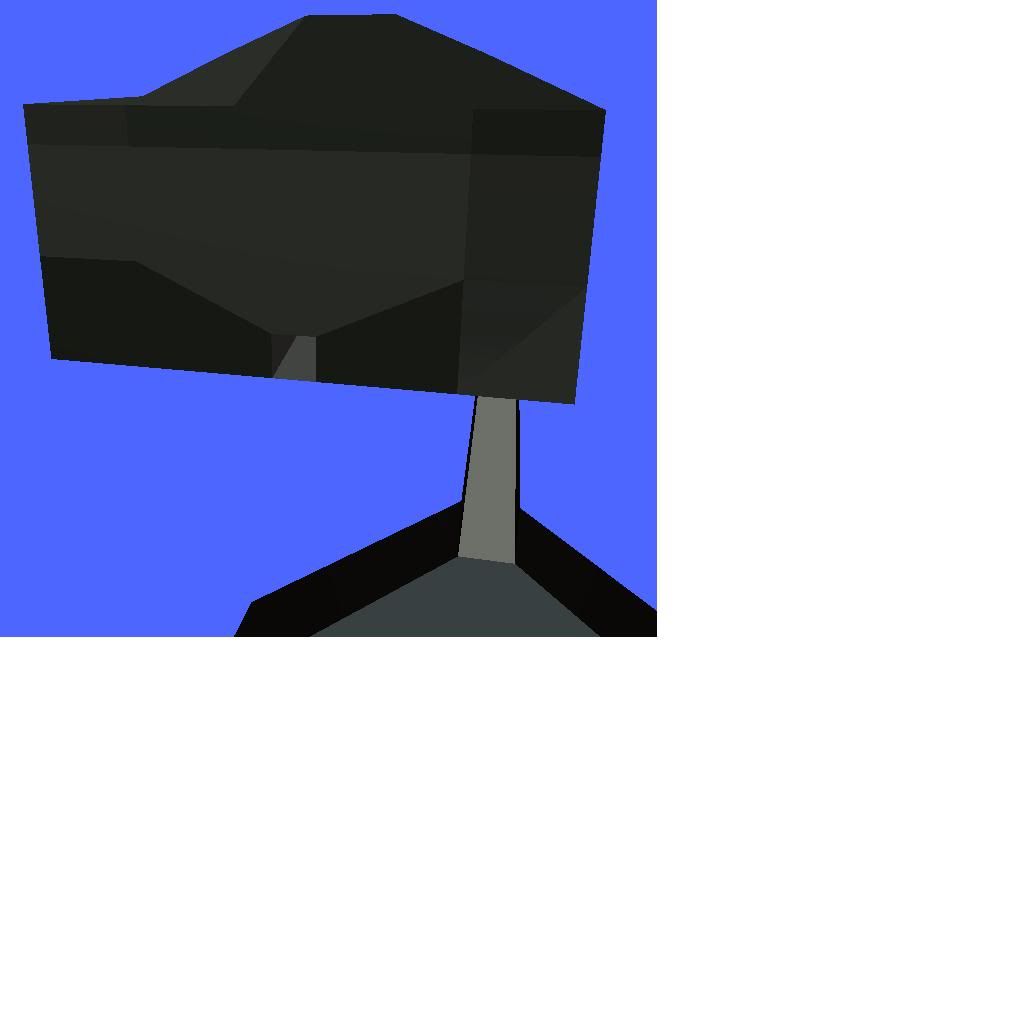
I suppose it wouldn't be essential for me to learn modeling myself, as I have a friend who models for me, who is willing to try just about anything, but when he makes and exports his models (with mshex) they look like this:
Hidden/Spoiler:
Image
Last edited by AgentSmith_#27 on Mon Jun 14, 2010 11:42 am, edited 1 time in total.
User avatar
Maveritchell
Jedi Admin
Jedi Admin
Posts: 7366
Joined: Mon Aug 21, 2006 11:03 pm

Re: Texturing exportation problems (possible mshex difficult

Post by Maveritchell »

It looks like there is some kind of texture showing there. It may be that the transforms aren't frozen, or it may just be that your friend is exporting incorrectly.

In any case, what you see in MeshViewer should not be your benchmark. You should always check your meshes in-game.
User avatar
AgentSmith_#27
Rebel Warrant Officer
Posts: 302
Joined: Thu Feb 11, 2010 3:10 pm
Projects :: No Projects I am ready to unveil
Games I'm Playing :: SWBF2-MW2-Madden 08
xbox live or psn: No gamertag set
Location: Zeroeditor
Contact:

Re: Texturing exportation problems (possible mshex difficult

Post by AgentSmith_#27 »

Maveritchell wrote:It looks like there is some kind of texture showing there. It may be that the transforms aren't frozen, or it may just be that your friend is exporting incorrectly.

In any case, what you see in MeshViewer should not be your benchmark. You should always check your meshes in-game.
Ty for the reply:

Well, I generally use Mesh Viewer first, then Zero Editor, but if it doesn't work in either of those two, why would it work in-game? I don't mean to be a snob or a know-it-all or anything, I'm just genuinely asking why it wouldn't be a waste of time?

Also, is there a way you can apply a texture wrongly, so it works in XSI but not in the MSH? If not then should I consider field of our problems Narrowed to something with how I'm/We're freezing the transforms (By how I mean I just use Freeze and Freeze M under edit with doorwall selected, no idea what my friend does) or exporting?
User avatar
DarthD.U.C.K.
Master of the Force
Master of the Force
Posts: 6027
Joined: Wed Sep 27, 2006 11:05 am
Location: Duckburg, Germany

Re: Texturing exportation problems (possible mshex difficult

Post by DarthD.U.C.K. »

AgentSmith_#27 wrote: Also, is there a way you can apply a texture wrongly, so it works in XSI but not in the MSH? If not then should I consider field of our problems Narrowed to something with how I'm/We're freezing the transforms (By how I mean I just use Freeze and Freeze M under edit with doorwall selected, no idea what my friend does) or exporting?
no, you cant
pressing "freeze" and/or "freeze mmodeling" should make shure that nothing is lost when exporting, however there are always cases when bugs happen for no logical reason, you can try to select all polys of the object, right click and clicl "extract (delete)" or export the model as obj and reimport it and see if the texture is still messed up in ZE/ingame
User avatar
AgentSmith_#27
Rebel Warrant Officer
Posts: 302
Joined: Thu Feb 11, 2010 3:10 pm
Projects :: No Projects I am ready to unveil
Games I'm Playing :: SWBF2-MW2-Madden 08
xbox live or psn: No gamertag set
Location: Zeroeditor
Contact:

Re: Texturing exportation problems (possible mshex difficult

Post by AgentSmith_#27 »

DarthD.U.C.K. wrote:no, you cant
pressing "freeze" and/or "freeze mmodeling" should make shure that nothing is lost when exporting, however there are always cases when bugs happen for no logical reason, you can try to select all polys of the object, right click and clicl "extract (delete)" or export the model as obj and reimport it and see if the texture is still messed up in ZE/ingame
Thing is I've made certain I press both freezes, and I've built this door model multiple times. so I suppose it could be narrowed down to exporting, but I've always made certain parent any/all objects (I hear the name doesn't matter) under MS3DSceneRoot (null) and from there I go to: File>Crosswalk>Export>Settings. Then I uncheck "keep referenced paths relative" Check "selection only" check "convert meshes to triangles" and check "Export XSI normals"
User avatar
Maveritchell
Jedi Admin
Jedi Admin
Posts: 7366
Joined: Mon Aug 21, 2006 11:03 pm

Re: Texturing exportation problems (possible mshex difficult

Post by Maveritchell »

AgentSmith_#27 wrote:Well, I generally use Mesh Viewer first, then Zero Editor, but if it doesn't work in either of those two, why would it work in-game? I don't mean to be a snob or a know-it-all or anything, I'm just genuinely asking why it wouldn't be a waste of time?
Neither of those are a 100%-accurate WYSIWYG viewer for the game. Most of the time, Zero Editor is reliable, but I know that models I export using multiple texture supports rarely show up correctly in MeshViewer. In any case, your end goal is always to have something that works in-game, and so it logically follows that appearance in-game should always be checked if it is a matter of concern.

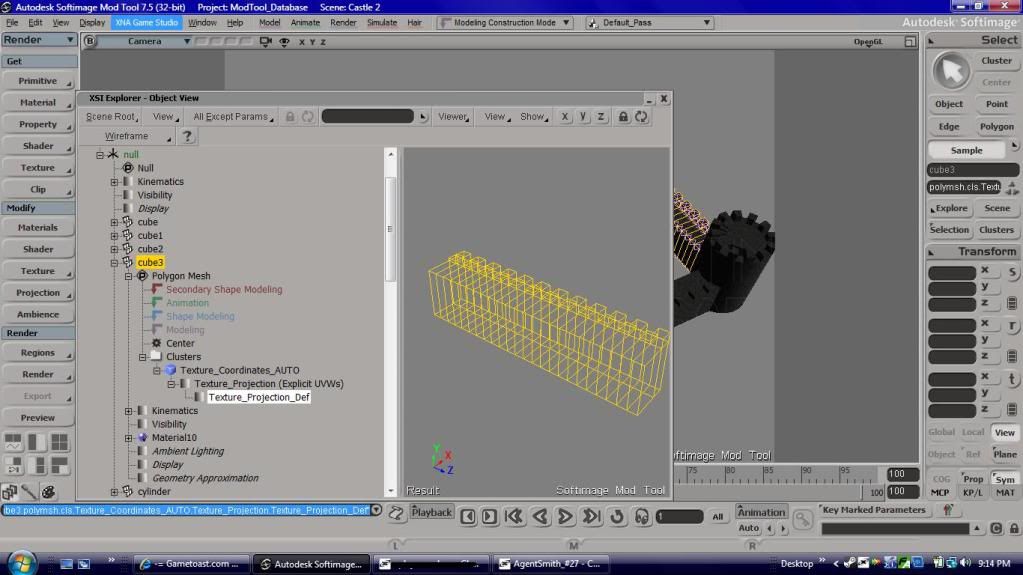
Your problem may be that you have too many texture projections; please open up your scene explorer (alt-8), expand your polymesh (the "+" next to its name), expand "Polygon Mesh," expand "Clusters", and then expand "Texture_Coordinates_AUTO" (or whatever appears closest, namewise, to this - it should be the last item under "Clusters"). Please take a screenshot of that.
User avatar
AgentSmith_#27
Rebel Warrant Officer
Posts: 302
Joined: Thu Feb 11, 2010 3:10 pm
Projects :: No Projects I am ready to unveil
Games I'm Playing :: SWBF2-MW2-Madden 08
xbox live or psn: No gamertag set
Location: Zeroeditor
Contact:

Re: Texturing exportation problems (possible mshex difficult

Post by AgentSmith_#27 »

Maveritchell wrote: Neither of those are a 100%-accurate WYSIWYG viewer for the game. Most of the time, Zero Editor is reliable, but I know that models I export using multiple texture supports rarely show up correctly in MeshViewer. In any case, your end goal is always to have something that works in-game, and so it logically follows that appearance in-game should always be checked if it is a matter of concern.

Your problem may be that you have too many texture projections; please open up your scene explorer (alt-8), expand your polymesh (the "+" next to its name), expand "Polygon Mesh," expand "Clusters", and then expand "Texture_Coordinates_AUTO" (or whatever appears closest, namewise, to this - it should be the last item under "Clusters"). Please take a screenshot of that.
Do you mean for me to do this or my friend? The screenshot I posted was my friends' model and has a slightly different problem than mine if you mean the model in the picture I'll just have him send me a screenshot of what you told me to and hopefully have it posted here first thing in the morning.

As for myself, I'm afraid I must just be missing something I'm supposed to do (or doing something I'm not supposed to) because now when I go through the whole process the object appears textured under textured decal, but not under render.. It's also crashing MshEx when I try to export as usual.

This drives me mad because knowing I'm unable to get proper new models (from me or my friend) strangely makes me unable to focus on anything else when I try to mod (I've been wanting to sit down and really grind and learn LUA for ages)
User avatar
Maveritchell
Jedi Admin
Jedi Admin
Posts: 7366
Joined: Mon Aug 21, 2006 11:03 pm

Re: Texturing exportation problems (possible mshex difficult

Post by Maveritchell »

AgentSmith_#27 wrote:Do you mean for me to do this or my friend? The screenshot I posted was my friends' model and has a slightly different problem than mine if you mean the model in the picture I'll just have him send me a screenshot of what you told me to and hopefully have it posted here first thing in the morning.
Either one, I suppose. I was specifically referring to the model posted in the first post. If you want, you could post your .xsi file along with your texture and I could take a look at it.
User avatar
CodaRez
Field Commander
Field Commander
Posts: 940
Joined: Mon May 25, 2009 6:49 am
Projects :: I would like one.....
Location: Ride around the world! And I won't give you anything :P

Re: Texturing exportation problems (possible mshex difficult

Post by CodaRez »

DarthD.U.C.K. wrote: export the model as obj and reimport it and see if the texture is still messed up in ZE/ingame
I have to say.....

Have you tried exporting to .obj and importing it back?


*Also, in the future with perhaps more complex models, the following texture tut can be more useful*

http://www.gametoast.com/forums/viewtop ... 36&t=13539
User avatar
AgentSmith_#27
Rebel Warrant Officer
Posts: 302
Joined: Thu Feb 11, 2010 3:10 pm
Projects :: No Projects I am ready to unveil
Games I'm Playing :: SWBF2-MW2-Madden 08
xbox live or psn: No gamertag set
Location: Zeroeditor
Contact:

Re: Texturing exportation problems (possible mshex difficult

Post by AgentSmith_#27 »

Would that be necessary since there's a problem with every single different model we've done?

I figure if we can get it to the point where my friend can export correctly, he can help me with my textures all that I need, so let's just focus on the problems in the screenshot :mrgreen:

I was told to post this by my friend: "hello Mav, thank you for you help, i may have something to help us all here.

The way i put my textures on the object is Render > Get > Texture > Image > New > (Select image) > Texture Projection > New > Cubic then i freeze all my objectss , Transforms and modelling but if the image looks too streched out i go to Advanced > Repeats and alter the texture repeats from there.


AgentSmith_#38"

These are for another model, (he's currently away and doesn't have the one seen in the pic) but this also has similar problems (though not as extremely bad)

The texture projections:
Hidden/Spoiler:
Image
And a zipped folder with the XSI file, texture file, msh file, and some screenshots: http://www.filefront.com/16745899/Castle.zip

I appreciate all the time and help I've gotten from you kind folks at Gametoast, and am sure I will appreciate all the help I'm going to get in the future :angel:
User avatar
Maveritchell
Jedi Admin
Jedi Admin
Posts: 7366
Joined: Mon Aug 21, 2006 11:03 pm

Re: Texturing exportation problems (possible mshex difficult

Post by Maveritchell »

A couple things I noticed about the model I was sent (castle.xsi):
1) Probably too many tris to be exported by MshEx (it crashes when I try - there are 8000+ tris).
2) Why so many primitives? Merge your primitives into a single polymesh unless there is a good reason not to.
3) There is an incredible amount of tiling used with the texture - I know you're having problems getting models working 100%, but when you do, and you see textures used like this, you will recognize that this is a bit excessive.
Hidden/Spoiler:
Image
Here is what I would have done if I were making this (see above). Since the castle is just the same thing repeated four times, I cut down the model to one of four parts. All you need to do to make this model look correct in ZE/ingame is place the model four times on the exact same spot (use ctrl-p to bring up position editor) and then rotate one piece to 90 degrees, one to 180, and another to 270. I also split the model (and would export it as two separate models) into an interior (castlestairs) and exterior (castlewalls), because when you use a MshEx model, you'll be using auto-generated VisualMunge collision. Having your smaller bits as one model and your bigger bits as another will make the collision easier to manage.

That aside, I am wondering if perhaps you are not making your scenematerial "local" before you export? Are you familiar with this step in using MshEx?

In any case, the problem with this model was (I assume) what you mentioned above (using "Repeats" to scale the texture). When you want to scale texture transforms on a model, select your polygons/object and use the texture editor (alt-7). You can use the scale button (S) to scale uniformly (leftclick) or along the X-axis (rightclick), and of course you can manually adjust position of points by moving individual/groupings of points. After merging individual pieces into a single polymesh (as mentioned above), I browsed to "clusters" and selected each individual cluster and reapplied the texture (select cluster, add image, alt-7), this time scaling the texture projection in the texture editor.
Hidden/Spoiler:
Image
I obviously used a little different scaling on the texture (just for this example, but as I mentioned above I do think the tiling was a bit too much), but you can see that the end result in MeshViewer is also what I saw in my XSI window:
Hidden/Spoiler:
Image
And one final note, just to preempt questions that may arise if you (or anyone) uses tiling extensively and sees texture mis-placement ingame: if your texture projection extends too much in the -X or -Y dimensions:
Hidden/Spoiler:
Image
-you may find texture stretching or misplacement on the final model. This is a quirk of VisualMunge, so you shouldn't see it pop up in MeshViewer, 3DOC, Unwrap3D, ZE, etc. (this is one reason why you should check in-game!). It won't happen to most people provided your texture is reasonably scaled (for example, it wasn't a problem in the above picture); I mention it here because it may happen if the scaling is off (i.e. if this model had been scaled in Texture Editor as it was scaled through the other means) by a lot.

User avatar
AgentSmith_#27
Rebel Warrant Officer
Posts: 302
Joined: Thu Feb 11, 2010 3:10 pm
Projects :: No Projects I am ready to unveil
Games I'm Playing :: SWBF2-MW2-Madden 08
xbox live or psn: No gamertag set
Location: Zeroeditor
Contact:

Re: Texturing exportation problems (possible mshex difficult

Post by AgentSmith_#27 »

:bowdown: A thousand, nay, A million thanks!
That aside, I am wondering if perhaps you are not making your scenematerial "local" before you export? Are you familiar with this step in using MshEx?
I do not believe my friend (or I for that matter) are familiar with this.

Besides that, AgentSmith_#38 sends a great many thanks as well.

Very descriptive and helpful, I cannot thank you enough.
I can only hope you will see the results of the aid you have given me in any future maps of mine you might review/play :D
User avatar
Maveritchell
Jedi Admin
Jedi Admin
Posts: 7366
Joined: Mon Aug 21, 2006 11:03 pm

Re: Texturing exportation problems (possible mshex difficult

Post by Maveritchell »

AgentSmith_#27 wrote::bowdown: A thousand, nay, A million thanks!
That aside, I am wondering if perhaps you are not making your scenematerial "local" before you export? Are you familiar with this step in using MshEx?
I do not believe my friend (or I for that matter) are familiar with this.
From the MshEx thread:
Each cluster must have a local copy of a material (the material name will be italicized = BAD, drag the material from the material editor onto the cluster)
An easy way to do it is open up your scene explorer and look under each model. It will usually say "material#" (which usually means it is already a local material) or SceneMaterial, which (when italicized) means that it needs to be set to local. If you see the latter, just click on it and then press "yes" when the dialogue box pops up.
User avatar
AgentSmith_#27
Rebel Warrant Officer
Posts: 302
Joined: Thu Feb 11, 2010 3:10 pm
Projects :: No Projects I am ready to unveil
Games I'm Playing :: SWBF2-MW2-Madden 08
xbox live or psn: No gamertag set
Location: Zeroeditor
Contact:

Re: Texturing exportation problems (Solved!)

Post by AgentSmith_#27 »

Very easy to understand, Worked like a charm, all my modeling problems are fixed, I can scarcely believe it! I do not know how to thank you.
Post Reply