[TUTORIAL][XSI] Enveloping humanoid meshes-The lazy way!

How to create models in XSI and other 3D applications and make them work in Battlefront 1 & 2. Post models, tips for application usage and share anything XSI, 3DMax, SketchUp, etc.

Moderator: Moderators

Post Reply
User avatar
Chadaface
Private
Posts: 30
Joined: Sat May 01, 2010 7:59 pm

[TUTORIAL][XSI] Enveloping humanoid meshes-The lazy way!

Post by Chadaface »

This tutorial will show you a quick way to do just that. Using XSI's GATOR feature you can quickly "transfer" the weights of a model and have it enveloped appropriately with just a few clicks.
I wont be covering the bits about modeling the mesh or texture mapping it.
Also you will need to be relatively familiar with XSI's basic functions to get this right.

You'll need psychOfred's skeleton and weighted clone trooper to get this done properly. You can get that file from this link: http://www.secretsociety.com/forum/down ... e_Beta.zip

Alright lets get started:
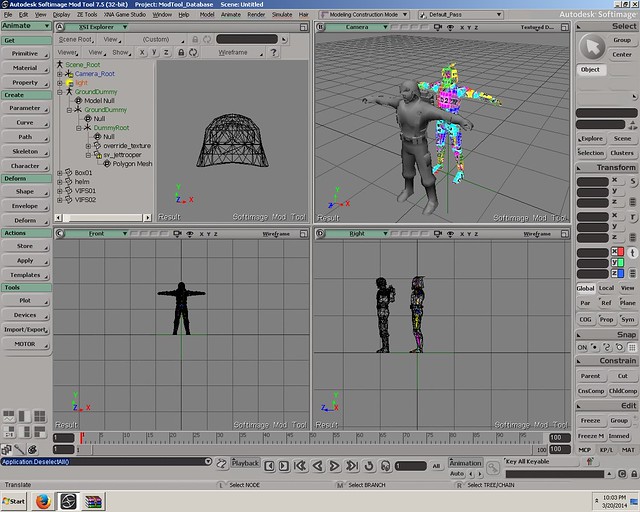
Import the .emdl file provided the zip into XSI. Once that's done you can either import/merge the mesh you want to envelope or build it with reference to the skeleton that came with the .emdl file. For this tutorial I used an edited version of the stock smuggler model that I had loaded into the scene:
Hidden/Spoiler:
Image
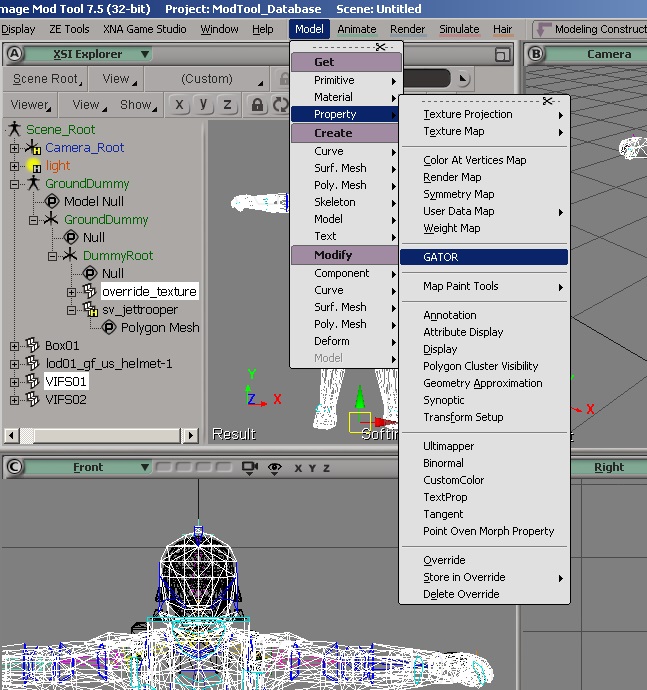
Now select the mesh that you need enveloped and the mesh for the clone in the scene (override_texture). Click on Model->Property (under "Get") ->GATOR.
Hidden/Spoiler:
Image
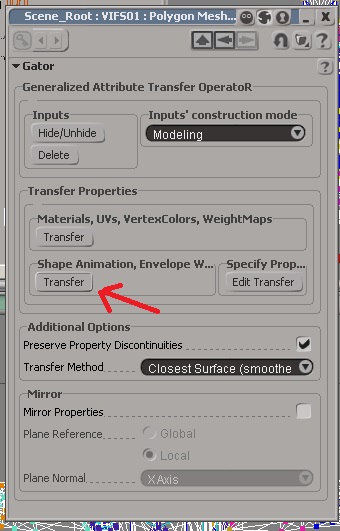
Now click on "Transfer" as indicated by the red arrow.

Hidden/Spoiler:
Image
There! the mesh that you had selected alongside "override_texture" now has the weights copied onto it. How ever if the mesh has a different topology/shape then the weights may need to be tuned.

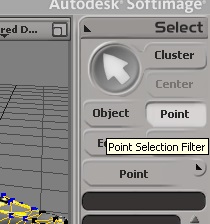
To tune them, set your selection mode to "point"
Hidden/Spoiler:
Image
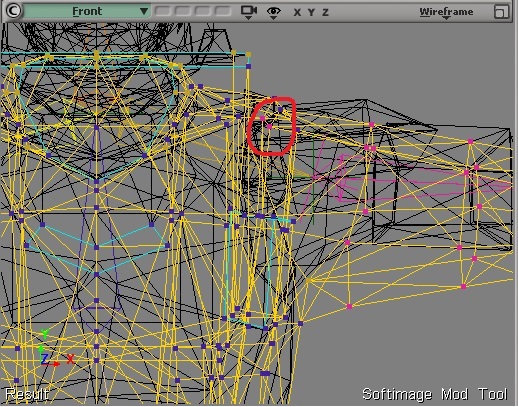
Select the vertices that may have been enveloped improperly:
Hidden/Spoiler:
Image
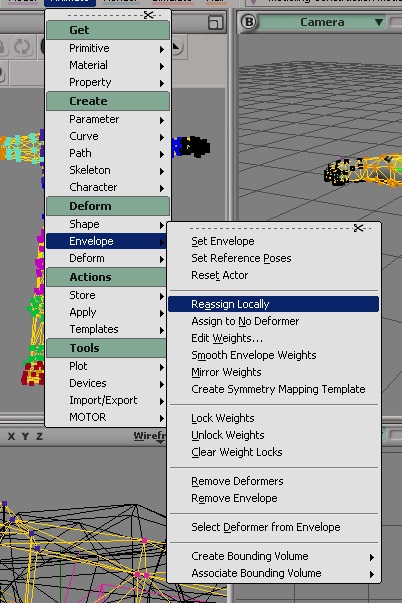
And reassign them to an appropriate bone:
Hidden/Spoiler:
Image
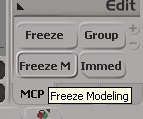
Now finally, freeze the mesh that had been enveloped (Select the meshes and then Click Freeze M at the bottom right) that you have enveloped and if necessary delete "override_texture" from the scene.
Hidden/Spoiler:
Image
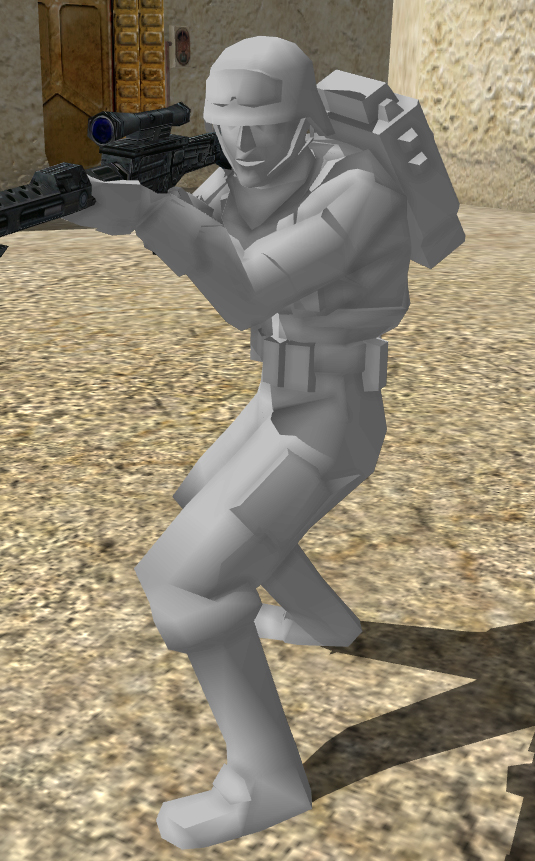
That's it, the model has been fully enveloped. Export it into the game and play around with it for a bit!

Hidden/Spoiler:
Image
User avatar
Anakin
Master of the Force
Master of the Force
Posts: 4817
Joined: Sat Sep 19, 2009 11:37 am
Projects :: RC Side Mod - Remastered - SWBF3 Legacy
Location: Mos Espa (germany)

Re: [TUTORIAL][XSI] Enveloping humanoid meshes-The lazy way!

Post by Anakin »

Wow thank you i'll try this. Since now i always made a whole new envelope
User avatar
minilogoguy18
Master Bounty Hunter
Posts: 1512
Joined: Wed Nov 09, 2005 11:12 pm
Projects :: No Mod project currently.
Games I'm Playing :: I have not listed any games yet
xbox live or psn: No gamertag set

Re: [TUTORIAL][XSI] Enveloping humanoid meshes-The lazy way!

Post by minilogoguy18 »

This should only be used to get a starting envelope. Also, editing vetex by vertex afterward is the slow way, use the weight painter.
User avatar
Anakin
Master of the Force
Master of the Force
Posts: 4817
Joined: Sat Sep 19, 2009 11:37 am
Projects :: RC Side Mod - Remastered - SWBF3 Legacy
Location: Mos Espa (germany)

Re: [TUTORIAL][XSI] Enveloping humanoid meshes-The lazy way!

Post by Anakin »

mh i tryed it, but it doesn't work for me. I select the msh i want to envelope, than go to Animate(Deform)->Envelope->Set Envelope. Than i select all bones, and XSI makes the first envelope. Than i select all the points that should go to one bone and in the weighteditor i set the values for these points to 100.
User avatar
DarthD.U.C.K.
Master of the Force
Master of the Force
Posts: 6027
Joined: Wed Sep 27, 2006 11:05 am
Location: Duckburg, Germany

Re: [TUTORIAL][XSI] Enveloping humanoid meshes-The lazy way!

Post by DarthD.U.C.K. »

thanks for the tip! it seems to be a really good way to get a decent weighting from the start.

@anakin: what doesnt work? the steps you describe do not match the tutorial at all.
User avatar
Anakin
Master of the Force
Master of the Force
Posts: 4817
Joined: Sat Sep 19, 2009 11:37 am
Projects :: RC Side Mod - Remastered - SWBF3 Legacy
Location: Mos Espa (germany)

Re: [TUTORIAL][XSI] Enveloping humanoid meshes-The lazy way!

Post by Anakin »

I mean the steps from the tut don't work for me.
select both mesh, Model->get->Property->GATOR Transform.

After i did this the msh has not the envelope from the other one.

The steps i posted is the way how i make it.
User avatar
DarthD.U.C.K.
Master of the Force
Master of the Force
Posts: 6027
Joined: Wed Sep 27, 2006 11:05 am
Location: Duckburg, Germany

Re: [TUTORIAL][XSI] Enveloping humanoid meshes-The lazy way!

Post by DarthD.U.C.K. »

you must select the unenveloped mesh, add the GATOR property and the pick the enveloped mesh.
User avatar
Chadaface
Private
Posts: 30
Joined: Sat May 01, 2010 7:59 pm

Re: [TUTORIAL][XSI] Enveloping humanoid meshes-The lazy way!

Post by Chadaface »

Anakin wrote:I mean the steps from the tut don't work for me.
select both mesh, Model->get->Property->GATOR Transform.

After i did this the msh has not the envelope from the other one.

The steps i posted is the way how i make it.
Are you transferring the correct properties? You need to transfer the weights/envelopes (The 2nd transfer button, as indicated by the arrow in the 3rd snapshot).

Also are you using psychOfred's scene? (The one provided by the link).
minilogoguy18 wrote:This should only be used to get a starting envelope. Also, editing vetex by vertex afterward is the slow way, use the weight painter.
Yeah but it gives you a pretty good base envelope. Vertex to vertex may be slow but in most of my cases only a couple of the vertices need to be reassigned.
User avatar
Anakin
Master of the Force
Master of the Force
Posts: 4817
Joined: Sat Sep 19, 2009 11:37 am
Projects :: RC Side Mod - Remastered - SWBF3 Legacy
Location: Mos Espa (germany)

Re: [TUTORIAL][XSI] Enveloping humanoid meshes-The lazy way!

Post by Anakin »

no i haven't opend the scene, because my XSI cannot open scenes anymore. I don't know why. So i imported an other unit with bones from the assets.
User avatar
minilogoguy18
Master Bounty Hunter
Posts: 1512
Joined: Wed Nov 09, 2005 11:12 pm
Projects :: No Mod project currently.
Games I'm Playing :: I have not listed any games yet
xbox live or psn: No gamertag set

Re: [TUTORIAL][XSI] Enveloping humanoid meshes-The lazy way!

Post by minilogoguy18 »

Wow, you guys have never really used GATOR before?

It's best used for your lowrez and shadowvolume meshes since they're close to the same structure and volume as the original mesh.

In JA modding I use it for the LOD's all the time.
User avatar
The Nasal Abyss
1st Lieutenant
1st Lieutenant
Posts: 428
Joined: Sun Sep 14, 2008 12:55 pm
Projects :: Currently Working on an Indie Game
Games I'm Playing :: Splatoon 2
xbox live or psn: Stm: Tight Verbage

Re: [TUTORIAL][XSI] Enveloping humanoid meshes-The lazy way!

Post by The Nasal Abyss »

minilogoguy18 wrote:Wow, you guys have never really used GATOR before?

It's best used for your lowrez and shadowvolume meshes since they're close to the same structure and volume as the original mesh.

In JA modding I use it for the LOD's all the time.
Years ago I attempted to match some motion capture data to the BF skeleton with GATOR, but I never really got too far with that experiment :funny2:
User avatar
minilogoguy18
Master Bounty Hunter
Posts: 1512
Joined: Wed Nov 09, 2005 11:12 pm
Projects :: No Mod project currently.
Games I'm Playing :: I have not listed any games yet
xbox live or psn: No gamertag set

Re: [TUTORIAL][XSI] Enveloping humanoid meshes-The lazy way!

Post by minilogoguy18 »

You must be thinking of MOTOR since that's the operator used for animation transfer.

MOTOR only works when you have a biped rig, doesn't work good on bare bones.

If I were still modding this game I'd probably make a biped based on the unit template skeleton because of the success I've had with Jedi Academy.
User avatar
The Nasal Abyss
1st Lieutenant
1st Lieutenant
Posts: 428
Joined: Sun Sep 14, 2008 12:55 pm
Projects :: Currently Working on an Indie Game
Games I'm Playing :: Splatoon 2
xbox live or psn: Stm: Tight Verbage

Re: [TUTORIAL][XSI] Enveloping humanoid meshes-The lazy way!

Post by The Nasal Abyss »

minilogoguy18 wrote:You must be thinking of MOTOR since that's the operator used for animation transfer.

MOTOR only works when you have a biped rig, doesn't work good on bare bones.

If I were still modding this game I'd probably make a biped based on the unit template skeleton because of the success I've had with Jedi Academy.
It's weird that you mention that, because I was in the middle of making a biped to be compatible with MOTOR and the BF skeleton (after discovering MOTOR didn't work with the imported skeleton) stuff but that's when I lost interest in the experiment and stopped :funny2:
User avatar
Chadaface
Private
Posts: 30
Joined: Sat May 01, 2010 7:59 pm

Re: [TUTORIAL][XSI] Enveloping humanoid meshes-The lazy way!

Post by Chadaface »

you making a comeback to SWBF2 minilogoguy?
But what about DF2 mod! Think of the playerbase!
User avatar
minilogoguy18
Master Bounty Hunter
Posts: 1512
Joined: Wed Nov 09, 2005 11:12 pm
Projects :: No Mod project currently.
Games I'm Playing :: I have not listed any games yet
xbox live or psn: No gamertag set

Re: [TUTORIAL][XSI] Enveloping humanoid meshes-The lazy way!

Post by minilogoguy18 »

No, I doubt I'll come back to SWBF2 modding, not with the JO and JA having the source code out and a new render engine being implemented. Of course the DF2 mod as well.

I just like making rigs in Softimage so I considered it. I already made one based on the unit skeleton but I could make one way better now.
Post Reply