Object Texture Problems (One more question)

In this forum you will find and post information regarding the modding of Star Wars Battlefront 2. DO NOT POST MOD IDEAS/REQUESTS.

Moderator: Moderators

Post Reply
xSwiftxClawx
Recruit Womprat Killer
Posts: 12
Joined: Thu Oct 16, 2008 5:33 pm
Projects :: No Mod project currently.
Games I'm Playing :: I have not listed any games yet
xbox live or psn: No gamertag set

Object Texture Problems (One more question)

Post by xSwiftxClawx »

Ok, so I'm still new to modding.
Please bear with me.

Can you put MSH and ODF files under subfolders in their folders?
Like for hoth_prop_trenchturret.odf could I put it under data_SFM\Worlds\SFM\odf\hoth?

Same question goes for MSH files.


Missing Textures
Hidden/Spoiler:
Ok, so I've implemented three objects so far:
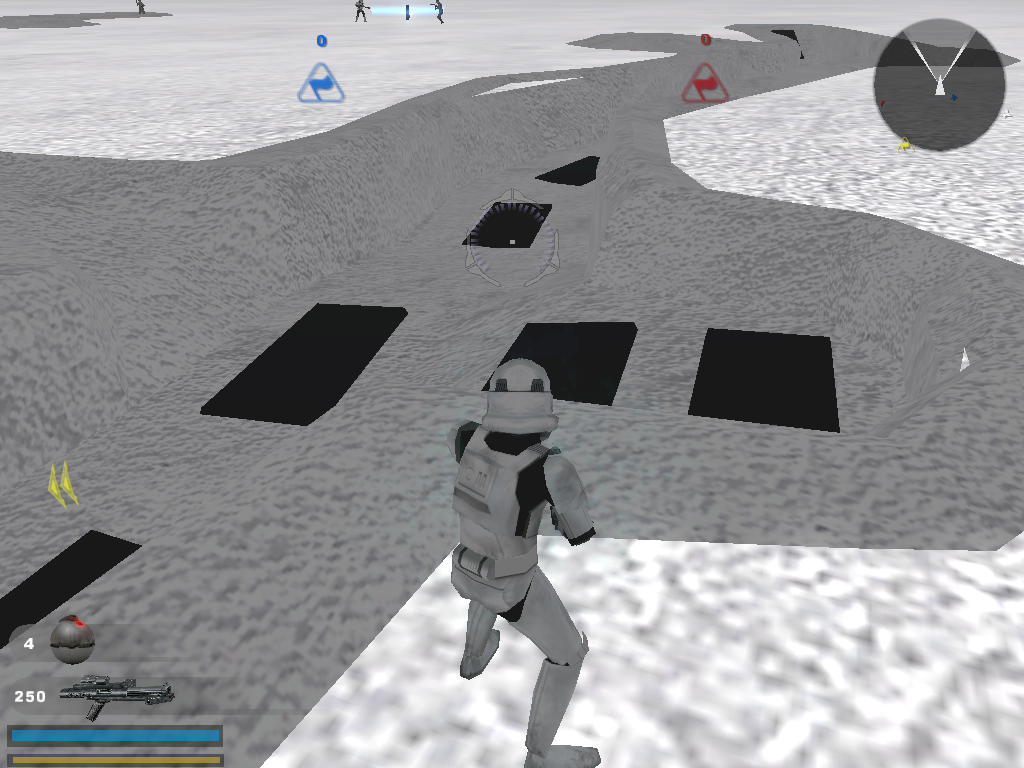
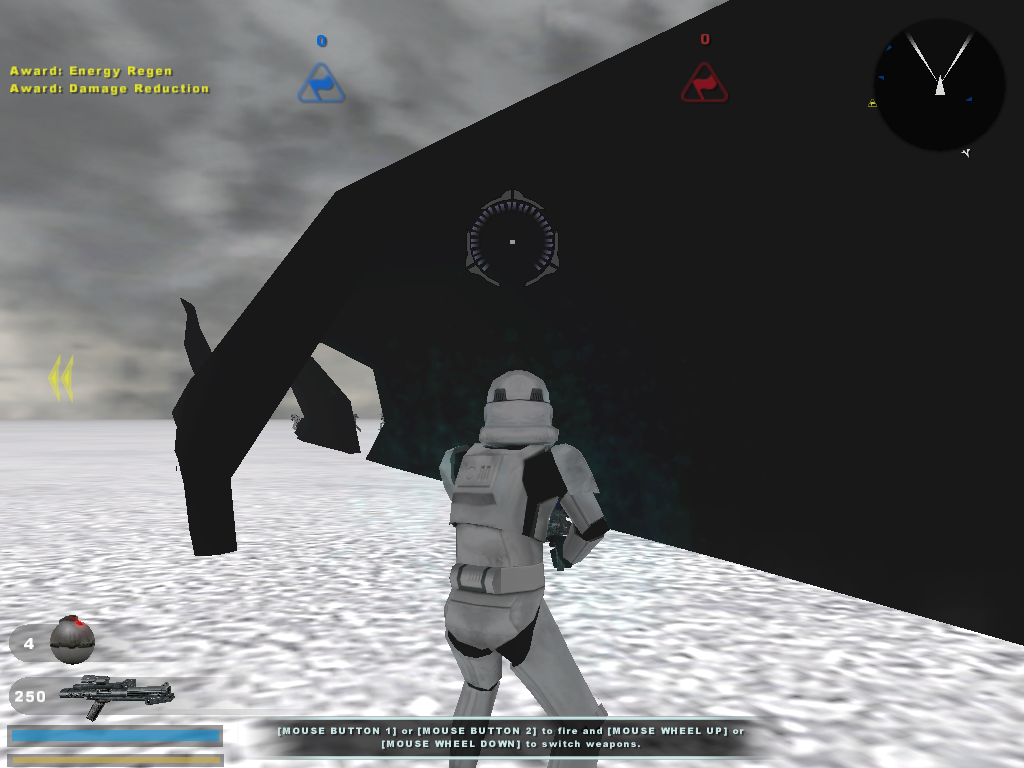
An Endor Fallen Tree trunk (end_prop_trunk4.odf) and Hoth's Turret Trench (hot_prop_trench_turrets.odf?).

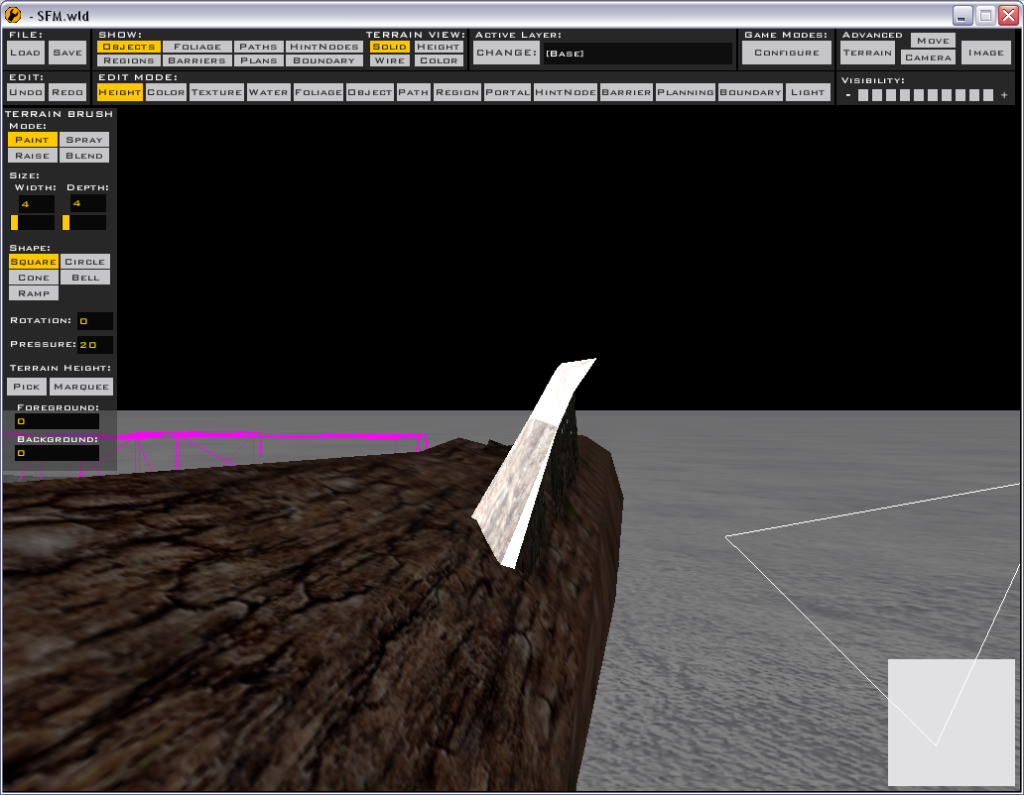
However, the object's texture or color doesn't show:
Trench:
http://i203.photobucket.com/albums/aa61 ... t_0006.png

Tree Trunk:
http://i203.photobucket.com/albums/aa61 ... t_0005.png

I have "end_prop_trunk04.msh" in my data_SFM\Worlds\SFM\msh (Map name is SFM) and I have "hoth_prop_trench_turrets.msh" and "hoth_prop_trench_turrets.msh.option" in data_SFM\Worlds\SFM\msh\PC (because that's where it was in the Hoth folder).

So why's it black?

Solution:
[quote]Anyway the problem is probably that you haven't got the tga files. The msh files are models only, they don't contain textures. Most will have tga (texture) names similar to the msh names. A hex editor (have a look in the 'everything you need' thread) can be useful when you're not sure what texture is being used. Open the msh file with the hex editor, press Ctrl + F and type 'tga'. This can be used to look for all the texture (tga) files the model uses.
The lazy way around this is to just copy all the msh and tga files from the world you want objects from. This leads to bigger map filesizes, so you'll have to (should) cut out the files you don't need before releasing. [/quote]

Changing Textures
Hidden/Spoiler:
Also, is there any way to change the color of the trench?
Right now it's gray and I want it to have a forest color (like Endor) for later.


Solution:
[quote]Oh and to edit the colours of a texture you need to open the tga associated with it in an editing program such as GIMP.[/quote]
Last edited by xSwiftxClawx on Fri Oct 24, 2008 11:51 pm, edited 5 times in total.
User avatar
Sky_216
Droid Pilot Assassin
Posts: 2086
Joined: Mon Feb 13, 2006 3:28 am
Projects :: No Mod project currently.
Games I'm Playing :: I have not listed any games yet
xbox live or psn: No gamertag set

Re: Object Problem + Question (Still New to This)

Post by Sky_216 »

Welcome to Gt SwiftClaw....

Anyway the problem is probably that you haven't got the tga files. The msh files are models only, they don't contain textures. Most will have tga (texture) names similar to the msh names. A hex editor (have a look in the 'everything you need' thread) can be useful when you're not sure what texture is being used. Open the msh file with the hex editor, press Ctrl + F and type 'tga'. This can be used to look for all the texture (tga) files the model uses.
The lazy way around this is to just copy all the msh and tga files from the world you want objects from. This leads to bigger map filesizes, so you'll have to (should) cut out the files you don't need before releasing.
Oh and to edit the colours of a texture you need to open the tga associated with it in an editing program such as GIMP.

BTW those black bits on the trench - pretty sure you need to get 'hoth_frosty_metals.tga' from the hoth assets.
xSwiftxClawx
Recruit Womprat Killer
Posts: 12
Joined: Thu Oct 16, 2008 5:33 pm
Projects :: No Mod project currently.
Games I'm Playing :: I have not listed any games yet
xbox live or psn: No gamertag set

Re: Object Problem + Question (Still New to This)

Post by xSwiftxClawx »

Thanks for the welcome.
Alright, ok.
I'll try it when I get back to school today.
Hidden/Spoiler:
And about editting the tga file for the trench.
I only have the msh and msh.options files in my msh/PC folder, so why's it a grayish color by default?
Never mind, I found out it links to hoth_main_1.tga which is the flooring on my stage.

(Can this thread be left open just incase I have anymore newbie questions?)
Hidden/Spoiler:
Just by the way, I've been through a few forums in my time, but this is the most respectful and intellectual one I've seen. Awesomeness.
Last edited by xSwiftxClawx on Fri Oct 24, 2008 4:45 pm, edited 2 times in total.
User avatar
RED51
Jedi
Jedi
Posts: 1024
Joined: Sun Sep 07, 2008 6:25 pm
Games I'm Playing :: SWBFII

Re: Object Problem + Question (Still New to This)

Post by RED51 »

Actully, there's a easier way to find out a msh's tga. Download the mshviewer(you can find it at SWBFII files) and open the msh up with it. After that, click info and you will see what tga it uses.
xSwiftxClawx
Recruit Womprat Killer
Posts: 12
Joined: Thu Oct 16, 2008 5:33 pm
Projects :: No Mod project currently.
Games I'm Playing :: I have not listed any games yet
xbox live or psn: No gamertag set

Re: Object Problem + Question (Still New to This)

Post by xSwiftxClawx »

Cool, the hex editor works pretty well.
And I the download link on File Front SWBF2 is gone.

The problem I have now is the missing tga file or something for this part of the trunk:
Hidden/Spoiler:
end_prop_trunk03.odf
Image
I have .tga.option files for each tga file there is.
Could that be the problem?

EDIT: Oh wait, never mind. It's just a ZE glitch apparently. The actual texture shows up ingame.
User avatar
Maveritchell
Jedi Admin
Jedi Admin
Posts: 7366
Joined: Mon Aug 21, 2006 11:03 pm

Re: Object Problem + Question (Still New to This)

Post by Maveritchell »

The only .tgas you should need for end_prop_trunk03 (checked with a hexeditor):

end_prop_tree.tga
end_prop_tree_lowrez.tga
end_prop_tree_bump.tga
end_prop_tree_ring.tga

...and any requisite .tga.options. If you have all those and it still looks odd in Zeroeditor, I would just ignore it. Objects in zeroeditor may be more correct than they appear. Once you munge and check ingame, things should be fine.
User avatar
[RDH]Zerted
Gametoast Staff
Gametoast Staff
Posts: 2982
Joined: Sun Feb 26, 2006 7:36 am
Projects :: Bos Wars AI - a RTS game
Games I'm Playing :: SWBF2 and Bos Wars
xbox live or psn: No gamertag set
Location: USA
Contact:

Re: Learning the Ways of the Mods

Post by [RDH]Zerted »

xSwiftxClawx wrote:Ok, so I'm still new to modding.
Please bear with me.

Could this thread be left open just in case I have any more problems?
Because, as a new modder, I'm bound to have so many problems...
Topics aren't locked just because they seem solved. When one becomes solved, a (Solved) should be put on it to lets others know they don't have to keep reading it and to help the people searching for solutions to similar problems.

If you have other modding problems, create a new topic for that problem. Putting everything in one thread makes it harder to search through and follow whats going on in that topic. If you want to collect all your problems and solutions to those problems in one place, use a text file.
xSwiftxClawx
Recruit Womprat Killer
Posts: 12
Joined: Thu Oct 16, 2008 5:33 pm
Projects :: No Mod project currently.
Games I'm Playing :: I have not listed any games yet
xbox live or psn: No gamertag set

Re: Object Texture Problems (One more question)

Post by xSwiftxClawx »

Can you put MSH and ODF files under subfolders in their folders?
Like for hoth_prop_trenchturret.odf could I put it under data_SFM\Worlds\SFM\odf\hoth?

Same question goes for MSH files.
User avatar
Sky_216
Droid Pilot Assassin
Posts: 2086
Joined: Mon Feb 13, 2006 3:28 am
Projects :: No Mod project currently.
Games I'm Playing :: I have not listed any games yet
xbox live or psn: No gamertag set

Re: Object Texture Problems (One more question)

Post by Sky_216 »

Don't think so. Think it's gotta be the other way round -
data_SFM\Worlds\SFM\hoth\odf
With hoth as the parent folder. Could be 100% wrong though....
Post Reply