

Death Star II: Throne Room

Working on a new map? Have a new mod out for swbf2?! Post an announcement of the up-coming release here.

Moderator: Moderators

User avatar
Maveritchell
Jedi Admin
Jedi Admin
Posts: 7366
Joined: Mon Aug 21, 2006 11:03 pm

Death Star II: Throne Room

Post by Maveritchell »

It's been a while since I've posted a standalone WIP; in fact it has probably been about two years since the last one. Thematically, then, I think it's fitting that I continue on with the Battle of Endor (for those of you keeping track, this now includes all three parts of the battle - Space Endor in the Conversion Pack, Endor ground campaign in Dark Times II, and now this as a standalone).

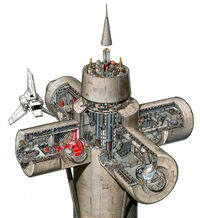
Anyway, this one should be pretty self-explanatory. I wanted to try my hand at making a more detailed, movie-accurate map. I think I did a decent job. This map is of the observation spire on the second Death Star (as seen here:)
Hidden/Spoiler:
Image
It's a pretty small map; it includes the four cardinal-direction rooms (throne room, shuttle docking room, map room, and Royal Guard room) and of course the pit and everything part and parcel with that.

There are a few different planned modes for the map. For those with the vanilla game, there will be three (maybe four) modes:
GCW(/CW?) team deathmatch
Hero Assault
GCW Hunt (Two-player, Luke vs. Vader)

There will also be additional (as yet undecided) content for anyone with Dark Times.

And fun story, before the pictures - I am fairly certain this map is over the maximum amount of tris that world geometry can handle. I ran into this pretty early on (there was originally even more modeled detail than is visible), and so I had to cut down on a lot of physical detail. There are still notably more tris in the scene than what I estimate SWBF2 can handle as world geometry (my guess is ~40k tris is the limit for world geometry), but I skirted around this by loading basically the entirety of my map (less a few dummy placeholder objects) through the script as spawned objects (the game can handle significantly more detail from spawned objects; my guess is that this is because the game was built to handle a lot of detailed playermodels/vehicles/etc. at once). The pipeline was a funny thing this time around.

And here are some relevant pictures:
Hidden/Spoiler:
Image
Image
Image
Lephenix

Re: Death Star II: Throne Room

Post by Lephenix »

OMG , new wip by the great Mav , that's awesome , epic :thumbs: .
[Padawan]Helkaan
Sith
Sith
Posts: 1444
Joined: Mon Aug 16, 2010 3:01 pm
Projects :: Dunno. Maybe making something
Games I'm Playing :: Some.

Re: Death Star II: Throne Room

Post by [Padawan]Helkaan »

Oh my God...

I can't find words to describe that... So I'll make a new word:
It is... It is... It is...
Hidden/Spoiler:
Fantasticalawesomenessgreatamazing
Darth_Spiderpig
Sith Master
Sith Master
Posts: 2631
Joined: Fri Mar 27, 2009 10:23 am
Projects :: Something cool...
Games I'm Playing :: BF2 CoDBO BFBC2
xbox live or psn: Has no xbox....Yup
Location: Does whatever a Spiderpig does
Contact:

Re: Death Star II: Throne Room

Post by Darth_Spiderpig »

Looks sweet, especially the star map. Just curious, but how did you do it? Looks like the stock Coruscant Holo Starmap effect with a larger core for and some kind of plain texture.

I love the Emperor in the first pic, just sitting there and watching the show. :lol:

Great Job as always Mav! :thumbs:
User avatar
naru1305
Major General
Major General
Posts: 657
Joined: Fri Jan 07, 2011 4:57 pm
Games I'm Playing :: SWBF2
Location: Germany
Contact:

Re: Death Star II: Throne Room

Post by naru1305 »

OMG a new map by mav? this is not a dream?
so i say :AWESOME!
User avatar
Maveritchell
Jedi Admin
Jedi Admin
Posts: 7366
Joined: Mon Aug 21, 2006 11:03 pm

Re: Death Star II: Throne Room

Post by Maveritchell »

Darth_Spiderpig wrote:Looks sweet, especially the star map. Just curious, but how did you do it? Looks like the stock Coruscant Holo Starmap effect with a larger core for and some kind of plain texture.
It's pretty similar to the Coruscant effect - it has a cloud of perpetually spawning particles (for the stars), a glowing core particle effect, the projector effect at the bottom (animated billboard effect), and a piece of geometry for the galaxy itself.
Lephenix

Re: Death Star II: Throne Room

Post by Lephenix »

The level of details is impressive :thumbs: .
[Padawan]Helkaan
Sith
Sith
Posts: 1444
Joined: Mon Aug 16, 2010 3:01 pm
Projects :: Dunno. Maybe making something
Games I'm Playing :: Some.

Re: Death Star II: Throne Room

Post by [Padawan]Helkaan »

Darth_Spiderpig wrote: I love the Emperor in the first pic, just sitting there and watching the show. :lol:
Lol, he doesn't imagine that he wil be eated by a reactor :funny2:
User avatar
acryptozoo
Master Bounty Hunter
Posts: 1642
Joined: Wed Jun 03, 2009 3:14 pm
Projects :: Yavin Mappack
Games I'm Playing :: Homeworld 2
xbox live or psn: acryptozoo
Location: in the jungles of Yavin IV
Contact:

Re: Death Star II: Throne Room

Post by acryptozoo »

:eek: PURE AWESOMENESS
awesome map idea and looks great too :D
User avatar
Maveritchell
Jedi Admin
Jedi Admin
Posts: 7366
Joined: Mon Aug 21, 2006 11:03 pm

Re: Death Star II: Throne Room

Post by Maveritchell »

[Padawan]Helkaan wrote:
Darth_Spiderpig wrote: I love the Emperor in the first pic, just sitting there and watching the show. :lol:
Lol, he doesn't imagine that he wil be eated by a reactor :funny2:
Funny you should mention that:
Hidden/Spoiler:
Image
User avatar
DarthD.U.C.K.
Master of the Force
Master of the Force
Posts: 6027
Joined: Wed Sep 27, 2006 11:05 am
Location: Duckburg, Germany

Re: Death Star II: Throne Room

Post by DarthD.U.C.K. »

wow, that looks really great! i love the many details!
in my opinion it may be a bit too grey all around though, letting the objects cast shadows may break it up a bit.
User avatar
Maveritchell
Jedi Admin
Jedi Admin
Posts: 7366
Joined: Mon Aug 21, 2006 11:03 pm

Re: Death Star II: Throne Room

Post by Maveritchell »

DarthD.U.C.K. wrote:in my opinion it may be a bit too grey all around though, letting the objects cast shadows may break it up a bit.
They are already within a giant shadowvolume (see window shadows). I could put a region-bounded directional light inside the walls and generate shadowvolumes for the interior objects as well, but having that many shadows (as well as trying to work shadows from two sets of light) is more of an investment than I probably want to make in light of the fact that it may make the game explode (I'm already pushing a lot of detail).

Edit: Yeah, tried it out. It doesn't cause any performance issues, but it mucks up the operation of the lights and shadows that are already there.
User avatar
naru1305
Major General
Major General
Posts: 657
Joined: Fri Jan 07, 2011 4:57 pm
Games I'm Playing :: SWBF2
Location: Germany
Contact:

Re: Death Star II: Throne Room

Post by naru1305 »

wow, awesome reactor :bowdown:
Lephenix

Re: Death Star II: Throne Room

Post by Lephenix »

Impressive :thumbs: .
OFF TOPIC : there will be a Dark times 3 ?
User avatar
Jendo7
Sith
Sith
Posts: 1304
Joined: Wed Apr 01, 2009 6:37 pm
Location: Cambridge, England.
Contact:

Re: Death Star II: Throne Room

Post by Jendo7 »

I love movie accurate maps, and this is looking extremely good. Just like the film :thumbs:
Nova Hawk
Banned
Posts: 4089
Joined: Mon Sep 22, 2008 3:17 pm
Projects :: No Mod project currently.
Games I'm Playing :: MW3 BF3

Re: Death Star II: Throne Room

Post by Nova Hawk »

Agreed with the above statements. Awesome job, Mav. Like Jendo, I always do love movie-accurate maps. :thumbs:
Xavious
Sith Master
Sith Master
Posts: 2783
Joined: Mon Jun 12, 2006 3:46 pm

Re: Death Star II: Throne Room

Post by Xavious »

Looks amazing. Does it have standard conquest mode? I don't see that listed.
User avatar
agentsmith38
Command Sergeant Major
Posts: 283
Joined: Thu May 27, 2010 9:47 am
Projects :: The Final Push Future - Omaha Beach
Games I'm Playing :: ArmA 2 OA
xbox live or psn: No gamertag set
Location: In the Trenches, getting ready to go over the top..

Re: Death Star II: Throne Room

Post by agentsmith38 »

Good lord Mav. That looks amazing! I seriously love the looks of it, It brought a tear to my eye.

That must've been extremely tough to make. This inspires me to make something as good as this. Me and 27 were discussing to make this but never got to it, i'm glad you did.

I wish you best of luck on this.
User avatar
Sky_216
Droid Pilot Assassin
Posts: 2086
Joined: Mon Feb 13, 2006 3:28 am
Projects :: No Mod project currently.
Games I'm Playing :: I have not listed any games yet
xbox live or psn: No gamertag set

Re: Death Star II: Throne Room

Post by Sky_216 »

Very impressive, as always. :thumbs:
but I skirted around this by loading basically the entirety of my map (less a few dummy placeholder objects) through the script as spawned objects


Spawned objects = pilotless aircraft?


Just a question on the tris, do you get objects flickering on and off when you get close to the limit or does it just go straight to crashes?
User avatar
Maveritchell
Jedi Admin
Jedi Admin
Posts: 7366
Joined: Mon Aug 21, 2006 11:03 pm

Re: Death Star II: Throne Room

Post by Maveritchell »

Sky_216 wrote:
but I skirted around this by loading basically the entirety of my map (less a few dummy placeholder objects) through the script as spawned objects


Spawned objects = pilotless aircraft?

Just a question on the tris, do you get objects flickering on and off when you get close to the limit or does it just go straight to crashes?
No, they're spawned objects. I loaded the classes (.odfs) directly into my world's .req file and then used a CreateEntity callback to create each prop individually post script-load.

As far as I've seen, as you push towards a limit of polies the game can render in your field of view, you'll get props flickering on and off. The crashing, however, is separate from that - you can have too many objects in a scene (or more simply, too many tris) without getting individual view rendering issues. Neither of these appears to be an issue with the map as it is now, though. I dodged a bit of a bullet by asking the game to treat my objects differently.
Post Reply


