
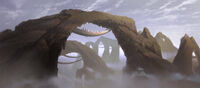
Could anyone help me on this?
Land bridges / arches [Solved]
Moderator: Moderators
-
ARC_Commander
- High General

- Posts: 838
- Joined: Tue Feb 06, 2007 7:18 pm
- Projects :: No Mod project currently.
- xbox live or psn: No gamertag set
Land bridges / arches [Solved]
I'm making a Cato Neimoidia map with the bridge cities and etc. I've made a sort of canyon, but I'm puzzled as to how to make the arches over it:


Could anyone help me on this?
-
Caleb1117
- 2008 Most Original Avatar
- Posts: 3096
- Joined: Sun Aug 20, 2006 5:55 pm
- Projects :: No Mod project currently.
- xbox live or psn: No gamertag set
- Location: X-Fire: caleb1117 ಠ_ಠ
RE: Land bridges / arches
I do not think its possable to make an arch (or cave) out of the terrain in ZE, the only way you can do it is with an object.
-
ARC_Commander
- High General

- Posts: 838
- Joined: Tue Feb 06, 2007 7:18 pm
- Projects :: No Mod project currently.
- xbox live or psn: No gamertag set
RE: Land bridges / arches
Ah, I see. I'll try that.
-
Caleb1117
- 2008 Most Original Avatar
- Posts: 3096
- Joined: Sun Aug 20, 2006 5:55 pm
- Projects :: No Mod project currently.
- xbox live or psn: No gamertag set
- Location: X-Fire: caleb1117 ಠ_ಠ
RE: Land bridges / arches
Well good luck, a Neimoidia map like that would be awsome!
- trainmaster611
- Sith Lord

- Posts: 1779
- Joined: Thu Aug 24, 2006 5:22 pm
- Projects :: No Mod project currently.
- xbox live or psn: No gamertag set
- Location: Building a railway to Coruscant
- Contact:
RE: Land bridges / arches
I know in the BF1 assets there is an arch in the tat1 world that might fit this map but its gonna be kinda small for you
You would have to model a new one
-
Caleb1117
- 2008 Most Original Avatar
- Posts: 3096
- Joined: Sun Aug 20, 2006 5:55 pm
- Projects :: No Mod project currently.
- xbox live or psn: No gamertag set
- Location: X-Fire: caleb1117 ಠ_ಠ
Wait no you wouldnt! thats it! use Eddie's\Squipple's scale option! let me explain
1 Find the object trainmaster is talking about.
2 in the odf file add this line under [GameObjectClass]
3 next find the msh file for the object lets pretend its called Tat_bldg_arch1.msh, now make a new text document named Tat_bldg_arch1.msh.option, make sure the file extention is option instead of txt. then open it with note pad and add this line
4 done!
Basicly the GeometryScale = 2.0, and the -scale 2.0, is you telling the game to make the object 2 times bigger. so if you said
GeometryScale = 6.0 it would be 6 times bigger.
Or,
GeometryScale = 0.10 the object would be a tenth of the original size.
But remeber the number that you put into the odf must match what the number in the .msh.option is.
1 Find the object trainmaster is talking about.
2 in the odf file add this line under [GameObjectClass]
Code: Select all
GeometryScale = 2.0Code: Select all
-scale 2.0Basicly the GeometryScale = 2.0, and the -scale 2.0, is you telling the game to make the object 2 times bigger. so if you said
GeometryScale = 6.0 it would be 6 times bigger.
Or,
GeometryScale = 0.10 the object would be a tenth of the original size.
But remeber the number that you put into the odf must match what the number in the .msh.option is.
-
ARC_Commander
- High General

- Posts: 838
- Joined: Tue Feb 06, 2007 7:18 pm
- Projects :: No Mod project currently.
- xbox live or psn: No gamertag set
-
Caleb1117
- 2008 Most Original Avatar
- Posts: 3096
- Joined: Sun Aug 20, 2006 5:55 pm
- Projects :: No Mod project currently.
- xbox live or psn: No gamertag set
- Location: X-Fire: caleb1117 ಠ_ಠ
-
Caleb1117
- 2008 Most Original Avatar
- Posts: 3096
- Joined: Sun Aug 20, 2006 5:55 pm
- Projects :: No Mod project currently.
- xbox live or psn: No gamertag set
- Location: X-Fire: caleb1117 ಠ_ಠ
-
ARC_Commander
- High General

- Posts: 838
- Joined: Tue Feb 06, 2007 7:18 pm
- Projects :: No Mod project currently.
- xbox live or psn: No gamertag set
- AceMastermind
- Gametoast Staff

- Posts: 3285
- Joined: Mon Aug 21, 2006 6:23 am
- Contact:
Offer to scale up arch model
Scaling an object up to the size that you need will most likely produce odd side effects(disappearing mesh ingame), if you'd like, i could scale it up for you properly in XSI, just give me the odf names of the objects and how large you want them.
-
ARC_Commander
- High General

- Posts: 838
- Joined: Tue Feb 06, 2007 7:18 pm
- Projects :: No Mod project currently.
- xbox live or psn: No gamertag set
- AceMastermind
- Gametoast Staff

- Posts: 3285
- Joined: Mon Aug 21, 2006 6:23 am
- Contact:
Rotate objects
On your keyboard.ARC_Commander wrote:So please tell me, where would I find Z and X?
Example
Hold down the "z" key and hold middle click on your mouse then move the mouse to rotate.
-
Caleb1117
- 2008 Most Original Avatar
- Posts: 3096
- Joined: Sun Aug 20, 2006 5:55 pm
- Projects :: No Mod project currently.
- xbox live or psn: No gamertag set
- Location: X-Fire: caleb1117 ಠ_ಠ
-
ARC_Commander
- High General

- Posts: 838
- Joined: Tue Feb 06, 2007 7:18 pm
- Projects :: No Mod project currently.
- xbox live or psn: No gamertag set
- trainmaster611
- Sith Lord

- Posts: 1779
- Joined: Thu Aug 24, 2006 5:22 pm
- Projects :: No Mod project currently.
- xbox live or psn: No gamertag set
- Location: Building a railway to Coruscant
- Contact:
Yeah I just pushed random buttons until it worked 
I didn't think that actually worked! Does it mess up the quality of the object? 
Oh and the name of the object is
Wow thats amazing!!!Caleb1117 wrote:Wait no you wouldnt! thats it! use Eddie's\Squipple's scale option! let me explain
1 Find the object trainmaster is talking about.
2 in the odf file add this line under [GameObjectClass]3 next find the msh file for the object lets pretend its called Tat_bldg_arch1.msh, now make a new text document named Tat_bldg_arch1.msh.option, make sure the file extention is option instead of txt. then open it with note pad and add this lineCode: Select all
GeometryScale = 2.04 done!Code: Select all
-scale 2.0
Basicly the GeometryScale = 2.0, and the -scale 2.0, is you telling the game to make the object 2 times bigger. so if you said
GeometryScale = 6.0 it would be 6 times bigger.
Or,
GeometryScale = 0.10 the object would be a tenth of the original size.
But remeber the number that you put into the odf must match what the number in the .msh.option is.
Oh and the name of the object is
tat1_bldg_arch_tri.msh
-
Penguin
- Jedi Admin

- Posts: 2541
- Joined: Sun Mar 05, 2006 12:00 am
- Location: Australia
-
Caleb1117
- 2008 Most Original Avatar
- Posts: 3096
- Joined: Sun Aug 20, 2006 5:55 pm
- Projects :: No Mod project currently.
- xbox live or psn: No gamertag set
- Location: X-Fire: caleb1117 ಠ_ಠ
So, the collision geometry of the object remains constant? I Don't know alot about the proses I basicly figured it out on my own, based on a few comments made by squipple. I only used it cause one of the squeddies objects was huge ingame, a painting.
As per Penguin's statement about "they can be different, they don't need to be the same." I didn't know that, however it would be sorta pointless to have it show a diffrent size in ZE, from whats ingame.
