Sides help thread...

In this forum you will find and post information regarding the modding of Star Wars Battlefront 2. DO NOT POST MOD IDEAS/REQUESTS.

Moderator: Moderators

Post Reply
LordofEntropy

Post by LordofEntropy »

There is a specific place. If you scroll down through the .lua (I'm assuming you're doing conquest with Clone Wars, or XXXc_con.lua for this) you should see:
mission script wrote:ReadDataFile("dc:SIDE\\rep.lvl",
"snw_inf_wampa",
"rep_inf_ep3_rocketeer",
"rep_inf_ep3_engineer",
"rep_inf_ep3_sniper",
"rep_inf_ep3_officer",
"rep_inf_ep3_jettrooper",
"rep_hover_fightertank",
"rep_hero_anakin",
"rep_hover_barcspeeder")

ReadDataFile("SIDE\\cis.lvl",
"cis_inf_rifleman",
"cis_inf_rocketeer",
"cis_inf_engineer",
"cis_inf_sniper",
"cis_inf_droideka",
"CIS_inf_officer")
Depending on which side you want your jedi to be on, you would put dc: in front of that side. Now, instead of a jedi, I put in a modded wampa (lol), but where it says snw_inf_wampa, you would put jdi_demojedi (or whatever your side_jediname is). Then, further down in the .lua, you should see:
mission script wrote: SetupTeams{
rep = {
team = REP,
units = 32,
reinforcements = 150,
soldier = { "snw_inf_wampa", 9,25},
assault = { "rep_inf_ep3_rocketeer",1, 4},
engineer = { "rep_inf_ep3_engineer",1, 4},
sniper = { "rep_inf_ep3_sniper",1, 4},
officer = {"rep_inf_ep3_officer",1, 4},
special = { "rep_inf_ep3_jettrooper",1, 4},

},
cis = {
team = CIS,
units = 10,
reinforcements = -1,
soldier = { "CIS_inf_rifleman",9, 25},
assault = { "CIS_inf_rocketeer",1, 4},
engineer = { "CIS_inf_engineer",1, 4},
sniper = { "CIS_inf_sniper",1, 4},
officer = { "CIS_inf_officer",1, 4},
special = { "cis_inf_droideka",1, 4},
and again, where i put the wampa, you would put jdi_demojedi. Munge all that up and you should be good (unless there are other, unrelated problems, which :? )
Slayer_Hunter_J

Post by Slayer_Hunter_J »

THank you! Now i can finally try him out!
C-26

Post by C-26 »

There is a specific place. If you scroll down through the .lua (I'm assuming you're doing conquest with Clone Wars, or XXXc_con.lua for this) you should see:

Depending on which side you want your jedi to be on, you would put dc: in front of that side. Now, instead of a jedi, I put in a modded wampa (lol), but where it says snw_inf_wampa, you would put jdi_demojedi (or whatever your side_jediname is). Then, further down in the .lua, you should see:
After I do this the game crashes right at the end of it's load time. Would this be due to an incorrect ODF file or missing files in the MSH folder?

If I want to use the standard EP3 Clone trooper with a new skin...what do I need in the MSH folder exactly. In my folder right now I have:

-rep_inf_ep3trooper.msh
-rep_inf_ep3trooper.msh.option
-rep_inf_ep3trooper.tga
-rep_inf_ep3trooper.tga.option
-rep_inf_ep3trooper_low1.msh
-rep_inf_ep3trooper_low1.msh.option

Am I missing anything important? Are the option files necessary?
Slayer_Hunter_J

Post by Slayer_Hunter_J »

I think you need the weapon MSH.
Slayer_Hunter_J

Post by Slayer_Hunter_J »

Im having another problem, i have done everything the tutrial said, placed the names in all the correct mission lua files, and the only thing that is happening is that the unit my unit is replacing is gone, so my hero himslef ist appearing. Any suggestions?
LordofEntropy

Post by LordofEntropy »

@ C-26: This problem is probably caused by a lack of either Shell files or Common files. Did you paste: C:\BF2_ModTools\assets\sides\Common into C:\BF2_ModTools\data_LOL\Sides? And did you paste: C:\BF2_ModTools\assets\Shell into C:\BF2_ModTools\data_LOL\_BUILD\Shell? If you did both of those things, can you tell me what errors, if any, you recieve when you munge? A notepad document should pop up about 2/3-3/4 of the way through the process with a list of warnings and/or errors.

In response to the question of what you need in terms of skins, if you leave every file in the msh folder, and only modify the .tgas, you should be fine. Those six files are the only ones that I can find, so you should be okay on that front.

@ Slayer: I had the same problem with my wampa... You have to add the wampa to the rep.req and repshell.req files in C:\BF2_ModTools\data_LOL\Sides\rep. The character class (.odf) goes in rep.req file, and all the skins (.tga) go in repshell.req This tells the game to load the wampa character before the map starts. Without these lines, the game tries to open a character it hasn't loaded, and leaves you with that blank space. therefore, for the republic (again using my wampa example), your rep.req file would look like this:

Code: Select all

ucft
{
    REQN
    {
        "lvl"
        "rep_bldg_forwardcenter"
        "rep_fly_anakinstarfighter_sc"
        "rep_fly_arc170fighter_dome"
        "rep_fly_arc170fighter_sc"
        "rep_fly_assault_dome"
        "rep_fly_cat_dome"
        "rep_fly_gunship"
        "kam_fly_ride_gunship"
        "rep_fly_gunship_sc"
        "rep_fly_gunship_dome"
        "......................................"
	"snw_inf_wampa"
    }
}
(the "......" is just to save space, dont actually delete all those other units lol)
And your repshell.req would look like this:

Code: Select all

ucft
{
	REQN
	{
		"model"
		
		"rep_inf_ep3trooper"
		"rep_weap_inf_rifle"
		
		"rep_inf_ep3spacepilot"
		"rep_weap_inf_pistol"
		
		"rep_inf_ep3heavytrooper"
		"rep_weap_inf_launcher"
		
		"rep_inf_ep3sniper"
		"rep_weap_inf_sniperrifle"
		
		"rep_inf_ep3armoredpilot"
		
		"rep_inf_clonecommander"
		"rep_weap_inf_chaingun"
		
		"rep_inf_ep3jettrooper"

		"hot_inf_wampa"
		"hot_inf_wampaface"
	}
}
Note: Neither of these files should be changed in any way, besides the addition of snw_inf_wampa and hot_inf_wampa/wampaface (or your respective jedi.odf and skins.tga files)
That should fix your problem.
C-26

Post by C-26 »

After copying the Common and Shell folders...I get this pop up after munging.
WARNING[PC_modelmunge msh\rep_inf_ep3trooper.msh]:rep_inf_ep3trooper has 1963 vertices and NO COLLISION GEOMETRY (WILL BE SLOW)!
0 Errors 1 Warnings
The game crashes again once it finishes loading the map.
LordofEntropy

Post by LordofEntropy »

@ C-26: Errm, I believe that would be errors with the animations. I have no idea why you would be missing default animations for the trooper, unless you changed the skin a ton and it no longer fits around the trooper's skeleton correctly. Did you paste the entire assets\sides\rep folder into data_modID\sides? All the needed animations should have been in that folder.
User avatar
[RDH]Zerted
Gametoast Staff
Gametoast Staff
Posts: 2982
Joined: Sun Feb 26, 2006 7:36 am
Projects :: Bos Wars AI - a RTS game
Games I'm Playing :: SWBF2 and Bos Wars
xbox live or psn: No gamertag set
Location: USA
Contact:

Post by [RDH]Zerted »

I am working on some tools to help the modders mod. I am creating a graphical interface to help users create new units and edit the ODF files. Progress is slow because there really isn't much information on them in the mod tool's documentation. The list of ODF ClassLabels is helpful, but is there any more information that can be released about the ODF files? How about a list of the different Properties that are used? Thanks for any help.

Image
Slayer_Hunter_J

Post by Slayer_Hunter_J »

LordofEntropy wrote:@ Slayer: I had the same problem with my wampa... You have to add the wampa to the rep.req and repshell.req files in C:\BF2_ModTools\data_LOL\Sides\rep. The character class (.odf) goes in rep.req file, and all the skins (.tga) go in repshell.req This tells the game to load the wampa character before the map starts. Without these lines, the game tries to open a character it hasn't loaded, and leaves you with that blank space. therefore, for the republic (again using my wampa example), your rep.req file would look like this
The rep side isnt in BF2_ModTools\data_***\Sides\rep. Or do you mean
BF2_ModTools\assets\sides\rep?
LordofEntropy

Post by LordofEntropy »

@ slayer: You should have pasted a side folder in C:\BF2_ModTools\data_ModID\Sides (or created your own). Those two files should be in there to tell the game which classes to load at the beginning of the map. If you intended to create a whole new side, you should add those files (***.req and ***shell.req) to the side folder and then put the names of all the classes you want the game to load in them.
Slayer_Hunter_J

Post by Slayer_Hunter_J »

Do i put just the rep.req and repshell.req in my jedi's side folder, create a new folder containing just those two, or paste the whole rep side folder in the side folder?
LordofEntropy

Post by LordofEntropy »

You want to put ***.req and ***shell.req in your Jedi's side folder. Make sure you name them correctly though... if your jedi's side is JDI, then name the files jdi.req and jdishell.req
Lord-Bandu

Post by Lord-Bandu »

Id like to make Sidious walk instead of float.

how can this be done?
Slayer_Hunter_J

Post by Slayer_Hunter_J »

Something happened for me! I had him (my hero) set as a hero and heor spawn every 1 kill, i killed some one and i asked me if i wanted to be him. I said yes, it showed his picture (although it was black, like an not yet unlocked unlockable character), i clicked spawn, and the game crashed. What can I do now?
LordofEntropy

Post by LordofEntropy »

umm... i have no idea lol... never had that problem before.
Slayer_Hunter_J

Post by Slayer_Hunter_J »

I read other people's problem, for them the map crasheds as soon as it loads, but not my problem.
C-26

Post by C-26 »

Success at last! :D

I deleted my old world...started from scratch using your suggestion Entropy and it finally worked.

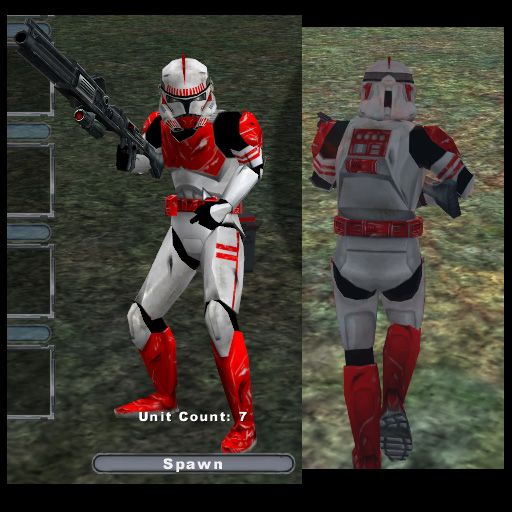
My skins wont go to waste after all. This is my Clone Shock Trooper skin. I'll post more pics of my other skins soon.

Thanks 8)

Image
LordofEntropy

Post by LordofEntropy »

Very nice man
RevanSithLord
Sith Master
Sith Master
Posts: 2636
Joined: Mon Nov 07, 2005 12:40 am
Projects :: Designated Days + LFC + GT vs SWBFC
Games I'm Playing :: FO3 + FO New Vegas
xbox live or psn: Master Revan
Location: GDSS Philadelphia

Post by RevanSithLord »

Holy freaking crap! O_O
Post Reply