Second Localize Problem!!!

In this forum you will find and post information regarding the modding of Star Wars Battlefront 2. DO NOT POST MOD IDEAS/REQUESTS.

Moderator: Moderators

Post Reply
User avatar
SW_elite
Filthy Thief
Filthy Thief
Posts: 507
Joined: Sat Jan 02, 2010 6:43 pm
Projects :: No Mod project currently.
Games I'm Playing :: I have not listed any games yet
xbox live or psn: No gamertag set
Location: Australia!!!

Second Localize Problem!!!

Post by SW_elite »

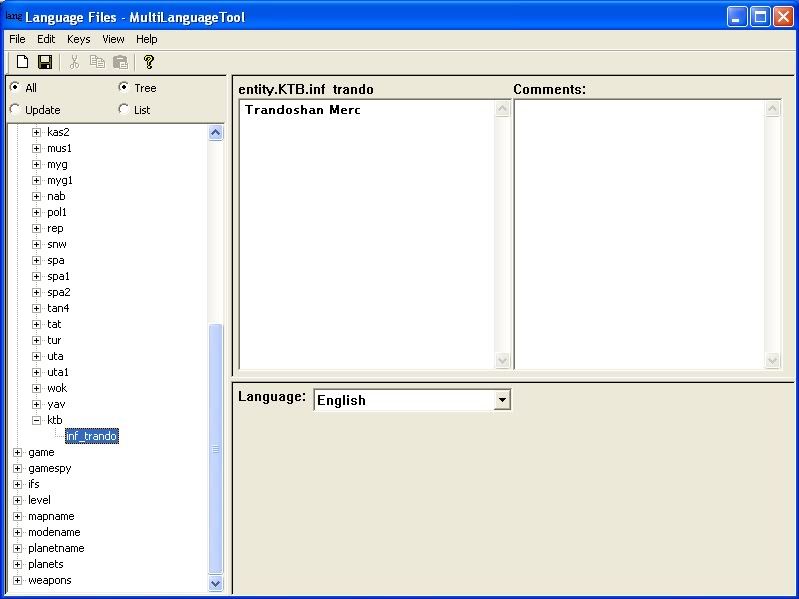
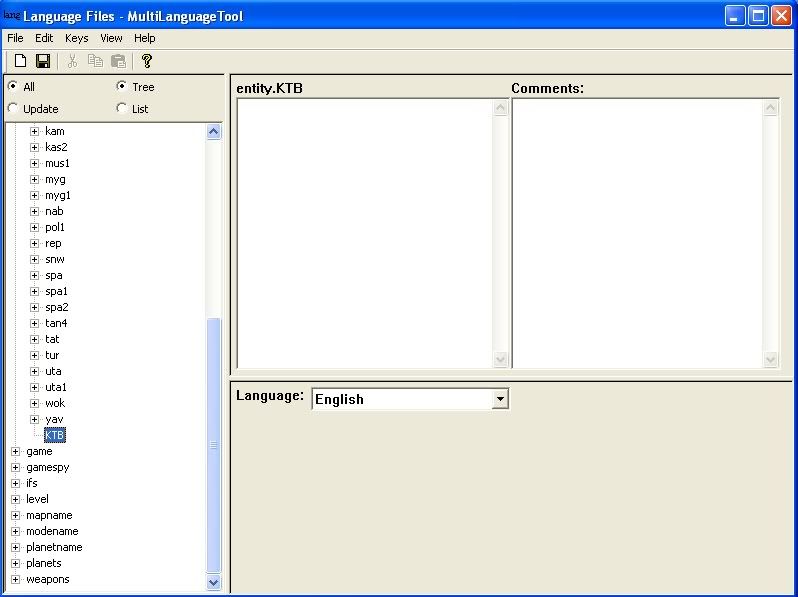
This time when I make some changes with the localization tool and then save, I go back in directly after the changes arent there. I also noticed that the ktb key changed itself to KTB. What do I do?

Before:
Hidden/Spoiler:
Image
After:
Hidden/Spoiler:
Image
myers73
Lieutenant General
Lieutenant General
Posts: 690
Joined: Fri Apr 03, 2009 11:04 pm
Projects :: No Mod project currently.
Games I'm Playing :: I have not listed any games yet
xbox live or psn: No gamertag set
Location: Atlanta, GA xfire=myers73 IngameName=mYers

Re: Second Localize Problem!!!

Post by myers73 »

did you add it as a key or scope?
User avatar
lucasfart
Sith
Sith
Posts: 1440
Joined: Tue Feb 24, 2009 5:32 am
Projects :: No Mod project currently.
Games I'm Playing :: I have not listed any games yet
xbox live or psn: No gamertag set
Location: Australia

Re: Second Localize Problem!!!

Post by lucasfart »

hmm. I don't think the capitals make a difference do they? In your first pic, the key name above "Trandoshan Merc" has it in capitals....Did this happen once or repeatedly?
User avatar
SW_elite
Filthy Thief
Filthy Thief
Posts: 507
Joined: Sat Jan 02, 2010 6:43 pm
Projects :: No Mod project currently.
Games I'm Playing :: I have not listed any games yet
xbox live or psn: No gamertag set
Location: Australia!!!

Re: Second Localize Problem!!!

Post by SW_elite »

I made sure it was a key, and another thing, when I do anything in the localize tool under the key ktb, it stuffs up...
myers73
Lieutenant General
Lieutenant General
Posts: 690
Joined: Fri Apr 03, 2009 11:04 pm
Projects :: No Mod project currently.
Games I'm Playing :: I have not listed any games yet
xbox live or psn: No gamertag set
Location: Atlanta, GA xfire=myers73 IngameName=mYers

Re: Second Localize Problem!!!

Post by myers73 »

ktb needs to be a scope, inf_trando needs to be a key
User avatar
SW_elite
Filthy Thief
Filthy Thief
Posts: 507
Joined: Sat Jan 02, 2010 6:43 pm
Projects :: No Mod project currently.
Games I'm Playing :: I have not listed any games yet
xbox live or psn: No gamertag set
Location: Australia!!!

Re: Second Localize Problem!!!

Post by SW_elite »

Ohhhhhhhhh, So do I make this new scope under entity, or do I just make a new scope?
Aman/Pinguin
Jedi
Jedi
Posts: 1104
Joined: Tue Jan 30, 2007 6:04 am
Projects :: Inactive
Location: Germany

Re: Second Localize Problem!!!

Post by Aman/Pinguin »

You seem to have done everything correct, since inf_trando is a key (you couldn't put any localize data into a scope) and ktb is a scope (you couldn't put a key into another key).


EDIT: Uhm, is it me or did the Scope turn into a key in the second screenshot?
Commander_Fett
High General
High General
Posts: 847
Joined: Fri Oct 17, 2008 9:59 pm
Projects :: No Mod project currently.

Re: Second Localize Problem!!!

Post by Commander_Fett »

Aman/Pinguin wrote:You seem to have done everything correct, since inf_trando is a key (you couldn't put any localize data into a scope) and ktb is a scope (you couldn't put a key into another key).


EDIT: Uhm, is it me or did the Scope turn into a key in the second screenshot?
Yeah, it certainly does look like that. SW_elite, you should probably just delete the KTB and add it as a scope again in entity, then add the merc as a key under it.

User avatar
SW_elite
Filthy Thief
Filthy Thief
Posts: 507
Joined: Sat Jan 02, 2010 6:43 pm
Projects :: No Mod project currently.
Games I'm Playing :: I have not listed any games yet
xbox live or psn: No gamertag set
Location: Australia!!!

Re: Second Localize Problem!!!

Post by SW_elite »

Hmmm...I tried that and still the same problem.

Woot Woot, Not to worry, I got it to work, Thanks for the help!
Post Reply