
Hey, I just got Fraps for Christmas, and boy does it stink.
Whenever I record, I always get 4 FPS, in every game I try (e.g. Freelancer, Ragdoll Masters, Geometry Wars). Any ideas?
Oh, and this might help: it's version 2.9.7.
EDIT: Hmm, it could be that it's saving the video files as .avi, but I dunno.
Fraps.
Moderator: Moderators
-
Teancum

- Jedi Admin

- Posts: 11080
- Joined: Wed Sep 07, 2005 11:42 pm
- Projects :: No Mod project currently.
- xbox live or psn: No gamertag set
- Location: Indiana
Re: Fraps.
That's how any video capture program will be. It takes tons of resources to run your game AND capture video. Turn down your settings when recording. The video won't capture the quality that you're playing at anyways.
-
PhantoM
Re: Fraps.
Well, GameCam is much smoother than this, but I only have the trial version of that. Settings are all the way down, so I think it's just a cruddy video capture program.Teancum wrote:That's how any video capture program will be. It takes tons of resources to run your game AND capture video. Turn down your settings when recording. The video won't capture the quality that you're playing at anyways.
EDIT: ... I feel like an idiot. The GameCam full version is much better than Fraps, AND it's cheaper. lmao ima refund Fraps and get that
-
Teancum
- Jedi Admin
- Posts: 11080
- Joined: Wed Sep 07, 2005 11:42 pm
- Projects :: No Mod project currently.
- xbox live or psn: No gamertag set
- Location: Indiana
Re: Fraps.
Why not just use Xfire to capture video then? That's free. Or try any from the list below.
http://en.wikipedia.org/wiki/List_of_sc ... re#Windows
Personally I've never had problems with FRAPS.
http://en.wikipedia.org/wiki/List_of_sc ... re#Windows
Personally I've never had problems with FRAPS.
-
PhantoM
Re: Fraps.
For some reason, Xfire video never records sound for me. Thanks for the link, but I'll just go with GameCam. You can lock this now.
-
Fluffy_the_ic

- Hoth Battle Chief

- Posts: 3223
- Joined: Thu Jan 24, 2008 7:03 pm
- xbox live or psn: fluffytherc
- Location: she/her
- Contact:
Re: Fraps.
...I don't think it does for anyone. I think to do that, you have to choose to record sound and put your mic right next to speakers.
-
Maveritchell

- Jedi Admin
- Posts: 7366
- Joined: Mon Aug 21, 2006 11:03 pm
Re: Fraps.
Xfire video does record sound, you just need to change your settings to allow it to.
-
PhantoM
Re: Fraps.
Cool, I didn't know I had to change anything. Could ya tell me exactly what to do to allow sound?Maveritchell wrote:Xfire video does record sound, you just need to change your settings to allow it to.
-
redgroupclan

- High General

- Posts: 867
- Joined: Thu Jan 24, 2008 11:47 pm
- Location: For less cheap gameplay - BF2 v1.1 server "NoEngineersAntiGlitch"
Re: Fraps.
Not a good idea. I tried using XFire video capture once, and it sent my computer to the north pole. My computer froze so much I could swear I saw ice cicles.Teancum wrote:Why not just use Xfire to capture video then? That's free.
-
AlexSecura
- Sith

- Posts: 1263
- Joined: Tue Jun 06, 2006 5:24 pm
- Projects :: No Mod project currently.
- xbox live or psn: No gamertag set
- Location: Germany
- Contact:
Re: Fraps.
You should try these FRAPS Settings,Phantom
set Video Capturing to -Half Size-
and
set Sound to : Detect best Sound input.
Check out the Frames Settings:
set them to 30FPS or 25 FPS.
Originaly its set to 60FPS .If you record now a Movie.It -steals 60 FPS from your running Game.
Which means If you have ingame 70FPS you play with 10FPS.To laggy to play.
Set it to 30 or 25 FPS.
The File You get is a avi file but its a Fraps.avi File
That means its an High Quality Codec from Beepa which captures everything direct from GFX Card Output.
A 6 mins movie that you record got so sometimes a size of 2-5 GB.Depends on Settings you did Ingame.
You need to convert the Output Avi again to divx or xvid AVI with another Program like - Convert Movie or so.
So you can shrink 4 GB to 150MB or lesser.
Hope this helps
set Video Capturing to -Half Size-
and
set Sound to : Detect best Sound input.
Check out the Frames Settings:
set them to 30FPS or 25 FPS.
Originaly its set to 60FPS .If you record now a Movie.It -steals 60 FPS from your running Game.
Which means If you have ingame 70FPS you play with 10FPS.To laggy to play.
Set it to 30 or 25 FPS.
The File You get is a avi file but its a Fraps.avi File
That means its an High Quality Codec from Beepa which captures everything direct from GFX Card Output.
A 6 mins movie that you record got so sometimes a size of 2-5 GB.Depends on Settings you did Ingame.
You need to convert the Output Avi again to divx or xvid AVI with another Program like - Convert Movie or so.
So you can shrink 4 GB to 150MB or lesser.
Hope this helps
-
PhantoM
Re: Fraps.
Hmm. I read through all that, and sorry but it doesn't really help. My problems are
1) Whenever I hit F9 (record key) my FPS always goes down to 4, no matter what settings I have selected (actually, on Freelancer it went to 5 once)
2) Doesn't record sound. Well, if I turn my speakers up all the way recording Freelancer, I can hear a tiny little voice through the static "freelancer alpha one dash one you are free to bomb us blah blah blah"
I'm just gonna get GameCam.
1) Whenever I hit F9 (record key) my FPS always goes down to 4, no matter what settings I have selected (actually, on Freelancer it went to 5 once)
2) Doesn't record sound. Well, if I turn my speakers up all the way recording Freelancer, I can hear a tiny little voice through the static "freelancer alpha one dash one you are free to bomb us blah blah blah"
I'm just gonna get GameCam.
-
AlexSecura
- Sith
- Posts: 1263
- Joined: Tue Jun 06, 2006 5:24 pm
- Projects :: No Mod project currently.
- xbox live or psn: No gamertag set
- Location: Germany
- Contact:
Re: Fraps.
You really want to use Gamecam and put Fraps away?
Thought you got it at Christmas
I never would change to Gamecam.Fraps is absolutelly the Best Program to record Ingame.
Besides of that you can record also nearly everthing you watch in Full Screen Settings which means Movies,Trailers and so on.
I dunno your PC Specs but you could activate FPS Overlay to see how many Frames you have ingame in Freelancer.If you have only 30 FPS ingame then i wouldnt wonder about that you only have 4-5 Frames while recording.
I sometimes have had Sound Problems while recording CoD 5 but that was a Problem from the previous Fraps Version and is fixed in 2.9.7
Also Assassins Creed made some Problems in the Past and is also fixed.
This must be your settings.
http://www.webstuffscan.com/wp-content/ ... panel2.jpg
but on Halfsize
If your own Sound Device is not listed like in the Pic than you need to refreh your SoundDriver.Fraps detects your Sound Device 100% correct.
Another Tip is.
Watch your recorded Movies in VLC Player.if i watch it in Windows Media Player,the Movie mostly lags like hell.WMP mostly cannot handle a 6min (4GB) Movie.
and
Put the Output Folder to another place than C:/Fraps.Best to another Partition or external HD.
C is nomaly your system drive and should not be used to record movies.
Try it with another Game than Freelancer like SWBF-2.To see if you have the same Problems.
Try to figure out your problem.Fraps is so easy to handle and great in output.Dont put it away.Dont forget every future and bugfixed Version of Fraps is for free.
Thought you got it at Christmas
I never would change to Gamecam.Fraps is absolutelly the Best Program to record Ingame.
Besides of that you can record also nearly everthing you watch in Full Screen Settings which means Movies,Trailers and so on.
I dunno your PC Specs but you could activate FPS Overlay to see how many Frames you have ingame in Freelancer.If you have only 30 FPS ingame then i wouldnt wonder about that you only have 4-5 Frames while recording.
I sometimes have had Sound Problems while recording CoD 5 but that was a Problem from the previous Fraps Version and is fixed in 2.9.7
Also Assassins Creed made some Problems in the Past and is also fixed.
This must be your settings.
http://www.webstuffscan.com/wp-content/ ... panel2.jpg
but on Halfsize
If your own Sound Device is not listed like in the Pic than you need to refreh your SoundDriver.Fraps detects your Sound Device 100% correct.
Another Tip is.
Watch your recorded Movies in VLC Player.if i watch it in Windows Media Player,the Movie mostly lags like hell.WMP mostly cannot handle a 6min (4GB) Movie.
and
Put the Output Folder to another place than C:/Fraps.Best to another Partition or external HD.
C is nomaly your system drive and should not be used to record movies.
Try it with another Game than Freelancer like SWBF-2.To see if you have the same Problems.
Try to figure out your problem.Fraps is so easy to handle and great in output.Dont put it away.Dont forget every future and bugfixed Version of Fraps is for free.
-
PhantoM
Re: Fraps.
Okay, here's my Fraps settings:
Still 4 FPS. I also tried it with
I tried everything I could, turning down the effects & graphics, but it didn't help at all.
Fraps version is 2.9.7.
Hidden/Spoiler:
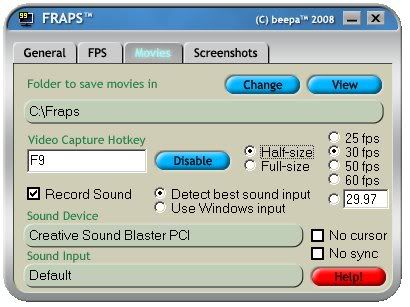
Hidden/Spoiler:
Fraps version is 2.9.7.
-
swbf_lase

- Major General

- Posts: 647
- Joined: Fri Jul 08, 2005 7:07 pm
- Projects :: No Mod project currently.
- xbox live or psn: No gamertag set
- Location: 127.0.0.1:465
- Contact:
Re: Fraps.
What video card do you have? Could chance you're getting that low of an FPS because you need to upgrade the video card unless you do what the above posters said.
-
PhantoM
Re: Fraps.
WHOA! I was just playing Spore Creature Creator, and I kept getting bluescreened because of the same thing over and over again, "nv4_disp.dll". Naturally, I googled it, downloaded an Nvidia patch, and now not only Spore works, but Fraps does too! Who woulda thunk it?? Bluescreens ftw, lmao
Okie now ya can lock this.
Okie now ya can lock this.
