How to create models in XSI and other 3D applications and make them work in Battlefront 1 & 2. Post models, tips for application usage and share anything XSI, 3DMax, SketchUp, etc.
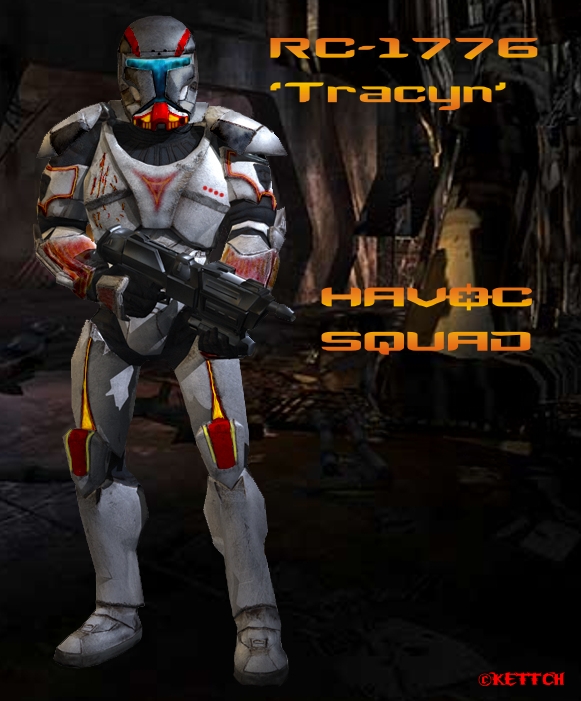
Here it is! It nothing super special but its a new mesh in game lol. Hope everyone can use it and make it better! Its a beefed up version of the Ep. 2 clone trooper from the existing model. I hope to see some good skins on the unit.
Oh, ya if there is any quick fixes you can think or want added to the mesh you better post soon because I won't be adding to this unit for a long while after that. Enjoy!
Something about his legs make him look like you stuck a tire pump in there and filled him up with air like a balloon... could just be the angle, though
What kind of texture look are you going for? He looks a bit rusty at the moment because of the fuzzy edges on the red/orange sections. It's really hard to tell from those images, though.
the helmet doesn't look quite right, but as you said, i think its more of a skinning thing. also its (the helmet) kinda pointy in a few places, whereas in most of the pics i've seen its more rounded. but, as everyone says, its incredible for a quick job, even more impressive to see that you got it ingame.
this is awesome, btw, i'm glad we'll be able to get to play as clone commandos. they should have been the reps new special class, instead of the clone commander, imo.
you've made a skin, and now you wanna know if we think you should add something to the mesh in XSI?
I have already edited it in XSI. I will be editing it further though, I was wonder if anyone had specific ideas to add to the model. I am working on cleaning it up right now.
I see this got moved. Its fine with me .. I am so confused where to post lol
Teancum wrote:Impressive, Vyse. Now we've got another guy who knows the skelatal process.
Thanky!
It's really not that hard. Pyshco Fred gave us the template so it's just adding and setting everything up around it. (Although when I start from stratch on a mesh that will get tricky)
Minilogoguy18 should really get some award or something! He has been helping me through the process and knows SOOO much!
Just need to figure out how to slice my own mesh into the template.. Hhhhmmm
Nice start Vyse,
Couldn't you just load up the template psycoFred made and import your model then rename the file. Of course you would have to go through the
process of rigging it. The model you import would be strictly geometry without bones or animations.
Krun wrote:Nice start Vyse,
Couldn't you just load up the template psycoFred made and import your model then rename the file. Of course you would have to go through the
process of rigging it. The model you import would be strictly geometry without bones or animations.
The way its setup the Mesh has the bones as a child of it. All you need to do (from what Minilogo said I think) is pop your mesh into replecace the current mesh. That way you don't have to go through and setup the childs and roots stuff like that again. Only I am not sure how to slice mine in.
The mesh in the screen is a premaid clone that I edited. To add the jet pack I will need to have it be apart of the current mesh, or in other words reload a brand new mesh with the pack on it..... and of course envolope it after I load it into the dummyroot.
you dont have to merge the jetpack you want to add onto your model just texture it and rig it and make it child to dummyroot and you can name override_texture whateve you want. they just used override_texture as a thing to mark it so that they could use multiple skins on one model like they did in BF1 with all the clones.
minilogoguy18 wrote:you dont have to merge the jetpack you want to add onto your model just texture it and rig it and make it child to dummyroot and you can name override_texture whateve you want. they just used override_texture as a thing to mark it so that they could use multiple skins on one model like they did in BF1 with all the clones.
Ok,I understand what your saying,I envolope it etc. Problem is I want to make sure its working so I go to animation mixer to see if its there but I can't get my model to change its stance? The read me said select your model,I did, then i hit M in the animation mix window. No matter what I do I can't get my model to change from its current stance. I push play etc. nothing happenes.
I think I must have the wrong things selected. Pic below. Note I don't have the pack on here. I wanted to see if I could get animation mixer working from the original model first.
the stances arent gonna change cause i dont think there are any animations in the file, just rotate some of the bones and when your done just hit <- or -> to move a frame back or forth and the skeleton will reset itself
minilogoguy18 wrote:the stances arent gonna change cause i dont think there are any animations in the file, just rotate some of the bones and when your done just hit <- or -> to move a frame back or forth and the skeleton will reset itself
minilogoguy18 wrote:the stances arent gonna change cause i dont think there are any animations in the file, just rotate some of the bones and when your done just hit <- or -> to move a frame back or forth and the skeleton will reset itself
IT WORKED!! This is totaly sweet! The whole thing is making more sense now. So I just add meshes to my dummyroot then envolope them!(Of course thats what you have been telling me lol but it just didn't make sesne till now ) I could just add a WHOLE new character mesh under the dummy root and envolope!! EASY!! It makes complete sense now why PAN had a seprate .tga for there jetpacks!
The only thing I haven't even tried yet is the Weights. I don't think that will be to hard....
Thanks so much again Minilogoguy! And everyone else! YAY