
Looks better every time, but...RogueKnight wrote:Finished model and texture.Hidden/Spoiler:
Questions, Comments, Flames, Commands, Mind Control, Jawas?
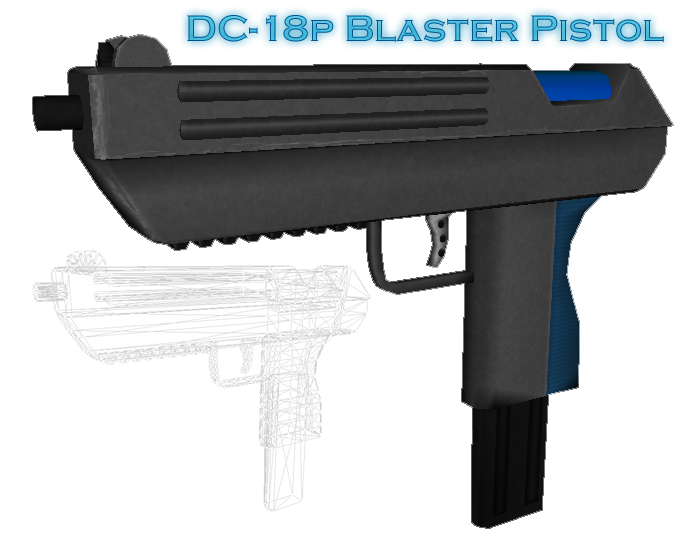
O rly?RogueKnight wrote:Finished
Moderator: Moderators


Looks better every time, but...RogueKnight wrote:Finished model and texture.Hidden/Spoiler:
Questions, Comments, Flames, Commands, Mind Control, Jawas?
O rly?RogueKnight wrote:Finished
Yes.Fluffy_the_ic wrote:O rly?RogueKnight wrote:Finished


Really nice mswf , i love it .mswf wrote:Very nice pistol, the texture really looks up to scratch.
Here are some shots of the model I've not worked on for a long time. I´m going to make a new texture for the rest of the body and a specular map and a normal map for all parts, but I think I´m almost done with the mesh work now.Hidden/Spoiler:

You've outdone yourself.mswf wrote:Very nice pistol, the texture really looks up to scratch.
Here are some shots of the model I've not worked on for a long time. I´m going to make a new texture for the rest of the body and a specular map and a normal map for all parts, but I think I´m almost done with the mesh work now.Hidden/Spoiler:


It's originally the Boba Fett model. When I started out, I wanted to focus on texturing it only, but as I worked on it more and more I decided to try and make it a quality-wise good model. I'm still not satisfied with it though, but I'm not finished so there's plenty of room for me there.DarthD.U.C.K. wrote:nice, is it selfmade or kitbashed?


 ?
? yeah i know that, but idont know how smooth them in xsi :S (if there is a way for sharpenes i think should there is a way for make the opposite (smoth) ), also unit template used some way for that xD, but i dont discover how stillDarthD.U.C.K. wrote:smooth edges are edges that arent hardened, however the pandemictool we use seems to make edges look "harder" ingame then the edges of the shipped models (i could be wrong though)


cool practicing nowFragMe! wrote:To get the smoothness as shown on mswf's model in XSI is subdivision modelling.
There are a few ways to do it which I won't get into here, maybe catch you on xfire.
You can also just select a group of polygons and apply the smooth operator found in the deform menus. Be careful with that one though it may give undesired results. It works best if the edges around the polies you want to smooth are set to be hard edges (done by selecting the edges desired right click when near or on one of the edges then near the bottom is a Mark Hard edges option. It will then turn them dark blue.
, anyway i wait you in xfire , many thanksNo, there were no subdivision modifiers applied to this model. All you see is smooth shading with a modifier which will, when exported, also physically split the edges apart.FragMe! wrote:To get the smoothness as shown on mswf's model in XSI is subdivision modelling.
which has different ways of doing things as they all seem to. You understood everything I said, apart from how I spell my nickname.DarthD.U.C.K. wrote:i think you misunderstood msfw (ir did i?)
he didnt subdivide or smooth anything, he just disconnected edges which resulted in them being rendered "hard",
the "smooth" edges are being rendered normaly just as in xsi
 And the disconnected edges is something done through a modifier (non-destructive edits), but I'll eventually apply them, that's the difference.
FragMe! wrote:Yes I was saying though that sub-d is one equivalent way in XSI I that I know about.
I know you are using that other wierd program
