
hello GT
how would one move a hub up and down in ze
Hubs up and down
Moderator: Moderators
-
acryptozoo

- Master Bounty Hunter

- Posts: 1642
- Joined: Wed Jun 03, 2009 3:14 pm
- Projects :: Yavin Mappack
- xbox live or psn: acryptozoo
- Location: in the jungles of Yavin IV
- Contact:
-
AQT
- Gametoast Staff

- Posts: 4910
- Joined: Sat Nov 03, 2007 4:55 pm
- Location: SoCal, USA
Re: Hubs up and down
In my experience, hubs rest on the level where the terrain is set at, but the height of a hub doesn't really matter since it is effective "infinitely" up and down.
-
THEWULFMAN
- Space Ranger
- Posts: 5557
- Joined: Tue Aug 17, 2010 3:30 pm
- Projects :: Evolved 2
- Location: Columbus, Ohio
- Contact:
Re: Hubs up and down
AQT wrote:In my experience, hubs rest on the level where the terrain is set at, but the height of a hub doesn't really matter since it is effective "infinitely" up and down.
I Concur :plokoon: , when I did my ryloth map the hubs just stuck to the terrian, but it doesnt really matter, its how you connect them is what matters.
-
acryptozoo
- Master Bounty Hunter
- Posts: 1642
- Joined: Wed Jun 03, 2009 3:14 pm
- Projects :: Yavin Mappack
- xbox live or psn: acryptozoo
- Location: in the jungles of Yavin IV
- Contact:
Re: Hubs up and down
yes i knew that i was tring to get them under ground
for units to go through my tunnel
for units to go through my tunnel
-
Jendo7

- Sith

- Posts: 1304
- Joined: Wed Apr 01, 2009 6:37 pm
- Location: Cambridge, England.
- Contact:
Re: Hubs up and down
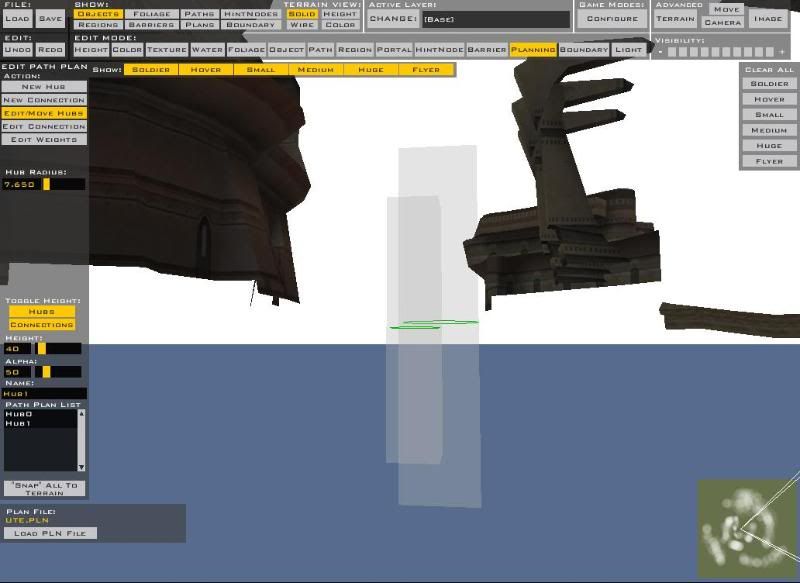
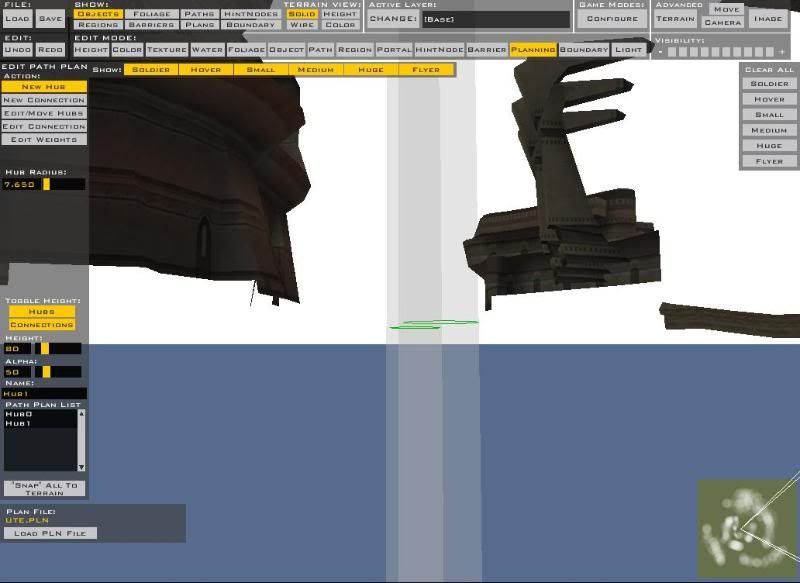
Well, in planning mode there is a height option on the left when your using edit/move hubs under toggle height, you see HEIGHT: with a number underneath it. Move the numbers higher with your mouse and the hubs will get bigger both upwards and downwards at the same time.
Edit - As you can see:
Edit - As you can see:
Hidden/Spoiler:
-
Fiodis

- Master of the Force

- Posts: 4145
- Joined: Wed Nov 12, 2008 9:27 pm
- Projects :: Rannoch + Tientia + Tools Programming
Re: Hubs up and down
Or what Mav wrote:
Maveritchell wrote:Another big concept I've found helpful in planning has been how to change the height of hubs. It's pretty easy, but not really intuitive, if you're new to ZE.
Basically, the height is always going to be flush to the ground when you place a hub, so there's no way to change hub height without changing terrain height, and you don't always want that. What some people are unaware of, though, is that the "undo" command will take back changes you've made to terrain, but not to hubs- which is key.
For example, if you're making planning inside a tunnel system, then lower the ground to under the tunnels, place your hubs and connections, and then "undo" to make your height what it originally was. Something to remember, though, is that once terrain has been raised over a hub, you can no longer do anything to it - changing position, resizing, or adding connections.
-
Jendo7
- Sith
- Posts: 1304
- Joined: Wed Apr 01, 2009 6:37 pm
- Location: Cambridge, England.
- Contact:
Re: Hubs up and down
I think if you do that, make sure you don't have units moving above the tunnel system, as you won't be able to add planning on their level. If you don't need planning above the tunnel, its fine just to use the height option.
-
acryptozoo
- Master Bounty Hunter
- Posts: 1642
- Joined: Wed Jun 03, 2009 3:14 pm
- Projects :: Yavin Mappack
- xbox live or psn: acryptozoo
- Location: in the jungles of Yavin IV
- Contact:
Re: Hubs up and down
yeah the hubs on the top swere around the tunnel so tried the hieght thing and it worked perfectly thanks all for clearing that upJendo7 wrote:I think if you do that, make sure you don't have units moving above the tunnel system, as you won't be able to add planning on their level. If you don't need planning above the tunnel, its fine just to use the height option.
-
AceMastermind

- Gametoast Staff
- Posts: 3285
- Joined: Mon Aug 21, 2006 6:23 am
- Contact:
Re: Hubs up and down
That just helps provide a visual for placing hubs in ZeroEditor and has no effect on anything ingame.Jendo7 wrote:Well, in planning mode there is a height option on the left when your using edit/move hubs under toggle height...
Hubs are infinite up and down just as all planning and don't need to be moved under or over the terrain, the green circle is just the icon that represents the hub and the Toggle Height, Height and Alpha tools just help you line it up in your level if you have areas above or below the terrain that need planning but those tools are strictly for use inside ZeroEditor and have no effect ingame.acryptozoo wrote:yes i knew that i was tring to get them under ground
for units to go through my tunnel
-
Jendo7
- Sith
- Posts: 1304
- Joined: Wed Apr 01, 2009 6:37 pm
- Location: Cambridge, England.
- Contact:
Re: Hubs up and down
Thanks for clearing that up Ace. I must have missed that in the docs 
Edit: Just found the infinite height reference in the docs:
I have to read more 
Edit: Just found the infinite height reference in the docs:
Hidden/Spoiler: