
I have a Few question about the foliage editing mode in ZE.
1.) What is it?
2.) How does it work?
3.) Can you place trees with it? I'm doing a big Yavin map and I need ALOT of trees. Basically, the whole thing is a forest with a few clearings and a road.
Foliage, Sectors, Portals and Framerate Improvement....
Moderator: Moderators
-
Hebes24
- Sith Master

- Posts: 2594
- Joined: Sat Jun 03, 2006 5:15 pm
- Projects :: No Mod project currently.
- xbox live or psn: No gamertag set
- Location: In An Epic Space Battle!
- Contact:
Foliage, Sectors, Portals and Framerate Improvement....
Last edited by Hebes24 on Mon Oct 02, 2006 1:36 pm, edited 1 time in total.
-
Big_rich
RE: Foliage....
1) Foliage are the little shrubs, grass, bushes you find in maps.
2) You "paint" it in ZE, then use a .prp file in your world1 folder to define the "foliage".EX of prp file:
3) Yes you can use it to place trees.Look in the above .prp file taken from endor, experment with it for placing those trees.
The layers noted in the above code define which "brush" or layer you are using in ZE. 1, 2, 3, 4.
2) You "paint" it in ZE, then use a .prp file in your world1 folder to define the "foliage".EX of prp file:
Code: Select all
	{
		File("end_prop_fern5.msh", 80);
		Frequency(50);
		Scale(1);
		Stiffness(0.0);
		CollisionSound("foliage_collision");
	 	ColorVariation(0.2);
		AIVisibilityFactor(0.7,1.0);
	}
	Mesh()
	{
		File("end_prop_fern5.msh", 150);
		Frequency(70);
		Scale(1);
		Stiffness(0.0);
		CollisionSound("foliage_collision");
	 	ColorVariation(0.2);
		AIVisibilityFactor(0.7,1.0);
	}
	Mesh()
	{
		GrassPatch("end_prop_grass.odf", 40);
		File("editor_grasspatch.msh", 80);
		Frequency(50);
		Scale(1);
		Stiffness(0.0);
	        CollisionSound("foliage_collision");
	        ColorVariation(0.2);
		AIVisibilityFactor(0.40,0.9);
	}
}

Layer(1)
{
	SpreadFactor(0.4);
 	Mesh()
	{
		File("end_prop_fern5.msh", 30);
		Frequency(20);
		Scale(1);
		Stiffness(0.0);
		CollisionSound("foliage_collision");
	        ColorVariation(0.2);
		AIVisibilityFactor(0.7,1.0);
	}

 	Mesh()
	{
		File("end_prop_treeclump_1.msh", 50);
		Frequency(50);
		Scale(1);
		Stiffness(0.0);
		CollisionSound("foliage_collision");
	        ColorVariation(0.2);
		AIVisibilityFactor(0.35,0.6);
	}
}

Layer(2)
{
	SpreadFactor(0.4);

 	Mesh()
	{
		File("end_prop_foliage5.msh", 100);
		Frequency(50);
		Scale(1);
		Stiffness(0.0);
		CollisionSound("foliage_collision");
	        ColorVariation(0.1);
		FadeDist(10.0);
		AIVisibilityFactor(0.2,0.4);
	}
 	Mesh()
	{
		File("end_prop_foliage6.msh", 100);
		Frequency(50);
		Scale(1);
		Stiffness(0.5);
		CollisionSound("foliage_collision");
	        ColorVariation(0.1);
		FadeDist(10.0);
		AIVisibilityFactor(0.1,0.2);
	}
 	Mesh()
	{
		File("end_prop_foliage7.msh", 140);
		Frequency(50);
		Scale(1);
		Stiffness(0.5);
		CollisionSound("foliage_collision");
	        ColorVariation(0.1);
		FadeDist(10.0);
		AIVisibilityFactor(0.1,0.2);
	}
}

TreeLine()
{
	Path("jungle1")
	{
		Distance(28);
		BorderOdf("end_prop_treebill.odf");
	}
}
The layers noted in the above code define which "brush" or layer you are using in ZE. 1, 2, 3, 4.
-
Hebes24
- Sith Master
- Posts: 2594
- Joined: Sat Jun 03, 2006 5:15 pm
- Projects :: No Mod project currently.
- xbox live or psn: No gamertag set
- Location: In An Epic Space Battle!
- Contact:
RE: Foliage....
Thanks Big_Rich! Though, where do you put the mshs, and odfs? in data_***\worlds\***\msh(or odf)?
Last edited by Hebes24 on Sun Oct 01, 2006 6:36 pm, edited 1 time in total.
-
EraOfDesann

- Jedi Admin

- Posts: 2170
- Joined: Mon May 30, 2005 5:22 pm
- Location: North Texas
- Contact:
-
Hebes24
- Sith Master
- Posts: 2594
- Joined: Sat Jun 03, 2006 5:15 pm
- Projects :: No Mod project currently.
- xbox live or psn: No gamertag set
- Location: In An Epic Space Battle!
- Contact:
-
Hebes24
- Sith Master
- Posts: 2594
- Joined: Sat Jun 03, 2006 5:15 pm
- Projects :: No Mod project currently.
- xbox live or psn: No gamertag set
- Location: In An Epic Space Battle!
- Contact:
-
Penguin
- Jedi Admin
- Posts: 2541
- Joined: Sun Mar 05, 2006 12:00 am
- Location: Australia
-
Big_rich
-
Hebes24
- Sith Master
- Posts: 2594
- Joined: Sat Jun 03, 2006 5:15 pm
- Projects :: No Mod project currently.
- xbox live or psn: No gamertag set
- Location: In An Epic Space Battle!
- Contact:
Aw man! That means I'll have about 6.022*10^23 trees that I'll have to place manually! My mouse finger hurts just thinking about it! Oh well....
Alright I put in a bunch of trees (filled about 1/3 of the map the way I want it) but now, whe I look at the forest, my Framerate is at 0.82!! (holy [diet dr. pepper]!) is there any way to have a forest and be able to actually look at it?
Alright I put in a bunch of trees (filled about 1/3 of the map the way I want it) but now, whe I look at the forest, my Framerate is at 0.82!! (holy [diet dr. pepper]!) is there any way to have a forest and be able to actually look at it?
-
Penguin
- Jedi Admin
- Posts: 2541
- Joined: Sun Mar 05, 2006 12:00 am
- Location: Australia
go back to having foliage with no collison, it runs slow in ZE becouse everythign shirez, not low rez and it doesnt render the collison, ingame it will run slower becouse it has hirez and lowrez calculating and collison and manging all the normal map stuff ((units, animation, etc))
but with foliage it doesn't do the colision and lowrez stuff, etc etc etc. lol
but with foliage it doesn't do the colision and lowrez stuff, etc etc etc. lol
-
Rekubot
- Jedi

- Posts: 1080
- Joined: Wed Apr 05, 2006 12:34 pm
- Projects :: No Mod project currently.
- xbox live or psn: Rekubot
- Location: UK
-
-(DW)-Big_Rich
Or maybe try using sectors, and adjust your farsceen/nearsceen range. You can do it, it's just gonna take allot of messing around with differant numbers to try to get a mix of distant fog and visual appeal. This is how felucia's level designers does it. I would suggest checking out feluica's sky file and maybe check it's sectors and portals. Maybe it can give you some hints on how to create the visual effect your looking for.
-
Hebes24
- Sith Master
- Posts: 2594
- Joined: Sat Jun 03, 2006 5:15 pm
- Projects :: No Mod project currently.
- xbox live or psn: No gamertag set
- Location: In An Epic Space Battle!
- Contact:
I don't know how to use sectors and portals, and I only have a vague idea about what they are. I frankly Hate the amount of fog Felucia and I still get lag there, so I don't like the fog Idea. I also think that nearscene and farscene ranges should not be played with, because I have som tall hills whare you can see the whole map, and I need certain objects to be visible from those heights (greattemples), so if I play with that, it won't look good.
This is what my map looks like now:
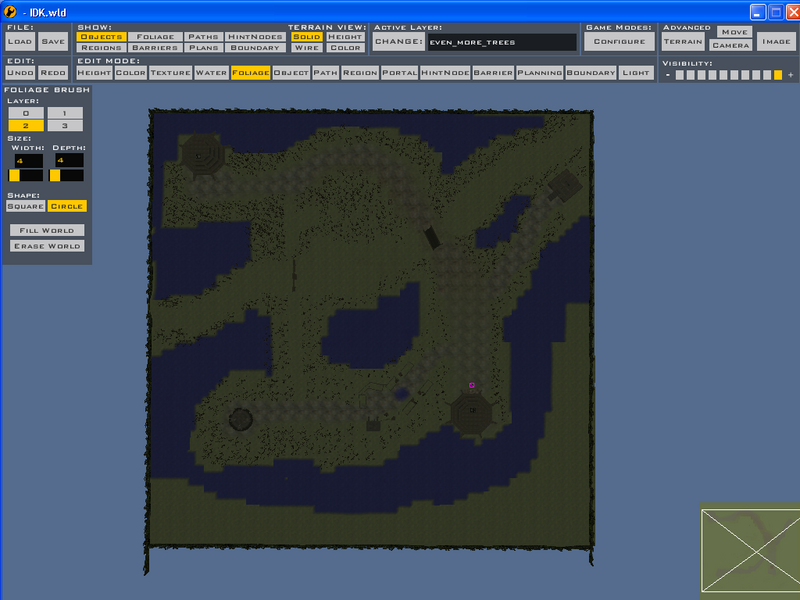
Basically, the real trees are where you should be on the map (on the paths to the CPs, etc), then it goes to the foliage trees where you technically shouldn't be, then at the edges it fades to no trees. this is better, but the framerate is still about 2-5 FPS when looking at a large section of trees. (ugh!)
Would sectors/portals improve the framerate? How do I set them up in ZE?
Do you know how bad 0.82 FPS is? Your unit moves like, every 3 seconds. But it's only if you look at the forest.Rekubot wrote: Otherwise, you've gotta live with the lag.
This is what my map looks like now:
Basically, the real trees are where you should be on the map (on the paths to the CPs, etc), then it goes to the foliage trees where you technically shouldn't be, then at the edges it fades to no trees. this is better, but the framerate is still about 2-5 FPS when looking at a large section of trees. (ugh!)
Would sectors/portals improve the framerate? How do I set them up in ZE?
-
xwingguy
sectors and portals....READ THE BF2 PORTALSYSTEM DOC! Also look at the shipped maps, especially tantiveIV
Also visit this post to make the portals & sectors work:
http://www.gametoast.com/index.php?name ... 717#103717
btw sectors & portals may not work for folage but hey, felucia used em
Also visit this post to make the portals & sectors work:
http://www.gametoast.com/index.php?name ... 717#103717
btw sectors & portals may not work for folage but hey, felucia used em
-
Hebes24
- Sith Master
- Posts: 2594
- Joined: Sat Jun 03, 2006 5:15 pm
- Projects :: No Mod project currently.
- xbox live or psn: No gamertag set
- Location: In An Epic Space Battle!
- Contact:
-
t551
- General

- Posts: 791
- Joined: Sat Jul 16, 2005 3:23 pm
- Projects :: No Mod project currently.
- xbox live or psn: No gamertag set
-
Big_rich
You have an example of this? I'm not to clear on what you mean.psych0fred wrote: Setting up collision and odfs/mshs helps (most people think if it works it works). Make sure your objects are small and have collision set up (vs having the engine use the visible geometry for collision). The larger the object the more time it takes to check a unit or vehicle's collision against it.
-
Hebes24
- Sith Master
- Posts: 2594
- Joined: Sat Jun 03, 2006 5:15 pm
- Projects :: No Mod project currently.
- xbox live or psn: No gamertag set
- Location: In An Epic Space Battle!
- Contact:
Yeah, I don't know what you mean either.
I've decided to scratch my forest idea, and only put trees in some places where it's really neccissary. And, since it's called "Yavin IV: Foothills" I could say that the whole map is very high altitude and close to the treeline, so there isn't that many trees anyway.
I've decided to scratch my forest idea, and only put trees in some places where it's really neccissary. And, since it's called "Yavin IV: Foothills" I could say that the whole map is very high altitude and close to the treeline, so there isn't that many trees anyway.