Texture not showing(using Milkshape3D and Bconstructor)

How to create models in XSI and other 3D applications and make them work in Battlefront 1 & 2. Post models, tips for application usage and share anything XSI, 3DMax, SketchUp, etc.

Moderator: Moderators

Post Reply
MasterFang1
Corporal
Corporal
Posts: 144
Joined: Sat Apr 05, 2008 4:30 pm
Projects :: No Mod project currently.
Games I'm Playing :: I have not listed any games yet
xbox live or psn: No gamertag set

Texture not showing(using Milkshape3D and Bconstructor)

Post by MasterFang1 »

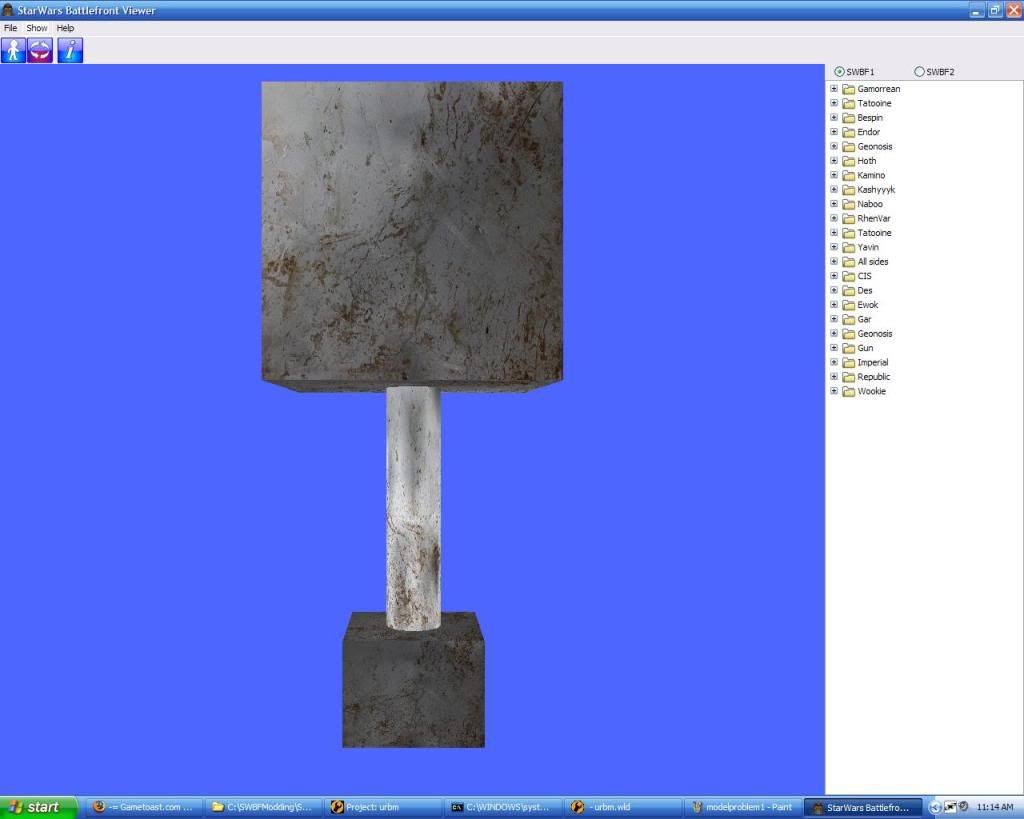
Well as the title says I'm using Milkshape3D to make my model and then Bconstructor to make it .msh format. So I made a very simple model in Milkshape 3D (I barely can model a rectangle) and assigned a single texture to the whole model. Now I exported it as MilkShape 3D ASCII then imported it into BConstructor and then exported as .msh. Now i opened it in SWBF viewer and I see this
Hidden/Spoiler:
Image
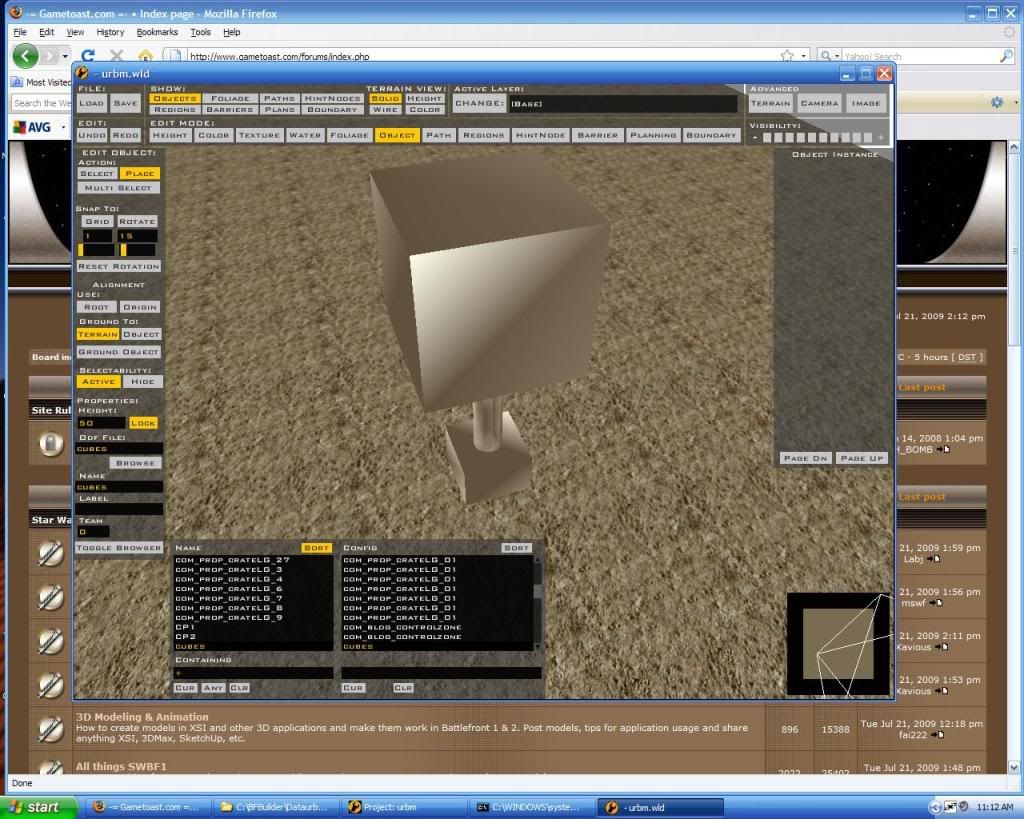
Everything looks fine right? Then I go to put it into ZeroEditor to put it into SWBF1 and then I get this:
Hidden/Spoiler:
Image
Im not sure why the texture would show up in SWBFviewer and not in ZE.
Also, I can't select the object after I place it. Help!
RogueKnight
Space Ranger
Posts: 2512
Joined: Sat Nov 22, 2008 1:50 pm
Projects :: Life. Work.
Games I'm Playing :: League of Legends
xbox live or psn: No gamertag set
Location: Washington, US

Re: Texture not showing(using Milkshape3D and Bconstructor)

Post by RogueKnight »

That happens because the msh file is looking for your texture in a certain location. Save your model and texture in the same folder, delete and reapply the texture, and it should work fine.
MasterFang1
Corporal
Corporal
Posts: 144
Joined: Sat Apr 05, 2008 4:30 pm
Projects :: No Mod project currently.
Games I'm Playing :: I have not listed any games yet
xbox live or psn: No gamertag set

Re: Texture not showing(using Milkshape3D and Bconstructor)

Post by MasterFang1 »

i dont understand what i need to do... my model and texture were saved in the same folder. all i did was copy and paste them to my MSH folder and make an odf for it.
User avatar
AceMastermind
Gametoast Staff
Gametoast Staff
Posts: 3285
Joined: Mon Aug 21, 2006 6:23 am
Contact:

Re: Texture not showing(using Milkshape3D and Bconstructor)

Post by AceMastermind »

MasterFang1 wrote:...Also, I can't select the object after I place it...
Select it from the object browser and press delete, the same goes for when you want to move or rotate it as well, you'll have to select it from the object browser first.
You'll also notice that it won't highlight blue when it's selected, this is another side-effect of using BConstructor.
RogueKnight
Space Ranger
Posts: 2512
Joined: Sat Nov 22, 2008 1:50 pm
Projects :: Life. Work.
Games I'm Playing :: League of Legends
xbox live or psn: No gamertag set
Location: Washington, US

Re: Texture not showing(using Milkshape3D and Bconstructor)

Post by RogueKnight »

MasterFang1 wrote:i dont understand what i need to do... my model and texture were saved in the same folder. all i did was copy and paste them to my MSH folder and make an odf for it.
Sorry bout that, I meant desktop.
Post Reply