

How do I make a vehicle?

How to create models in XSI and other 3D applications and make them work in Battlefront 1 & 2. Post models, tips for application usage and share anything XSI, 3DMax, SketchUp, etc.

Moderator: Moderators

Post Reply
User avatar
Lorul1
Rebel Colonel
Rebel Colonel
Posts: 562
Joined: Wed Apr 24, 2013 10:34 pm
Projects :: Assault on Theed
Games I'm Playing :: Battlegrounds
xbox live or psn: No gamertag set
Location: Your House

How do I make a vehicle?

Post by Lorul1 »

hello
My plan is to make a working Juggernaut from some msh's I got here on gametoast.
I put together the Juggernaut msh parts in softimage and that's about it.

This is my first time making any vehicle so can someone please give me detailed instructions on how to do this.
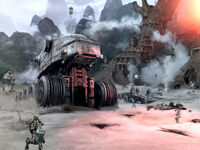
Image


The tutorial below didn't help much because at the beginning of the video i see that his Juggernaut is already in a "dummyroot" I don't know what a "dummyroot" is.
https://www.youtube.com/watch?v=ogOM2s_Il0Y


Some questions I have are :

- How do i make my Juggernaut face the right direction
- Dose it need to have its transformations frozen or something like that
- How do i do low profile
- How do i animate the wheals like real wheals
- How do i do collisions and do i need to press the "h" key to hide them

I just need some kind of detailed tutorial that explains everything to me from the begging. Any help would be appreciated.


EDIT :
I used softimage to basically fit together my juggernaut model (with the weals) and I came across some different colored nodes on my model under something called "boneroot".
they are :

front_gun_l
front_gun_r
hp_lgun2
hp_lgun3
turret1_x
turret_x

looks like some of my work has been done already, but I have no clue how to use them and what they do. please help :runaway:

the model I'm using can be found here:
viewtopic.php?f=64&t=23324&p=505253&hil ... ut#p505253
jedimoose32
Field Commander
Field Commander
Posts: 938
Joined: Thu Jan 24, 2008 12:41 am
Projects :: Engineering Degree
Location: The Flatlands of Canada

Re: how do I make a vehicle

Post by jedimoose32 »

I can answer almost all of your questions.

-Dummyroot: This is a null (Get > Primitive > Null). Just create a null, rename it to dummyroot, then in the Explorer view make everything a child of it (your main mesh, collision mesh, etc). When you go to export the model you will branch select the dummyroot (i.e. select it and all its children by middle-clicking it) and then perform the export.

-Direction: If I recall correctly, vehicles need to face the positive Z (blue) axis in Softimage.

-Transformations: Yes.

-'Low profile': I'm assuming you mean the low-rez model? There are a few methods. Most times a simple Polygon Reduction (Modify > Poly Msh > Polygon Reduction) works fine, but sometimes that makes the profile of the object look funny. There are a bunch of other methods you can use. See >here< for another way.

-Wheels: Check out >this< page for a video tutorial (the example ANDE shows is conveniently also a Juggernaut). Or I suppose you could try doing it >this< way instead, though it wouldn't look quite the same.

-Collision: Using special collision primitives, or just a low-poly version of your main mesh. Plenty of detail in the official documentation Art Guide (also found >here<). And you do not need to hide the collision meshes before exporting.

-Nodes: "boneroot" is the name of a null that serves as the parent for your other animators and hardpoints. "front_gun_l" is another null. I haven't looked at that model specifically; it could be used for making the guns aim/swivel, or it could be a hardpoint that tells the vehicle's weapons where the shots should originate. I'm sure you can deduce that from looking at where front_gun_l is located. There is a good turret essay by Darth DUCK somewhere that can give you some insight, or better yet the Everything You Need/FAQ thread has a link to a fully commented AAT tank's odf file - you could try importing the AAT into Softimage and compare what you see there with Fred's notes on the commented odf.

I hope this has helped. There are lots of great tutorials out there that you can piece together to make a working whole. Try looking around in either the modelling or BF2 modding FAQ threads if you hit any roadblocks. :)
Post Reply