Battlefront II crashes with new core.lvl

In this forum you will find and post information regarding the modding of Star Wars Battlefront 2. DO NOT POST MOD IDEAS/REQUESTS.

Moderator: Moderators

User avatar
Anakin
Master of the Force
Master of the Force
Posts: 4817
Joined: Sat Sep 19, 2009 11:37 am
Projects :: RC Side Mod - Remastered - SWBF3 Legacy
Location: Mos Espa (germany)

Re: Battlefront II crashes with new core.lvl

Post by Anakin »

shell_interface: Found custom_gc_0.lvl
game_interface: Found user_script_0.lvl
user_script_10: Found user_script_11.lvl

ff_rebuildFakeConsoleList(): Adding in modder's custom commands...
ff_rebuildFakeConsoleList(): Finished adding in modder's custom commands.
fakeconsole_functions: AddCommand: Not adding command: Unlock Vehicles
fakeconsole_functions: AddCommand: Not adding command: Force No Views
fakeconsole_functions: AddCommand: Not adding command: Allow CP Capture
fakeconsole_functions: AddCommand: Not adding command: Not Immune To Mines
fakeconsole_functions: AddCommand: Not adding command: Disable Tumble Recovery
fakeconsole_functions: AddCommand: Not adding command: Allow AI Spawn 1
fakeconsole_functions: AddCommand: Not adding command: Allow AI Spawn 2
fakeconsole_functions: AddCommand: Not adding command: Team Auto-assign On
fakeconsole_functions: AddCommand: Not adding command: Heros SP Rules Off
fakeconsole_functions: AddCommand: Not adding command: Heros SP Scripted Off
fakeconsole_functions: AddCommand: Not adding command: Menu Sounds On
fakeconsole_functions: AddCommand: Not adding command: No Flee Just Die
fakeconsole_functions: AddCommand: Not adding command: Restore Award Effects
fakeconsole_functions: AddCommand: Not adding command: Allow Victory
fakeconsole_functions: AddCommand: Not adding command: AI AutoBalance Off
fakeconsole_functions: AddCommand: Not adding command: AI BlindJetJumps Off
fakeconsole_functions: AddCommand: Not adding command: Hide Team Points
fakeconsole_functions: AddCommand: Not adding command: Remove JetPacks
are you sure you removed all mods completely??

Mods do not only install in addon folder. The more important things are the scripts that are loaded always no matter whether you load the map/mod it came with or not
TheMastermindOfMaom
Private First Class
Posts: 314
Joined: Sun Nov 22, 2015 1:48 pm
Projects :: None.
xbox live or psn: #PCMasterRace
Location: Greece

Re: Battlefront II crashes with new core.lvl

Post by TheMastermindOfMaom »

I have removed customgc scripts,user_scripts,the Skin Changer and changed core...still crashes.
User avatar
[RDH]Zerted
Gametoast Staff
Gametoast Staff
Posts: 2982
Joined: Sun Feb 26, 2006 7:36 am
Projects :: Bos Wars AI - a RTS game
Games I'm Playing :: SWBF2 and Bos Wars
xbox live or psn: No gamertag set
Location: USA
Contact:

Re: Battlefront II crashes with new core.lvl

Post by [RDH]Zerted »

The point of removing everything is so you can single out what individual change breaks something and make sure things don't conflicting with other. The debug log shows that you haven't removed all the mods, excluding v1.3. I suggest you reinstall SWBF2 (clear out the virtual folder contents too) and use a blank profile on v1.0 of the game (play a map to make sure it doesn't crash). Remake a core.lvl from a new mod map to make sure there aren't any accidental changes in your current mod. Follow the tutorials to remake the core.lvl step by step. Don't change anything in the core, not even some text, just get it working first. Make sure that your mod map isn't copied to the addon folder after you munge. If a map has a shell core.lvl it will crash. Test the core on two different, non-space maps.

If it doesn't work post your debug log, size of the modified core.lvl, core.req, size of the retail core.lvl, a description of when it crashed, and what language you have the game in. If you want to list every step you took to make and deploy your core.lvl that would be great too.
TheMastermindOfMaom
Private First Class
Posts: 314
Joined: Sun Nov 22, 2015 1:48 pm
Projects :: None.
xbox live or psn: #PCMasterRace
Location: Greece

Re: Battlefront II crashes with new core.lvl

Post by TheMastermindOfMaom »

After Anakin told me I didn't remove all mods,I removed all scripts and the 1.3 patch. Still crashes.

I tried the re-install,delete the virtual folder thing and still crashes.

Game does not crash with the stock core.lvl. Modded one crashes even if not changed.

I followed Ace's tutorial.

Changed core.req
Got his sounds,copied the ones from Assets and put them where the tutorial told me.
Munged with Common ticked.
Changed a name in editlocalize.
Munged with both common/localize ticked.
Changed the core.lvl on my bf2 folder.
Crashes when opening a map.
User avatar
[RDH]Zerted
Gametoast Staff
Gametoast Staff
Posts: 2982
Joined: Sun Feb 26, 2006 7:36 am
Projects :: Bos Wars AI - a RTS game
Games I'm Playing :: SWBF2 and Bos Wars
xbox live or psn: No gamertag set
Location: USA
Contact:

Re: Battlefront II crashes with new core.lvl

Post by [RDH]Zerted »

Could you post a new debug log? I want to make sure something isn't there.
User avatar
Anakin
Master of the Force
Master of the Force
Posts: 4817
Joined: Sat Sep 19, 2009 11:37 am
Projects :: RC Side Mod - Remastered - SWBF3 Legacy
Location: Mos Espa (germany)

Re: Battlefront II crashes with new core.lvl

Post by Anakin »

Does it crash if you do not change anything, just rebuild the stock core?
TheMastermindOfMaom
Private First Class
Posts: 314
Joined: Sun Nov 22, 2015 1:48 pm
Projects :: None.
xbox live or psn: #PCMasterRace
Location: Greece

Re: Battlefront II crashes with new core.lvl

Post by TheMastermindOfMaom »

Removed everything,all mods and custom scripts. Here is the log.
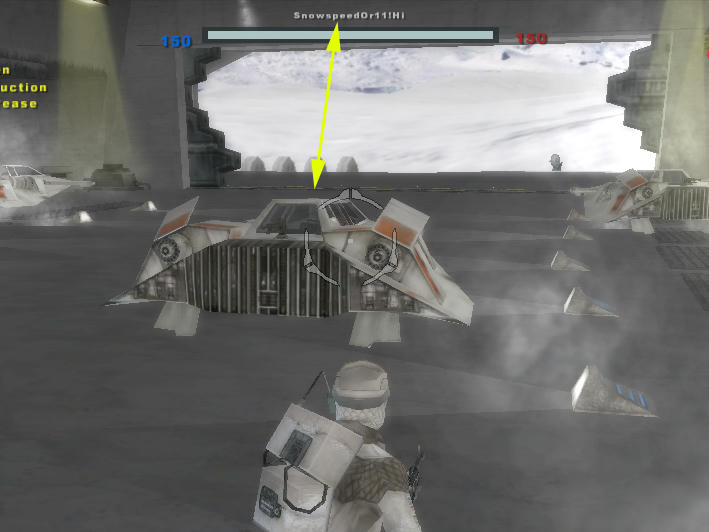
Changed Snowspeeder to Snowspeedor. Tried to play Hoth.

Log: http://pastebin.com/kMiFitx3
User avatar
AceMastermind
Gametoast Staff
Gametoast Staff
Posts: 3285
Joined: Mon Aug 21, 2006 6:23 am
Contact:

Re: Battlefront II crashes with new core.lvl

Post by AceMastermind »

Image

Either your tools are broken or your method needs refining.
TheMastermindOfMaom
Private First Class
Posts: 314
Joined: Sun Nov 22, 2015 1:48 pm
Projects :: None.
xbox live or psn: #PCMasterRace
Location: Greece

Re: Battlefront II crashes with new core.lvl

Post by TheMastermindOfMaom »

Didn't the log say anything? I saw severity 3 problems in there.

Munge works and I can make maps with ZeroEditor. So no way they are broken.

I followed your tutorial.
User avatar
[RDH]Zerted
Gametoast Staff
Gametoast Staff
Posts: 2982
Joined: Sun Feb 26, 2006 7:36 am
Projects :: Bos Wars AI - a RTS game
Games I'm Playing :: SWBF2 and Bos Wars
xbox live or psn: No gamertag set
Location: USA
Contact:

Re: Battlefront II crashes with new core.lvl

Post by [RDH]Zerted »

So we're getting closer to the problem. The maps aren't trying to load any moddb moves any more which is good, but you defiantly shouldn't be getting severity 3 problems, especially from ifs_login_EnterInterface*. Your install is screwed up. I recommend purging SWBF2 and reinstalling. Make sure there aren't any files hiding in Windows' virtual store version of SWBF2, even an uninstall won't get rid of those. If you don't know how to access that, ask or search online.

Also, could you list the sizes of the primary .lvl files? (ingame.lvl, common.lvl, shell.lvl, core.lvl, etc...)

*
Message Severity: 3
C:\Battlefront2\main\Battlefront2\Source\LuaHelper.cpp(312)
CallProc failed: (none):0: attempt to compare two nil values
stack traceback:
(none): in function `ifs_login_EnterInterface'
(none): in function <(none):598>
User avatar
AceMastermind
Gametoast Staff
Gametoast Staff
Posts: 3285
Joined: Mon Aug 21, 2006 6:23 am
Contact:

Re: Battlefront II crashes with new core.lvl

Post by AceMastermind »

TheMastermindOfMaom wrote:I followed your tutorial.
There really is no tutorial because it is just a single step, all you have to do is overwrite the default core.req with the complete one, then you just make your edits and munge. It'll work even without the sound stuff, you just won't have menu sounds.
User avatar
AnthonyBF2
Sith
Sith
Posts: 1255
Joined: Wed Aug 21, 2013 3:55 pm
Projects :: PS2+PSP Overhaul

Re: Battlefront II crashes with new core.lvl

Post by AnthonyBF2 »

Another thing that helps me get rid of deep issues is taking out specific assets from my mod folder, then rebuild a mod folder with the same name/ID and toss the assets back in.

In your case, you'll want to save data_mod\common\localize folder and all it's contents then trash the rest and restart.
TheMastermindOfMaom
Private First Class
Posts: 314
Joined: Sun Nov 22, 2015 1:48 pm
Projects :: None.
xbox live or psn: #PCMasterRace
Location: Greece

Re: Battlefront II crashes with new core.lvl

Post by TheMastermindOfMaom »

Re-installed BF2 and have no mods on it,only the 1.3 patch.

Changed the core.lvl (no localization edited)

Log: http://pastebin.com/7H8kpSKF
Post Reply