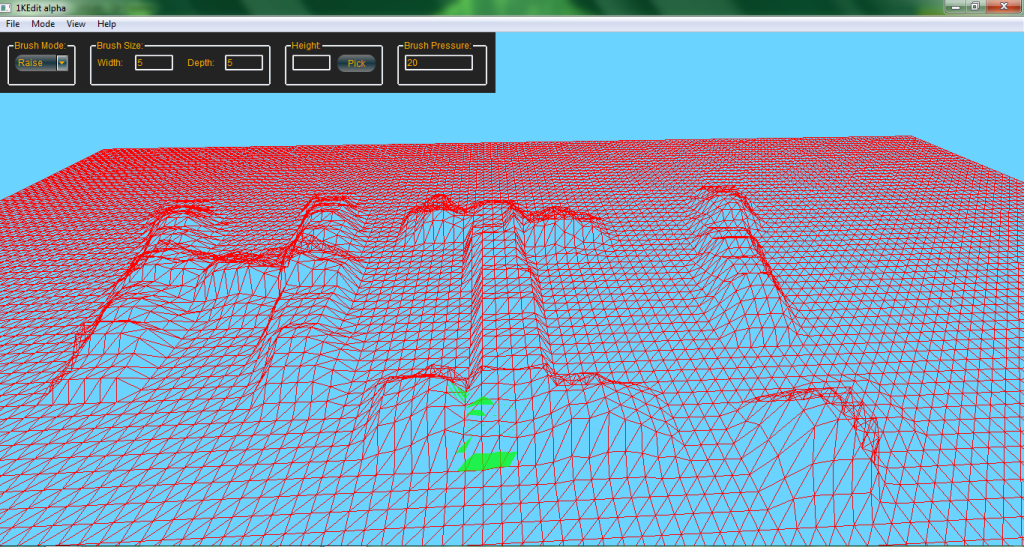
And after another five days of coding instead of studying for final exams, terrain height brushes are working. This is a terrain I imported perfectly flat, then messed around with:
Clipping through the terrain a bit, it can do that at a distance. I'll have to raise it a bit. It's also pretty sensitive. I might tweak down the master sensitivity, but for now you can adjust it with pressure, just like in ZE. With ZeroEdit you can have pressures from 1 to 100, IIRC, but usually (at least for me) most work was done with it in the 10-40 range. In this tool (have yet to decide on a name) you can set a pressure from 0 to whatever, but at the current sensitivity generally you'd want to stay below 30.
Actually you can set negative pressures, and then left-clicking will lower while right-clicking will raise. Heh, I hadn't anticipated that behavior.

Next on the agenda is getting more brush features functional - right now it's locked in the shape of a 5x5 square, and only the raise/lower mode is enabled. Painting (setting all vertices to a single height) ought to be easy, it's blending I need to spend some time thinking about. Resizing should work fine with the present code, actually; I just haven't rigorously tested it. I suspect some bug will show up that I'll have to fix.
Ande, if I catch you on XFire, could you explain how to recolor the group box borders? I can't seem to find that online; the border-color setting doesn't seem to change anything.


If you want I'll provide a link once I find it.