
i added the geo_prop_dust to my map but it caused a big amount of lag, when i removed it from my map, i munged but it still appeared in my map,
now my maps gonna be a lagfest.
does anyone know how to get rid of the geo_prop_dust
ps- i also deleted the odf for it and the msh in my world folder.
Geo_prop_dust problem
Moderator: Moderators
-
Gunjak
-
RC-1290

-
xwingguy
-
Gunjak
-
Squirrel7Hunter
-
-_-
- Gametoast Staff

- Posts: 2678
- Joined: Sat May 07, 2005 1:22 pm
-
PvtParts
- Jedi

- Posts: 1001
- Joined: Mon Apr 03, 2006 9:12 pm
- Projects :: No Mod project currently.
- xbox live or psn: No gamertag set
- Location: plundering yer booty
Edit: Oh shnizzle. Make sure you dont have the 'cp' entry typed in the first box, as a matter of fact make sure the first box is empty.
Check all layers, and to be safe, in the object browser (do this in all layers as well) type in this box:
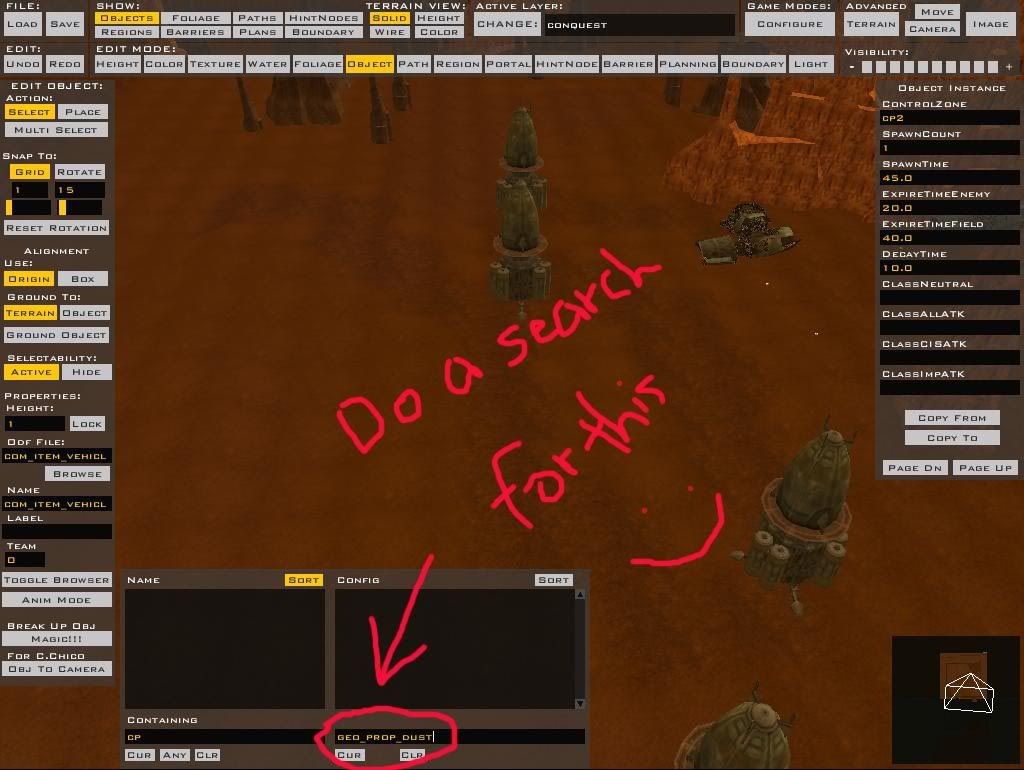
Also do searches for other things, such as geo_prop_mist. It could be something else. Have you changed the map to more units? I highly doubt one dust can cause that much lag.
Once you do this, do another clean (make sure to select all before doing it). Then munge.
Check all layers, and to be safe, in the object browser (do this in all layers as well) type in this box:
Also do searches for other things, such as geo_prop_mist. It could be something else. Have you changed the map to more units? I highly doubt one dust can cause that much lag.
Once you do this, do another clean (make sure to select all before doing it). Then munge.
-
Gunjak
er i tried it just now still no geo_prop_dust , i'll take a screenie of what my map looks like now .PvtParts wrote:Edit: Oh shnizzle. Make sure you dont have the 'cp' entry typed in the first box, as a matter of fact make sure the first box is empty.
Check all layers, and to be safe, in the object browser (do this in all layers as well) type in this box:
Also do searches for other things, such as geo_prop_mist. It could be something else. Have you changed the map to more units? I highly doubt one dust can cause that much lag.
Once you do this, do another clean (make sure to select all before doing it). Then munge.

EW horrible!
-
PvtParts
- Jedi
- Posts: 1001
- Joined: Mon Apr 03, 2006 9:12 pm
- Projects :: No Mod project currently.
- xbox live or psn: No gamertag set
- Location: plundering yer booty
-
Gunjak
Yeah ive checked em all, i have used a geo_prop_mist to make the effect of fumes coming off a run down LAAT, ill delete it and see if that is the problem.
ps how can i post a full screen piccy, photo bucket doesnt support that i dont think?
ZOMG it worked, after all that it was soo easy , all i had to do was delete the geo_prop_mist, ahh crap, i feel like a nub again
One more thing where do i find the .fx? nva mind i found it
ps how can i post a full screen piccy, photo bucket doesnt support that i dont think?
ZOMG it worked, after all that it was soo easy , all i had to do was delete the geo_prop_mist, ahh crap, i feel like a nub again
One more thing where do i find the .fx? nva mind i found it