Trouble getting door animations working [Solved]

How to create models in XSI and other 3D applications and make them work in Battlefront 1 & 2. Post models, tips for application usage and share anything XSI, 3DMax, SketchUp, etc.

Moderator: Moderators

Post Reply
Marth8880
Resistance Leader
Posts: 5042
Joined: Tue Feb 09, 2010 8:43 pm
Projects :: DI2 + Psychosis
Games I'm Playing :: Silent Hill 2
xbox live or psn: Marth8880
Location: Edinburgh, UK
Contact:

Trouble getting door animations working [Solved]

Post by Marth8880 »

So I've never been able to successfully get custom doors working. I believe it's always been an issue with my exported animations.

I'm able to export meshes and character animations perfectly fine, but when it comes to doors, they never seem to work for me, and I haven't the slightest idea why. My only guess is it's something to do with the animations themselves.

I highly doubt it's an issue with my animation munge .bat files because I'm able to export character animations perfectly fine, I don't get any errors in the ZenAsset log or munge log, and the munged files appear where they should.

This time, I followed FragMe!'s simple door animation tutorial (found here: http://www.gametoast.com/viewtopic.php?f=36&t=14540 ). The game freezes and soon crashes while the map is loading (near the end of the load cycle). This only happens when the door object is placed in the map.


When I exported, I:
- checked "Export Animations" in the ZE Tools .msh exporter when exporting the open animation
- checked "Export Animations" and "Current frame as Basepose" in the exporter when exporting the basepose
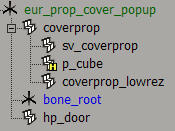
- selected the following object pre-exporting:
Hidden/Spoiler:
Image
ODF file:

Code: Select all

[GameObjectClass]
ClassLabel  = "door"
GeometryName    = "editor_eur_prop_cover_popup.msh"

[Properties]
GeometryName    = "eur_prop_cover_popup"
AnimationName     = "eur_cover_popup"

Animation         = "open"
AnimationTrigger  = "hp_door 4.0"

OrdnanceCollision = "p_cube"

FoleyFXGroup    = "metal_foley"
MSH file:
https://www.dropbox.com/s/5zxoc2hvdxmi8 ... p.msh?dl=0

Animation bank folder:
https://www.dropbox.com/s/1igvndt8yy344 ... up.7z?dl=0


Any help whatsoever is very highly appreciated. Let me know if you have any questions or require further information.

Thanks!
Last edited by Marth8880 on Sat Jan 23, 2016 1:19 pm, edited 2 times in total.
thelegend
Sith
Sith
Posts: 1433
Joined: Thu Jan 23, 2014 6:01 am
Projects :: Star Wars - Battlefront III Legacy
Games I'm Playing :: Swbf GTA CoD LoL KH
xbox live or psn: El_Fabricio#
Location: Right behind you :)

Re: Trouble getting door animations working

Post by thelegend »

Hey,
ai the moment I am working on this. I changed one thing: I applied the animation from bone_root to bone_cover (Just as a test) and it still crashes. Then I changed the Classlabel to prop, hide the Animation lines and exported your mesh only. It crashed pc_ModelMunge. I still want to test out other methods but I think it's because of your model. The Animation is fine. MshViewer opens the object fine before and even after pc_ModelMunge crash it still opens the mesh fine.

Edit: Removed the door from my map and it didn't crash anymore. It makes me angry I can't get it working since I already made doors which work fine.
I will send you a door I made for my latest map. It's a simple Up and Down door with no real special things at all. Maybe you can compare your files with mine. I am sorry for that.
User avatar
AceMastermind
Gametoast Staff
Gametoast Staff
Posts: 3285
Joined: Mon Aug 21, 2006 6:23 am
Contact:

Re: Trouble getting door animations working

Post by AceMastermind »

http://www.mediafire.com/download/zjate ... th_door.7z

Image

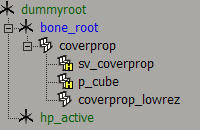
I rearranged the hierarchy a bit
enveloped the lowrez and sv to bone_root
replaced hp_door geometry with a null
renamed hp_door to hp_active
renamed eur_prop_cover_popup to dummyroot
keyed dummyroot on first frame
FreezeM all geometry except the primitive

You might not need to do some of those but i'm just sticking with what usually works.
Marth8880
Resistance Leader
Posts: 5042
Joined: Tue Feb 09, 2010 8:43 pm
Projects :: DI2 + Psychosis
Games I'm Playing :: Silent Hill 2
xbox live or psn: Marth8880
Location: Edinburgh, UK
Contact:

Re: Trouble getting door animations working

Post by Marth8880 »

So apparently, making hp_door a child of bone_root fixed the problem. :u


Old:

Image

New:

Image


Thanks anyway for the help!

Oh, and it's worth noting that when the issue was still unresolved, the ZenAsset log had been mentioning that "hp_door may be a floating bone" or something along those lines.
User avatar
AceMastermind
Gametoast Staff
Gametoast Staff
Posts: 3285
Joined: Mon Aug 21, 2006 6:23 am
Contact:

Re: Trouble getting door animations working

Post by AceMastermind »

Marth8880 wrote:So apparently, making hp_door a child of bone_root fixed the problem.

Old:
Image
That's different than the hierarchy of the msh you uploaded:
Image

Your bone_root has no child nodes there.
Moving the the hp_door shouldn't make a difference unless it is because you're using geometry as a hard point. As a null it works fine as child of dummyroot.
You also shouldn't hide your lowrez mesh because it'll make it more difficult to see when you place it in ZE since it displays lowrez geometry.
Post Reply