
Um, yeah. I was curious if it's possible to override the trooper texture for the HD Clone. No explanation necessary.
And if so, how do I do it correctly?
About the HD Clone from RepSharpshooter...
Moderator: Moderators
-
Havoc 526

- Rebel Warrant Officer

- Posts: 317
- Joined: Sat Apr 04, 2009 6:24 pm
- Projects :: Something
- Location: Howling at the Moon
-
Null_1138
- Jedi

- Posts: 1192
- Joined: Thu Oct 16, 2008 4:05 pm
Re: About the HD Clone from RepSharpshooter...
Treat it like any other skin. Open it up in an image editor like Paint.net, GIMP, or Photoshop, edit it as you please, and save. Be sure to keep a copy of the original though.
-
Havoc 526
- Rebel Warrant Officer
- Posts: 317
- Joined: Sat Apr 04, 2009 6:24 pm
- Projects :: Something
- Location: Howling at the Moon
Re: About the HD Clone from RepSharpshooter...
I'd hate to admit it, but that's kinda what I did. Now look:
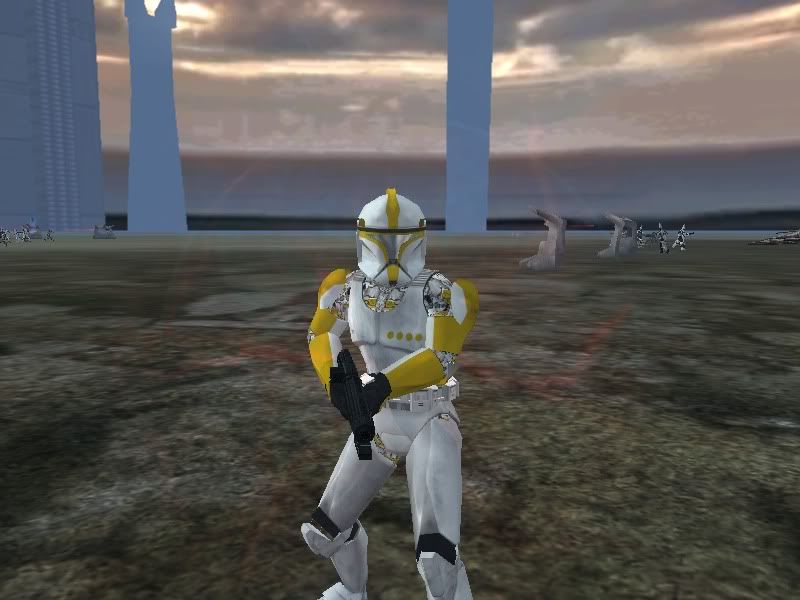
-
Deviss
- Master of the Force

- Posts: 3772
- Joined: Tue Aug 12, 2008 7:59 pm
- Projects :: Clone Wars Extended
Re: About the HD Clone from RepSharpshooter...
i understand you i have the extra texture black for leather for this reason i remove it so all parts from clone use the same and one skinLink504 wrote:I'd hate to admit it, but that's kinda what I did. Now look:Hidden/Spoiler:

-
The_Emperor
- Supreme Galactic Ruler
- Posts: 2118
- Joined: Sat Dec 10, 2005 6:30 am
- Projects :: No Mod project currently.
- xbox live or psn: No gamertag set
- Location: Waaaaay over there.
Re: About the HD Clone from RepSharpshooter...
Removed the alpha channel perhaps?
@ DEVISS: huh, what where now?
@ DEVISS:
huh, what where now?-
Deviss
- Master of the Force
- Posts: 3772
- Joined: Tue Aug 12, 2008 7:59 pm
- Projects :: Clone Wars Extended
Re: About the HD Clone from RepSharpshooter...
yeah i modified UV for the black parts (clone leather) use the part into skin the same all clones use XD you want the modelThe_Emperor wrote:@ DEVISS:
 ?
?-
Null_1138
- Jedi
- Posts: 1192
- Joined: Thu Oct 16, 2008 4:05 pm
Re: About the HD Clone from RepSharpshooter...
Uh, you did leave rep_inf_cloneleather.tga alone, right?Link504 wrote:I'd hate to admit it, but that's kinda what I did. Now look:Hidden/Spoiler:
-
mswf
- Master Bounty Hunter

- Posts: 1674
- Joined: Tue Mar 31, 2009 3:40 pm
- Location: Twello, The Netherlands
- Contact:
Re: About the HD Clone from RepSharpshooter...
My guess? He didn't. I suggest you to redownload it, since it appears you deleted/somehow replaced the clone_leather.tga.Null_1138 wrote:Uh, you did leave rep_inf_cloneleather.tga alone, right?Link504 wrote:I'd hate to admit it, but that's kinda what I did. Now look:Hidden/Spoiler:
-
Havoc 526
- Rebel Warrant Officer
- Posts: 317
- Joined: Sat Apr 04, 2009 6:24 pm
- Projects :: Something
- Location: Howling at the Moon
Re: About the HD Clone from RepSharpshooter...
Oh, yes. I left it alone. It works perfectly for all my main troopers, but anyone with a override texture is messed up.
-
mswf
- Master Bounty Hunter
- Posts: 1674
- Joined: Tue Mar 31, 2009 3:40 pm
- Location: Twello, The Netherlands
- Contact:
Re: About the HD Clone from RepSharpshooter...
It would have been usefull if you said that you encountered the bug while using an override-texture more clearly. (not meaning to sound angry, it's only that I'm experiencing an "oooooh, now I understand" moment)
I think it's because the model uses 2 textures and you're overriding all the textures with 1. Because of this, you also apply the new skin as the skin to replace the clone_leather.tga . It may be an error with your .odf, but I'm not sure if a model with 2 separate textures is compatible with the override command.
I think it's because the model uses 2 textures and you're overriding all the textures with 1. Because of this, you also apply the new skin as the skin to replace the clone_leather.tga . It may be an error with your .odf, but I'm not sure if a model with 2 separate textures is compatible with the override command.
-
ANDEWEGET

- Ancient Force
- Posts: 1266
- Joined: Tue Apr 01, 2008 8:42 am
- Location: Germany
- Contact:
Re: About the HD Clone from RepSharpshooter...
the model "override_texture" has originally 2 textures applied. if you use override texture you apply the texture for the model you reference in the odf, if it has 2 textures it uses the override texture for both.
you could hex other texture names in, that should work.
you could hex other texture names in, that should work.
-
Havoc 526
- Rebel Warrant Officer
- Posts: 317
- Joined: Sat Apr 04, 2009 6:24 pm
- Projects :: Something
- Location: Howling at the Moon
Re: About the HD Clone from RepSharpshooter...
Well, I guess that's my only option. Not a first....but I digress.ANDEWEGET wrote:the model "override_texture" has originally 2 textures applied. if you use override texture you apply the texture for the model you reference in the odf, if it has 2 textures it uses the override texture for both.
you could hex other texture names in, that should work.
Thanks guys!