Even more LUA and map problems [Solved]

In this forum you will find and post information regarding the modding of Star Wars Battlefront 2. DO NOT POST MOD IDEAS/REQUESTS.

Moderator: Moderators

Post Reply
Commander_Fett
High General
High General
Posts: 847
Joined: Fri Oct 17, 2008 9:59 pm
Projects :: No Mod project currently.

Even more LUA and map problems [Solved]

Post by Commander_Fett »

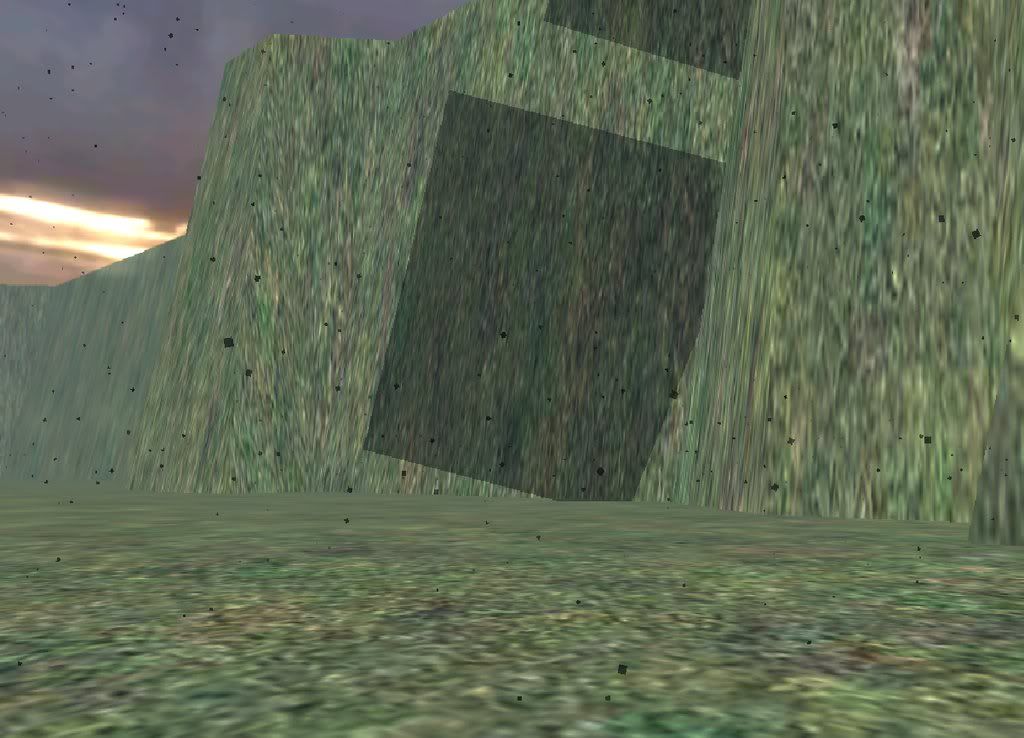
Hey, I was working on one of my maps, and I added in some bespin buildings. Now, there are a bunch of black squares in the sky:
Hidden/Spoiler:
Image
Does anyone know why?
Also, I was wondering how to add a timer to a map, so it ends after x minutes, and make the AI goal in conquest to defeat enemies, not capture cps. I have tried to do these myself, but it just ends up crashing. Can anyone help?
User avatar
bobfinkl
Rebel Colonel
Rebel Colonel
Posts: 593
Joined: Sun Jul 13, 2008 9:01 am
Projects :: Lots of unreleased stuff
Games I'm Playing :: Life
xbox live or psn: No gamertag set
Location: The quaint little city gametoast.

Re: Even more LUA and map problems

Post by bobfinkl »

For the timer you need to add the lines in the center (the -- timer to beat-- lines) in the same position compared to the other lines (assuming your using a conquest script that is).

Code: Select all

   --This sets up the actual objective.  This needs to happen after cp's are defined
    conquest = ObjectiveConquest:New{teamATT = ATT, teamDEF = DEF, 
                                     textATT = "game.modes.con", 
                                     textDEF = "game.modes.con2",
                                     multiplayerRules = true}

   -- Timer to Beat -- 
    timeoutTimer = CreateTimer("timeout")
       SetTimerValue(timeoutTimer, 480)
        ShowTimer(timeoutTimer)
        StartTimer("timeout")

        OnTimerElapse(
              function(timer)
                    ShowTimer(nil)
                    DestroyTimer(timer)
              end,
              timeoutTimer

    --This adds the CPs to the objective.  This needs to happen after the objective is set up
    conquest:AddCommandPost(cp1)
    conquest:AddCommandPost(cp2)
    conquest:AddCommandPost(cp3)
    conquest:AddCommandPost(cp4)
I haven't tried that exact code but it should work to end your game when the time runs out (change the timer value number to edit the time it takes for the timer to run out that one is specified for 8 minutes).

And to make the AI go for kills and not conquest you can't eliminate the want for cps entirely on a conquest script but you can add this line.

Code: Select all

    AddAIGoal(1, "Deathmatch", 100)
    AddAIGoal(2, "Deathmatch", 100)
That will make the AI concentrate more on killing enemies that capturing cps.
Commander_Fett
High General
High General
Posts: 847
Joined: Fri Oct 17, 2008 9:59 pm
Projects :: No Mod project currently.

Re: Even more LUA and map problems

Post by Commander_Fett »

Thanks, I'll try out the timer. But, the deathmatch thing, I tried that, and I got a bunch of errors. I'll try again, though.
User avatar
Maveritchell
Jedi Admin
Jedi Admin
Posts: 7366
Joined: Mon Aug 21, 2006 11:03 pm

Re: Even more LUA and map problems

Post by Maveritchell »

That's because you're trying to assign an AI goal when one's already assigned. You need to "ClearAIGoals(1)" and "ClearAIGoals(2)".
User avatar
bobfinkl
Rebel Colonel
Rebel Colonel
Posts: 593
Joined: Sun Jul 13, 2008 9:01 am
Projects :: Lots of unreleased stuff
Games I'm Playing :: Life
xbox live or psn: No gamertag set
Location: The quaint little city gametoast.

Re: Even more LUA and map problems

Post by bobfinkl »

Weird I can use Deathmatch goals with any other goals and it works just fine.
Commander_Fett
High General
High General
Posts: 847
Joined: Fri Oct 17, 2008 9:59 pm
Projects :: No Mod project currently.

Re: Even more LUA and map problems

Post by Commander_Fett »

Wait, so I need to replace
Hidden/Spoiler:
-- load the gametype script
ScriptCB_DoFile("ObjectiveConquest")
ScriptCB_DoFile("setup_teams")

-- REP Attacking (attacker is always #1)
REP = 1;
CIS = 2;
-- These variables do not change
ATT = REP;
DEF = CIS;


function ScriptPostLoad()


--This defines the CPs. These need to happen first
cp1 = CommandPost:New{name = "cp1"}
cp2 = CommandPost:New{name = "cp2"}
cp3 = CommandPost:New{name = "cp3"}
cp4 = CommandPost:New{name = "cp4"}


--This sets up the actual objective. This needs to happen after cp's are defined
conquest = ObjectiveConquest:New{teamATT = ATT, teamDEF = DEF,
textATT = "game.modes.con",
textDEF = "game.modes.con2",
multiplayerRules = true}

--This adds the CPs to the objective. This needs to happen after the objective is set up
conquest:AddCommandPost(cp1)
conquest:AddCommandPost(cp2)
conquest:AddCommandPost(cp3)
conquest:AddCommandPost(cp4)

conquest:Start()

EnableSPHeroRules()

end
With
Hidden/Spoiler:
-- load the gametype script
ScriptCB_DoFile("ObjectiveConquest")
ScriptCB_DoFile("setup_teams")

-- REP Attacking (attacker is always #1)
REP = 1;
CIS = 2;
-- These variables do not change
ATT = REP;
DEF = CIS;


function ScriptPostLoad()


--This defines the CPs. These need to happen first
cp1 = CommandPost:New{name = "cp1"}
cp2 = CommandPost:New{name = "cp2"}
cp3 = CommandPost:New{name = "cp3"}
cp4 = CommandPost:New{name = "cp4"}


--This sets up the actual objective. This needs to happen after cp's are defined
"ClearAIGoals(1)"
"ClearAIGoals(2)"

--This adds the CPs to the objective. This needs to happen after the objective is set up
conquest:AddCommandPost(cp1)
conquest:AddCommandPost(cp2)
conquest:AddCommandPost(cp3)
conquest:AddCommandPost(cp4)

conquest:Start()

EnableSPHeroRules()

end
Or do I add that below?
User avatar
bobfinkl
Rebel Colonel
Rebel Colonel
Posts: 593
Joined: Sun Jul 13, 2008 9:01 am
Projects :: Lots of unreleased stuff
Games I'm Playing :: Life
xbox live or psn: No gamertag set
Location: The quaint little city gametoast.

Re: Even more LUA and map problems

Post by bobfinkl »

You would add it between conqueststart() and enablespherorules(), you would also add the extra goal there too.

Edit: And Don't delete the conquest setup that's why your adding the ClearAIGoals in.
Commander_Fett
High General
High General
Posts: 847
Joined: Fri Oct 17, 2008 9:59 pm
Projects :: No Mod project currently.

Re: Even more LUA and map problems

Post by Commander_Fett »

Okay, thanks for the clarafication. Does anyone know how to fix the sky?
EDIT: I did the LUA stuff, but I get this
Hidden/Spoiler:
C:\BF2_ModTools\ToolsFL\Bin\luac.exe: ..\..\common\scripts\FTM\FTMc_con.lua:51: `)' expected (to close `(' at line 40) near `conquest'
ERROR[scriptmunge scripts\FTM\FTMc_con.lua]:Could not read input file.ERROR[scriptmunge scripts\FTM\FTMc_con.lua]:Could not read input file. [continuing]
2 Errors 0 Warnings

ERROR[levelpack mission\FTMc_con.req]:Expecting bracket, but none was found.
File : munged\pc\ftmc_con.script.req(1)...

ucft <--
ERROR[levelpack mission\FTMc_con.req]:Expecting bracket, but none was found.
File : munged\pc\ftmc_con.script.req(1)...

ucft <--
[continuing]
2 Errors 0 Warnings
mungelog and a FATAL error when I play. I'm sure I did something wrong, but I don't know what. Here's my LUA:
Hidden/Spoiler:
--
-- Copyright (c) 2005 Pandemic Studios, LLC. All rights reserved.
--

-- load the gametype script
ScriptCB_DoFile("ObjectiveConquest")
ScriptCB_DoFile("setup_teams")

-- REP Attacking (attacker is always #1)
REP = 1;
CIS = 2;
-- These variables do not change
ATT = REP;
DEF = CIS;


function ScriptPostLoad()


--This defines the CPs. These need to happen first
cp1 = CommandPost:New{name = "cp1"}
cp2 = CommandPost:New{name = "cp2"}
cp3 = CommandPost:New{name = "cp3"}
cp4 = CommandPost:New{name = "cp4"}


--This sets up the actual objective. This needs to happen after cp's are defined
conquest = ObjectiveConquest:New{teamATT = ATT, teamDEF = DEF,
textATT = "game.modes.con",
textDEF = "game.modes.con2",
multiplayerRules = true}

-- Timer to Beat --
timeoutTimer = CreateTimer("timeout")
SetTimerValue(timeoutTimer, 900)
ShowTimer(timeoutTimer)
StartTimer("timeout")

OnTimerElapse(
function(timer)
ShowTimer(nil)
DestroyTimer(timer)
end,
timeoutTimer


--This adds the CPs to the objective. This needs to happen after the objective is set up
conquest:AddCommandPost(cp1)
conquest:AddCommandPost(cp2)
conquest:AddCommandPost(cp3)
conquest:AddCommandPost(cp4)

conquest:Start()

ClearAIGoals(1)
ClearAIGoals(2)


AddAIGoal(1, "Deathmatch", 100)
AddAIGoal(2, "Deathmatch", 100)

EnableSPHeroRules()

end


---------------------------------------------------------------------------
-- FUNCTION: ScriptInit
-- PURPOSE: This function is only run once
-- INPUT:
-- OUTPUT:
-- NOTES: The name, 'ScriptInit' is a chosen convention, and each
-- mission script must contain a version of this function, as
-- it is called from C to start the mission.
---------------------------------------------------------------------------
function ScriptInit()

ReadDataFile("ingame.lvl")


SetMaxFlyHeight(500)
SetMaxPlayerFlyHeight (500)

SetMemoryPoolSize ("ClothData",20)
SetMemoryPoolSize ("Combo",50) -- should be ~ 2x number of jedi classes
SetMemoryPoolSize ("Combo::State",650) -- should be ~12x #Combo
SetMemoryPoolSize ("Combo::Transition",650) -- should be a bit bigger than #Combo::State
SetMemoryPoolSize ("Combo::Condition",650) -- should be a bit bigger than #Combo::State
SetMemoryPoolSize ("Combo::Attack",550) -- should be ~8-12x #Combo
SetMemoryPoolSize ("Combo::DamageSample",6000) -- should be ~8-12x #Combo::Attack
SetMemoryPoolSize ("Combo::Deflect",100) -- should be ~1x #combo

ReadDataFile("sound\\yav.lvl;yav1cw")
ReadDataFile("dc:SIDE\\rep.lvl",
"rep_inf_ep3_rifleman",
"rep_hero_anikan")
ReadDataFile("SIDE\\cis.lvl",
"cis_inf_rifleman",
"cis_inf_rocketeer",
"cis_inf_engineer",
"cis_inf_sniper",
"cis_inf_officer",
"cis_hero_darthmaul",
"cis_hover_aat")
ReadDataFile("dc:SIDE\\des.lvl",
"tat_inf_jawa")


ReadDataFile("SIDE\\tur.lvl",
"tur_bldg_laser",
"tur_bldg_tower")

SetupTeams{
rep = {
team = REP,
units = 1,
reinforcements = 10,
soldier = { "rep_inf_ep3_rifleman",1, 1},
-- assault = { "rep_inf_ep3_rocketeer",1, 4},
-- engineer = { "rep_inf_ep3_engineer",1, 4},
-- sniper = { "rep_inf_ep3_sniper",1, 4},
-- officer = {"rep_inf_ep3_officer",1, 4},
-- special = { "rep_inf_ep3_jettrooper",1, 4},

},
cis = {
team = CIS,
units = 20,
reinforcements = -1,
soldier = { "cis_inf_rifleman",9, 25},
assault = { "cis_inf_rocketeer",1, 4},
engineer = { "cis_inf_engineer",1, 4},
sniper = { "cis_inf_sniper",1, 4},
officer = {"cis_inf_officer",1, 4},
-- special = { "cis_inf_droideka",1, 4},
}
}

-- SetHeroClass(CIS, "cis_hero_darthmaul")
SetHeroClass(REP, "rep_hero_anakin")

AddUnitClass(CIS, "tat_inf_jawa")


-- Level Stats
-- ClearWalkers()
AddWalkerType(0, 4) -- special -> droidekas
AddWalkerType(1, 0) -- 1x2 (1 pair of legs)
AddWalkerType(2, 0) -- 2x2 (2 pairs of legs)
AddWalkerType(3, 0) -- 3x2 (3 pairs of legs)
local weaponCnt = 1024
SetMemoryPoolSize("Aimer", 75)
SetMemoryPoolSize("AmmoCounter", weaponCnt)
SetMemoryPoolSize("BaseHint", 1024)
SetMemoryPoolSize("EnergyBar", weaponCnt)
SetMemoryPoolSize("EntityCloth", 32)
SetMemoryPoolSize("EntityFlyer", 32)
SetMemoryPoolSize("EntityHover", 32)
SetMemoryPoolSize("EntityLight", 200)
SetMemoryPoolSize("EntitySoundStream", 4)
SetMemoryPoolSize("EntitySoundStatic", 32)
SetMemoryPoolSize("MountedTurret", 32)
SetMemoryPoolSize("Navigator", 128)
SetMemoryPoolSize("Obstacle", 1024)
SetMemoryPoolSize("PathNode", 1024)
SetMemoryPoolSize("SoundSpaceRegion", 64)
SetMemoryPoolSize("TreeGridStack", 1024)
SetMemoryPoolSize("UnitAgent", 128)
SetMemoryPoolSize("UnitController", 128)
SetMemoryPoolSize("Weapon", weaponCnt)

SetSpawnDelay(10.0, 0.25)
--ReadDataFile("dc:FTM\\FTM.lvl", "FTM_conquest")
ReadDataFile("dc:FTM\\FTM.lvl", "FTM_conquest")
SetDenseEnvironment("false")


-- Sound

SetSoundEffect("ScopeDisplayZoomIn", "binocularzoomin")
SetSoundEffect("ScopeDisplayZoomOut", "binocularzoomout")

voiceSlow = OpenAudioStream("sound\\global.lvl", "rep_unit_vo_slow")
AudioStreamAppendSegments("sound\\global.lvl", "cis_unit_vo_slow", voiceSlow)
AudioStreamAppendSegments("sound\\global.lvl", "global_vo_slow", voiceSlow)

voiceQuick = OpenAudioStream("sound\\global.lvl", "rep_unit_vo_quick")
AudioStreamAppendSegments("sound\\global.lvl", "cis_unit_vo_quick", voiceQuick)

OpenAudioStream("sound\\global.lvl", "cw_music")
-- OpenAudioStream("sound\\global.lvl", "global_vo_quick")
-- OpenAudioStream("sound\\global.lvl", "global_vo_slow")
OpenAudioStream("sound\\yav.lvl", "yav1")
OpenAudioStream("sound\\yav.lvl", "yav1_emt")

SetBleedingVoiceOver(REP, REP, "rep_off_com_report_us_overwhelmed", 1)
SetBleedingVoiceOver(REP, CIS, "rep_off_com_report_enemy_losing", 1)
SetBleedingVoiceOver(CIS, REP, "cis_off_com_report_enemy_losing", 1)
SetBleedingVoiceOver(CIS, CIS, "cis_off_com_report_us_overwhelmed", 1)

SetOutOfBoundsVoiceOver(2, "cisleaving")
SetOutOfBoundsVoiceOver(1, "repleaving")

SetAmbientMusic(REP, 1.0, "rep_yav_amb_start", 0,1)
SetAmbientMusic(REP, 0.8, "rep_yav_amb_middle", 1,1)
SetAmbientMusic(REP, 0.2, "rep_yav_amb_end", 2,1)
SetAmbientMusic(CIS, 1.0, "cis_yav_amb_start", 0,1)
SetAmbientMusic(CIS, 0.8, "cis_yav_amb_middle", 1,1)
SetAmbientMusic(CIS, 0.2, "cis_yav_amb_end", 2,1)

SetVictoryMusic(REP, "rep_yav_amb_victory")
SetDefeatMusic (REP, "rep_yav_amb_defeat")
SetVictoryMusic(CIS, "cis_yav_amb_victory")
SetDefeatMusic (CIS, "cis_yav_amb_defeat")

SetSoundEffect("ScopeDisplayZoomIn", "binocularzoomin")
SetSoundEffect("ScopeDisplayZoomOut", "binocularzoomout")
--SetSoundEffect("BirdScatter", "birdsFlySeq1")
--SetSoundEffect("WeaponUnableSelect", "com_weap_inf_weaponchange_null")
--SetSoundEffect("WeaponModeUnableSelect", "com_weap_inf_modechange_null")
SetSoundEffect("SpawnDisplayUnitChange", "shell_select_unit")
SetSoundEffect("SpawnDisplayUnitAccept", "shell_menu_enter")
SetSoundEffect("SpawnDisplaySpawnPointChange", "shell_select_change")
SetSoundEffect("SpawnDisplaySpawnPointAccept", "shell_menu_enter")
SetSoundEffect("SpawnDisplayBack", "shell_menu_exit")


--OpeningSateliteShot
AddCameraShot(0.908386, -0.209095, -0.352873, -0.081226, -45.922508, -19.114113, 77.022636);

AddCameraShot(-0.481173, 0.024248, -0.875181, -0.044103, 14.767292, -30.602322, -144.506851);
AddCameraShot(0.999914, -0.012495, -0.004416, -0.000055, 1.143253, -33.602314, -76.884430);
AddCameraShot(0.839161, 0.012048, -0.543698, 0.007806, 19.152437, -49.802273, 24.337317);
AddCameraShot(0.467324, 0.006709, -0.883972, 0.012691, 11.825212, -49.802273, -7.000720);
AddCameraShot(0.861797, 0.001786, -0.507253, 0.001051, -11.986043, -59.702248, 23.263165);
AddCameraShot(0.628546, -0.042609, -0.774831, -0.052525, 20.429928, -48.302277, 9.771714);
AddCameraShot(0.765213, -0.051873, 0.640215, 0.043400, 57.692474, -48.302277, 16.540724);
AddCameraShot(0.264032, -0.015285, -0.962782, -0.055734, -16.681797, -42.902290, 129.553268);
AddCameraShot(-0.382320, 0.022132, -0.922222, -0.053386, 20.670977, -42.902290, 135.513001);
end

Can someone please help?
User avatar
[RDH]Zerted
Gametoast Staff
Gametoast Staff
Posts: 2982
Joined: Sun Feb 26, 2006 7:36 am
Projects :: Bos Wars AI - a RTS game
Games I'm Playing :: SWBF2 and Bos Wars
xbox live or psn: No gamertag set
Location: USA
Contact:

Re: Even more LUA and map problems

Post by [RDH]Zerted »

You need to have a ) after the timeoutTimer. Also, you don't need to clear the AI goals before adding new ones. However, if you don't want some of the AI to trying to capture CPs, then you should clear the goals.
Commander_Fett
High General
High General
Posts: 847
Joined: Fri Oct 17, 2008 9:59 pm
Projects :: No Mod project currently.

Re: Even more LUA and map problems

Post by Commander_Fett »

Thank you all, it works now! Woot! I was wondering, though, how do you force a player onto a certain team? I was looking through the campaign scripts, but didn't see anything, did I just miss something? Also, can someone please help with the black flying square problem? It's really starting to bug me.
User avatar
AceMastermind
Gametoast Staff
Gametoast Staff
Posts: 3285
Joined: Mon Aug 21, 2006 6:23 am
Contact:

Re: Even more LUA and map problems

Post by AceMastermind »

Commander_Fett wrote:...I was wondering, though, how do you force a player onto a certain team? I was looking through the campaign scripts, but didn't see anything, did I just miss something?
http://www.gametoast.com/forums/search. ... mit=Search
Commander_Fett wrote:...can someone please help with the black flying square problem? It's really starting to bug me.
It looks like environment fx with a missing texture.
Commander_Fett
High General
High General
Posts: 847
Joined: Fri Oct 17, 2008 9:59 pm
Projects :: No Mod project currently.

Re: Even more LUA and map problems

Post by Commander_Fett »

Is there any way to make it so the black squares arn't there at all? Or do have to copy Bespin's fx file?
User avatar
bobfinkl
Rebel Colonel
Rebel Colonel
Posts: 593
Joined: Sun Jul 13, 2008 9:01 am
Projects :: Lots of unreleased stuff
Games I'm Playing :: Life
xbox live or psn: No gamertag set
Location: The quaint little city gametoast.

Re: Even more LUA and map problems

Post by bobfinkl »

Do you have an fx file already there? Because it looks like that's a precipitation form of some kind or other.
Commander_Fett
High General
High General
Posts: 847
Joined: Fri Oct 17, 2008 9:59 pm
Projects :: No Mod project currently.

Re: Even more LUA and map problems

Post by Commander_Fett »

I have the Naboo fx.
User avatar
bobfinkl
Rebel Colonel
Rebel Colonel
Posts: 593
Joined: Sun Jul 13, 2008 9:01 am
Projects :: Lots of unreleased stuff
Games I'm Playing :: Life
xbox live or psn: No gamertag set
Location: The quaint little city gametoast.

Re: Even more LUA and map problems

Post by bobfinkl »

Delete some lines and see what that does, or just delete all of them.
Commander_Fett
High General
High General
Posts: 847
Joined: Fri Oct 17, 2008 9:59 pm
Projects :: No Mod project currently.

Re: Even more LUA and map problems

Post by Commander_Fett »

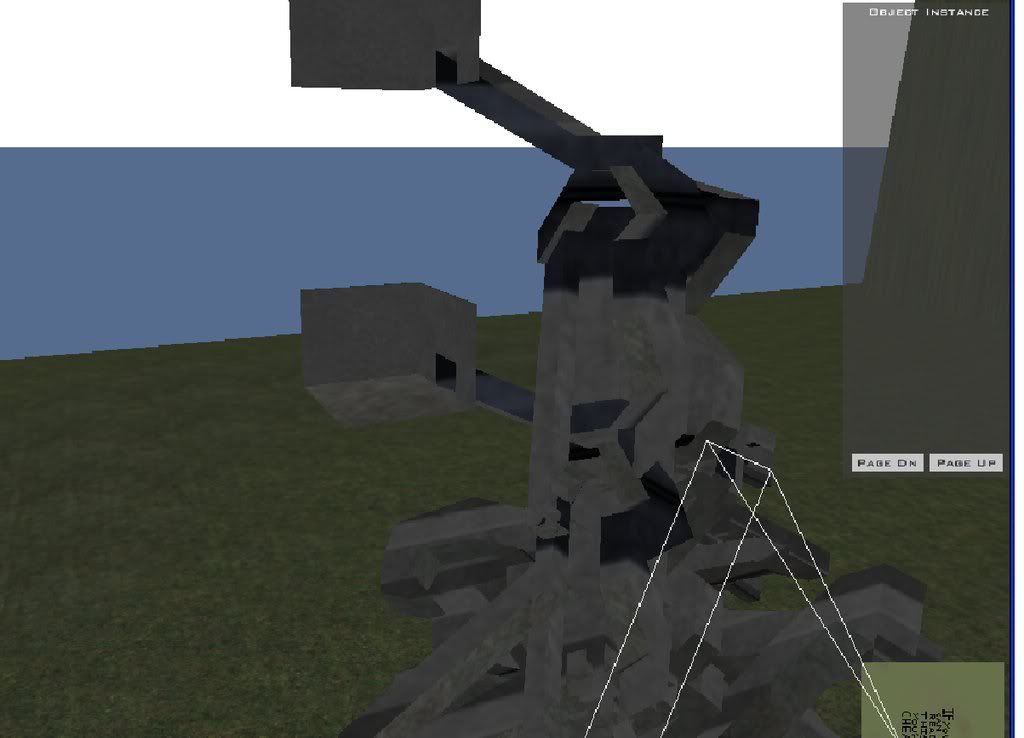
New question: I was making a map for somebody, but there was a smwll problem nwith a model they sent me, so they edited it and sent me a new version. The problem is, when I try to place the new object, it's two of it, stacked one on top of the other:
Hidden/Spoiler:
Image
Does anyone know wht the problem is?
(I tried putting it in a different map, and got the same result)
User avatar
Fluffy_the_ic
Hoth Battle Chief
Hoth Battle Chief
Posts: 3223
Joined: Thu Jan 24, 2008 7:03 pm
xbox live or psn: fluffytherc
Location: she/her
Contact:

Re: Even more LUA and map problems

Post by Fluffy_the_ic »

The only idea that I have is that I bumpmapped it wrong. Just try not to show pics of the fixed version, umkay?
Commander_Fett
High General
High General
Posts: 847
Joined: Fri Oct 17, 2008 9:59 pm
Projects :: No Mod project currently.

Re: Even more LUA and map problems

Post by Commander_Fett »

Okay. Ummm, I was having more trouble with adding rain to my map, and getting rid of the floating white squares of doom. Here is my fx file:
Hidden/Spoiler:
Effect("ColorControl")
{
Enable(1);
XBOX()
{
GammaBrightness(0.48);
GammaContrast(0.54);
}
PC()
{
GammaBrightness(0.48);
GammaContrast(0.55);
}

}

Effect("Precipitation")
{
Enable(1);
Type("Streaks");
Range(12.5);
Color(216, 220, 228);
VelocityRange(1.0);
ParticleDensityRange(0.0);
CameraCrossVelocityScale(0.2);
CameraAxialVelocityScale(1.0);

GroundEffect("com_sfx_rainsplash");
GroundEffectSpread(8);

PS2()
{
AlphaMinMax(0.8, 1.0);
ParticleSize(0.06);
ParticleDensity(80.0);
Velocity(8.0);
StreakLength(1.7);
GroundEffectsPerSec(7);
}
XBOX()
{
AlphaMinMax(0.2, 0.3);
ParticleSize(0.02);
ParticleDensity(256.0);
Velocity(9.0);
StreakLength(1.0);
GroundEffectsPerSec(15);
}
PC()
{
AlphaMinMax(0.3, 0.45);
ParticleSize(0.02);
ParticleDensity(256.0);
Velocity(9.0);
StreakLength(1.0);
GroundEffectsPerSec(15);
}
}

Effect("Lightning")
{
Enable(1);
Color(255, 255, 255);
SunlightFadeFactor(0.1);
SkyDomeDarkenFactor(0.4);
BrightnessMin(1.0);
FadeTime(0.2);
TimeBetweenFlashesMinMax(3.0, 5.0);
TimeBetweenSubFlashesMinMax(0.01, 0.5);
NumSubFlashesMinMax(2, 5);
HorizonAngleMinMax(30, 60);
SoundCrack("kam_amb_thunder");
SoundSubCrack("kam_amb_thundersub");
}

LightningBolt("skybolt")
{
Texture("lightning");
Width(30.0);
FadeTime(0.5);
BreakDistance(20.0);
TextureSize(30.0);
SpreadFactor(20.0);
MaxBranches(2.0);
BranchFactor(0.5);
BranchSpreadFactor(8);
BranchLength(80.0);
InterpolationSpeed(0.4);
NumChildren(1);
ChildBreakDistance(15.0);
ChildTextureSize(8.0);
ChildWidth(1.0);
ChildSpreadFactor(10.0);
Color(255,255,255,255);
ChildColor(255,255,255,150);
}


Effect("hdr")
{
Enable(1)
DownSizeFactor(0.25)
NumBloomPasses(3)
MaxTotalWeight(1.0)
GlowThreshold(0.5)

GlowFactor(1.0)

}


Effect("Blur")
{
PS2()
{
Enable(1);
Mode(1)
ConstantBlend(0.35)
DownSizeFactor(0.35)
}
PC()
{
Enable(0);
Mode(1)
ConstantBlend(0.3)
DownSizeFactor(0.25)
}
XBOX()
{
Enable(1);
Mode(1)
ConstantBlend(0.3)
DownSizeFactor(0.25)
}
}


Effect("Godray")
{
Enable(1);
MaxGodraysInWorld(100);
PS2()
{
MaxGodraysOnScreen(3);
}
PC()
{
MaxGodraysOnScreen(10);
}
XBOX()
{
MaxGodraysOnScreen(3);
}
OffsetAngle(0.000000);
DustVelocity(0.1, -0.2, 0.0);
MaxViewDistance(30);
}


Effect("Precipitation")
{
Enable(1);
Type("Quads");
Texture("fx_pollen");
ParticleSize(0.015);
Color(215, 255, 225);
Range(15.0);
Velocity(-0.3);
VelocityRange(1);
PS2()
{
ParticleDensity(18.0);
}
XBOX()
{
ParticleDensity(20.0);
}
PC()
{
ParticleDensity(50.0);
}
ParticleDensityRange(0.0);
CameraCrossVelocityScale(0.5);
CameraAxialVelocityScale(1.0);
AlphaMinMax(0.5, 0.9);
RotationRange(25);
}


Effect("Water")
{

// general parameters
PatchDivisions(4,4);

// ocean parameters
OceanEnable(0);

// water event parameters
WaterRingColor(148, 170, 192,255);
WaterWakeColor(192, 192, 192,255);
WaterSplashColor((192, 192, 192,255);


// PS2 parameters
PS2()
{
Tile(2.0,2.0);
Velocity(0.0,0.0);
LODDecimation(8);
MainTexture("fel1_water");
MinDiffuseColor(32, 40, 32, 188);
MaxDiffuseColor(128, 130, 128, 188);
BorderDiffuseColor(160, 160, 160, 255);
SpecularColor(192, 222, 192, 152);
SpeckleSpecularColor(200, 200, 200, 150);
SpeckleAmbientColor(50, 50, 50, 80);
SpeckleTextures("water_specularmask_",25, 4.0);
SpeckleTile(5.0, 5.0);
SpeckleScrollSpeed(0.11,0.11);
SpeckleCoordShift(5.0,5.0);
LightAzimAndElev(1.0,0.0);
OscillationEnable(0);
}


// XBOX parameters
XBOX()
{
Tile(2.0,2.0);
NormalMapTextures("water_normalmap_",16,8.0);
LODDecimation(1);
RefractionColor(5, 217, 255, 255);
ReflectionColor(255,255,255,255);
UnderwaterColor(61, 124, 144, 128);
FresnelMinMax(0.3,0.4);
Velocity(0.01, 0.001);
OscillationEnable(0);

}

// PC parameters
PC()
{
Tile(2.0,2.0);
MainTexture("fel1_water");
LODDecimation(1);
RefractionColor(5, 217, 255, 255);
ReflectionColor(57,90,138,255);
UnderwaterColor(61, 124, 144, 128);
FresnelMinMax(0.3,0.4);
FarSceneRange(1500)

NormalMapTextures("water_normalmap_",16,8.0);
BumpMapTextures("water_bumpmap_",16,8.0);
SpecularMaskTextures("water_specularmask_",25, 4);
SpecularMaskTile(3.0, 3.0);
SpecularMaskScrollSpeed(0.0,0.0);
Velocity(0.01,0.01);
OscillationEnable(0);

}

}


//Effect("FogCloud")
//{
// Enable(1);
// Texture("fx_fluffy.tga");
// Range(30.0, 60.0);
// Color(168, 172, 180, 128);
// Velocity(5.0, 0.0);
// Rotation(0.0);
// Height(10.0);
// ParticleSize(20.0);
// ParticleDensity(30.0);
//}


Effect("MotionBlur")
{
Enable(1);
}

Effect("ScopeBlur")
{
Enable(1);
}


//SunFlare()
//{
// Angle(120.000000, 60.000000);
// Color(215, 215, 255);
// Size(5.0);
// FlareOutSize(20.0);
// NumFlareOuts(50);
// InitialFlareOutAlpha(70);
// HaloInnerRing(9.0, 60, 60, 255, 200);
// HaloMiddleRing(20.0, 40, 40, 255, 100);
// HaloOutterRing(40.0, 10, 10, 128, 0);
// SpikeColor(200,200,245,128);
// SpikeSize(16.0);
//}

Effect("Shadow")

{

Enable(1)
BlurEnable(0)
Intensity(0.1)

}
But there are still a bunch of black particles in the air, and the rain won't show up. Can anyone help? :?
User avatar
AceMastermind
Gametoast Staff
Gametoast Staff
Posts: 3285
Joined: Mon Aug 21, 2006 6:23 am
Contact:

Re: Even more LUA and map problems

Post by AceMastermind »

Do you have fx_pollen.tga in your world1 folder?
Commander_Fett
High General
High General
Posts: 847
Joined: Fri Oct 17, 2008 9:59 pm
Projects :: No Mod project currently.

Re: Even more LUA and map problems

Post by Commander_Fett »

Ummm... no.

EDIT: Okay, it works now, muchos gracias! Do rainshadow regions have to be cylinders, or can they be cubes/ rectangles too?
Post Reply