
I noticed that when you import a msh make some edits then export it out the edges aren't smooth as they used to be. I basically want to do this through XSI:
http://www.youtube.com/watch?v=PMgjVJogIbc
How would I do so?
Smooth Shading Edges in XSI? [solved]
Moderator: Moderators
-
Nedarb7

- Lieutenant General

- Posts: 676
- Joined: Sat Sep 22, 2012 3:41 pm
Smooth Shading Edges in XSI? [solved]
Last edited by Nedarb7 on Tue Mar 12, 2013 3:06 pm, edited 1 time in total.
-
Marth8880
- Resistance Leader
- Posts: 5042
- Joined: Tue Feb 09, 2010 8:43 pm
- Projects :: DI2 + Psychosis
- xbox live or psn: Marth8880
- Location: Edinburgh, UK
- Contact:
Re: Smooth Shading Edges in XSI?
That's automatically done in XSI. Could you provide screenshots of your flat-shaded polygons?
-
Nedarb7
- Lieutenant General
- Posts: 676
- Joined: Sat Sep 22, 2012 3:41 pm
Re: Smooth Shading Edges in XSI?
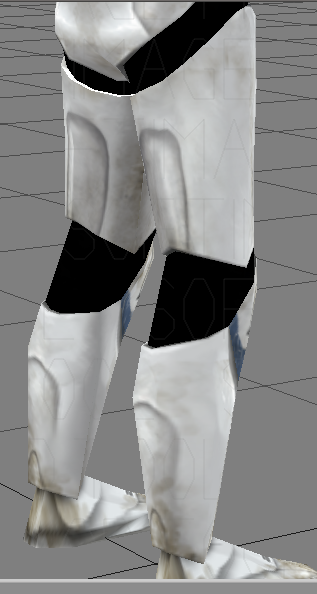
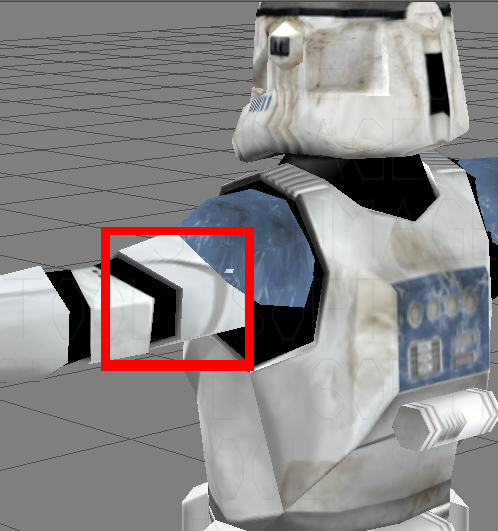
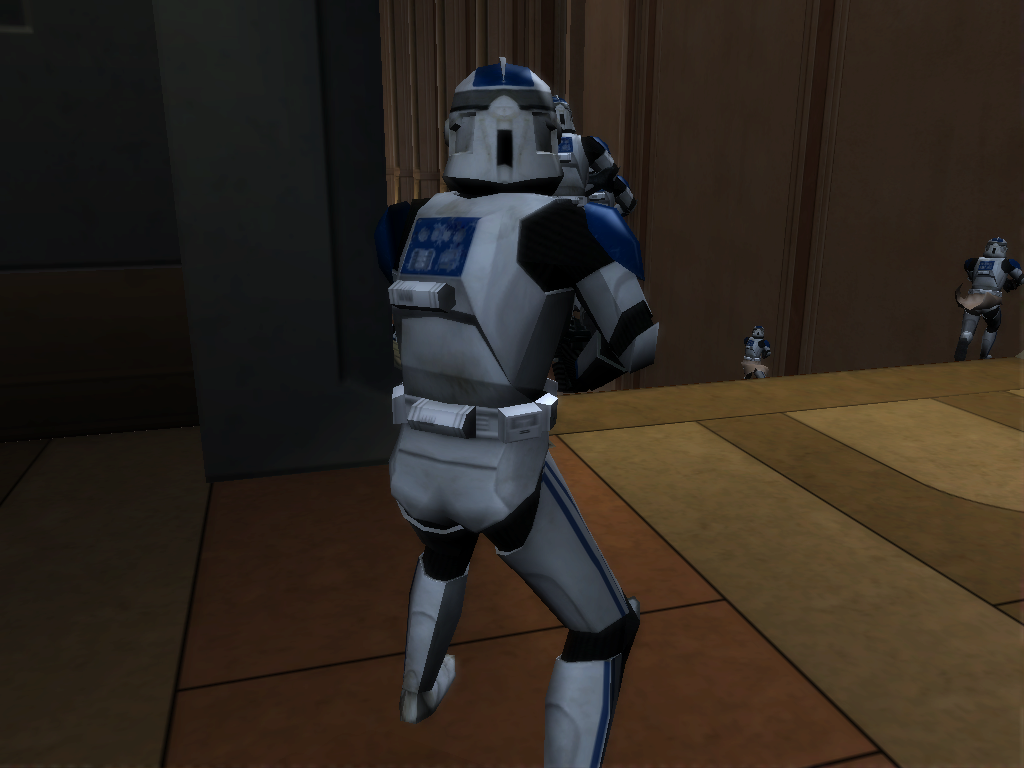
Here are the screenshots:
In XSI it looks fine in most areas:
but...
The arms and legs are sharp in-game
In XSI it looks fine in most areas:
Hidden/Spoiler:
Hidden/Spoiler:
-
minilogoguy18

- Master Bounty Hunter

- Posts: 1512
- Joined: Wed Nov 09, 2005 11:12 pm
- Projects :: No Mod project currently.
- xbox live or psn: No gamertag set
Re: Smooth Shading Edges in XSI?
A lot of importers don't preserve certain normal or geometry approximation data, especially some of the more simplistic file types like .obj and .3ds. I know that the old trooper and jedi star fighter models were XSI Model files (.emdl) and in older versions of XSI I don't think it preserved user normals where as now a .emdl file can store as much info as a scene file as long as the options are set correctly in the preferences.
Just go in and manually add the hard edges, not a big deal and only takes a few mins.
The raw scene files that Pandemic exported to game more than likely had all the hard edges marked making everything look the way it does in game and the data was lost on export to .emdl.
Just go in and manually add the hard edges, not a big deal and only takes a few mins.
The raw scene files that Pandemic exported to game more than likely had all the hard edges marked making everything look the way it does in game and the data was lost on export to .emdl.
-
sereja2
- Command Sergeant Major

- Posts: 253
- Joined: Wed Aug 31, 2011 4:22 am
- Projects :: Naboo Otoh Gunga
- xbox live or psn: No gamertag set
- Location: Ukraine
Re: Smooth Shading Edges in XSI?
To loose "hard eges", I am usualy, just click, under "Modify" panel: Poly. Msh>Weld Boundary Points/Edges, and set Distance: 0,002, in pop up window.
-
Nedarb7
- Lieutenant General
- Posts: 676
- Joined: Sat Sep 22, 2012 3:41 pm
Re: Smooth Shading Edges in XSI?
Thanks Sereja, I think that will do. I'll get back with the results soon.
-EDIT-
Hmm, still no result. What exactly is adding hard edges minilogoguy18?
-EDIT-
Hmm, still no result. What exactly is adding hard edges minilogoguy18?
-
minilogoguy18
- Master Bounty Hunter
- Posts: 1512
- Joined: Wed Nov 09, 2005 11:12 pm
- Projects :: No Mod project currently.
- xbox live or psn: No gamertag set
Re: Smooth Shading Edges in XSI?
If you want to have hard/creased edges you just select the edges you want creased, right click and choose mark hard edge/vertex.
-
Nedarb7
- Lieutenant General
- Posts: 676
- Joined: Sat Sep 22, 2012 3:41 pm
Re: Smooth Shading Edges in XSI?
So if I:
or do I need to:
And the edges will be smooth in-game?right click and choose mark hard edge/vertex.
or do I need to:
thenright click and choose mark hard edge/vertex.
under "Modify" panel: Poly. Msh>Weld Boundary Points/Edges, and set Distance: 0,002, in pop up window.
-
sereja2
- Command Sergeant Major
- Posts: 253
- Joined: Wed Aug 31, 2011 4:22 am
- Projects :: Naboo Otoh Gunga
- xbox live or psn: No gamertag set
- Location: Ukraine
Re: Smooth Shading Edges in XSI?
Well, actualy, Weld option, may help you connect polygons, if they are disconnected. Just set view from Textured to Wireframe, and select your model. If you spot some light blue lined polygons - they are disconnected, and this may cause hard edge effect. If all of your polygons are white, so, Weld option is useless, and problem hiding elsewhere...
-
Nedarb7
- Lieutenant General
- Posts: 676
- Joined: Sat Sep 22, 2012 3:41 pm
Re: Smooth Shading Edges in XSI?
Okay, so the problem is hidden elsewhere then. Any ideas?
-
minilogoguy18
- Master Bounty Hunter
- Posts: 1512
- Joined: Wed Nov 09, 2005 11:12 pm
- Projects :: No Mod project currently.
- xbox live or psn: No gamertag set
Re: Smooth Shading Edges in XSI?
Why are you trying to soften edges on something that is rigid anyway?
You could always use a modifier like relax.
You could always use a modifier like relax.
-
Nedarb7
- Lieutenant General
- Posts: 676
- Joined: Sat Sep 22, 2012 3:41 pm
Re: Smooth Shading Edges in XSI?
This is why:
Clones aren't supposed to be rigid everywhere.
I'll try to "relax" it.
Hidden/Spoiler:
I'll try to "relax" it.
-
Marth8880
- Resistance Leader
- Posts: 5042
- Joined: Tue Feb 09, 2010 8:43 pm
- Projects :: DI2 + Psychosis
- xbox live or psn: Marth8880
- Location: Edinburgh, UK
- Contact:
Re: Smooth Shading Edges in XSI?
You could always just add more edges (and of course buff it...in(?) with the angle of the cylinder) to make it more detailed and to smooth the shading more.
-
Nedarb7
- Lieutenant General
- Posts: 676
- Joined: Sat Sep 22, 2012 3:41 pm
Re: Smooth Shading Edges in XSI?
I know that but I don't want to have too many polys, I want to keep it as close as possible to
the original meshes poly count.
the original meshes poly count.
-
Marth8880
- Resistance Leader
- Posts: 5042
- Joined: Tue Feb 09, 2010 8:43 pm
- Projects :: DI2 + Psychosis
- xbox live or psn: Marth8880
- Location: Edinburgh, UK
- Contact:
Re: Smooth Shading Edges in XSI?
Trust me, adding like 16 more triangles isn't going to make really any impact at all on the game's performance, but the decision is ultimately yours.
-
Nedarb7
- Lieutenant General
- Posts: 676
- Joined: Sat Sep 22, 2012 3:41 pm
Re: Smooth Shading Edges in XSI?
I'll think about it, first I need to try "relaxing" the mesh.
-EDIT-
Relaxing worked for the legs. I think I can fix it from now on.
Thanks for the help!
-EDIT-
Relaxing worked for the legs. I think I can fix it from now on.
Thanks for the help!