How To's, Questions, and Solutions for problems. This covers anything from computer hardware problems to software recommendations to tutorials for various software programs.
Note: Neither Gametoast nor any of its members/visitors are responsible for any damage to your computer as a result from advice given in this forum. Follow advice at your own risk and be sure to back up any important files.
Okay, so about 3 weeks ago, for the first time, my laptop started screwing up. The screen began to display strange coloured pixelated boxes and patterns over what I should normally see. This was very puzzling, so I contacted Dell tech support. He was sure it was an LCD problem, but to be sure, he asked me to connect my laptop to an external monitor. I tried this about a week later, and it showed up fine on the monitor. I then tried running my laptop without the external monitor, and it worked fine. 3 weeks later (now) I'm having the same problem. I tried connecting it to an external monitor again, except this time, it shows up all screwed up on the external monitor as well I'm really confused...so here is a screenshot of the problem I'm having:
Its prolly just the screen breaking. The quality of dell laptops is rubbish. my sister had hers for about a year, about a month after the warranty went and her screen bust, for her it was the light so everything was dim. My dads dell has had something that looks like that happen to it and i think it was something video card related. keep trying, im sure there is someway to fix it.
but galacticmarine plugged it into a seperate monitor, then it should have worked, I'd say it's the built in video on the motherboard or, as galacticmarine said, a corrupted driver, maybe.....
If it is doing it at bootup, then it wouldn't help. It uses a preset setting when booting the comp that is initiated in the BIOS. What is happening is probably either the Video Card or LCD is going out, or there is a loose connection somewhere. I would not recommend fixing it yourself since laptops are pretty fragile unless you know exactly what you are doing (I take them apart all the time ). If it is in warrantee, get it fixed. If not, sae up for a new one. Now Dell could be stupid and have everything controlled by the display drivers, but unless that is the case, reinstalling them won't help. I have a feeling though it is the vid card.
98% sure its your graphics card, I've seen similer things like this happen and its always been the graphics card. you can do either of the following. but don't go out and buy a new graphics card or reformat your computer untill you've gotten your laptop inspected as I might be wrong.
1: update your graphics card to see if it works then
2: buy a new graphics card
3: reformat your computer and see if that works
Don't even bother with the Dell support, they are no help whatsoever.... Is your laptop in the right situation so that you could implant a new video card?
Buy a new one, either directly from ATI/Dell, or look for a used/new one on ebay.
If you still have warranty, try bugging Dell, if you shout loud enough they will listen . Speaking of Dell....I need to call them back about my wireless card problems...
So guys, just a question: what do you think the problem is? I personally think it's a loose connection. Because it's clearly not a screen or display driver problem, and if it was a graphics card problem, why would the issue occur, stay dormant for two weeks, then reoccur?
I just recovered from an issue like this. Similar artifacting (different colors and occasional gaps of clearness between thick artifacted stripes). Went through everything from a HD Wipe, update/rolled back display drivers, new heatsink/fan for chipset, overall power/cooling optimization hardware and software wise, and a quick monitor swap with my brother.
Ultimatly it ended up being the video card. My poor 9800 Pro died. It lasted me long and was a decent card but whatever. Ended up getting a X1650 Pro from HIS.
But before you buy any major new hardware (videocard/cpu or motherboard!!), definatly try at the very least all the things I mentioned up above, and anything else you can think of. Im sure you want your computer back (I know I did) but its definatly not worth the money for new stuff if it does end up being something simple.
First think I'd look into is heat..there's some programs out there you can download to monitor system, cpu, chipset, and gpu temperature. I've never really done anything w/ laptops but I know with a regular desktop you might want to reapply the coating or insulation on your chipset (ie artic silver). Of course try other monitors (again not sure how this'd work on laptop). All the while you should check out the internet. But I can almost guarantee your going to get exactly the kind of suggestions everyone's given (unless its video card specific - so be sure to search in that field).
Hope its not your video card...but then again a new gpu can be nice.
Yeah, I think just before the issue occurred (both times) the computer got really hot. However, as I said before, why would there be a pause in which everything was fine before it started again?
Mine went on and off like that too. It could be symptomatic of a dieing video card.
Or, dieing hardware. Heat may have damaged the hardware permanantly (or perhaps 'severely'). I mean how long have you had the laptop? How often do you game? Do you ever get random reboots during games, memory errors, unexplainable lockups (not CTD i mean total computer screwed must reset lockups)? Any heat issues before?
Theirs funnels you can buy at some stores to attatch to the large case fans that you can aim right on your chipset/gpu/cpu to really cool it down. Maybe look into that and see if it helps.
I've had the laptop for about 3 years now. I do not game often and I do not have random reboots during games. No major screw-ups. I've never had any real heat up issues, but my computer has gotten pretty hot before. I believe that the issue may be a result of a dying video card, like you said. But, can I replace the video card myself, or do I need Dell to do it for me?
Again I've never dealth with this sort of stuff, but if you or someone you know has even a general understanding of installing hardware and video cards I would definatly go with do it yourself (though i dont even know if you can install things yourself with a laptop w/o major taking apart/putting together issues). Least expensive way is also going to be the quickest probably.

 I'm really confused...so here is a screenshot of the problem I'm having: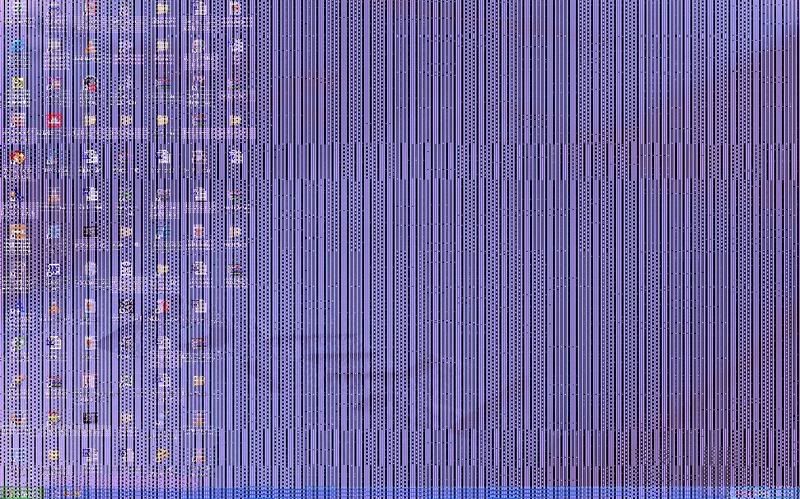


 ). If it is in warrantee, get it fixed. If not, sae up for a new one. Now Dell could be stupid and have everything controlled by the display drivers, but unless that is the case, reinstalling them won't help. I have a feeling though it is the vid card.


 . Speaking of Dell....I need to call them back about my wireless card problems...