
Problem with bes2_bldg_base

In this forum you will find and post information regarding the modding of Star Wars Battlefront 2. DO NOT POST MOD IDEAS/REQUESTS.

Moderator: Moderators

Post Reply
modmaster13
General
General
Posts: 777
Joined: Wed Aug 18, 2010 4:23 pm
Games I'm Playing :: COD SWBF
xbox live or psn: KrypticcElementt
Location: Twitter @_KrypticElement
Contact:

Problem with bes2_bldg_base

Post by modmaster13 »

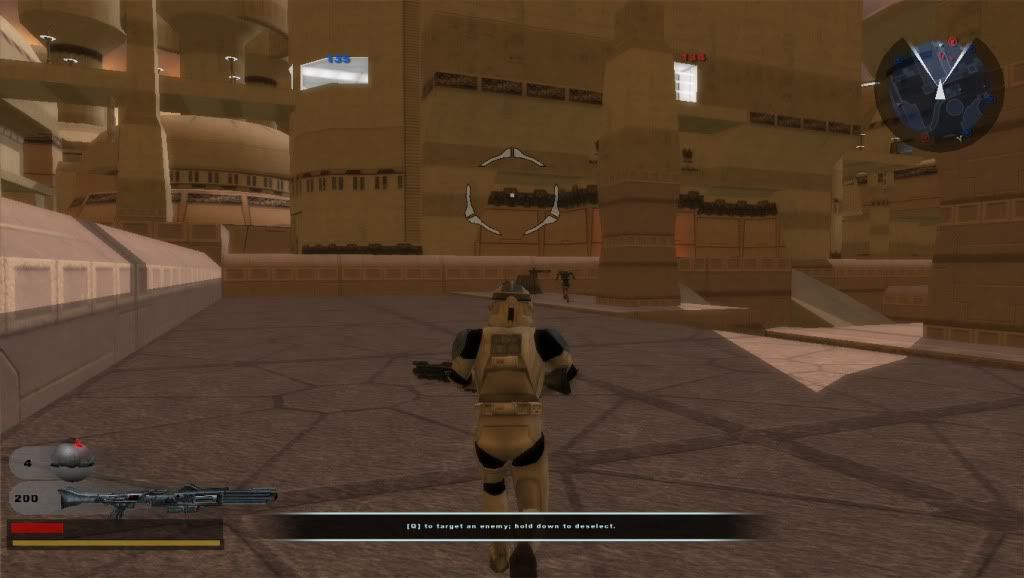
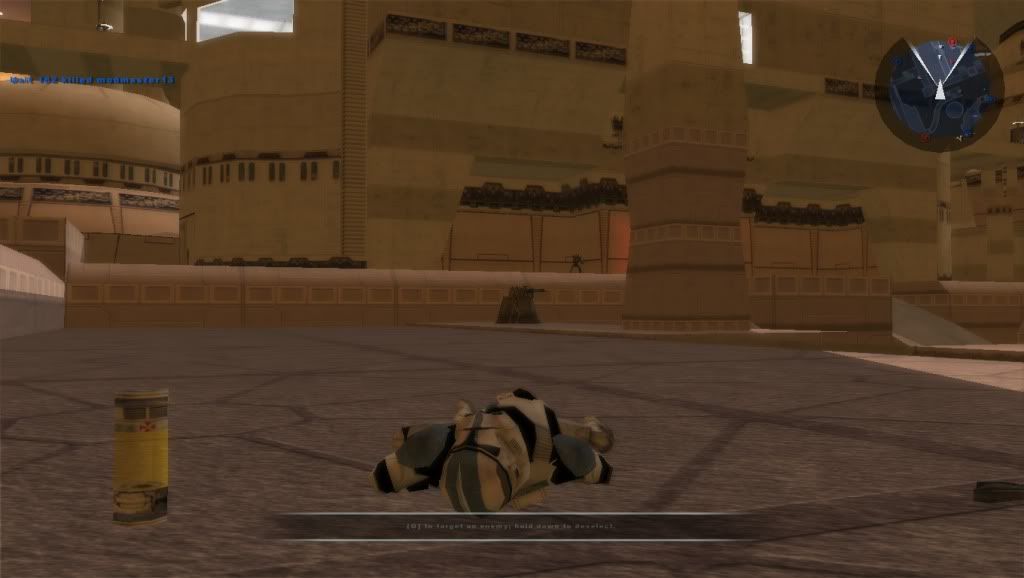
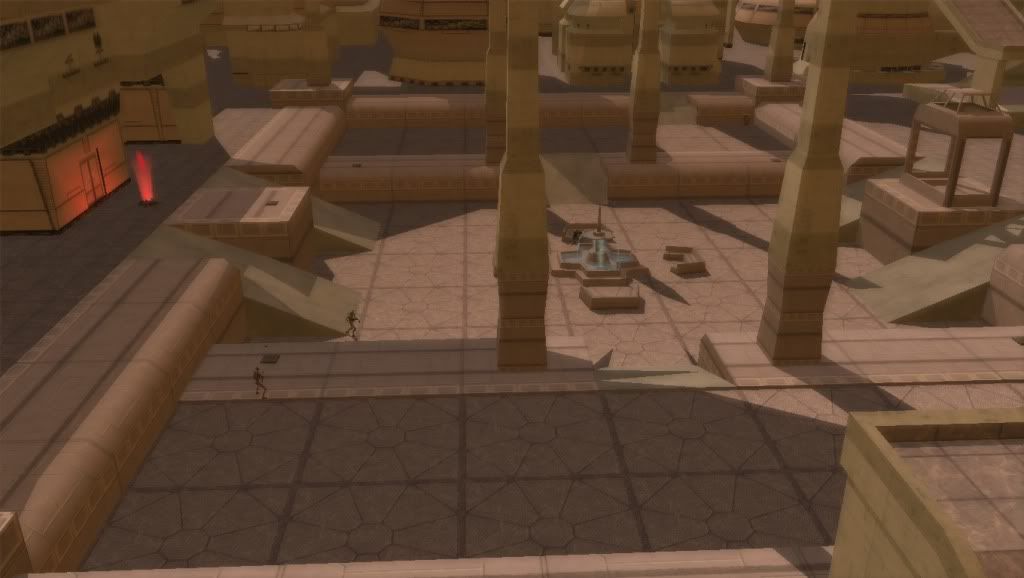
Ok, so I had this problem for a while now, the courtyard base have unknown shadows casting. Here are a couple of pics:
Hidden/Spoiler:
ImageImageImage
There are no shadow regions in that area. I am using AQT's Improved Bespin Assets. Is there something wrong with this model? :?
AQT
Gametoast Staff
Gametoast Staff
Posts: 4910
Joined: Sat Nov 03, 2007 4:55 pm
Location: SoCal, USA

Re: Problem with bes2_bldg_base

Post by AQT »

Off-topic: Shadow regions do not remove or add shadows; they change the color of the lighting in the areas they encompass to whatever color was set.

On-topic: I really don't see what the problem is here. In the real world, tall and huge structures tend to cast long shadows that cover large areas when the sun is in the right positions. Could this possibly be the case here considering that the courtyard is practically surrounded by big buildings? I would say yes.

P.S. :?
RevanSithLord
Sith Master
Sith Master
Posts: 2636
Joined: Mon Nov 07, 2005 12:40 am
Projects :: Designated Days + LFC + GT vs SWBFC
Games I'm Playing :: FO3 + FO New Vegas
xbox live or psn: Master Revan
Location: GDSS Philadelphia

Re: Problem with bes2_bldg_base

Post by RevanSithLord »

I agree with AQT on this one. The shadows look natural to me. It all depends on where the sun is at. In real life there are buildings that cast such large shadows. I don't see this as a problem.

Sorry if I didn't help there.
User avatar
Marvel4
Rebel Colonel
Rebel Colonel
Posts: 556
Joined: Mon Jun 21, 2010 12:57 pm
Projects :: Marvel4s BF1 Conversion Pack + Era Mod

Re: Problem with bes2_bldg_base

Post by Marvel4 »

Umm, you didn't understand him. I think he means the shape of the shadows, they don't look like the building. :)
RevanSithLord
Sith Master
Sith Master
Posts: 2636
Joined: Mon Nov 07, 2005 12:40 am
Projects :: Designated Days + LFC + GT vs SWBFC
Games I'm Playing :: FO3 + FO New Vegas
xbox live or psn: Master Revan
Location: GDSS Philadelphia

Re: Problem with bes2_bldg_base

Post by RevanSithLord »

Hmm, you're right. On second glance it does look a little off....
FragMe!
Gametoast Staff
Gametoast Staff
Posts: 2244
Joined: Sat May 13, 2006 12:34 am
Projects :: Not sure keep changing my mind.
Games I'm Playing :: F1 and SWBF
xbox live or psn: No gamertag set
Location: Origin name GT_FragMe
Contact:

Re: Problem with bes2_bldg_base

Post by FragMe! »

The light is coming though the windows if you'd like to put it that way even though there is a wall behind them.

Meaning since there is nothing (shadowvolume in particular) to stop the light it doesn't cast a shadow it is a quirk of the game and shadowvolumes. If there was a shadowvolume with an inward facing poly where the windows were it would block the light and therefore cast a shadow.

And from the artguide doc "Also, the mesh must be completely closed without any open ends or polygons"
User avatar
DarthD.U.C.K.
Master of the Force
Master of the Force
Posts: 6027
Joined: Wed Sep 27, 2006 11:05 am
Location: Duckburg, Germany

Re: Problem with bes2_bldg_base

Post by DarthD.U.C.K. »

the shadowvolume doesnt have to be closed. if it is open somewhere the edges will be welded automatically. if your problem really is the shadowvolume, then try to make a msh.option file with "-highresshadow", open the msh in a hexeditor, sreach for "sv" and "shadowvolume" and rename them to something else.
weird...i think i wrote the exact same thing already somewhere else
modmaster13
General
General
Posts: 777
Joined: Wed Aug 18, 2010 4:23 pm
Games I'm Playing :: COD SWBF
xbox live or psn: KrypticcElementt
Location: Twitter @_KrypticElement
Contact:

Re: Problem with bes2_bldg_base

Post by modmaster13 »

DarthD.U.C.K. wrote:the shadowvolume doesnt have to be closed. if it is open somewhere the edges will be welded automatically. if your problem really is the shadowvolume, then try to make a msh.option file with "-highresshadow", open the msh in a hexeditor, sreach for "sv" and "shadowvolume" and rename them to something else.
weird...i think i wrote the exact same thing already somewhere else
Yeah you posted something like that in a previous topic...I tried to look for what could possible casting that shadow but there is no building in the way at all. I'll try removing shadow volume from the model like what Darth D.U.C.K. said. :wink:

EDIT: Man, this may turn into a how-to-get-rid-of-shadow-volume topic...The "shadow volume hex is:

73 68 61 64 6F 77 76 6F 6C 75 6D 65

If I want to rename it, should I change it to this (hhadowvolume) :

68 68 61 64 6F 77 76 6F 6C 75 6D 65

Or should I type it in the text section?

I also updated my bes2_bldg_base.msh.option file:
Hidden/Spoiler:
-bump bes2_bldg_edge_piece -highresshadow
AQT
Gametoast Staff
Gametoast Staff
Posts: 4910
Joined: Sat Nov 03, 2007 4:55 pm
Location: SoCal, USA

Re: Problem with bes2_bldg_base

Post by AQT »

modmaster13 wrote:Or should I type it in the text section?
It doesn't matter since the change would apply to both sections but in their respective forms.

And you won't be getting a new shadow using -highresshadow or -hiresshadow in the .msh.option with a MSH that large.
Post Reply

