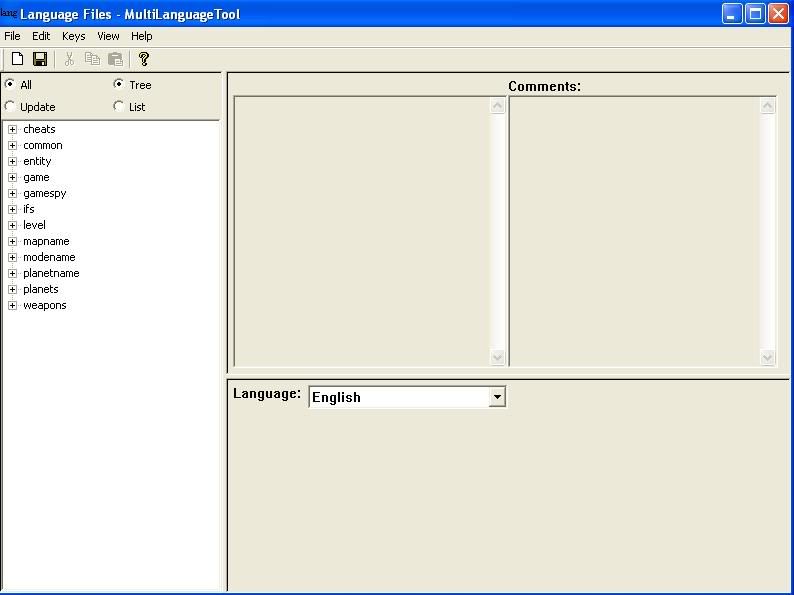
Okay, I'm attempting to add Geonesians to a Hero Assault map of mine, but I still can't figure out how to use the localize tool, in part because the screenshots in the tutorials bear little or no resemblance to what I am encountering.
To start, in the tutorials, the Localize tool subdivides into three catagories: Level, Weapons, and Entity. But when I open the tool, there are far more catagories present (screenshot: http://i82.photobucket.com/albums/j252/ ... enshot.jpg )
Worse, most of the information contained by the tool relates not to my own level, but to all the various levels included in BF2 and BF1 (Naboo, Mustafar, Rhen Var, ect.) The only place where my level is even referenced is in the mapname section, where I can find my world's name and description.
What exactly should I do to set things up?
Problem using the Localize Tool - world properties not there
Moderator: Moderators
-
Tohron
-
Teancum

- Jedi Admin

- Posts: 11080
- Joined: Wed Sep 07, 2005 11:42 pm
- Projects :: No Mod project currently.
- xbox live or psn: No gamertag set
- Location: Indiana
-
Tohron
 I tried the two links in the sticky, and the reason I posted this at all is because something about my localize tool is different from the samples in the tutorial and I want to know how to fix this.
-
Teancum
- Jedi Admin
- Posts: 11080
- Joined: Wed Sep 07, 2005 11:42 pm
- Projects :: No Mod project currently.
- xbox live or psn: No gamertag set
- Location: Indiana
-
Tohron
It's more than just that, though (as I said). Here's what else is wrong:
-Localize Tool lists all of the maps for BF1 and BF2 under level, mapname, ect.
-My map id (BKC) cannot be found under level
Am I actually supposed to add the map id under level? If so, the tutorial said nothing about that - it said you'd find the map id already there.
-Localize Tool lists all of the maps for BF1 and BF2 under level, mapname, ect.
-My map id (BKC) cannot be found under level
Am I actually supposed to add the map id under level? If so, the tutorial said nothing about that - it said you'd find the map id already there.