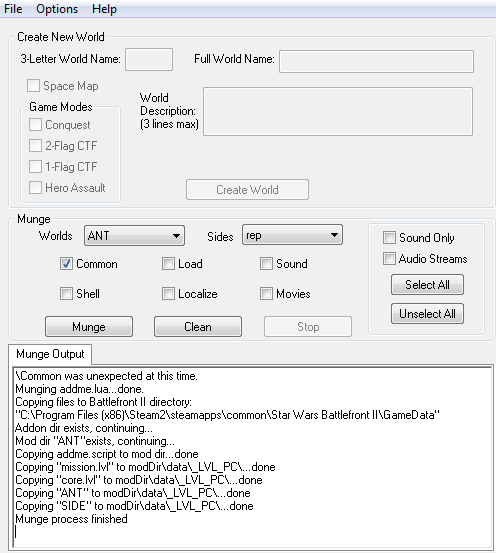
I need mod help!
Moderator: Moderators
- Ant
- Chief Warrant Officer

- Posts: 326
- Joined: Sat Sep 29, 2012 8:16 am
- Projects :: The Clone Wars Mod
- Contact:
I need mod help!
Okay so I made all of my cool skins...and I tried following the instructions but I just have no clue what to do...can someone help me or somehow do it for me....i dont get what to put into the folders and what to name it etc etc

Last edited by Ant on Mon Jan 21, 2013 3:58 pm, edited 1 time in total.
- Nedarb7
- Lieutenant General

- Posts: 676
- Joined: Sat Sep 22, 2012 3:41 pm
Re: I need mod help!
Did you munge the side?
C:\BF2_ModTools\data_ANT\_BUILD then double click on visualmunge with sides selected everything?
Last edited by Nedarb7 on Mon Jan 21, 2013 4:01 pm, edited 1 time in total.
- Ant
- Chief Warrant Officer

- Posts: 326
- Joined: Sat Sep 29, 2012 8:16 am
- Projects :: The Clone Wars Mod
- Contact:
Re: I need mod help!
All i did so far was design them in the Rep asset folder.Nedarb7 wrote:Did you munge the side?
EDIT: I have nothing in that side folder...
Last edited by Ant on Mon Jan 21, 2013 4:02 pm, edited 1 time in total.
-
Dreadnot9
- Chief Warrant Officer

- Posts: 341
- Joined: Wed Jun 06, 2012 2:05 pm
- Projects :: Rising Conflict CW v2.0
- xbox live or psn: Steam is Dreadnot9
Re: I need mod help!
http://www.gametoast.com/forums/viewtop ... =27&t=3726
EDIT: In fact, here's the whole FAQ: forums/viewtopic.php?f=27&t=13806
Please, consult it and follow the tutorials exactly. Also, you've got to be more specific with your problems, or it is very difficult to help you. Tell us, step-by-step, what you've done.
EDIT: In fact, here's the whole FAQ: forums/viewtopic.php?f=27&t=13806
Please, consult it and follow the tutorials exactly. Also, you've got to be more specific with your problems, or it is very difficult to help you. Tell us, step-by-step, what you've done.
Last edited by Dreadnot9 on Mon Jan 21, 2013 4:03 pm, edited 1 time in total.
- Nedarb7
- Lieutenant General

- Posts: 676
- Joined: Sat Sep 22, 2012 3:41 pm
Re: I need mod help!
If your not making a map skip:
Code: Select all
Now go to:
\BF2_ModTools\data_ABC\Common\scripts\ABC
and open the LUA file named:
ABCc_con.lua (ABCg_con.lua for GCW)
Now, if you look down the LUA file you will see:
Code:
ReadDataFile("SIDE\\rep.lvl",
change it to this:
Code:
ReadDataFile("dc:SIDE\\rep.lvl",
Then close and save the LUA. -
Dreadnot9
- Chief Warrant Officer

- Posts: 341
- Joined: Wed Jun 06, 2012 2:05 pm
- Projects :: Rising Conflict CW v2.0
- xbox live or psn: Steam is Dreadnot9
Re: I need mod help!
Do you mean you put them in C:\BF2_ModTools\assets\sides\rep?Ant wrote:All i did so far was design them in the Rep asset folder.
Because that won't do anything.
- Nedarb7
- Lieutenant General

- Posts: 676
- Joined: Sat Sep 22, 2012 3:41 pm
Re: I need mod help!
Yes I was just about to say that. (NOTE: Never edit the assets make a copy of the side folder first!)
- Ant
- Chief Warrant Officer

- Posts: 326
- Joined: Sat Sep 29, 2012 8:16 am
- Projects :: The Clone Wars Mod
- Contact:
Re: I need mod help!
Okay i did everything and it munged...then what...where do i move the folders to put it into my game?Nedarb7 wrote:Yes I was just about to say that. (NOTE: Never edit the assets make a copy of the side folder first!)
- Nedarb7
- Lieutenant General

- Posts: 676
- Joined: Sat Sep 22, 2012 3:41 pm
Re: I need mod help!
Go to C:\BF2_ModTools\data_***\_LVL_PC\SIDE and copy the "rep.lvl" and "repshell.lvl" then go to C:\Program Files\LucasArts\Star Wars Battlefront II\GameData\data\_lvl_pc\side
and put the rep.lvl and repshell.lvl into a backup folder. Now take your
rep.lvl and repshell.lvl and place them in C:\Program Files\LucasArts\Star Wars
Battlefront II\GameData\data\_lvl_pc\side. Run battlefront 2
and put the rep.lvl and repshell.lvl into a backup folder. Now take your
rep.lvl and repshell.lvl and place them in C:\Program Files\LucasArts\Star Wars
Battlefront II\GameData\data\_lvl_pc\side. Run battlefront 2
- Ant
- Chief Warrant Officer

- Posts: 326
- Joined: Sat Sep 29, 2012 8:16 am
- Projects :: The Clone Wars Mod
- Contact:
Re: I need mod help!
tHERE IS NOT _lvl_pc\side!Nedarb7 wrote:C:\BF2_ModTools\data_***\_LVL_PC\SIDE
- Nedarb7
- Lieutenant General

- Posts: 676
- Joined: Sat Sep 22, 2012 3:41 pm
Re: I need mod help!
Did you munge with sides selected "EVERYTHING" and does your rep folder and common side folder exist in: C:\BF2_ModTools\data_***\Sides?
- Ant
- Chief Warrant Officer

- Posts: 326
- Joined: Sat Sep 29, 2012 8:16 am
- Projects :: The Clone Wars Mod
- Contact:
Re: I need mod help!
Nedarb7 wrote:Did you munge with sides selected "EVERYTHING" and does your rep folder and common side folder exist in: C:\BF2_ModTools\data_***\Sides?

I had it like that ^^^
EDIT: There is a rep, ANT, and tur in the C:\BF2_ModTools\data_***\Sides?
Last edited by Ant on Mon Jan 21, 2013 4:32 pm, edited 1 time in total.
- Nedarb7
- Lieutenant General

- Posts: 676
- Joined: Sat Sep 22, 2012 3:41 pm
Re: I need mod help!
Then there should be: C:\BF2_ModTools\data_ANT\_LVL_PC\SIDE
- Ant
- Chief Warrant Officer

- Posts: 326
- Joined: Sat Sep 29, 2012 8:16 am
- Projects :: The Clone Wars Mod
- Contact:
Re: I need mod help!
There isnt nor a common folder...Nedarb7 wrote:Then there should be: C:\BF2_ModTools\data_ANT\_LVL_PC\SIDE
- Nedarb7
- Lieutenant General

- Posts: 676
- Joined: Sat Sep 22, 2012 3:41 pm
Re: I need mod help!
New plan try going to:
C:\Program Files\Steam\steamapps\common\Star Wars Battlefront II\GameData\addon\ANT\data\_LVL_PC\SIDE
instead and copy your side from there.
C:\Program Files\Steam\steamapps\common\Star Wars Battlefront II\GameData\addon\ANT\data\_LVL_PC\SIDE
instead and copy your side from there.
- Ant
- Chief Warrant Officer

- Posts: 326
- Joined: Sat Sep 29, 2012 8:16 am
- Projects :: The Clone Wars Mod
- Contact:
Re: I need mod help!
Nedarb7 wrote:New plan try going to:
C:\Program Files\Steam\steamapps\common\Star Wars Battlefront II\GameData\addon\ANT\data\_LVL_PC\SIDE
instead and copy your side from there.
WAIT! I found my mistake i didnt copy over the common folder! But the LVL PC still doesnt show...
NOTE: The problem is i cant find my side...can someone help me or somehow do it for me...
Last edited by Ant on Mon Jan 21, 2013 4:45 pm, edited 1 time in total.
- Nedarb7
- Lieutenant General

- Posts: 676
- Joined: Sat Sep 22, 2012 3:41 pm
Re: I need mod help!
It still wont show up?
This doesn't make any sense.
-EDIT-
Copy and paste this in the address bar:
C:\BF2_ModTools\data_ANT\_LVL_PC\SIDE
-EDIT-
Copy and paste this in the address bar:
C:\BF2_ModTools\data_ANT\_LVL_PC\SIDE
Last edited by Nedarb7 on Mon Jan 21, 2013 4:46 pm, edited 1 time in total.
- Ant
- Chief Warrant Officer

- Posts: 326
- Joined: Sat Sep 29, 2012 8:16 am
- Projects :: The Clone Wars Mod
- Contact:
Re: I need mod help!
When i hit munge what should i do next...i see no LVL PC folderNedarb7 wrote:It still wont show up?This doesn't make any sense.
- Nedarb7
- Lieutenant General

- Posts: 676
- Joined: Sat Sep 22, 2012 3:41 pm
Re: I need mod help!
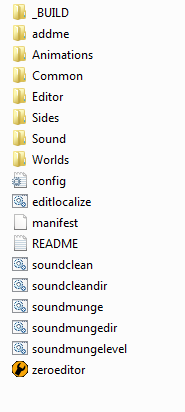
Ohhhhh, your not leaving the _BUILD folder are you. Go back once and you will see a _LVL_PC
- Ant
- Chief Warrant Officer

- Posts: 326
- Joined: Sat Sep 29, 2012 8:16 am
- Projects :: The Clone Wars Mod
- Contact:
Re: I need mod help!
Nedarb7 wrote:Ohhhhh, your not leaving the _BUILD folder are you. Go back once and you will see a _LVL_PC

EDIT
I think I found the problem...what should be in my ANT and rep folder in my sides..caz this is what i got in my rep a whole assest list in Rep and some files i moved in my ANT