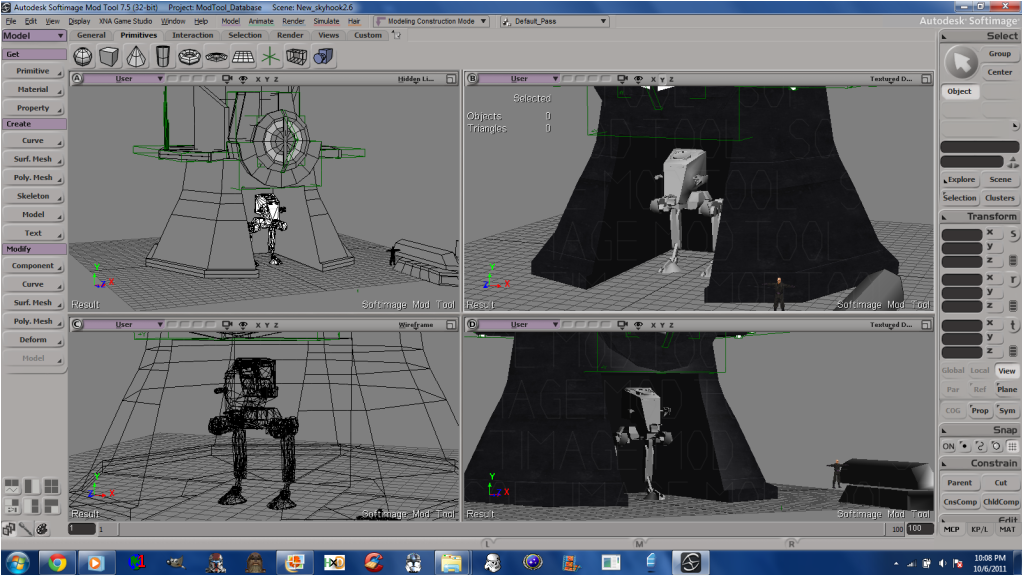
I made a model in XSI recently, and I need a way to cut a cube area out of the model. For example, say I made a house in XSI. After I made the house, I wanted to add a door area, so you could walk in and out freely. What is an easy way to do this in XSI?
Thanks for your help.
PS: I did search for an answer. If I missed something, I'm sorry.
Cutting into a mesh/poly? [Solved]
Moderator: Moderators
-
Cerfon Rournes

- Master Bounty Hunter

- Posts: 1558
- Joined: Thu Jul 08, 2010 5:53 pm
- Projects :: WIP. I will reveal what it is later on..
- xbox live or psn: No gamertag set
- Location: New York, USA
- Contact:
-
Anakin

- Master of the Force

- Posts: 4817
- Joined: Sat Sep 19, 2009 11:37 am
- Projects :: RC Side Mod - Remastered - SWBF3 Legacy
- Location: Mos Espa (germany)
Re: Cutting into a mesh/poly?
so i was looking for something like this but there is no way 
pls correct me if i'm wrong
pls correct me if i'm wrong
-
naru1305

- Major General

- Posts: 657
- Joined: Fri Jan 07, 2011 4:57 pm
- Location: Germany
- Contact:
Re: Cutting into a mesh/poly?
with the little tool "Add edge Tool" in xsi, you can make new points with edges(Modify -> Poly.Mesh=> the second point it is) and now you can select the polygon in them and press delete. but i have said to anakin earlier this day, that you must have an interior, cause the polygons only work one-way. if you only cut the door out and go into it, you will see your building invisible, noone can see you inside, but you can see all the others. so you must create an interior first, with walls and then it will work perfect.
please corect me if im wrong
Edit: for the beginning you can make a cube, select all polygons and under Modify -> Poly.Mesh press "Invert polygons", this will rotate these polygons inside, so that you can t look outside
good luck
please corect me if im wrong
Edit: for the beginning you can make a cube, select all polygons and under Modify -> Poly.Mesh press "Invert polygons", this will rotate these polygons inside, so that you can t look outside
good luck
Last edited by naru1305 on Sun Apr 10, 2011 1:22 pm, edited 1 time in total.
-
Maveritchell

- Jedi Admin

- Posts: 7366
- Joined: Mon Aug 21, 2006 11:03 pm
Re: Cutting into a mesh/poly?
A search for "cut into model" reveals some pretty basic results:
forums/viewtopic.php?f=36&t=12707&hilit=cut+into+model
forums/viewtopic.php?f=36&t=11473&hilit=cut+into+model
forums/viewtopic.php?f=36&t=12707&hilit=cut+into+model
forums/viewtopic.php?f=36&t=11473&hilit=cut+into+model
-
DarthD.U.C.K.

- Master of the Force
- Posts: 6027
- Joined: Wed Sep 27, 2006 11:05 am
- Location: Duckburg, Germany
Re: Cutting into a mesh/poly?
please ignore the "tutorial" in the firts link, its really obsolete.
the easiest way to di it is to select the polygon you want to have the opening in, press CTRL+d and scale the newly create polygon so it has the shape of the chamber/dooropening/whatever, then duplicate it again and move it inwards.
if you have a seperate interior you wanna connect, delete the polygon and make an opening of the same shape in the interior so both openings connect.
the easiest way to di it is to select the polygon you want to have the opening in, press CTRL+d and scale the newly create polygon so it has the shape of the chamber/dooropening/whatever, then duplicate it again and move it inwards.
if you have a seperate interior you wanna connect, delete the polygon and make an opening of the same shape in the interior so both openings connect.
-
Cerfon Rournes
- Master Bounty Hunter
- Posts: 1558
- Joined: Thu Jul 08, 2010 5:53 pm
- Projects :: WIP. I will reveal what it is later on..
- xbox live or psn: No gamertag set
- Location: New York, USA
- Contact:
Re: Cutting into a mesh/poly?
Thanks for all the help guys, I will be back soon with results..
EDIT
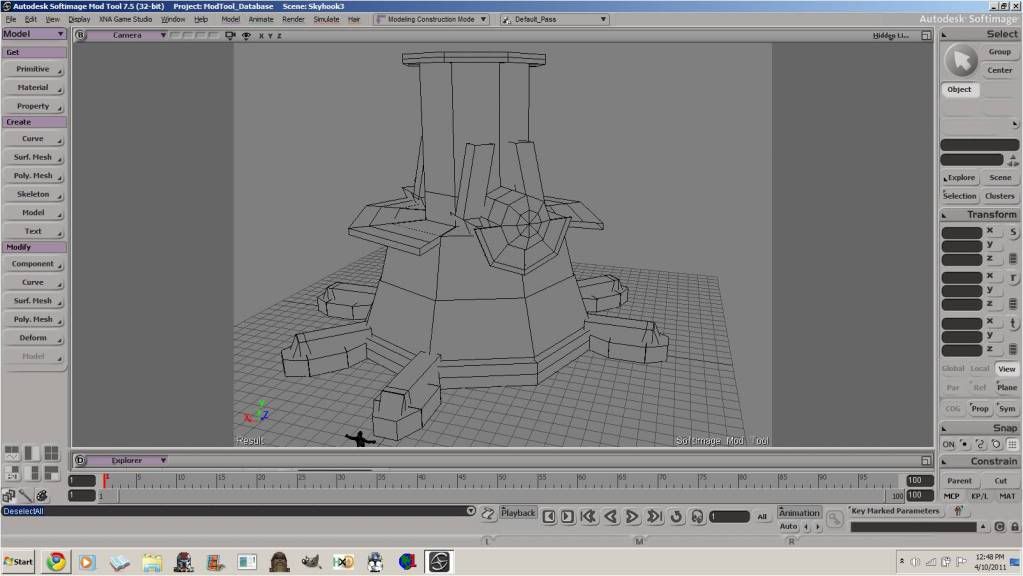
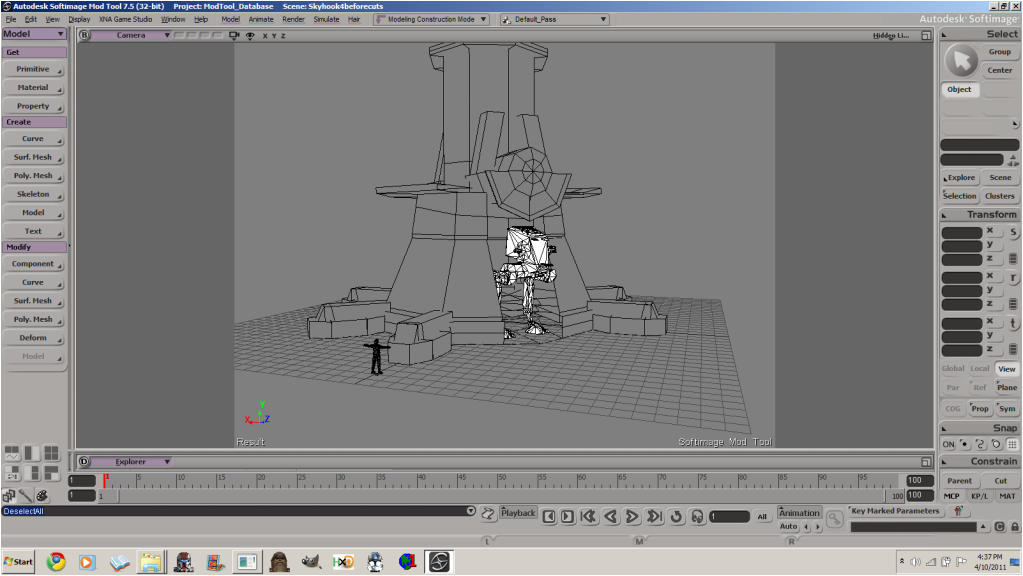
Solved! Naru's solution, and AceMastermind's solution in Mav's second link helped. Thanks!
Here are the results..
Before.
After.
EDIT
Solved! Naru's solution, and AceMastermind's solution in Mav's second link helped. Thanks!
Here are the results..
Before.
Hidden/Spoiler:
Hidden/Spoiler:
-
Cerfon Rournes
- Master Bounty Hunter
- Posts: 1558
- Joined: Thu Jul 08, 2010 5:53 pm
- Projects :: WIP. I will reveal what it is later on..
- xbox live or psn: No gamertag set
- Location: New York, USA
- Contact:
Cutting a hole into unique mesh.
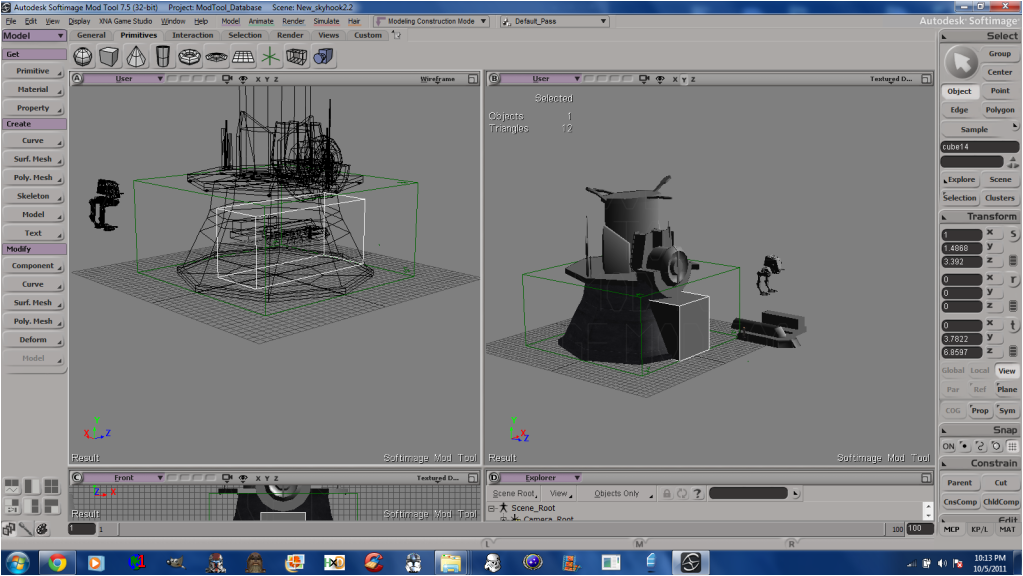
Alright, I want to cut a hole (cube) out of my mesh.
Any tips on how to do this? I've searched extensively for an answer, but nothing has been useful.
I also tried Darth D.U.C.K's tuto, but I'm having a hard time understanding It.
Thanks for the help guys.
Hidden/Spoiler:
I also tried Darth D.U.C.K's tuto, but I'm having a hard time understanding It.
Thanks for the help guys.
-
minilogoguy18

- Master Bounty Hunter
- Posts: 1512
- Joined: Wed Nov 09, 2005 11:12 pm
- Projects :: No Mod project currently.
- xbox live or psn: No gamertag set
Re: Cutting a hole into unique mesh.
What exactly are you trying to make? An archway for a door?
Hint: You should turn on the 'Headlight' option to get rid of all those annoying shadows, I can also see tons of edges no doing anything that can be deleted.
Hint: You should turn on the 'Headlight' option to get rid of all those annoying shadows, I can also see tons of edges no doing anything that can be deleted.
-
FragMe!
- Gametoast Staff

- Posts: 2244
- Joined: Sat May 13, 2006 12:34 am
- Projects :: Not sure keep changing my mind.
- xbox live or psn: No gamertag set
- Location: Origin name GT_FragMe
- Contact:
Re: Cutting a hole into unique mesh.
If you are trying to make a "hallway" all the way though the model use boolean difference.
Step 1 save model
Step 2 freeze M on model
Step 3 select your model
Step 4 go to modify/poly mesh/boolean difference
Step 5 select the cube as the cutter (make sure it extends past both side if it is to go all the way through). you should have a hole in your mesh.
Step 6 adjust location of cube if required
Step 7 freeze M of you model once you are satisfied, if you don't freeze it deleting or moving the cube will affect the hole you cut.
Step 1 save model
Step 2 freeze M on model
Step 3 select your model
Step 4 go to modify/poly mesh/boolean difference
Step 5 select the cube as the cutter (make sure it extends past both side if it is to go all the way through). you should have a hole in your mesh.
Step 6 adjust location of cube if required
Step 7 freeze M of you model once you are satisfied, if you don't freeze it deleting or moving the cube will affect the hole you cut.
-
DarthD.U.C.K.
- Master of the Force
- Posts: 6027
- Joined: Wed Sep 27, 2006 11:05 am
- Location: Duckburg, Germany
Re: Cutting a hole into unique mesh.
wow, my tutorial was weird....im suprised anybody read it.
anyway, if both objects are pretty primitive the boolean method fragme described is the best. if they are more complex however boolean creates many unclean edges and its better to cut the hole into the bigger object manually and then insert the other object.
anyway, if both objects are pretty primitive the boolean method fragme described is the best. if they are more complex however boolean creates many unclean edges and its better to cut the hole into the bigger object manually and then insert the other object.
-
ANDEWEGET

- Ancient Force

- Posts: 1266
- Joined: Tue Apr 01, 2008 8:42 am
- Location: Germany
- Contact:
Re: Cutting a hole into unique mesh.
Boolean works well for more complex models, too, but I think they improved it sometime between 5.11 and 2011 so it might not work as well in older versions. Id use extruding in most cases, though.
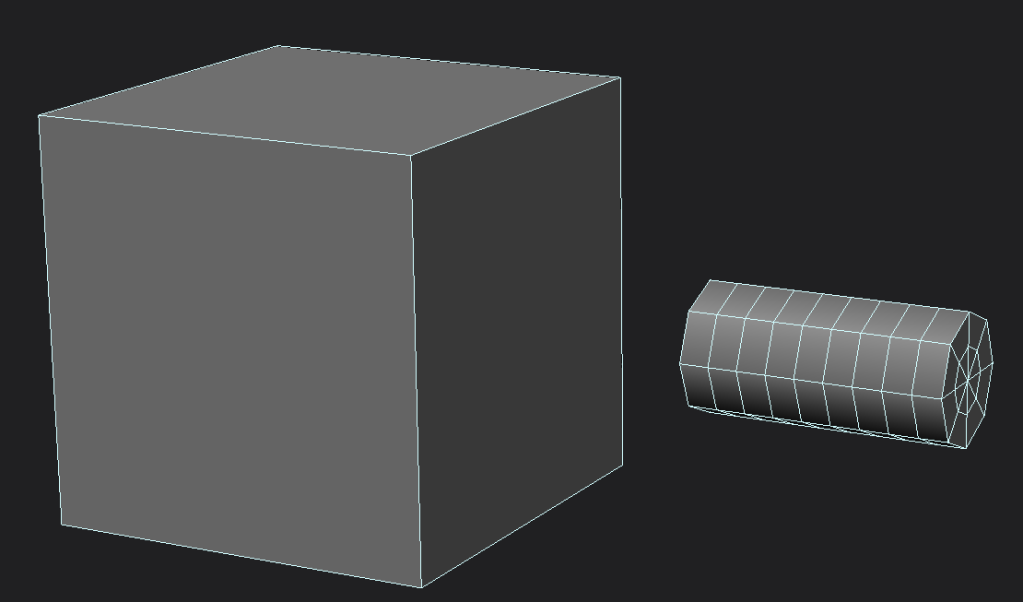
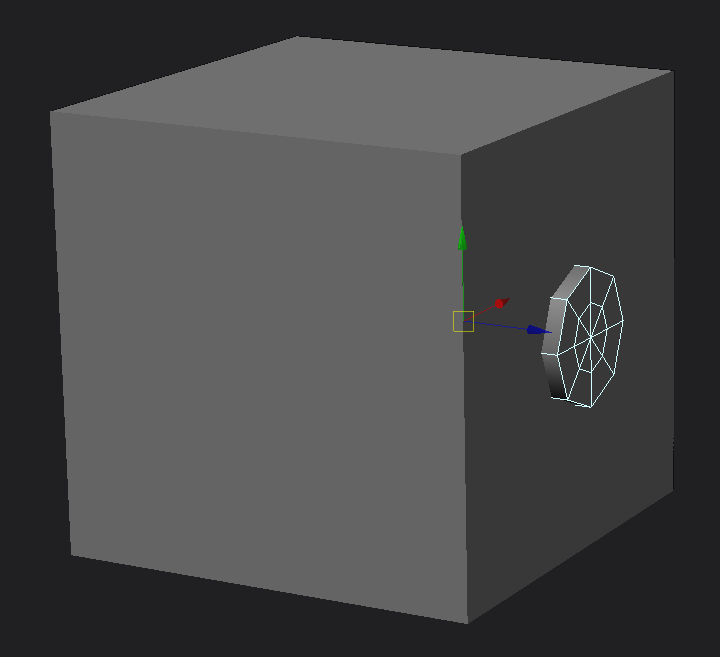
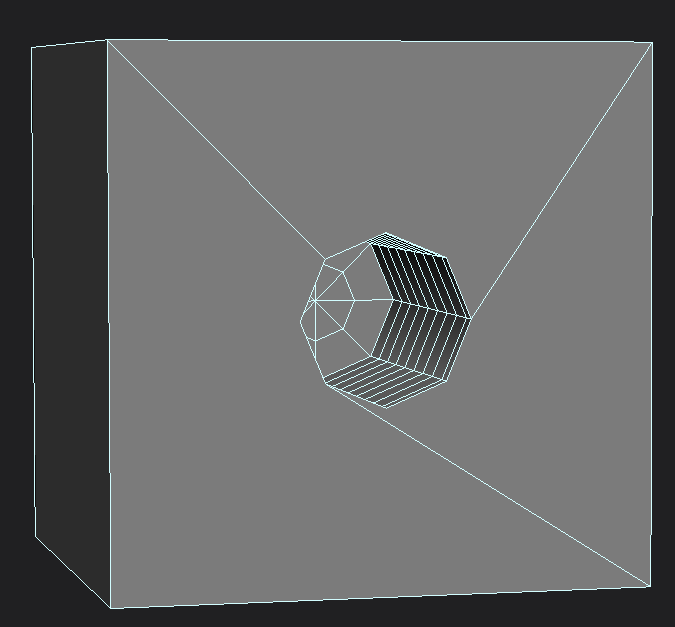
A thing to remember when using boolean difference is that it "recreates" the model you use as cutter inside the cut model. As you can see in the pictures it creates the hole with exactly the same topology the cylinder(cutter) has. So if you arent cutting exact forms into models, use simple/basic geometry.
Another thing are the edges it creates on the surface of the cube to support the cut. Usually they arent very efficient/nice looking, redrawing those is easy and quickly done though(use the draw edge tool; i believe its \ or / in the standard keymap).

A thing to remember when using boolean difference is that it "recreates" the model you use as cutter inside the cut model. As you can see in the pictures it creates the hole with exactly the same topology the cylinder(cutter) has. So if you arent cutting exact forms into models, use simple/basic geometry.
Hidden/Spoiler:
-
Cerfon Rournes
- Master Bounty Hunter
- Posts: 1558
- Joined: Thu Jul 08, 2010 5:53 pm
- Projects :: WIP. I will reveal what it is later on..
- xbox live or psn: No gamertag set
- Location: New York, USA
- Contact:
Re: Cutting a hole into unique mesh.
@FragMe!: That worked like a charm, thanks. Everyone else, thanks for the tips.
EDIT
EDIT
And how would this be done?minilogoguy18 wrote:Hint: You should turn on the 'Headlight' option to get rid of all those annoying shadows, I can also see tons of edges no doing anything that can be deleted.
-
minilogoguy18
- Master Bounty Hunter
- Posts: 1512
- Joined: Wed Nov 09, 2005 11:12 pm
- Projects :: No Mod project currently.
- xbox live or psn: No gamertag set
Re: Cutting a hole into unique mesh.
As simple as clicking on the area of the viewport where you display mode is seleced ex. wireframe, textured decal etc., you'll see it in that drop down menu.
There's many ways to go about what you're trying, boolean is one but I like having more control and not having to go back and redo the topology for a clean efficient (as in fewer vertex's) result. Though if you do the extrude method you'll have that one odd poly on the bottom you'll just have to go back and delete.
There's many ways to go about what you're trying, boolean is one but I like having more control and not having to go back and redo the topology for a clean efficient (as in fewer vertex's) result. Though if you do the extrude method you'll have that one odd poly on the bottom you'll just have to go back and delete.
-
Cerfon Rournes
- Master Bounty Hunter
- Posts: 1558
- Joined: Thu Jul 08, 2010 5:53 pm
- Projects :: WIP. I will reveal what it is later on..
- xbox live or psn: No gamertag set
- Location: New York, USA
- Contact:
Re: Cutting a hole into unique mesh.
^Thanks for the info.
-
AceMastermind

- Gametoast Staff
- Posts: 3285
- Joined: Mon Aug 21, 2006 6:23 am
- Contact:
Re: Cutting a hole into unique mesh.
I would just use the knife tool. Make a polygon selection on the object to isolate the cut then use that cube as your snap guide, this should give greater control of your edge flow and minimize cleanup. You're not actually cutting anything, just adding edges which allow you to manipulate the geometry and there is more than one way to do this in XSI regardless of how complex the geometry is.
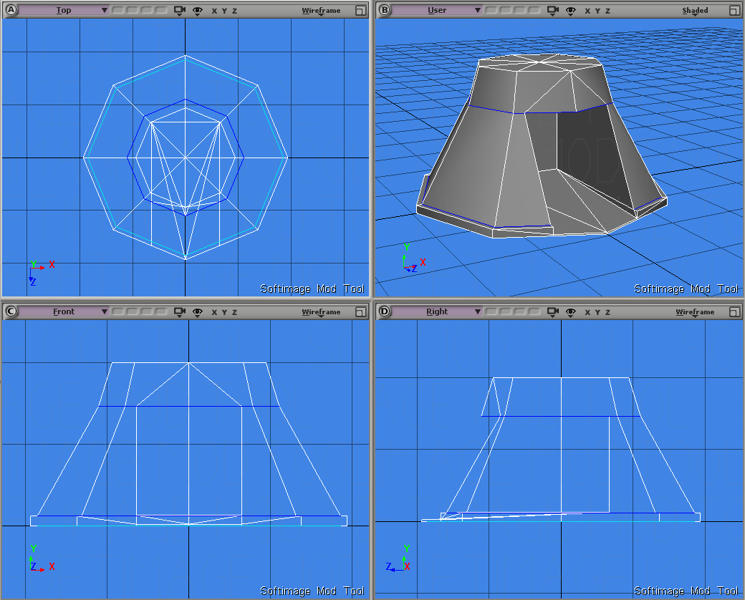
Result after extruding interior polygons inward then flattening with minor cleanup:
Result after extruding interior polygons inward then flattening with minor cleanup:
Hidden/Spoiler:
-
Cerfon Rournes
- Master Bounty Hunter
- Posts: 1558
- Joined: Thu Jul 08, 2010 5:53 pm
- Projects :: WIP. I will reveal what it is later on..
- xbox live or psn: No gamertag set
- Location: New York, USA
- Contact:
Re: Cutting a hole into unique mesh.
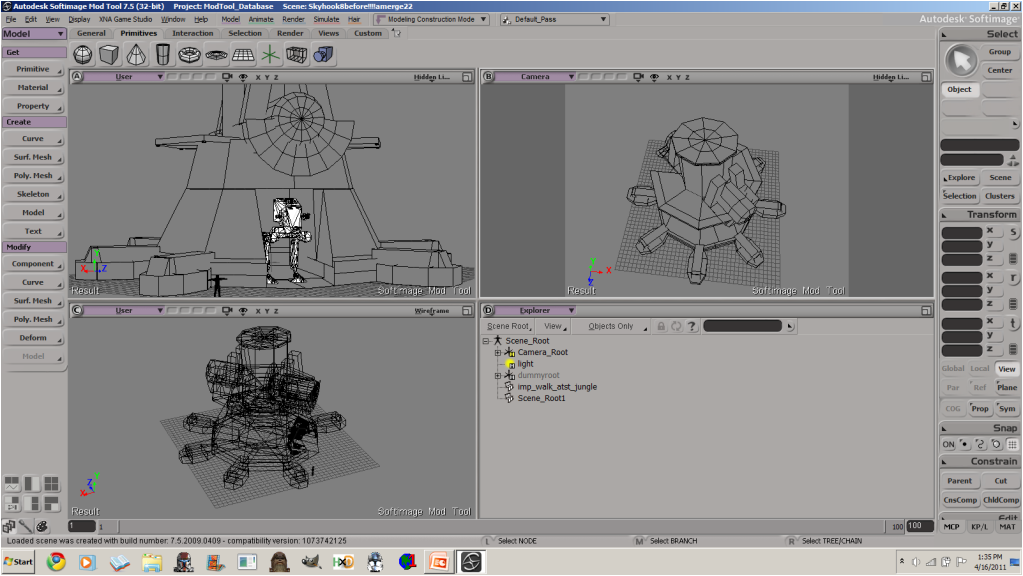
I made this model before using the knife method..
But I find that the boolean difference method faster and more accurate for the newer version.
Hidden/Spoiler:
Hidden/Spoiler: