Obj normal smoothing

How to create models in XSI and other 3D applications and make them work in Battlefront 1 & 2. Post models, tips for application usage and share anything XSI, 3DMax, SketchUp, etc.

Moderator: Moderators

Post Reply
User avatar
Fiodis
Master of the Force
Master of the Force
Posts: 4145
Joined: Wed Nov 12, 2008 9:27 pm
Projects :: Rannoch + Tientia + Tools Programming

Obj normal smoothing

Post by Fiodis »

When I export a model to an obj file it always seems to have more than one normal per vertex. More precisely, every vertex seems to have only one position but a different normal for every triangle it's a part of. Sometimes there are duplicate normals in the list. For instance, this .obj file:
Hidden/Spoiler:
[code]# XSI Wavefront OBJ Export v3.0
# File Created: Fri Nov 29 12:34:55 2013
# XSI Version: 6.01 Mod Tool.2008.1218
o sphere
# Hierarchy (from self to top father)
g sphere

#begin 5 vertices
v 0.000000 -1.000000 0.000000
v 0.000000 1.000000 0.000000
v -1.000000 -0.000000 0.000000
v 0.500000 -0.000000 0.866025
v 0.500000 -0.000000 -0.866025
#end 5 vertices

#begin 18 normals
vn -0.500000 0.000000 0.866025
vn -0.447214 -0.447214 0.774597
vn -0.500000 0.000000 0.866025
vn -0.447214 0.447214 0.774597
vn 1.000000 0.000000 0.000000
vn 0.894427 -0.447214 0.000000
vn 1.000000 0.000000 0.000000
vn 0.894427 0.447214 0.000000
vn -0.500000 0.000000 -0.866025
vn -0.447214 -0.447214 -0.774597
vn -0.500000 0.000000 -0.866025
vn -0.447214 0.447214 -0.774597
#end 18 vertex normals

#begin 18 texture vertices
vt 0.537259 0.338340 0.000000
vt 0.871693 0.003906 0.000000
vt 0.871693 0.449818 0.000000
vt 0.871693 0.003906 0.000000
vt 0.537259 0.338340 0.000000
vt 0.425782 0.003906 0.000000
vt 0.003906 0.421019 0.000000
vt 0.416740 0.063494 0.000000
vt 0.416740 0.480606 0.000000
vt 0.416740 0.063494 0.000000
vt 0.003906 0.421019 0.000000
vt 0.003906 0.003906 0.000000
vt 0.449818 0.492187 0.000000
vt 0.115384 0.826621 0.000000
vt 0.003906 0.492187 0.000000
vt 0.115384 0.826621 0.000000
vt 0.449818 0.492187 0.000000
vt 0.449818 0.938099 0.000000
#end 18 texture vertices

#begin 6 faces
f 4/1/1 3/2/2 1/3/3
f 3/4/4 4/5/5 2/6/6
f 5/7/7 4/8/8 1/9/9
f 4/10/10 5/11/11 2/12/12
f 3/13/13 5/14/14 1/15/15
f 5/16/16 3/17/17 2/18/18
#end 6 faces
[/code]
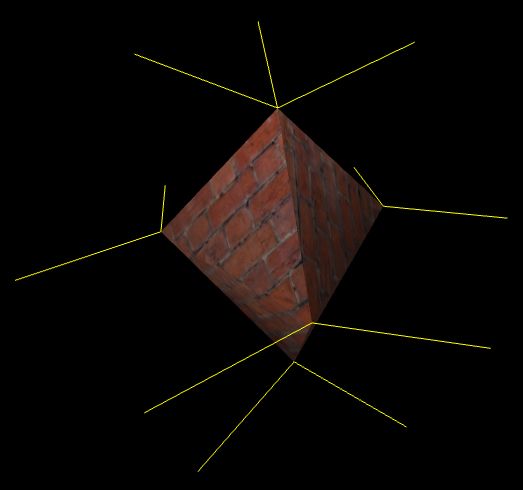
Describes this mesh (shown with normals rendered in yellow):
Hidden/Spoiler:
Image
There are 5 vertices but 18 normals. The vertex on the top is part of three different tris, so it has three different normals. The ones on the sides are part of four tris, so they have four normals, but they come in identical pairs.

This works well for lighting, but for some other things I'm doing I need there to be only one normal per vertex. In some other 3D modelling programs this is called smoothing the normals, a process which takes a weighted average of all the normals at a vertex, taking into account the size of the faces the vertex is part of. I could try and write something like this myself, but it seems like the kind of thing that should be built into Mod Tool. Is there some option to smooth the normals before exporting to OBJ?

Post Reply