SWBF Series Model Showcase Thread 5th Edition

How to create models in XSI and other 3D applications and make them work in Battlefront 1 & 2. Post models, tips for application usage and share anything XSI, 3DMax, SketchUp, etc.

Moderator: Moderators

Post Reply
User avatar
The Nasal Abyss
1st Lieutenant
1st Lieutenant
Posts: 428
Joined: Sun Sep 14, 2008 12:55 pm
Projects :: Currently Working on an Indie Game
Games I'm Playing :: Splatoon 2
xbox live or psn: Stm: Tight Verbage

Re: SWBF Series Model Showcase Thread 5th Edition

Post by The Nasal Abyss »

Image

Before you ask; Yes, the shading will look like that in-game :)

I went with vertex color occlusion because I didn't want to sacrifice texture quality. I also didn't want to have a ton of unique rock textures that would've just boosted the amount of space the map took up. You get a very similar look (if you have enough geo to play with) and it takes up less space and memory to boot!

I am using this technique and more in my up-coming map. It looks pretty good if I might say so myself ;) It's still a long ways out though.

EDIT: I forgot to mention; They are rocks BTW haha
THEWULFMAN
Space Ranger
Posts: 5557
Joined: Tue Aug 17, 2010 3:30 pm
Projects :: Evolved 2
Location: Columbus, Ohio
Contact:

Re: SWBF Series Model Showcase Thread 5th Edition

Post by THEWULFMAN »

Hidden/Spoiler:
[quote="The Nasal Abyss"]Image

Before you ask; Yes, the shading will look like that in-game :)

I went with vertex color occlusion because I didn't want to sacrifice texture quality. I also didn't want to have a ton of unique rock textures that would've just boosted the amount of space the map took up. You get a very similar look (if you have enough geo to play with) and it takes up less space and memory to boot!

I am using this technique and more in my up-coming map. It looks pretty good if I might say so myself ;) It's still a long ways out though.[/quote]
Looks good. :)
The Nasal Abyss wrote:EDIT: I forgot to mention; They are rocks BTW haha
Hidden/Spoiler:
Image
CressAlbane
Master Bounty Hunter
Posts: 1519
Joined: Fri Dec 18, 2009 8:02 am
Projects :: CTF Arenas
Games I'm Playing :: Steam- cressalbane2
Location: ¿uoıʇɐɔoן ʎɯ sıɥʇ sı

Re: SWBF Series Model Showcase Thread 5th Edition

Post by CressAlbane »

I thought it was some arm of somthing :faint:
But it's a great rock wall!
User avatar
DarthD.U.C.K.
Master of the Force
Master of the Force
Posts: 6027
Joined: Wed Sep 27, 2006 11:05 am
Location: Duckburg, Germany

Re: SWBF Series Model Showcase Thread 5th Edition

Post by DarthD.U.C.K. »

cool rockwall, vertexocclusion looks great!
but should there be also some occlusion from below caused by the ground on which the rocks rest?
User avatar
acryptozoo
Master Bounty Hunter
Posts: 1642
Joined: Wed Jun 03, 2009 3:14 pm
Projects :: Yavin Mappack
Games I'm Playing :: Homeworld 2
xbox live or psn: acryptozoo
Location: in the jungles of Yavin IV
Contact:

Re: SWBF Series Model Showcase Thread 5th Edition

Post by acryptozoo »

awesome rocks :D
User avatar
The Nasal Abyss
1st Lieutenant
1st Lieutenant
Posts: 428
Joined: Sun Sep 14, 2008 12:55 pm
Projects :: Currently Working on an Indie Game
Games I'm Playing :: Splatoon 2
xbox live or psn: Stm: Tight Verbage

Re: SWBF Series Model Showcase Thread 5th Edition

Post by The Nasal Abyss »

DarthD.U.C.K. wrote:cool rockwall, vertexocclusion looks great!
but should there be also some occlusion from below caused by the ground on which the rocks rest?
There will be, but I didn't have it for this particular build. This was a test, more or less. It'll be there for the final model, because this particular mesh will be a one-off in the map.

Though, for my other rocks and stuff (that will be using the same technique) I probably won't have the occlusion from the ground that so they can be totally modular.

Edit; Also, I was meaning to ask if there was any way to just render something with diffuse and vertex colors. Any time I try to render my vertex colored stuff the default xsi light messes it up.
User avatar
ANDEWEGET
Ancient Force
Ancient Force
Posts: 1266
Joined: Tue Apr 01, 2008 8:42 am
Location: Germany
Contact:

Re: SWBF Series Model Showcase Thread 5th Edition

Post by ANDEWEGET »

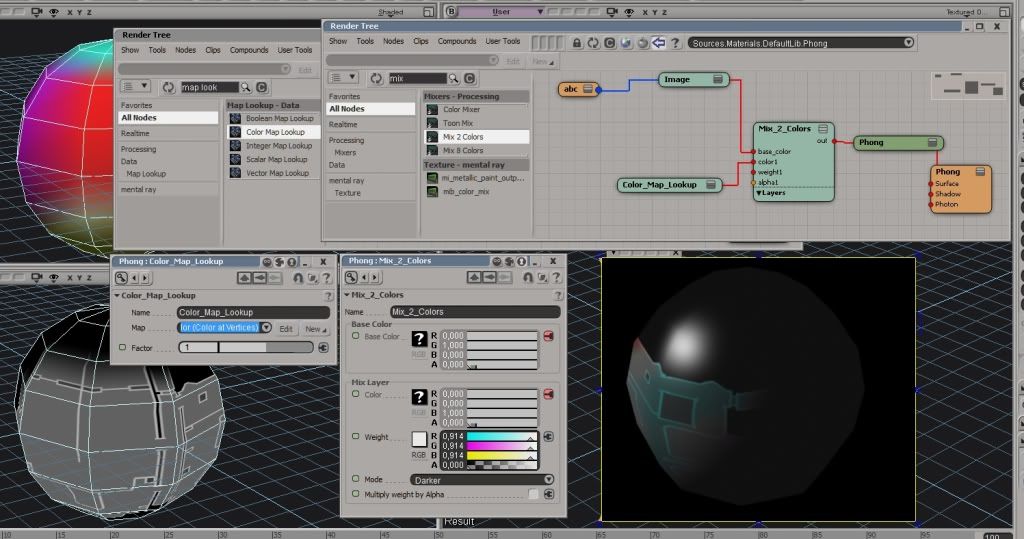
How exactly do you want to render the vertex colors with the diffuse? If you want to overlay/multiply/darken the diffuse, this might be the way to go(dunno if theres a faster/better way, Im not that familiar with all the rendering stuff):
Hidden/Spoiler:
Image
Its not that easy to see, but the grey texture is colored in the render output. The Mix_2_Colors output is connected to the Phong diffuse input. In case youre not familiar with the material tree, abc and Image are texture(abc) and the Image node(Image), which then lets you output the texture into other nodes such as Phong or Lambert. They get auto created if you choose Nodes>Texture>Image.
It of course is possible to connect the Color_Map_Lookup output to the ambient or spec or any spot in the Phong Node, too.
User avatar
The Nasal Abyss
1st Lieutenant
1st Lieutenant
Posts: 428
Joined: Sun Sep 14, 2008 12:55 pm
Projects :: Currently Working on an Indie Game
Games I'm Playing :: Splatoon 2
xbox live or psn: Stm: Tight Verbage

Re: SWBF Series Model Showcase Thread 5th Edition

Post by The Nasal Abyss »

I just wanted to render it as if the color map was the lighting. No other lighting, just the color map "multiplying" the diffuse. That shader setup will probably work fine. I'll try it out and get back to you.

I was just curious. I won't use this other than previewing my meshes and seeing how it will possibly look in-game to cut down on unnecessary exports and the like. This isn't terribly important.

EDIT: With further experimenting, I could have found this out myself. Sorry for wasting your time Ande. :cpu:

EDIT 2: I'm side-stepping this by just screen-capturing the "constant" shaded and "textured decal" views identically and composting in photoshop. Not the best way to do this I'm sure, but it gives me exactly what I want :)

Just thought I would say this for anyone that was curious about viewing their vertex colored models like how they will be in-game.
Last edited by The Nasal Abyss on Fri Aug 12, 2011 1:41 am, edited 1 time in total.
User avatar
Unlucky13
Sergeant Major
Sergeant Major
Posts: 239
Joined: Mon Jan 24, 2011 11:11 am
Projects :: Models models models
Games I'm Playing :: Random stuff

Re: SWBF Series Model Showcase Thread 5th Edition

Post by Unlucky13 »

@The Nasal Abyss
That looks awesome. I can't wait for your next map. Your last map stayed in my addon for months. :)

My simple model.
Hidden/Spoiler:
Image

Image
And yes it will hurt a lot ingame.
Lephenix
Captain
Captain
Posts: 497
Joined: Tue Jul 12, 2011 6:46 am
Projects :: Becoming a Concept Artist-Illustrator
Contact:

Re: SWBF Series Model Showcase Thread 5th Edition

Post by Lephenix »

Simple but nice :wink: .
User avatar
The Nasal Abyss
1st Lieutenant
1st Lieutenant
Posts: 428
Joined: Sun Sep 14, 2008 12:55 pm
Projects :: Currently Working on an Indie Game
Games I'm Playing :: Splatoon 2
xbox live or psn: Stm: Tight Verbage

Re: SWBF Series Model Showcase Thread 5th Edition

Post by The Nasal Abyss »

I hate doing UV's. It's been 3 hours and I'm only like 1/3 the way done with this wall :x

Image

This also has the ambient occlusion vertex colors applied to it.
User avatar
DarthD.U.C.K.
Master of the Force
Master of the Force
Posts: 6027
Joined: Wed Sep 27, 2006 11:05 am
Location: Duckburg, Germany

Re: SWBF Series Model Showcase Thread 5th Edition

Post by DarthD.U.C.K. »

that looks really good!
if you dont like UVing, you should try out roadkill, i tcan automaticlal unwrap models so that they wont have any uneven stretching.
User avatar
The Nasal Abyss
1st Lieutenant
1st Lieutenant
Posts: 428
Joined: Sun Sep 14, 2008 12:55 pm
Projects :: Currently Working on an Indie Game
Games I'm Playing :: Splatoon 2
xbox live or psn: Stm: Tight Verbage

Re: SWBF Series Model Showcase Thread 5th Edition

Post by The Nasal Abyss »

I may have to check that out. My patience is running thin.

EDIT: Darth Duck, you are the man. What would've been a days work was done in ~6 minutes and looks better than what XSI's UV tools would've let me do. Thanks dude. Results below.....
Hidden/Spoiler:
Image

Image
For reference, this is what the mesh looks like without the vertex occlusion:
Hidden/Spoiler:
Image
The vertex occlusion really adds depth and a nice effect to the model. I'll probably be doing this to every one of my meshes from here on out! ;)
fiddler_on_the_roof
1st Lieutenant
1st Lieutenant
Posts: 460
Joined: Wed Nov 12, 2008 5:28 pm
Projects :: No Mod project currently.
Games I'm Playing :: I have not listed any games yet
xbox live or psn: No gamertag set

Re: SWBF Series Model Showcase Thread 5th Edition

Post by fiddler_on_the_roof »

nice wall! looks really good
Darth_Spiderpig
Sith Master
Sith Master
Posts: 2631
Joined: Fri Mar 27, 2009 10:23 am
Projects :: Something cool...
Games I'm Playing :: BF2 CoDBO BFBC2
xbox live or psn: Has no xbox....Yup
Location: Does whatever a Spiderpig does
Contact:

Re: SWBF Series Model Showcase Thread 5th Edition

Post by Darth_Spiderpig »

The occlusion looks great, I really like what I see.

This now may be a bit off topic, but the link for the Roadkill download in the XSI FAQ leads me to a page where you can download it by clicking on a link, but that one delivers me to a "not found" site.
Has anyone got a working link for me? :o
Lephenix
Captain
Captain
Posts: 497
Joined: Tue Jul 12, 2011 6:46 am
Projects :: Becoming a Concept Artist-Illustrator
Contact:

Re: SWBF Series Model Showcase Thread 5th Edition

Post by Lephenix »

Excellent :thumbs: (i have never understood roadkill :cpu: ).
User avatar
ANDEWEGET
Ancient Force
Ancient Force
Posts: 1266
Joined: Tue Apr 01, 2008 8:42 am
Location: Germany
Contact:

Re: SWBF Series Model Showcase Thread 5th Edition

Post by ANDEWEGET »

Nice stones ;). A pinch of color on the stone(moss/colored stone)would make it a bit more interesting.
I would not rely too much on roadkill though(maybe because I never used it...). It speeds things up, yes, but being able to decently UV your models will always be useful. I like to create my textures by hand, too, without using photos(depends on the situation, but usually is slower and doesnt look as real). The best way would be to mix both of it, I suppose...

The better you get at something, the less you "hate" it, too. I noticed that with math in school. If I didnt understand it/didnt practice enough I "hated" it, although when I did understand it I liked it rather well. Its the same with UVs(and weighting), when I began doing it, I "hated" it. Now, its more like a break from the "artistic" stuff(texturing,sculpting/modeling,[animation]). ;D Good work reading all this!
Lephenix
Captain
Captain
Posts: 497
Joined: Tue Jul 12, 2011 6:46 am
Projects :: Becoming a Concept Artist-Illustrator
Contact:

Re: SWBF Series Model Showcase Thread 5th Edition

Post by Lephenix »

ANDEWEGET wrote:;D Good work reading all this!
It was interesting to read it :thumbs: .
User avatar
Marvel4
Rebel Colonel
Rebel Colonel
Posts: 556
Joined: Mon Jun 21, 2010 12:57 pm
Projects :: Marvel4s BF1 Conversion Pack + Era Mod

Re: SWBF Series Model Showcase Thread 5th Edition

Post by Marvel4 »

The Nasal Abyss wrote:I may have to check that out. My patience is running thin.

EDIT: Darth Duck, you are the man. What would've been a days work was done in ~6 minutes and looks better than what XSI's UV tools would've let me do. Thanks dude. Results below.....
Hidden/Spoiler:
Image

Image
For reference, this is what the mesh looks like without the vertex occlusion:
Hidden/Spoiler:
Image
The vertex occlusion really adds depth and a nice effect to the model. I'll probably be doing this to every one of my meshes from here on out! ;)
Very nice! :bowdown:
User avatar
naru1305
Major General
Major General
Posts: 657
Joined: Fri Jan 07, 2011 4:57 pm
Games I'm Playing :: SWBF2
Location: Germany
Contact:

Re: SWBF Series Model Showcase Thread 5th Edition

Post by naru1305 »

woah, this is awesome, i love it, great work :bowdown:
Post Reply