
Hello everyone!
I've got a few questions about skins and textures.
I found a wonderful tool which allows one to convert models/skins of units from Empire at War foc to battlefront 2.
Now the problem is I dont know how to work with it and there was no tutorial for. Does anyone know what I am talking
about and how to use it? I am working on a Zann Consortium side mod but I got no textures for it.
Modtools name: 3D Object converter 6.0
I also have a offtopic question.
I have no idea if this is illegal or whatsoever but does anyone know where I can get mod assets from the Dark Times,Ultimative CloneWars,Battlefront BFX
or the Total Conversion pack? I want to use the skins from the different units. I am not going to upload the side mod unless I get permisson to use the skins/models
for public.
As I said I just want to use them for myself.
If anyone knows where to get the skins or knows how
to create skins/models please let me know.
Battlefront is old but fantastic game and most people find it lame
but mods like this could make this game popular again. Who knows if this might catch other people's interest in this game?
Jawa26
Models+textures from EAW FOC to battlefront 2.
Moderator: Moderators
-
Jawa26
- Private Recruit
- Posts: 23
- Joined: Sun Nov 16, 2014 8:53 am
- Projects :: No Mod project currently.
- xbox live or psn: No gamertag set
-
hunpeter12
- Command Sergeant Major

- Posts: 260
- Joined: Mon Apr 18, 2011 2:53 pm
- Projects :: Underground City The Complex [WIP]
Re: Models+textures from EAW FOC to battlefront 2.
The 3d object converter is not a free software, you have to buy the full version to use it. The textures are easy to extract with a tool called .meg extractor (http://www.petrolution.net/item-223?addview) then converting from .dds to .tga with Photoshop.
For your other questions: from these mods only the assets for BFX were publicly released (at least I think so), but you can add any of the other eras to your map, but can not or only barely modify them. Skins can be extracted from .lvl files, with the LVL extractor (http://www.gamefront.com/files/files/36 ... xtract.zip).
You should read through the assets links thread:viewtopic.php?f=64&t=12991, or use the search function.
And modelling and skinning is not that hard, if you real the documentation here on GT carefully. (like the Everything you need thread)
P.S I can't model to save my life, but I'm fine with skins, they're easy to make
For your other questions: from these mods only the assets for BFX were publicly released (at least I think so), but you can add any of the other eras to your map, but can not or only barely modify them. Skins can be extracted from .lvl files, with the LVL extractor (http://www.gamefront.com/files/files/36 ... xtract.zip).
You should read through the assets links thread:viewtopic.php?f=64&t=12991, or use the search function.
And modelling and skinning is not that hard, if you real the documentation here on GT carefully. (like the Everything you need thread)
P.S I can't model to save my life, but I'm fine with skins, they're easy to make
-
Jawa26
- Private Recruit
- Posts: 23
- Joined: Sun Nov 16, 2014 8:53 am
- Projects :: No Mod project currently.
- xbox live or psn: No gamertag set
Re: Models+textures from EAW FOC to battlefront 2.
Thank you these skins are very useful!
The two programs do not work for me.
The LVL extractor does not even open up.
and the other one does not allow me to do anything.
it says :
The directory or file cannot be created.
Do you know why?
About the skins can you give me a link for a tutorial
or can explain it to me.
I would appreciate it alot.
Jawa
The two programs do not work for me.
The LVL extractor does not even open up.
and the other one does not allow me to do anything.
it says :
The directory or file cannot be created.
Do you know why?
About the skins can you give me a link for a tutorial
or can explain it to me.
I would appreciate it alot.
Jawa
-
Locutus

- 1st Lieutenant

- Posts: 420
- Joined: Fri Jun 04, 2010 10:08 am
- Projects :: Stargate Battlefront Pegasus
- Location: Germany
- Contact:
Re: Models+textures from EAW FOC to battlefront 2.
To use the models from EaW/Foc you either need 3DS Max 6 (EaW only), 8 (EaW + FoC) or 9 (EaW + FoC + UaW).
You have to extract models and textures using the meg extractor, then you can use the alamo importer from Mike.nl to import the models to Max. From there you can go on and convert the models into a format you need.
You have to extract models and textures using the meg extractor, then you can use the alamo importer from Mike.nl to import the models to Max. From there you can go on and convert the models into a format you need.
-
Jawa26
- Private Recruit
- Posts: 23
- Joined: Sun Nov 16, 2014 8:53 am
- Projects :: No Mod project currently.
- xbox live or psn: No gamertag set
Re: Models+textures from EAW FOC to battlefront 2.
Thank you locutus.
I did some research on the programs you listed..
I am not sure but are they for free because I only found a website were you have to buy them.
So it is actually possible to have Tyber Zann for example as a Hero in battlefront 2?
I am going to try it. I will report back if it worked.
Jawa 26
I did some research on the programs you listed..
I am not sure but are they for free because I only found a website were you have to buy them.
So it is actually possible to have Tyber Zann for example as a Hero in battlefront 2?
I am going to try it. I will report back if it worked.
Jawa 26
-
Locutus
- 1st Lieutenant
- Posts: 420
- Joined: Fri Jun 04, 2010 10:08 am
- Projects :: Stargate Battlefront Pegasus
- Location: Germany
- Contact:
Re: Models+textures from EAW FOC to battlefront 2.
Max is not free unless you are a student and have your university listed in the Autodesk student program.
Unfortunately the required Max versions are very old and really hard to acquire.
Unfortunately the required Max versions are very old and really hard to acquire.
-
AceMastermind

- Gametoast Staff

- Posts: 3285
- Joined: Mon Aug 21, 2006 6:23 am
- Contact:
Re: Models+textures from EAW FOC to battlefront 2.
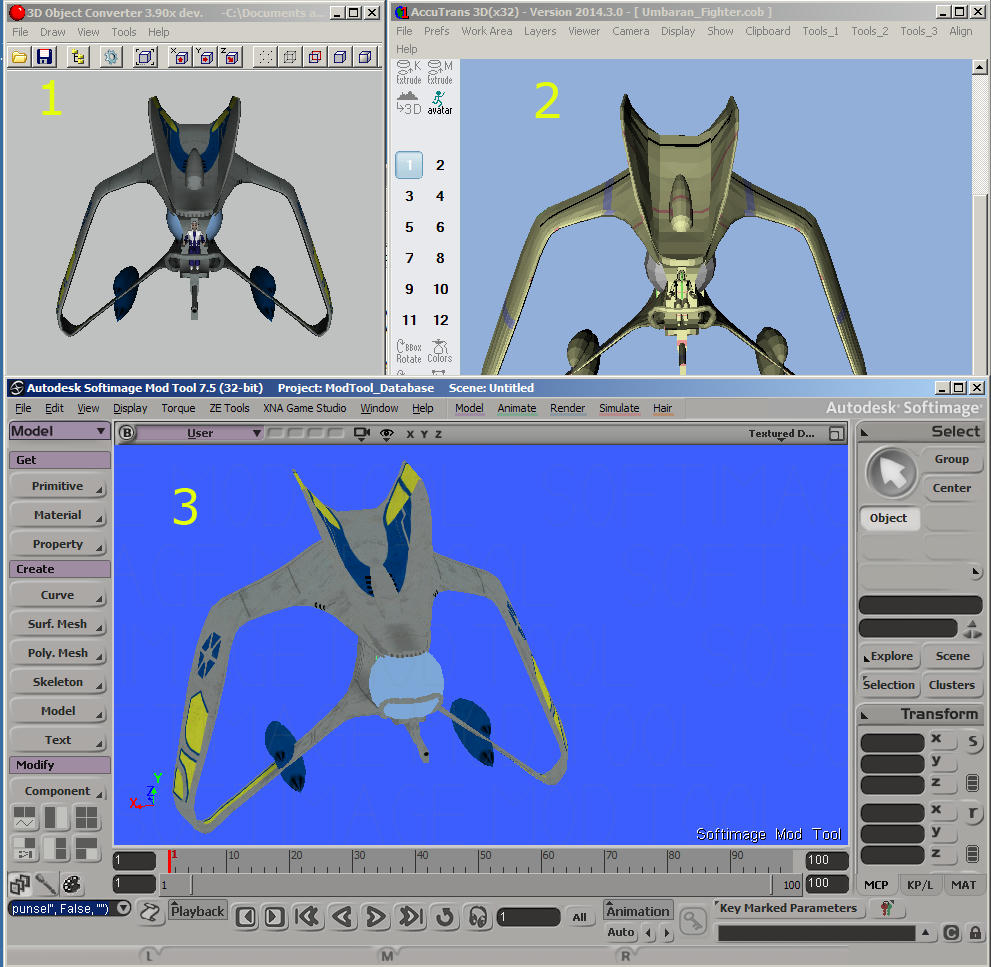
Import *.alo into 3D Object Converter
Export as Caligari trueSpace ASCII (*.cob)
Import *.cob into AccuTrans 3D
Export as Wavefront obj
Import *.obj in Softimage Mod Tool 7.5
Export to *.msh with ZETools
All of the above software is free to use. All import modules are enabled in 3DOC, but export modules are limited. This means you can import any format it supports and just export as *.cob (which preserves UVs) then convert from there. There are other programs that can convert *.cob to another format but AccuTrans is lightweight and easy to use as a conversion tool, and despite what the site says, you don't have to buy it. Just download and use, nothing to install.
Export as Caligari trueSpace ASCII (*.cob)
Import *.cob into AccuTrans 3D
Export as Wavefront obj
Import *.obj in Softimage Mod Tool 7.5
Export to *.msh with ZETools
All of the above software is free to use. All import modules are enabled in 3DOC, but export modules are limited. This means you can import any format it supports and just export as *.cob (which preserves UVs) then convert from there. There are other programs that can convert *.cob to another format but AccuTrans is lightweight and easy to use as a conversion tool, and despite what the site says, you don't have to buy it. Just download and use, nothing to install.
-
JazzMaster
- Master Sergeant

- Posts: 166
- Joined: Sun Mar 31, 2013 2:56 pm
- Projects :: Cato Neimoidia- Invasion
- xbox live or psn: No gamertag set
Re: Models+textures from EAW FOC to battlefront 2.
Just tried your method, Ace. It works for the models, but so far I haven't been able to get the UVs into AccuTrans or XSI.
-
AceMastermind
- Gametoast Staff
- Posts: 3285
- Joined: Mon Aug 21, 2006 6:23 am
- Contact:
Re: Models+textures from EAW FOC to battlefront 2.
3DOC doesn't play nice with dds textures. Hex edit the *.alo file and change any instance of dds to tga and convert your textures to tga so 3DOC will display the model correctly. Check the UVs again to make sure they're still intact and you should be good from there.
http://empireatwar.filefront.com/file/U ... ter;121534
Hidden/Spoiler:
-
JazzMaster
- Master Sergeant
- Posts: 166
- Joined: Sun Mar 31, 2013 2:56 pm
- Projects :: Cato Neimoidia- Invasion
- xbox live or psn: No gamertag set
Re: Models+textures from EAW FOC to battlefront 2.
Wierd.. I followed everything you said with the umbaran fighter. Hexed the .ALO and converted the .dds files to .tga. The UVs show up the same way as in your photo in 3DOC and AccuTrans, but the UVs do not import into XSI still.
I'm using the same build of 3Doc (3.90x dev.) and XSI (ModTool 7.5 32-bit) but i have AccuTrans v2014.40 insteand v2014.30.
I'm using the same build of 3Doc (3.90x dev.) and XSI (ModTool 7.5 32-bit) but i have AccuTrans v2014.40 insteand v2014.30.
-
AceMastermind
- Gametoast Staff
- Posts: 3285
- Joined: Mon Aug 21, 2006 6:23 am
- Contact:
Re: Models+textures from EAW FOC to battlefront 2.
The UVs are there, you can double check by opening the obj file with notepad and search for 'vt'. If texture coords exist in the obj file then all you need to do is assign the texture to the model in XSI. Also, the latest version of 3DOC is still capable of exporting as *.cob too.
-
JazzMaster
- Master Sergeant
- Posts: 166
- Joined: Sun Mar 31, 2013 2:56 pm
- Projects :: Cato Neimoidia- Invasion
- xbox live or psn: No gamertag set
Re: Models+textures from EAW FOC to battlefront 2.
The "vt" marks are there when i open it in notepad. All the polygon clusters show up in XSI, but there are no texture projections to assign the textures to.