
Instead of spamming the forums with topics I'll just make a list here
In anybody could answer 1 I would be happy
thanks(in advance)
Problems-
#1 Textures in ZE wont show up objects have no skin or won't show up at all
they show up just fine in game.....it just make placing objects harder. Does
anybody know how to fix it?
#2 I can't get the geonosians on the CIS team. And is it true that it's Gen
not Geo for the geonosian unit placing? How do I get it to work? (solved)
#3 Rancor is screwed in ZE it just stretches from the middle of my to the
place I want to put it. How do I fix it, and place it.
#4 Would I have to copy ODFs and MSHs from SWBF1 mod tools to get
the Scarlette pit? (solved)
#5 My skins Don't work (I'll probably have to go into more detail. I will
when the other problems are solved or wait for the Wiki to get back up.
#6 How do you change Weapons? (solved)
EDIT: sorry forgot-
#7 Can I put obi-wan on the alliance side? If I can how? (solved)
#8 How do I add custom units(there not mine I downloaded them but they
didn't come with installation instructions)
I think that's all right now
and again many Thanks!
List of problems
Moderator: Moderators
-
EGG_GUTS
- Master Bounty Hunter

- Posts: 1626
- Joined: Thu Dec 07, 2006 7:38 pm
- Projects :: No Mod project currently.
- xbox live or psn: No gamertag set
- Location: CANADA!
List of problems
Last edited by EGG_GUTS on Sat Dec 23, 2006 11:43 am, edited 3 times in total.
-
trainmaster611

- Sith Lord

- Posts: 1779
- Joined: Thu Aug 24, 2006 5:22 pm
- Projects :: No Mod project currently.
- xbox live or psn: No gamertag set
- Location: Building a railway to Coruscant
- Contact:
RE: List of problems
4)Yes
6)Do you mean in game? If not then try editing the ODF
6)Do you mean in game? If not then try editing the ODF
-
EGG_GUTS
- Master Bounty Hunter
- Posts: 1626
- Joined: Thu Dec 07, 2006 7:38 pm
- Projects :: No Mod project currently.
- xbox live or psn: No gamertag set
- Location: CANADA!
-
EGG_GUTS
- Master Bounty Hunter
- Posts: 1626
- Joined: Thu Dec 07, 2006 7:38 pm
- Projects :: No Mod project currently.
- xbox live or psn: No gamertag set
- Location: CANADA!
-
Darth_Z13
- Jedi High Council

- Posts: 2275
- Joined: Sat Jun 17, 2006 9:51 am
- xbox live or psn: Xanthius Wylon
- Location: Canada
Re: List of problems
You probably didn't copy over the TarGA files.EGG_GUTS wrote:#1 Textures in ZE wont show up objects have no skin or won't show up at all
they show up just fine in game.....it just make placing objects harder. Does
anybody know how to fix it?
Voila! There's how you load him....#2 I can't get the geonosians on the CIS team. And is it true that it's Gen
not Geo for the geonosian unit placing? How do I get it to work?
Code: Select all
    ReadDataFile("SIDE\\geo.lvl",
                             "gen_inf_geonosian")
Code: Select all
            soldier  = { "cis_inf_rifleman",10, 25},
            assault  = { "cis_inf_rocketeer",1, 4},
            engineer = { "cis_inf_engineer",1, 4},
            sniper   = { "cis_inf_sniper",1, 4},
            officer = {"cis_inf_officer",1, 4},
            special = { "geo_inf_geonosian",1, 4},
Dunno how to fix that.#3 Rancor is screwed in ZE it just stretches from the middle of my to the
place I want to put it. How do I fix it, and place it.
What do you mean? Do they crash or are they black or do they not munge?#5 My skins Don't work (I'll probably have to go into more detail. I will
when the other problems are solved or wait for the Wiki to get back up.
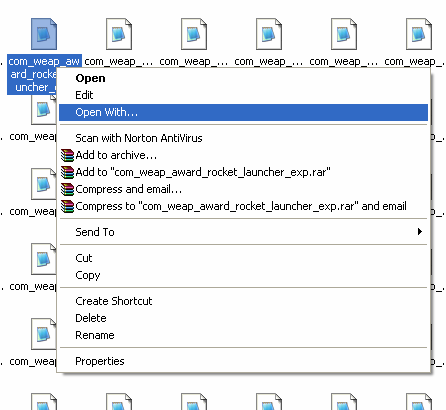
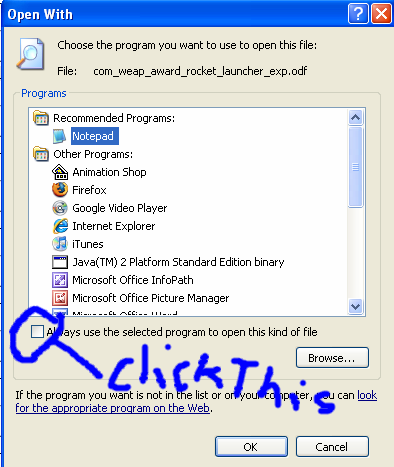
ODF editing. Here is the ODF called rep_inf_default_jettrooper.#6 How do you change Weapons?
Code: Select all
[GameObjectClass]
ClassParent         = "rep_inf_default"

[Properties]
MaxHealth           = 300.0

PointsToUnlock      = 12

UnitType            = "trooper"

AISizeType          = "HOVER"

ControlSpeed        = "jet    1.50 1.25 1.25"

JetJump             = "5.0" //7 //The initial jump-push given when enabling the jet
JetPush             = "8.0" //The constant push given while the jet is enabled (20 is gravity)
JetAcceleration     = "30.0" //Acceleration while hovering.
JetEffect           = "rep_sfx_jetpack"
JetType             = "hover"
JetFuelRechargeRate = "0.12" //Additional fuel per second (fuel is 0 to 1)
JetFuelCost         = "0.16" //Cost per second when hovering (only used for jet-hovers)(fuel is 0 to 1)
JetFuelInitialCost  = "0.25" //initial cost when jet jumping(fuel is 0 to 1)
JetFuelMinBorder    = "0.24" //minimum fuel to perform a jet jump(fuel is 0 to 1)

CAMERASECTION       = "STAND"

EyePointOffset      = "0.0 1.8 0.0"
TrackCenter         = "0.0 1.8 0.0
TrackOffset         = "0.0 0.0 3.5"
TiltValue           = "7.5"

//These probably need to be set
//CAMERASECTION       = "STANDZOOM"
//EyePointOffset      = "0.0 1.8 0.0"
//TrackCenter         = "0.0 1.8 0.0
//TrackOffset         = "0.4 0.05 2.8"
//TiltValue           = "3.5"

CAMERASECTION       = "CROUCH"

EyePointOffset      = "0.0 1.3 0.0"
TrackCenter         = "0.0 1.3 0.0
TrackOffset         = "0.0 0.15 3.5"
TiltValue           = "7.5"

//These probably need to be set
//CAMERASECTION       = "CROUCHZOOM"
//EyePointOffset      = "0.0 1.3 0.0"
//TrackCenter         = "0.0 1.3 0.0
//TrackOffset         = "0.4 0.2 2.8"
//TiltValue           = "3.5"


WEAPONSECTION = 1
WeaponName         = "rep_weap_inf_emp_launcher"
WeaponAmmo         = 4

WEAPONSECTION = 2
WeaponName         = "rep_weap_inf_commando_pistol"
WeaponAmmo         = 0

WEAPONSECTION = 3
WeaponName         = "rep_weap_inf_thermaldetonator"
WeaponAmmo         = 4
WeaponChannel      = 1

WEAPONSECTION = 4
WeaponName         = "rep_weap_award_pistol"
WeaponAmmo         = 6

CollisionScale      = "0.0 0.0 0.0"

EngineSound         = "rep_inf_Jetpack_engine_parameterized"
TurnOnSound         = "rep_weap_jetpack_turnon"
TurnOffSound        = "rep_weap_jetpack_turnoff"
TurnOffTime         = 0.0


VOUnitType        	= 121
Code: Select all
WEAPONSECTION = 1
WeaponName         = "rep_weap_inf_emp_launcher"
WeaponAmmo         = 4

WEAPONSECTION = 2
WeaponName         = "rep_weap_inf_commando_pistol"
WeaponAmmo         = 0

WEAPONSECTION = 3
WeaponName         = "rep_weap_inf_thermaldetonator"
WeaponAmmo         = 4
WeaponChannel      = 1

WEAPONSECTION = 4
WeaponName         = "rep_weap_award_pistol"
WeaponAmmo         = 6
Load him here:#7 Can I put obi-wan on the alliance side? If I can how?
Code: Select all
    ReadDataFile("SIDE\\rep.lvl",
                            "rep_hero_obiwan")
Code: Select all
SetHeroClass(ALL, "rep_hero_obiwan")
That's creating a new side. Read the jedi creation document and it will give you a good idea of what to do.#8 How do I add cusatom units(there not mine I downloaded them but they
didn't come with installation instructions)
-
EGG_GUTS
- Master Bounty Hunter
- Posts: 1626
- Joined: Thu Dec 07, 2006 7:38 pm
- Projects :: No Mod project currently.
- xbox live or psn: No gamertag set
- Location: CANADA!
-
Darth_Z13
- Jedi High Council
- Posts: 2275
- Joined: Sat Jun 17, 2006 9:51 am
- xbox live or psn: Xanthius Wylon
- Location: Canada
-
EGG_GUTS
- Master Bounty Hunter
- Posts: 1626
- Joined: Thu Dec 07, 2006 7:38 pm
- Projects :: No Mod project currently.
- xbox live or psn: No gamertag set
- Location: CANADA!
Ok i did what you said for the geonosian and it didn't work here's my Lua
--
-- Copyright (c) 2005 Pandemic Studios, LLC. All rights reserved.
--
-- load the gametype script
ScriptCB_DoFile("ObjectiveConquest")
ScriptCB_DoFile("setup_teams")
-- REP Attacking (attacker is always #1)
REP = 1;
CIS = 2;
-- These variables do not change
ATT = REP;
DEF = CIS;
function ScriptPostLoad()
--This defines the CPs. These need to happen first
cp1 = CommandPost:New{name = "cp1"}
cp2 = CommandPost:New{name = "cp2"}
cp3 = CommandPost:New{name = "cp3"}
cp4 = CommandPost:New{name = "cp4"}
cp5 = CommandPost:New{name = "cp5"}
cp6 = CommandPost:New{name = "cp6"}
cp7 = CommandPost:New{name = "cp7"}
cp8 = CommandPost:New{name = "cp8"}
cp9 = CommandPost:New{name = "cp9"}
cp0 = CommandPost:New{name = "cp0"}
--This sets up the actual objective. This needs to happen after cp's are defined
conquest = ObjectiveConquest:New{teamATT = ATT, teamDEF = DEF,
textATT = "game.modes.con",
textDEF = "game.modes.con2",
multiplayerRules = true}
--This adds the CPs to the objective. This needs to happen after the objective is set up
conquest:AddCommandPost(cp1)
conquest:AddCommandPost(cp2)
conquest:AddCommandPost(cp3)
conquest:AddCommandPost(cp4)
conquest:AddCommandPost(cp5)
conquest:AddCommandPost(cp6)
conquest:AddCommandPost(cp7)
conquest:AddCommandPost(cp8)
conquest:AddCommandPost(cp9)
conquest:AddCommandPost(cp0)
conquest:Start()
EnableSPHeroRules()
end
---------------------------------------------------------------------------
-- FUNCTION: ScriptInit
-- PURPOSE: This function is only run once
-- INPUT:
-- OUTPUT:
-- NOTES: The name, 'ScriptInit' is a chosen convention, and each
-- mission script must contain a version of this function, as
-- it is called from C to start the mission.
---------------------------------------------------------------------------
function ScriptInit()
ReadDataFile("ingame.lvl")
SetMaxFlyHeight(30)
SetMaxPlayerFlyHeight (30)
SetMemoryPoolSize ("ClothData",20)
SetMemoryPoolSize ("Combo",50) -- should be ~ 2x number of jedi classes
SetMemoryPoolSize ("Combo::State",650) -- should be ~12x #Combo
SetMemoryPoolSize ("Combo::Transition",650) -- should be a bit bigger than #Combo::State
SetMemoryPoolSize ("Combo::Condition",650) -- should be a bit bigger than #Combo::State
SetMemoryPoolSize ("Combo::Attack",550) -- should be ~8-12x #Combo
SetMemoryPoolSize ("Combo::DamageSample",6000) -- should be ~8-12x #Combo::Attack
SetMemoryPoolSize ("Combo::Deflect",100) -- should be ~1x #combo
ReadDataFile("sound\\yav.lvl;yav1cw")
ReadDataFile("SIDE\\rep.lvl",
"rep_inf_ep3_rifleman",
"rep_inf_ep3_rocketeer",
"rep_inf_ep3_engineer",
"rep_inf_ep3_sniper",
"rep_inf_ep2_officer",
"rep_inf_ep2_jettrooper",
"rep_hover_fightertank",
"rep_hero_yoda",
"rep_hover_barcspeeder")
ReadDataFile("SIDE\\cis.lvl",
"cis_inf_marine",
"cis_inf_rocketeer",
"cis_inf_engineer",
"geo_inf_geonosian",
"cis_inf_officer_hunt",
"cis_inf_droideka",
"cis_hero_grievous",
"cis_hover_aat")
ReadDataFile("SIDE\\geo.lvl",
"geo_inf_geonosian")
ReadDataFile("SIDE\\tur.lvl",
"tur_bldg_laser",
"tur_bldg_tower")
SetupTeams{
rep = {
team = REP,
units = 20,
reinforcements = 150,
soldier = { "rep_inf_ep3_rifleman",9, 25},
assault = { "rep_inf_ep3_rocketeer",1, 4},
engineer = { "rep_inf_ep3_engineer",1, 4},
sniper = { "rep_inf_ep3_sniper",1, 4},
officer = {"rep_inf_ep2_officer",1, 4},
special = { "rep_inf_ep2_jettrooper",1, 4},
},
cis = {
team = CIS,
units = 20,
reinforcements = 150,
soldier = { "cis_inf_marine",9, 25},
assault = { "cis_inf_rocketeer",1, 4},
engineer = { "cis_inf_engineer",1, 4},
sniper = { "geo_inf_geonosian",1, 4},
officer = {"cis_inf_officer_hunt",1, 4},
special = { "",1, 4},
}
}
SetHeroClass(CIS, "cis_hero_grievous")
SetHeroClass(REP, "rep_hero_yoda")
-- Level Stats
-- ClearWalkers()
AddWalkerType(0, 4) -- special -> droidekas
AddWalkerType(1, 0) -- 1x2 (1 pair of legs)
AddWalkerType(2, 0) -- 2x2 (2 pairs of legs)
AddWalkerType(3, 0) -- 3x2 (3 pairs of legs)
local weaponCnt = 1024
SetMemoryPoolSize("Aimer", 75)
SetMemoryPoolSize("AmmoCounter", weaponCnt)
SetMemoryPoolSize("BaseHint", 1024)
SetMemoryPoolSize("EnergyBar", weaponCnt)
SetMemoryPoolSize("EntityCloth", 32)
SetMemoryPoolSize("EntityFlyer", 32)
SetMemoryPoolSize("EntityHover", 32)
SetMemoryPoolSize("EntityLight", 200)
SetMemoryPoolSize("EntitySoundStream", 4)
SetMemoryPoolSize("EntitySoundStatic", 32)
SetMemoryPoolSize("MountedTurret", 32)
SetMemoryPoolSize("Navigator", 128)
SetMemoryPoolSize("Obstacle", 1024)
SetMemoryPoolSize("PathNode", 1024)
SetMemoryPoolSize("SoundSpaceRegion", 64)
SetMemoryPoolSize("TreeGridStack", 1024)
SetMemoryPoolSize("UnitAgent", 128)
SetMemoryPoolSize("UnitController", 128)
SetMemoryPoolSize("Weapon", weaponCnt)
SetSpawnDelay(10.0, 0.25)
--ReadDataFile("dc:AHZ\\AHZ.lvl", "AHZ_conquest")
ReadDataFile("dc:AHZ\\AHZ.lvl", "AHZ_conquest")
SetDenseEnvironment("false")
-- Sound
SetSoundEffect("ScopeDisplayZoomIn", "binocularzoomin")
SetSoundEffect("ScopeDisplayZoomOut", "binocularzoomout")
voiceSlow = OpenAudioStream("sound\\global.lvl", "rep_unit_vo_slow")
AudioStreamAppendSegments("sound\\global.lvl", "cis_unit_vo_slow", voiceSlow)
AudioStreamAppendSegments("sound\\global.lvl", "global_vo_slow", voiceSlow)
voiceQuick = OpenAudioStream("sound\\global.lvl", "rep_unit_vo_quick")
AudioStreamAppendSegments("sound\\global.lvl", "cis_unit_vo_quick", voiceQuick)
OpenAudioStream("sound\\global.lvl", "cw_music")
-- OpenAudioStream("sound\\global.lvl", "global_vo_quick")
-- OpenAudioStream("sound\\global.lvl", "global_vo_slow")
OpenAudioStream("sound\\yav.lvl", "yav1")
OpenAudioStream("sound\\yav.lvl", "yav1")
OpenAudioStream("sound\\yav.lvl", "yav1_emt")
SetBleedingVoiceOver(REP, REP, "rep_off_com_report_us_overwhelmed", 1)
SetBleedingVoiceOver(REP, CIS, "rep_off_com_report_enemy_losing", 1)
SetBleedingVoiceOver(CIS, REP, "cis_off_com_report_enemy_losing", 1)
SetBleedingVoiceOver(CIS, CIS, "cis_off_com_report_us_overwhelmed", 1)
SetOutOfBoundsVoiceOver(2, "cisleaving")
SetOutOfBoundsVoiceOver(1, "repleaving")
SetAmbientMusic(REP, 1.0, "rep_yav_amb_start", 0,1)
SetAmbientMusic(REP, 0.8, "rep_yav_amb_middle", 1,1)
SetAmbientMusic(REP, 0.2, "rep_yav_amb_end", 2,1)
SetAmbientMusic(CIS, 1.0, "cis_yav_amb_start", 0,1)
SetAmbientMusic(CIS, 0.8, "cis_yav_amb_middle", 1,1)
SetAmbientMusic(CIS, 0.2, "cis_yav_amb_end", 2,1)
SetVictoryMusic(REP, "rep_yav_amb_victory")
SetDefeatMusic (REP, "rep_yav_amb_defeat")
SetVictoryMusic(CIS, "cis_yav_amb_victory")
SetDefeatMusic (CIS, "cis_yav_amb_defeat")
SetSoundEffect("ScopeDisplayZoomIn", "binocularzoomin")
SetSoundEffect("ScopeDisplayZoomOut", "binocularzoomout")
--SetSoundEffect("BirdScatter", "birdsFlySeq1")
--SetSoundEffect("WeaponUnableSelect", "com_weap_inf_weaponchange_null")
--SetSoundEffect("WeaponModeUnableSelect", "com_weap_inf_modechange_null")
SetSoundEffect("SpawnDisplayUnitChange", "shell_select_unit")
SetSoundEffect("SpawnDisplayUnitAccept", "shell_menu_enter")
SetSoundEffect("SpawnDisplaySpawnPointChange", "shell_select_change")
SetSoundEffect("SpawnDisplaySpawnPointAccept", "shell_menu_enter")
SetSoundEffect("SpawnDisplayBack", "shell_menu_exit")
--OpeningSateliteShot
AddCameraShot(0.908386, -0.209095, -0.352873, -0.081226, -45.922508, -19.114113, 77.022636);
AddCameraShot(-0.481173, 0.024248, -0.875181, -0.044103, 14.767292, -30.602322, -144.506851);
AddCameraShot(0.999914, -0.012495, -0.004416, -0.000055, 1.143253, -33.602314, -76.884430);
AddCameraShot(0.839161, 0.012048, -0.543698, 0.007806, 19.152437, -49.802273, 24.337317);
AddCameraShot(0.467324, 0.006709, -0.883972, 0.012691, 11.825212, -49.802273, -7.000720);
AddCameraShot(0.861797, 0.001786, -0.507253, 0.001051, -11.986043, -59.702248, 23.263165);
AddCameraShot(0.628546, -0.042609, -0.774831, -0.052525, 20.429928, -48.302277, 9.771714);
AddCameraShot(0.765213, -0.051873, 0.640215, 0.043400, 57.692474, -48.302277, 16.540724);
AddCameraShot(0.264032, -0.015285, -0.962782, -0.055734, -16.681797, -42.902290, 129.553268);
AddCameraShot(-0.382320, 0.022132, -0.922222, -0.053386, 20.670977, -42.902290, 135.513001);
end
thanks
--
-- Copyright (c) 2005 Pandemic Studios, LLC. All rights reserved.
--
-- load the gametype script
ScriptCB_DoFile("ObjectiveConquest")
ScriptCB_DoFile("setup_teams")
-- REP Attacking (attacker is always #1)
REP = 1;
CIS = 2;
-- These variables do not change
ATT = REP;
DEF = CIS;
function ScriptPostLoad()
--This defines the CPs. These need to happen first
cp1 = CommandPost:New{name = "cp1"}
cp2 = CommandPost:New{name = "cp2"}
cp3 = CommandPost:New{name = "cp3"}
cp4 = CommandPost:New{name = "cp4"}
cp5 = CommandPost:New{name = "cp5"}
cp6 = CommandPost:New{name = "cp6"}
cp7 = CommandPost:New{name = "cp7"}
cp8 = CommandPost:New{name = "cp8"}
cp9 = CommandPost:New{name = "cp9"}
cp0 = CommandPost:New{name = "cp0"}
--This sets up the actual objective. This needs to happen after cp's are defined
conquest = ObjectiveConquest:New{teamATT = ATT, teamDEF = DEF,
textATT = "game.modes.con",
textDEF = "game.modes.con2",
multiplayerRules = true}
--This adds the CPs to the objective. This needs to happen after the objective is set up
conquest:AddCommandPost(cp1)
conquest:AddCommandPost(cp2)
conquest:AddCommandPost(cp3)
conquest:AddCommandPost(cp4)
conquest:AddCommandPost(cp5)
conquest:AddCommandPost(cp6)
conquest:AddCommandPost(cp7)
conquest:AddCommandPost(cp8)
conquest:AddCommandPost(cp9)
conquest:AddCommandPost(cp0)
conquest:Start()
EnableSPHeroRules()
end
---------------------------------------------------------------------------
-- FUNCTION: ScriptInit
-- PURPOSE: This function is only run once
-- INPUT:
-- OUTPUT:
-- NOTES: The name, 'ScriptInit' is a chosen convention, and each
-- mission script must contain a version of this function, as
-- it is called from C to start the mission.
---------------------------------------------------------------------------
function ScriptInit()
ReadDataFile("ingame.lvl")
SetMaxFlyHeight(30)
SetMaxPlayerFlyHeight (30)
SetMemoryPoolSize ("ClothData",20)
SetMemoryPoolSize ("Combo",50) -- should be ~ 2x number of jedi classes
SetMemoryPoolSize ("Combo::State",650) -- should be ~12x #Combo
SetMemoryPoolSize ("Combo::Transition",650) -- should be a bit bigger than #Combo::State
SetMemoryPoolSize ("Combo::Condition",650) -- should be a bit bigger than #Combo::State
SetMemoryPoolSize ("Combo::Attack",550) -- should be ~8-12x #Combo
SetMemoryPoolSize ("Combo::DamageSample",6000) -- should be ~8-12x #Combo::Attack
SetMemoryPoolSize ("Combo::Deflect",100) -- should be ~1x #combo
ReadDataFile("sound\\yav.lvl;yav1cw")
ReadDataFile("SIDE\\rep.lvl",
"rep_inf_ep3_rifleman",
"rep_inf_ep3_rocketeer",
"rep_inf_ep3_engineer",
"rep_inf_ep3_sniper",
"rep_inf_ep2_officer",
"rep_inf_ep2_jettrooper",
"rep_hover_fightertank",
"rep_hero_yoda",
"rep_hover_barcspeeder")
ReadDataFile("SIDE\\cis.lvl",
"cis_inf_marine",
"cis_inf_rocketeer",
"cis_inf_engineer",
"geo_inf_geonosian",
"cis_inf_officer_hunt",
"cis_inf_droideka",
"cis_hero_grievous",
"cis_hover_aat")
ReadDataFile("SIDE\\geo.lvl",
"geo_inf_geonosian")
ReadDataFile("SIDE\\tur.lvl",
"tur_bldg_laser",
"tur_bldg_tower")
SetupTeams{
rep = {
team = REP,
units = 20,
reinforcements = 150,
soldier = { "rep_inf_ep3_rifleman",9, 25},
assault = { "rep_inf_ep3_rocketeer",1, 4},
engineer = { "rep_inf_ep3_engineer",1, 4},
sniper = { "rep_inf_ep3_sniper",1, 4},
officer = {"rep_inf_ep2_officer",1, 4},
special = { "rep_inf_ep2_jettrooper",1, 4},
},
cis = {
team = CIS,
units = 20,
reinforcements = 150,
soldier = { "cis_inf_marine",9, 25},
assault = { "cis_inf_rocketeer",1, 4},
engineer = { "cis_inf_engineer",1, 4},
sniper = { "geo_inf_geonosian",1, 4},
officer = {"cis_inf_officer_hunt",1, 4},
special = { "",1, 4},
}
}
SetHeroClass(CIS, "cis_hero_grievous")
SetHeroClass(REP, "rep_hero_yoda")
-- Level Stats
-- ClearWalkers()
AddWalkerType(0, 4) -- special -> droidekas
AddWalkerType(1, 0) -- 1x2 (1 pair of legs)
AddWalkerType(2, 0) -- 2x2 (2 pairs of legs)
AddWalkerType(3, 0) -- 3x2 (3 pairs of legs)
local weaponCnt = 1024
SetMemoryPoolSize("Aimer", 75)
SetMemoryPoolSize("AmmoCounter", weaponCnt)
SetMemoryPoolSize("BaseHint", 1024)
SetMemoryPoolSize("EnergyBar", weaponCnt)
SetMemoryPoolSize("EntityCloth", 32)
SetMemoryPoolSize("EntityFlyer", 32)
SetMemoryPoolSize("EntityHover", 32)
SetMemoryPoolSize("EntityLight", 200)
SetMemoryPoolSize("EntitySoundStream", 4)
SetMemoryPoolSize("EntitySoundStatic", 32)
SetMemoryPoolSize("MountedTurret", 32)
SetMemoryPoolSize("Navigator", 128)
SetMemoryPoolSize("Obstacle", 1024)
SetMemoryPoolSize("PathNode", 1024)
SetMemoryPoolSize("SoundSpaceRegion", 64)
SetMemoryPoolSize("TreeGridStack", 1024)
SetMemoryPoolSize("UnitAgent", 128)
SetMemoryPoolSize("UnitController", 128)
SetMemoryPoolSize("Weapon", weaponCnt)
SetSpawnDelay(10.0, 0.25)
--ReadDataFile("dc:AHZ\\AHZ.lvl", "AHZ_conquest")
ReadDataFile("dc:AHZ\\AHZ.lvl", "AHZ_conquest")
SetDenseEnvironment("false")
-- Sound
SetSoundEffect("ScopeDisplayZoomIn", "binocularzoomin")
SetSoundEffect("ScopeDisplayZoomOut", "binocularzoomout")
voiceSlow = OpenAudioStream("sound\\global.lvl", "rep_unit_vo_slow")
AudioStreamAppendSegments("sound\\global.lvl", "cis_unit_vo_slow", voiceSlow)
AudioStreamAppendSegments("sound\\global.lvl", "global_vo_slow", voiceSlow)
voiceQuick = OpenAudioStream("sound\\global.lvl", "rep_unit_vo_quick")
AudioStreamAppendSegments("sound\\global.lvl", "cis_unit_vo_quick", voiceQuick)
OpenAudioStream("sound\\global.lvl", "cw_music")
-- OpenAudioStream("sound\\global.lvl", "global_vo_quick")
-- OpenAudioStream("sound\\global.lvl", "global_vo_slow")
OpenAudioStream("sound\\yav.lvl", "yav1")
OpenAudioStream("sound\\yav.lvl", "yav1")
OpenAudioStream("sound\\yav.lvl", "yav1_emt")
SetBleedingVoiceOver(REP, REP, "rep_off_com_report_us_overwhelmed", 1)
SetBleedingVoiceOver(REP, CIS, "rep_off_com_report_enemy_losing", 1)
SetBleedingVoiceOver(CIS, REP, "cis_off_com_report_enemy_losing", 1)
SetBleedingVoiceOver(CIS, CIS, "cis_off_com_report_us_overwhelmed", 1)
SetOutOfBoundsVoiceOver(2, "cisleaving")
SetOutOfBoundsVoiceOver(1, "repleaving")
SetAmbientMusic(REP, 1.0, "rep_yav_amb_start", 0,1)
SetAmbientMusic(REP, 0.8, "rep_yav_amb_middle", 1,1)
SetAmbientMusic(REP, 0.2, "rep_yav_amb_end", 2,1)
SetAmbientMusic(CIS, 1.0, "cis_yav_amb_start", 0,1)
SetAmbientMusic(CIS, 0.8, "cis_yav_amb_middle", 1,1)
SetAmbientMusic(CIS, 0.2, "cis_yav_amb_end", 2,1)
SetVictoryMusic(REP, "rep_yav_amb_victory")
SetDefeatMusic (REP, "rep_yav_amb_defeat")
SetVictoryMusic(CIS, "cis_yav_amb_victory")
SetDefeatMusic (CIS, "cis_yav_amb_defeat")
SetSoundEffect("ScopeDisplayZoomIn", "binocularzoomin")
SetSoundEffect("ScopeDisplayZoomOut", "binocularzoomout")
--SetSoundEffect("BirdScatter", "birdsFlySeq1")
--SetSoundEffect("WeaponUnableSelect", "com_weap_inf_weaponchange_null")
--SetSoundEffect("WeaponModeUnableSelect", "com_weap_inf_modechange_null")
SetSoundEffect("SpawnDisplayUnitChange", "shell_select_unit")
SetSoundEffect("SpawnDisplayUnitAccept", "shell_menu_enter")
SetSoundEffect("SpawnDisplaySpawnPointChange", "shell_select_change")
SetSoundEffect("SpawnDisplaySpawnPointAccept", "shell_menu_enter")
SetSoundEffect("SpawnDisplayBack", "shell_menu_exit")
--OpeningSateliteShot
AddCameraShot(0.908386, -0.209095, -0.352873, -0.081226, -45.922508, -19.114113, 77.022636);
AddCameraShot(-0.481173, 0.024248, -0.875181, -0.044103, 14.767292, -30.602322, -144.506851);
AddCameraShot(0.999914, -0.012495, -0.004416, -0.000055, 1.143253, -33.602314, -76.884430);
AddCameraShot(0.839161, 0.012048, -0.543698, 0.007806, 19.152437, -49.802273, 24.337317);
AddCameraShot(0.467324, 0.006709, -0.883972, 0.012691, 11.825212, -49.802273, -7.000720);
AddCameraShot(0.861797, 0.001786, -0.507253, 0.001051, -11.986043, -59.702248, 23.263165);
AddCameraShot(0.628546, -0.042609, -0.774831, -0.052525, 20.429928, -48.302277, 9.771714);
AddCameraShot(0.765213, -0.051873, 0.640215, 0.043400, 57.692474, -48.302277, 16.540724);
AddCameraShot(0.264032, -0.015285, -0.962782, -0.055734, -16.681797, -42.902290, 129.553268);
AddCameraShot(-0.382320, 0.022132, -0.922222, -0.053386, 20.670977, -42.902290, 135.513001);
end
thanks
-
EGG_GUTS
- Master Bounty Hunter
- Posts: 1626
- Joined: Thu Dec 07, 2006 7:38 pm
- Projects :: No Mod project currently.
- xbox live or psn: No gamertag set
- Location: CANADA!
-
Darth_Z13
- Jedi High Council
- Posts: 2275
- Joined: Sat Jun 17, 2006 9:51 am
- xbox live or psn: Xanthius Wylon
- Location: Canada
-
EGG_GUTS
- Master Bounty Hunter
- Posts: 1626
- Joined: Thu Dec 07, 2006 7:38 pm
- Projects :: No Mod project currently.
- xbox live or psn: No gamertag set
- Location: CANADA!
-
CmdAt-a
-
EGG_GUTS
- Master Bounty Hunter
- Posts: 1626
- Joined: Thu Dec 07, 2006 7:38 pm
- Projects :: No Mod project currently.
- xbox live or psn: No gamertag set
- Location: CANADA!
-
Elmo
- Field Commander

- Posts: 962
- Joined: Wed Nov 08, 2006 5:13 pm
- Projects :: No Mod project currently.
- xbox live or psn: No gamertag set
huh? if you want to edit a unit in the republic side.... do this:
1. Go into assets/sides and copy the rep folder...
2. paste it in your Data***/sides folder...
3. Open up the rep folder...
4. Open up whatever unit's odf that you want to modify using notepad...
5. make whatever changes you want!(in the unit's odf)
Edit: Also... when you munge be sure to select your side in the dropdown bar.
1. Go into assets/sides and copy the rep folder...
2. paste it in your Data***/sides folder...
3. Open up the rep folder...
4. Open up whatever unit's odf that you want to modify using notepad...
5. make whatever changes you want!(in the unit's odf)
Edit: Also... when you munge be sure to select your side in the dropdown bar.
-
EGG_GUTS
- Master Bounty Hunter
- Posts: 1626
- Joined: Thu Dec 07, 2006 7:38 pm
- Projects :: No Mod project currently.
- xbox live or psn: No gamertag set
- Location: CANADA!
-
EGG_GUTS
- Master Bounty Hunter
- Posts: 1626
- Joined: Thu Dec 07, 2006 7:38 pm
- Projects :: No Mod project currently.
- xbox live or psn: No gamertag set
- Location: CANADA!
ok I went to Bf2_modtools/data_***/sides/rep/odfs and opened
rep_inf_default_marine and changed it (just for testing) and it didn't work
here's the odf
[GameObjectClass]
ClassParent = "rep_inf_default"
[Properties]
UnitType = "assault"
MaxSpeed = 6.0 // base forward speed
MaxStrafeSpeed = 4.5 // base right/left speed
WEAPONSECTION = 1
WeaponName = "rep_weap_inf_chaingun"
WeaponAmmo = 0
WEAPONSECTION = 2
WeaponName = "rep_weap_inf_sniper_rifle"
WeaponAmmo = 4
WEAPONSECTION = 3
WeaponName = "rep_weap_inf_forcepush"
WeaponAmmo = 0
WeaponChannel = 1
WEAPONSECTION = 4
WeaponName = "rep_weap_award_rifle"
WeaponAmmo = 4
VOUnitType = 121
rep_inf_default_marine and changed it (just for testing) and it didn't work
here's the odf
[GameObjectClass]
ClassParent = "rep_inf_default"
[Properties]
UnitType = "assault"
MaxSpeed = 6.0 // base forward speed
MaxStrafeSpeed = 4.5 // base right/left speed
WEAPONSECTION = 1
WeaponName = "rep_weap_inf_chaingun"
WeaponAmmo = 0
WEAPONSECTION = 2
WeaponName = "rep_weap_inf_sniper_rifle"
WeaponAmmo = 4
WEAPONSECTION = 3
WeaponName = "rep_weap_inf_forcepush"
WeaponAmmo = 0
WeaponChannel = 1
WEAPONSECTION = 4
WeaponName = "rep_weap_award_rifle"
WeaponAmmo = 4
VOUnitType = 121