Model showcase thread Part II

How to create models in XSI and other 3D applications and make them work in Battlefront 1 & 2. Post models, tips for application usage and share anything XSI, 3DMax, SketchUp, etc.

Moderator: Moderators

Locked
JabbaLovesLava
Sith
Sith
Posts: 1396
Joined: Tue Jun 07, 2005 11:50 am

Re: Model showcase thread Part II

Post by JabbaLovesLava »

Something along the lines of... KezDt

Anyways... more models! :)
User avatar
GMan
Private First Class
Posts: 84
Joined: Tue Apr 22, 2008 7:44 am

Re: Model showcase thread Part II

Post by GMan »

Awsome models :thumbs: .Here are my 2 latest ones:
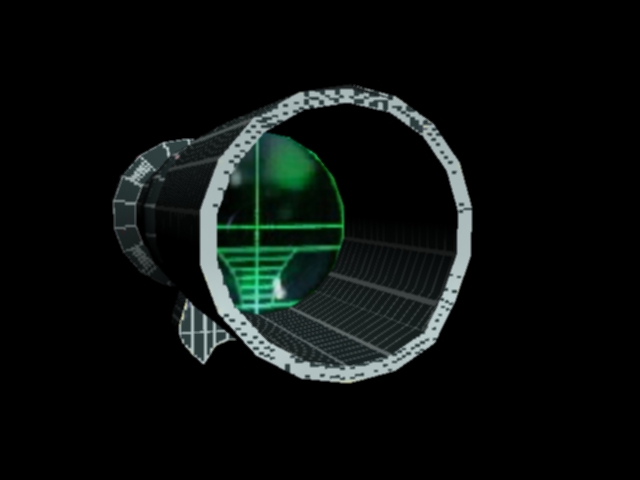
Advanced Combat Optical Gunsight Scope Attachment:
Hidden/Spoiler:
Image
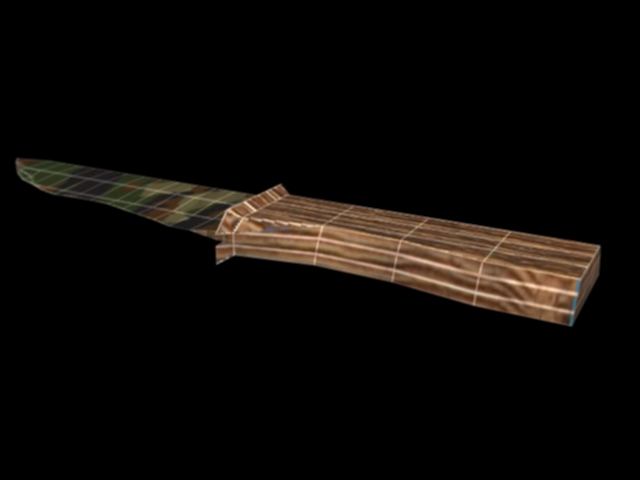
Knife:
Hidden/Spoiler:
Image
EDIT:sorry for the white lines on the models,but i don't know how to remove them :oops:
JabbaLovesLava
Sith
Sith
Posts: 1396
Joined: Tue Jun 07, 2005 11:50 am

Re: Model showcase thread Part II

Post by JabbaLovesLava »

Seems like they are part of the texture, so change the texture and they should disappear.
User avatar
GMan
Private First Class
Posts: 84
Joined: Tue Apr 22, 2008 7:44 am

Re: Model showcase thread Part II

Post by GMan »

Believe me they are not part of the texture.I'm not that dum to put them in.I think that they're some stupid things from a option in 3ds max 9.
jedi_pilot
Command Sergeant Major
Posts: 288
Joined: Sat Sep 15, 2007 2:09 pm

Re: Model showcase thread Part II

Post by jedi_pilot »

Wow, it would be awsome if you could turn that scope into an addon .msh :D .
MandeRek
Sith Master
Sith Master
Posts: 2766
Joined: Tue Oct 02, 2007 10:51 am
Projects :: Battlefront Zer0
Games I'm Playing :: SWTOR
xbox live or psn: No gamertag set
Location: Ghosting around GT
Contact:

Re: Model showcase thread Part II

Post by MandeRek »

I don't think you can apply addons to a weapon.. It's only for the unit odf
Taivyx
2008 Best Games Related Avatar
Posts: 1706
Joined: Thu Jun 07, 2007 3:34 pm
Projects :: Terra Strife - discontinued
Games I'm Playing :: none
xbox live or psn: No gamertag set
Contact:

Re: Model showcase thread Part II

Post by Taivyx »

Nevertheless, that'd be awesome if it was possible.
The texture on the scope can be improved, as it is quite low-resolution right now, but the model looks quite nice.
User avatar
GMan
Private First Class
Posts: 84
Joined: Tue Apr 22, 2008 7:44 am

Re: Model showcase thread Part II

Post by GMan »

Yes i'm trying to higher the resolution of all of my textures and it would be cool if i could see them ingame
@Taivyx:can you tell me how to remove the white lines from the rendering program because somewhere i read that you were using it too and there are no white lines on your models?
Taivyx
2008 Best Games Related Avatar
Posts: 1706
Joined: Thu Jun 07, 2007 3:34 pm
Projects :: Terra Strife - discontinued
Games I'm Playing :: none
xbox live or psn: No gamertag set
Contact:

Re: Model showcase thread Part II

Post by Taivyx »

GMan wrote:Yes i'm trying to higher the resolution of all of my textures and it would be cool if i could see them ingame
@Taivyx:can you tell me how to remove the white lines from the rendering program because somewhere i read that you were using it too and there are no white lines on your models?
I'm not sure where the white lines came from, as my renders have never had anything like that, and the only relevant parameter I found (Force Wireframe) was under the "Renderer" tab, in the "Default Scanline Render" parameters.
But that cut out faces, and rendered only edges, so I dunno, honestly :|


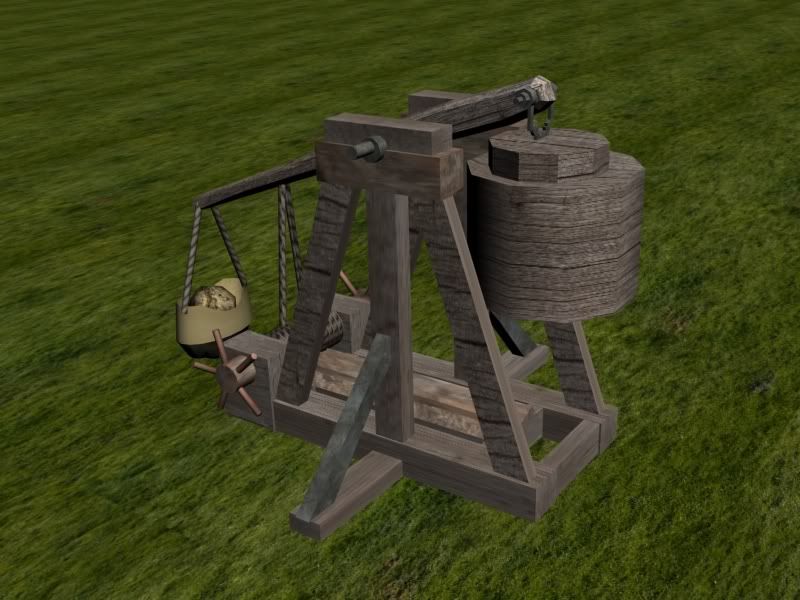
Here's a trebuchet that I'm doing as a required supplementary project for my science project on siege machines.
It'll eventually be fully-animated :wink:
Hidden/Spoiler:
Image
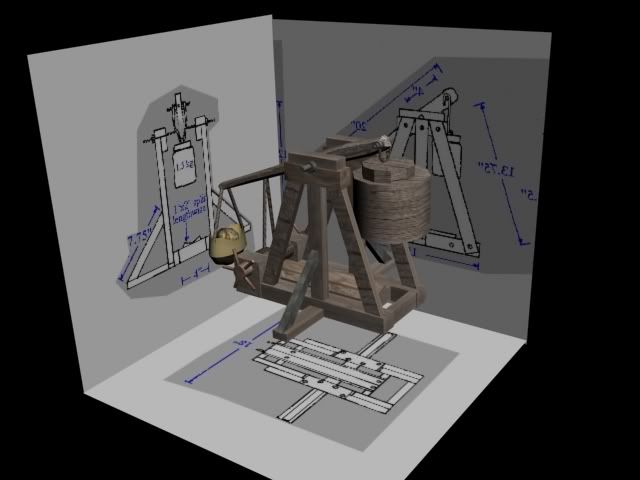
And here's how I made it:
Hidden/Spoiler:
Image
Caleb1117
2008 Most Original Avatar
Posts: 3096
Joined: Sun Aug 20, 2006 5:55 pm
Projects :: No Mod project currently.
xbox live or psn: No gamertag set
Location: X-Fire: caleb1117 ಠ_ಠ

Re: Model showcase thread Part II

Post by Caleb1117 »

Bah Mangonels are better. :P

Seriously though, nice job, I can't wait to see how it looks animated.
MandeRek
Sith Master
Sith Master
Posts: 2766
Joined: Tue Oct 02, 2007 10:51 am
Projects :: Battlefront Zer0
Games I'm Playing :: SWTOR
xbox live or psn: No gamertag set
Location: Ghosting around GT
Contact:

Re: Model showcase thread Part II

Post by MandeRek »

Wow, wicked! Nice work man! :o

Can also be used in Terra Strife btw.. :P
Commander_Cody771
Vader's Apprentice
Posts: 1069
Joined: Thu Jun 07, 2007 5:02 pm
Projects :: No Mod project currently.
Games I'm Playing :: I have not listed any games yet
xbox live or psn: No gamertag set
Location: Looking for a new CPU
Contact:

Re: Model showcase thread Part II

Post by Commander_Cody771 »

Not really. :roll: Nice model btw.
User avatar
trainmaster611
Sith Lord
Sith Lord
Posts: 1779
Joined: Thu Aug 24, 2006 5:22 pm
Projects :: No Mod project currently.
Games I'm Playing :: I have not listed any games yet
xbox live or psn: No gamertag set
Location: Building a railway to Coruscant
Contact:

Re: Model showcase thread Part II

Post by trainmaster611 »

Umm I don't see why not :roll:

Did you make the model from scratch or did you use that program that turns pictures into models. Either way, nice job :thumbs:
User avatar
Fluffy_the_ic
Hoth Battle Chief
Hoth Battle Chief
Posts: 3223
Joined: Thu Jan 24, 2008 7:03 pm
xbox live or psn: fluffytherc
Location: she/her
Contact:

Re: Model showcase thread Part II

Post by Fluffy_the_ic »

Arena:Image
Image
'Nuther View: Image
Image
Have an elevator animation. Gonna upload on Youtube soon. but, I want to make a couple parts transparent, and I want to know what an alpha channel is. So could someone please tell me?
Caleb1117
2008 Most Original Avatar
Posts: 3096
Joined: Sun Aug 20, 2006 5:55 pm
Projects :: No Mod project currently.
xbox live or psn: No gamertag set
Location: X-Fire: caleb1117 ಠ_ಠ

Re: Model showcase thread Part II

Post by Caleb1117 »

Alpha channel is a layer in an image that will make parts of it transparent, when used as an image.

Take this for instance, it is a typical square/rectangular image, the Alpha channel around the person (The Tick) makes the background that was in the original image nonexistant.

Image

Its sort of like erasing things from an image, but it makes stuff invisible instead of just white.

I just noticed I missed a spot in-between his antennae, darn. :|
User avatar
Fluffy_the_ic
Hoth Battle Chief
Hoth Battle Chief
Posts: 3223
Joined: Thu Jan 24, 2008 7:03 pm
xbox live or psn: fluffytherc
Location: she/her
Contact:

Re: Model showcase thread Part II

Post by Fluffy_the_ic »

Caleb1117 wrote:Alpha channel is a layer in an image that will make parts of it transparent, when used as an image.

Take this for instance, it is a typical square/rectangular image, the Alpha channel around the person (The Tick) makes the background that was in the original image nonexistant.

Image

Its sort of like erasing things from an image, but it makes stuff invisible instead of just white.

I just noticed I missed a spot in-between his antennae, darn. :|
Ooooooooooooooooooooooooooooooooooooookaaaaaaaaaaaaay... How do you make a texture with an alpha channel?
Taivyx
2008 Best Games Related Avatar
Posts: 1706
Joined: Thu Jun 07, 2007 3:34 pm
Projects :: Terra Strife - discontinued
Games I'm Playing :: none
xbox live or psn: No gamertag set
Contact:

Re: Model showcase thread Part II

Post by Taivyx »

If you use GIMP: http://docs.gimp.org/en/gimp-layer-alpha-add.html
If you use Photoshop: http://graphicssoft.about.com/od/photos ... ps504h.htm

Nice Arena btw
trainmaster611 wrote:Umm I don't see why not :roll:

Did you make the model from scratch or did you use that program that turns pictures into models. Either way, nice job :thumbs:
Made it from scratch, the blueprints are just there for scaling and position and all that jazz
User avatar
Fluffy_the_ic
Hoth Battle Chief
Hoth Battle Chief
Posts: 3223
Joined: Thu Jan 24, 2008 7:03 pm
xbox live or psn: fluffytherc
Location: she/her
Contact:

Re: Model showcase thread Part II

Post by Fluffy_the_ic »

Taivyx wrote:If you use GIMP: http://docs.gimp.org/en/gimp-layer-alpha-add.html
If you use Photoshop: http://graphicssoft.about.com/od/photos ... ps504h.htm

Nice Arena btw
trainmaster611 wrote:Umm I don't see why not :roll:

Did you make the model from scratch or did you use that program that turns pictures into models. Either way, nice job :thumbs:
Made it from scratch, the blueprints are just there for scaling and position and all that jazz
Thanks.
EDIT: So, does that mean that a transparent back in gimp is and alpha channel?
User avatar
Challenger33
Lieutenant General
Lieutenant General
Posts: 726
Joined: Wed Aug 23, 2006 3:44 pm
Projects :: No Mod project currently.
xbox live or psn: No gamertag set
Location: Building a legion of papercraft models.
Contact:

Re: Model showcase thread Part II

Post by Challenger33 »

Hidden/Spoiler:
Image
My first model in a while; I still have quite a ways to go.
{501st}Commander_Appo
1st Lieutenant
1st Lieutenant
Posts: 441
Joined: Thu Jun 14, 2007 2:40 pm
Projects :: No Mod project currently.
Games I'm Playing :: I have not listed any games yet
xbox live or psn: No gamertag set
Location: Earth
Contact:

Re: Model showcase thread Part II

Post by {501st}Commander_Appo »

Cool, nice moduel. :thumbs:
Locked