
Combo file? [Solved]
Moderator: Moderators
-
yukisuna

- Rebel Sergeant

- Posts: 210
- Joined: Wed Jan 28, 2009 5:50 am
- Projects :: My new PC hates the Mod Tools
- xbox live or psn: Samura Yukisuna
- Location: Stuck in a place full of happy happiness known as Steam.
Combo file? [Solved]
i've just finished my jedi with new attacks and all that, and i got a .combo file, but what do i type in in the weapon file? the jedi just holds the sword as an rifle, and the first AI/Player spawning as him crashes the game. can anyone help me?
-
DarthD.U.C.K.

- Master of the Force

- Posts: 6027
- Joined: Wed Sep 27, 2006 11:05 am
- Location: Duckburg, Germany
Re: combo file?
can your post your bf2log?
can to which file you are refering exactly?
can to which file you are refering exactly?
-
yukisuna
- Rebel Sergeant
- Posts: 210
- Joined: Wed Jan 28, 2009 5:50 am
- Projects :: My new PC hates the Mod Tools
- xbox live or psn: Samura Yukisuna
- Location: Stuck in a place full of happy happiness known as Steam.
Re: combo file?
the log isnt saying anything.
but, ive named the file: duelant.combo, because thats what the sword animations is named. duelant.anims, duelant.zaabin, and duelant.zafbin. so i thought it would read the file if i did that. but it didnt... but do you really need that log? it only says (model) has 1839 vertices and NO COLLISION GEOMETRY (will be slow). so..?
this time it didnt say anything...
but, ive named the file: duelant.combo, because thats what the sword animations is named. duelant.anims, duelant.zaabin, and duelant.zafbin. so i thought it would read the file if i did that. but it didnt... but do you really need that log? it only says (model) has 1839 vertices and NO COLLISION GEOMETRY (will be slow). so..?
this time it didnt say anything...
-
DarthD.U.C.K.
- Master of the Force
- Posts: 6027
- Joined: Wed Sep 27, 2006 11:05 am
- Location: Duckburg, Germany
Re: combo file?
i mean the bf2log not the mungelog
-
yukisuna
- Rebel Sergeant
- Posts: 210
- Joined: Wed Jan 28, 2009 5:50 am
- Projects :: My new PC hates the Mod Tools
- xbox live or psn: Samura Yukisuna
- Location: Stuck in a place full of happy happiness known as Steam.
Re: combo file?
were can i find it? 
-
MetalcoreRancor
- Brigadier General

- Posts: 628
- Joined: Thu Jun 07, 2007 11:13 am
- Projects :: No Mod project currently.
- xbox live or psn: No gamertag set
Re: combo file?
.combo must be named the same name as the character using it, so name it the same as the jedi you made.
this is the line you need in your lightsabre odf,
ComboAnimationBank = "human_sabre melee comboname"
Furthermore, add AnimationName = "animname" to your jedi odf.
the animname part is replaced by your new anim set.
this is the line you need in your lightsabre odf,
ComboAnimationBank = "human_sabre melee comboname"
Furthermore, add AnimationName = "animname" to your jedi odf.
the animname part is replaced by your new anim set.
-
yukisuna
- Rebel Sergeant
- Posts: 210
- Joined: Wed Jan 28, 2009 5:50 am
- Projects :: My new PC hates the Mod Tools
- xbox live or psn: Samura Yukisuna
- Location: Stuck in a place full of happy happiness known as Steam.
Re: combo file?
thank you, rancor, i used your tutorial right before i asked the question.
-
Fiodis

- Master of the Force
- Posts: 4145
- Joined: Wed Nov 12, 2008 9:27 pm
- Projects :: Rannoch + Tientia + Tools Programming
Re: combo file?
For BFront2.txt (an extremely helpful debugging tool), go to BF2_Modtools main folder. Find BF2_modtools.exe and move it to your game's GameData folder. Run it from in there, and you'll get a smalelr version of the game. Play your map, if it crashes then it crashes. Then go to GameData and look for a text file called BFront2.txt. Open it, you have yourself an error list. Severity 3's and up usually cause a CTD (Crash To Desktop).
Note ~ For most Vista users, if you haven't changed the security settings, your copy of BFront2.txt will show up in a different folder:
C:\Users\*your username*\AppData\Local\VirtualStore\Program Files\LucasArts\Star Wars Battlefront II\GameData
EDIT - off-topic: 1,111 posts! Eleventy-eleven!
Note ~ For most Vista users, if you haven't changed the security settings, your copy of BFront2.txt will show up in a different folder:
C:\Users\*your username*\AppData\Local\VirtualStore\Program Files\LucasArts\Star Wars Battlefront II\GameData
EDIT - off-topic: 1,111 posts! Eleventy-eleven!
-
RogueKnight
- Space Ranger
- Posts: 2512
- Joined: Sat Nov 22, 2008 1:50 pm
- Projects :: Life. Work.
- xbox live or psn: No gamertag set
- Location: Washington, US
Re: combo file?
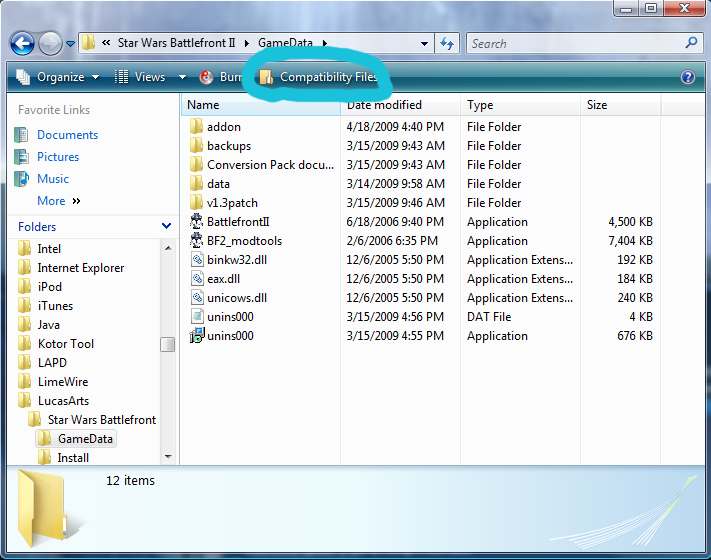
An easy way to find it is to just go to C:\Program Files\LucasArts\Star Wars Battlefront II\Gamedata and click on compatibility files in the upper left hand part of the top toolbar.Fiodis wrote:
Note ~ For most Vista users, if you haven't changed the security settings, your copy of BFront2.txt will show up in a different folder:
C:\Users\*your username*\AppData\Local\VirtualStore\Program Files\LucasArts\Star Wars Battlefront II\GameData
-
yukisuna
- Rebel Sergeant
- Posts: 210
- Joined: Wed Jan 28, 2009 5:50 am
- Projects :: My new PC hates the Mod Tools
- xbox live or psn: Samura Yukisuna
- Location: Stuck in a place full of happy happiness known as Steam.
Re: combo file?
MetalcoreRancor wrote:.combo must be named the same name as the character using it, so name it the same as the jedi you made.
this is the line you need in your lightsabre odf,
ComboAnimationBank = "human_sabre melee comboname"
Furthermore, add AnimationName = "animname" to your jedi odf.
the animname part is replaced by your new anim set.
well, were in the odf? under the '[GameObjectClass]' or under the [Properties]?
heres what's in the jedi's odf file:
[GameObjectClass]
ClassParent = "com_inf_default"
GeometryName = "jed_inf_jedi.msh"
AnimationName = "duelant"
[Properties]
GeometryName = "jed_inf_jedi"
GeometryLowRes = "jed_inf_jedi_low1"
OverrideTexture = "jed_inf_jedi03"
AnimationName = "duelant"
WeaponName1 = "duel_saber"
WeaponAmmo1 = 0
with AnimationName, did you mean the files in the munged folder or the combo file?
-
kinetosimpetus
- Imperial Systems Expert

- Posts: 2381
- Joined: Wed Mar 25, 2009 4:15 pm
- Projects :: A secret project
Re: combo file?
remove the AnimationName above [Properties]
-
Teancum

- Jedi Admin

- Posts: 11080
- Joined: Wed Sep 07, 2005 11:42 pm
- Projects :: No Mod project currently.
- xbox live or psn: No gamertag set
- Location: Indiana
Re: combo file?
Yep, that's the problem. [GameObjectClass] should only ever have the type (aka flyer, soldier, etc) OR the ClassParent, then a GeometryName.
-
yukisuna
- Rebel Sergeant
- Posts: 210
- Joined: Wed Jan 28, 2009 5:50 am
- Projects :: My new PC hates the Mod Tools
- xbox live or psn: Samura Yukisuna
- Location: Stuck in a place full of happy happiness known as Steam.
Re: combo file?
thank you, all of you! (almost) all of the combo attacks worked in-game! most important: it worked. again, thanks to all of you
-
MetalcoreRancor
- Brigadier General
- Posts: 628
- Joined: Thu Jun 07, 2007 11:13 am
- Projects :: No Mod project currently.
- xbox live or psn: No gamertag set
Re: Combo file? [Solved]
Ah, simple odf issues. Go figure.
It happens to me all the time =P
It happens to me all the time =P