Where'd my objects go! Episode II: Revenge of the Objects

In this forum you will find and post information regarding the modding of Star Wars Battlefront 2. DO NOT POST MOD IDEAS/REQUESTS.

Moderator: Moderators

Post Reply
Hebes24
Sith Master
Sith Master
Posts: 2594
Joined: Sat Jun 03, 2006 5:15 pm
Projects :: No Mod project currently.
Games I'm Playing :: I have not listed any games yet
xbox live or psn: No gamertag set
Location: In An Epic Space Battle!
Contact:

Where'd my objects go! Episode II: Revenge of the Objects

Post by Hebes24 »

I made a new map, a Yavin map to be exact. I copied the odf, msh, effects folders from assets\worlds\YAV. I pasted them in data_IDK\worlds\IDK. I put some in ZE (two "greattemples" and the interiors to go with them), then I munge, and they do not show up ingame. :? They are in new layers, but even the objects I put in "[base]" don't show up!!! I also updated the REQ's and MRQ's via the button in ZE.

I got this in the MungeLog:
WARNING[PC_modelmunge msh\yav_bldg_ruins_reflectionpool.msh]:_CreateShadowMesh(bone:yav_bldg_ruins_reflectionpool,lod:0): ignoring duplicate tri 145,146,133
WARNING[PC_modelmunge msh\yav_bldg_ruins_reflectionpool.msh]:_CreateShadowMesh(bone:yav_bldg_ruins_reflectionpool,lod:0): ignoring duplicate tri 132,133,135
WARNING[PC_modelmunge msh\yav_bldg_ruins_reflectionpool.msh]:_CreateShadowMesh(bone:yav_bldg_ruins_reflectionpool,lod:0): ignoring duplicate tri 145,142,143
WARNING[PC_modelmunge msh\yav_bldg_ruins_reflectionpool.msh]:_CreateShadowMesh(bone:yav_bldg_ruins_reflectionpool,lod:0): ignoring duplicate tri 273,274,276
WARNING[PC_modelmunge msh\yav_bldg_ruins_reflectionpool.msh]:_CreateShadowMesh(bone:yav_bldg_ruins_reflectionpool,lod:0): ignoring duplicate tri 262,264,274
WARNING[PC_modelmunge msh\yav_bldg_ruins_reflectionpool.msh]:_CreateShadowMesh(bone:yav_bldg_ruins_reflectionpool,lod:0): ignoring duplicate tri 262,266,265
WARNING[PC_modelmunge msh\yav_bldg_ruins_reflectionpool.msh]:_CreateShadowMesh(bone:yav_bldg_ruins_reflectionpool,lod:0): ignoring duplicate tri 275,276,261
0 Errors 7 Warnings
The wierd part is, I only get this in the BFront2 log:
Message Severity: 2
.\Source\StringDB.cpp(48 )
ID=d1a56a80: trying to replace "yav_bldg_greattemple_interior" with "yav_bldg_greattemple_interior1"
Any Ideas? I already cleaned, then munged, and got the same errors.


As always, any help would be greatly appreciated! :D
Last edited by Hebes24 on Sun Sep 10, 2006 12:47 pm, edited 1 time in total.
Penguin
Jedi Admin
Jedi Admin
Posts: 2541
Joined: Sun Mar 05, 2006 12:00 am
Location: Australia

RE: Hey! Where

Post by Penguin »

thats all normal.
t551
General
General
Posts: 791
Joined: Sat Jul 16, 2005 3:23 pm
Projects :: No Mod project currently.
Games I'm Playing :: I have not listed any games yet
xbox live or psn: No gamertag set

RE: Hey! Where

Post by t551 »

Off-topic: Nice title for your topic, Hebes.
Hebes24
Sith Master
Sith Master
Posts: 2594
Joined: Sat Jun 03, 2006 5:15 pm
Projects :: No Mod project currently.
Games I'm Playing :: I have not listed any games yet
xbox live or psn: No gamertag set
Location: In An Epic Space Battle!
Contact:

RE: Hey! Where

Post by Hebes24 »

@ Penguin - If those are normal, then why aren't my objects appearing!? :?

@ t551t551 - That was a good title wasn't it. :P


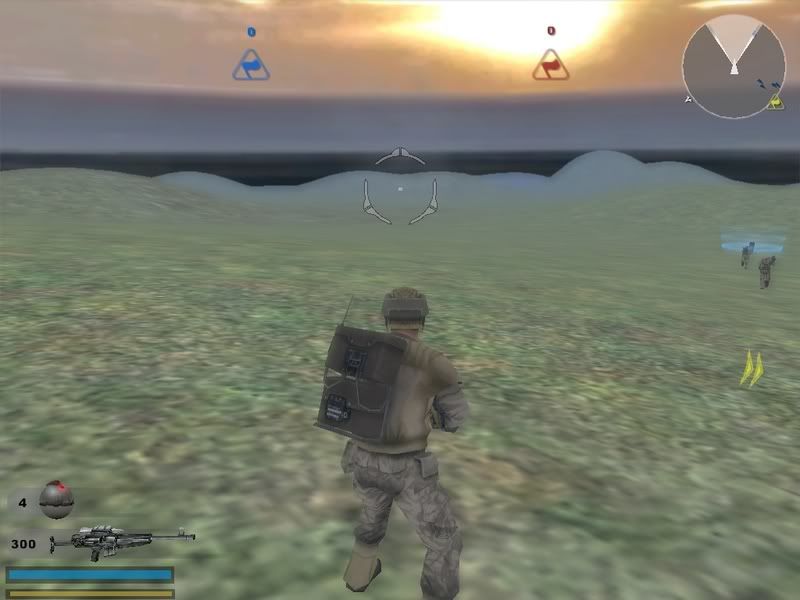
Edit: Look, nothing there:
Hidden/Spoiler:
Image
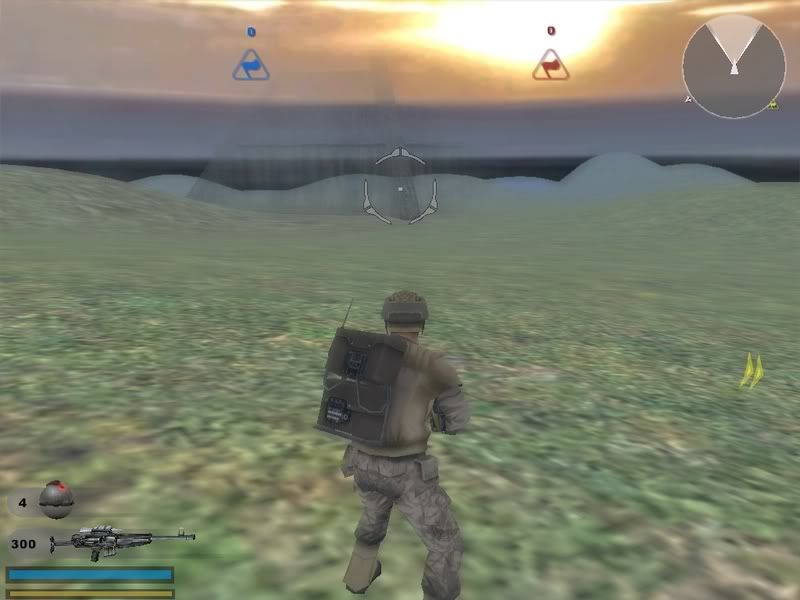
Wait! What the-!? Look what's coming through the gloom!
Hidden/Spoiler:
Image
It's my Temple! :o But, you should be able to see something that big from where I was earlier. I'll look in the .fx file and see what I can do with it.

*NOT SOLVED YET*

EDIT2
Ok, I did something to the .fx file that i thought would make it work, but it didn't. what do I change to make the object viewing distance farther?

here's my fx file:
Hidden/Spoiler:
[quote]Effect("Water")
{
// general parameters
PatchDivisions(8,8 );
Tile(2.0,2.0);

// ocean parameters
OceanEnable(0);

// water event parameters
WaterRingColor(148, 170, 192,255);
WaterWakeColor(192, 192, 192,255);
WaterSplashColor((192, 192, 192,255);

DisableLowRes();

// PS2 parameters
PS2()
{
Velocity(0.1,0.02);
LODDecimation(8 );
MainTexture("yav_water.tga");
MinDiffuseColor(32, 40, 32, 255);
MaxDiffuseColor(128, 130, 128, 255);
BorderDiffuseColor(160, 160, 160, 255);
SpecularColor(192, 192, 192, 192);
SpeckleSpecularColor(160, 160, 160, 255);
SpeckleAmbientColor(0, 0, 0, 255);
SpeckleTextures("water_specularmask_",25, 2.0);
SpeckleTile(4.0, 4.0);
SpeckleScrollSpeed(0.2,0.0);
SpeckleCoordShift(10.0,10.0);
LightAzimAndElev(1.0,0.0);
}
// PC parameters
PC()
{
Velocity(0.01,0.02);
MainTexture("yav_water.tga");
LODDecimation(1);

RefractionColor(101, 136, 140, 255);
ReflectionColor(150,150,150,150);
UnderwaterColor(128, 130, 128, 64);
FresnelMinMax(0.2,0.7)

NormalMapTextures("water_normalmap_",16,8.0);
BumpMapTextures("water_bumpmap_",16,8.0);
SpecularMaskTextures("water_specularmask_",25, 2.0);
SpecularMaskTile(4.0,4.0);
SpecularMaskScrollSpeed(0.0,0.0);
}
// XBOX parameters
XBOX()
{
Velocity(0.01,0.002);
LODDecimation(1);
RefractionColor(128, 130, 128, 64);
ReflectionColor(150,150,150,150);
UnderwaterColor(128, 130, 128, 64);
FresnelMinMax(0.2,0.7)
NormalMapTextures("water_normalmap_",16,8.0);
}
}

Effect("Blur")
{
PS2()
{
Enable(1);
MinMaxDepth(0.95,1.0);
}
PC()
{
Enable(1);
Mode(1)
ConstantBlend(0.3)
DownSizeFactor(0.2500)
}
XBOX()
{
Enable(1);
Mode(1)
ConstantBlend(0.45)
DownSizeFactor(0.2500)
}
}

SunFlare()
{
Angle(120.000000, -30.000000);
Color(255, 255, 255);
Size(5.0);
FlareOutSize(40.0);
NumFlareOuts(40);
InitialFlareOutAlpha(70);
HaloInnerRing(0.0, 255, 255, 255, 255);
PS2()
{
HaloMiddleRing(10.0, 255, 200, 0, 255);
}
PC()
{
HaloMiddleRing(10.0, 255, 200, 0, 128);
}
XBOX()
{
HaloMiddleRing(10.0, 255, 200, 0, 128);
}
HaloOutterRing(40.0, 255, 127, 0, 0);
SpikeColor(230,230,0,128);
SpikeSize(9.0);
}
[/quote]
darthpingu

RE: Hey! Where

Post by darthpingu »

Make a lowrez tga for it:
Shrink the content of the tga to 64 pixels in a new tga called ***_lowrez.tga
***=the tga name.
Rekubot
Jedi
Jedi
Posts: 1080
Joined: Wed Apr 05, 2006 12:34 pm
Projects :: No Mod project currently.
Games I'm Playing :: Shadow Complex
xbox live or psn: Rekubot
Location: UK

RE: Hey! Where

Post by Rekubot »

It doesn't need a lowrez TGA, it needs a lowrez MSH file. Are you sure you copied that over? (Check the prop ODF)
Hebes24
Sith Master
Sith Master
Posts: 2594
Joined: Sat Jun 03, 2006 5:15 pm
Projects :: No Mod project currently.
Games I'm Playing :: I have not listed any games yet
xbox live or psn: No gamertag set
Location: In An Epic Space Battle!
Contact:

RE: Hey! Where

Post by Hebes24 »

I copied the odf, msh, and effects files straight from the assets. There is no lowrez msh. the wierd part is, that in the shipped yavin map, you can see it from where I was standing in the first pic. :?
archer01

Post by archer01 »

Sight distance and other related junk is a function of the .sky file. Under "SkyInfo()" you'll see something like "NearSceneRange(values and whatnot);". The NearSceneRange is what the game uses to decide when to fade (render) stuff in. Beware though, from what I know about graphics engines, this is what controls the distance in which the game actually starts using processor power to render the objects, so really large numbers might slow down a map.

FogRange can also affect visibility but it's setting only affects the fog itself, not when things fade in/start rendering.


On a side note:
Don't trust everything that came with the mod tools. Much of the stuff included in them was NOT used in the final version of the game. I don't know about everyone else, but I can't even load Endor in ZE. Some of the models are the Xbox versions (which 'should' be compatible with a PC, but you never know... some surface/fx configurations might be different). And the shell scripts are from pre-version 1.1 of the game (which came out first? the mod tools or the patch? Either way, the stuff is old).
Hebes24
Sith Master
Sith Master
Posts: 2594
Joined: Sat Jun 03, 2006 5:15 pm
Projects :: No Mod project currently.
Games I'm Playing :: I have not listed any games yet
xbox live or psn: No gamertag set
Location: In An Epic Space Battle!
Contact:

Post by Hebes24 »

What do all those values mean?
archer01

Post by archer01 »

I'm not 'entirely' sure.

(*Edited: What I wrote here first didn't make a lick of sense. See below for my "guessed" example.)

But as I said, I don't know for sure. If you find out, be sure to tell us. :D
Last edited by archer01 on Tue Sep 12, 2006 5:22 pm, edited 1 time in total.
Hebes24
Sith Master
Sith Master
Posts: 2594
Joined: Sat Jun 03, 2006 5:15 pm
Projects :: No Mod project currently.
Games I'm Playing :: I have not listed any games yet
xbox live or psn: No gamertag set
Location: In An Epic Space Battle!
Contact:

Post by Hebes24 »

The thing is, I'm pretty sure it doesn't have a lowrez model. :?

So, if I had the range to be (20.0, 300.0, 300.0, 600.0); it would start showing the Hi-Res model at 20, and continue to show it until 300, (I'm guessing this is meters away?) then it will turn into the Low-res at 300, and continue until 600, where it will disappear?
archer01

Post by archer01 »

I don't think that's how it works... computer graphics engines are rarely that simple (LOTS of math involved).

Take this from Yavin's sky file:
NearSceneRange(60.000000, 150.000000, 90.000000, 200.000000);

If I had to take a wild guess... and I mean a WILD guess... I would say that if the distance slider is at it's lowest in the game's video options menu, then it will use the high-rez model up until 60 meters away. Then it switches to the low-rez (if the game has one). Once it hits 90 meters, it fades out of view.

The same process would be used for the 150 - 200 but only if the graphics settings are maxed out. I have no idea if this is the way it actually works though.

Sorry about the way I decribed it in my post above. I got my sentences mixed.
User avatar
AceMastermind
Gametoast Staff
Gametoast Staff
Posts: 3285
Joined: Mon Aug 21, 2006 6:23 am
Contact:

NearSceneRange values breakdown

Post by AceMastermind »

NearSceneRange(a,b,c,d)
"c" should always be larger than "a"
NearSceneRange(start min, start max, end min, end max)
The range between the two is controlled by the slider under video options.

FarSceneRange first requires a world to have a far scene because it uses low res terrain for the distant texture
FarSceneRange is just min and max distance. If a world has no far scene it uses reflecting color as the fog color in the far scene.

Source:
http://www.secretsociety.com/forum/disp ... sp?mid=197
Hidden/Spoiler:
[quote="Psych0fred"]NearSceneRange(start min, start max, end min, end max) where the range between the two is controlled by the slider under video options.

FarSceneRange first requires a world have a far scene (far scene uses low res terrain for the distant texture and FarSceneRange is just min and max distance. If a world has no far scene it uses reflecting color as the fog color in the far scene.

A couple other sky notes that may be useful:
Suninfo(height angle, direction angle)
The angle is the direction the light goes not comes from, so 0 is directly below, 90 is on the horizon and 180 is overhead. The heioght angle you set using common sense, the directional angle you play with and see how it looks until you like it. This is because the direction angle is based on the x direction of a world (which is different based on your sun position)

On PC AmbientVehicle and Ambientunit are not used unless there are not top and bottom directional settings, in which case it then uses ambient vehicle, otherwise static world objects use the ambient color setting and dynamic objects (vehicles, units, etc) use the top and bottom directional settings.

Sun shadow color is the color which is subtracted from the area that is being hit by a shadow.[/quote]
archer01

Post by archer01 »

Nice. Thanks Ace! That verifies my guess. :D
Hebes24
Sith Master
Sith Master
Posts: 2594
Joined: Sat Jun 03, 2006 5:15 pm
Projects :: No Mod project currently.
Games I'm Playing :: I have not listed any games yet
xbox live or psn: No gamertag set
Location: In An Epic Space Battle!
Contact:

Post by Hebes24 »

So, since there is no low-res model or texture, I should have a big number for A, so you can see it from a large distance away?
User avatar
trainmaster611
Sith Lord
Sith Lord
Posts: 1779
Joined: Thu Aug 24, 2006 5:22 pm
Projects :: No Mod project currently.
Games I'm Playing :: I have not listed any games yet
xbox live or psn: No gamertag set
Location: Building a railway to Coruscant
Contact:

Post by trainmaster611 »

That problem occurs on all maps with the temple. Even the shipped maps have that problem! You have to get really close to find it! Check Archer01's Yavin 4: Arroyo Pass Map. It has the same problem. :raider:
archer01

Post by archer01 »

*Edit (again):
I checked even further... It appears that the buildings have lowrez versions of themselves as part of the model. If you open the geo_bunker_outside.msh (a building that doesn't vanish) file in a hex editor, you'll find some mentions of the term "lowrez" in it. The temple msh has no mention of a lowrez version anywhere in it.

@Hebes24
If you did put a large number for A it should solve your problem (just make sure everything else is still higher than A), but it will likely make the graphics lag even more on slower computers.
Hebes24
Sith Master
Sith Master
Posts: 2594
Joined: Sat Jun 03, 2006 5:15 pm
Projects :: No Mod project currently.
Games I'm Playing :: I have not listed any games yet
xbox live or psn: No gamertag set
Location: In An Epic Space Battle!
Contact:

Post by Hebes24 »

Yeah, I get lag like a [diet dr. pepper] on most maps like the one I'm planning, so I'm used to it. :P
Post Reply