
Crashing due to Command Posts...?
Moderator: Moderators
-
obiboba3po
- 2008 Most Technically Challenging Avatar
- Posts: 2376
- Joined: Tue Feb 12, 2008 7:46 pm
- Projects :: No Mod project currently.
- xbox live or psn: No gamertag set
- Location: NJ, USA
Re: Crashing due to Command Posts...?
try saving and restarting ZE. sometimes objects and regions, etc. do that sometimes, im not sure why lol. You have to have a spawn path for each cp and make sure that each path is called for in each corresponding CPs object details (the tab thingy in object mode)
-
Leo the Larg

- First Lance Corporal

- Posts: 121
- Joined: Thu May 21, 2009 2:39 pm
- Projects :: No Mod project currently.
- xbox live or psn: No gamertag set
- Location: With the Cantina Band. You'll never know which one, we all look so alike...
Re: Crashing due to Command Posts...?
The CPs are matched up, but I don't know what you mean. Just save my map, and exit ZE, then go back in??obiboba3po wrote:try saving and restarting ZE. sometimes objects and regions, etc. do that sometimes, im not sure why lol. You have to have a spawn path for each cp and make sure that each path is called for in each corresponding CPs object details (the tab thingy in object mode)
And I'll try what 501st said.
EDIT
I did what 501st said, it started up and I began loading my map, but again, after it was done loading the screen went black and crashed back to desktop.
-
obiboba3po
- 2008 Most Technically Challenging Avatar
- Posts: 2376
- Joined: Tue Feb 12, 2008 7:46 pm
- Projects :: No Mod project currently.
- xbox live or psn: No gamertag set
- Location: NJ, USA
Re: Crashing due to Command Posts...?
i said to restart ZE if you can't select an object or path or something (often happens when you delete it)
Heres a pic of what im talking about. Ooooh wait i know exactly whats wrong! you were most likely in the wrong layer adding/deleting spawn paths. make sure that all spawn paths are placed under the conquest layer (i assume this is conquest) and of course that all your cps are also under the conquest layer.
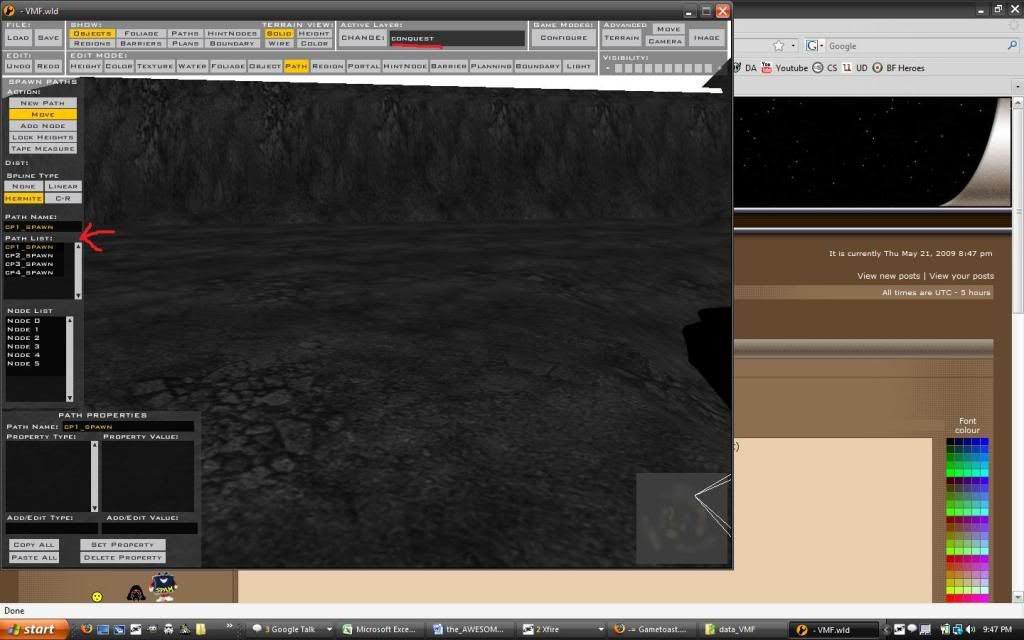
sorry for crappy messed up photobucket quality lol.
Heres a pic of what im talking about. Ooooh wait i know exactly whats wrong!
you were most likely in the wrong layer adding/deleting spawn paths. make sure that all spawn paths are placed under the conquest layer (i assume this is conquest) and of course that all your cps are also under the conquest layer. sorry for crappy messed up photobucket quality lol.
-
Leo the Larg
- First Lance Corporal
- Posts: 121
- Joined: Thu May 21, 2009 2:39 pm
- Projects :: No Mod project currently.
- xbox live or psn: No gamertag set
- Location: With the Cantina Band. You'll never know which one, we all look so alike...
Re: Crashing due to Command Posts...?
Hate to break it to you, but I've been doing this in Conquest the whole time.
I don't think you understand what I mean...
There are 3 extra paths on my map, I can't select them because they don't appear on the spawn path toolbar on the side. They are just paths on the map, but aren't labeled, and don't appear anywhere else than the map itself.
I don't think you understand what I mean...
There are 3 extra paths on my map, I can't select them because they don't appear on the spawn path toolbar on the side. They are just paths on the map, but aren't labeled, and don't appear anywhere else than the map itself.
-
501st_commander
- Master Bounty Hunter

- Posts: 1570
- Joined: Wed Dec 10, 2008 7:48 pm
Re: Crashing due to Command Posts...?
ok now post your bfront2.logLeo the Larg wrote:I did what 501st said, it started up and I began loading my map, but again, after it was done loading the screen went black and crashed back to desktop.
-
Leo the Larg
- First Lance Corporal
- Posts: 121
- Joined: Thu May 21, 2009 2:39 pm
- Projects :: No Mod project currently.
- xbox live or psn: No gamertag set
- Location: With the Cantina Band. You'll never know which one, we all look so alike...
Re: Crashing due to Command Posts...?
What is the bf2.log? Is that the error message? Because this time, it just crashed with no message at all.
-
501st_commander
- Master Bounty Hunter
- Posts: 1570
- Joined: Wed Dec 10, 2008 7:48 pm
Re: Crashing due to Command Posts...?
the bfront2.log can be found in the same place as the modtool.exe
unless you have vista, then you click the
unless you have vista, then you click the
Last edited by 501st_commander on Thu May 21, 2009 10:15 pm, edited 1 time in total.
-
501st_commander
- Master Bounty Hunter
- Posts: 1570
- Joined: Wed Dec 10, 2008 7:48 pm
Re: Crashing due to Command Posts...?
this one:
-
Leo the Larg
- First Lance Corporal
- Posts: 121
- Joined: Thu May 21, 2009 2:39 pm
- Projects :: No Mod project currently.
- xbox live or psn: No gamertag set
- Location: With the Cantina Band. You'll never know which one, we all look so alike...
Re: Crashing due to Command Posts...?
Here it is, but I warn you, it is long:
Hidden/Spoiler:
-
501st_commander
- Master Bounty Hunter
- Posts: 1570
- Joined: Wed Dec 10, 2008 7:48 pm
Re: Crashing due to Command Posts...?
ok there are no sev 3's in there so i dont know what is causing this.
Are you loading custem sides?
i'm asking this because i found this:
Are you loading custem sides?
i'm asking this because i found this:
Code: Select all
Message Severity: 2
.\Source\EntitySoldier.cpp(10471)
Soldier imp_inf_darktrooper has geometry collision
-
Leo the Larg
- First Lance Corporal
- Posts: 121
- Joined: Thu May 21, 2009 2:39 pm
- Projects :: No Mod project currently.
- xbox live or psn: No gamertag set
- Location: With the Cantina Band. You'll never know which one, we all look so alike...
Re: Crashing due to Command Posts...?
No, not loading any custom sides. No custom weps, units, or even skins. I do have BFX and The Dark Times mods, but I can't run those with my map so I don't see the problem.
-
501st_commander
- Master Bounty Hunter
- Posts: 1570
- Joined: Wed Dec 10, 2008 7:48 pm
Re: Crashing due to Command Posts...?
only thing i can think of is the spawn paths. Do you have them on the conquest layer and are they named cp*_spawn? and is it the same in the cp properties? they ARE case-sencetive.
*cp name
*cp name
-
obiboba3po
- 2008 Most Technically Challenging Avatar
- Posts: 2376
- Joined: Tue Feb 12, 2008 7:46 pm
- Projects :: No Mod project currently.
- xbox live or psn: No gamertag set
- Location: NJ, USA
Re: Crashing due to Command Posts...?
I believe he stated that they were all under the conquest layer. The name doesn't really matter as long as its consistent. (if its named cp1_spawn you have to call it exactly that in the cp1 object properties) Im a little confused, do you have 5 seperate spawn paths with a distinct name that's being referenced in each corresponding cp?501st_commander wrote:only thing i can think of is the spawn paths. Do you have them on the conquest layer and are they named cp*_spawn? and is it the same in the cp properties? they ARE case-sencetive.
*cp name
just another random thing to check, in the cp objects, you choose a side (0, 1, 2) is there a mix of 1s and 2s? If theres only cps for one side im not sure what happens.
-
Leo the Larg
- First Lance Corporal
- Posts: 121
- Joined: Thu May 21, 2009 2:39 pm
- Projects :: No Mod project currently.
- xbox live or psn: No gamertag set
- Location: With the Cantina Band. You'll never know which one, we all look so alike...
Re: Crashing due to Command Posts...?
Here is a list of my spawn/control/capture's:
cp1_spawn/control/capture
cp2_spawn/control/capture
cp3_spawn/control/capture
cp4_spawn/control/capture
cp5_spawn/control/capture
("spawn/control/capture" are different files completely separate.)
Like I said there are those random default spawn paths on my map that aren't listed anywhere else, only visible on the map. (Unselectable too)
Edit: The cps match up with their corresponding regions/spawn paths. The CPs do have teams CPs 1 and 2 go to Team 1, CPs 3 and 4 go to Team 2, and CP 5 goes to team 0 (neutral).
cp1_spawn/control/capture
cp2_spawn/control/capture
cp3_spawn/control/capture
cp4_spawn/control/capture
cp5_spawn/control/capture
("spawn/control/capture" are different files completely separate.)
Like I said there are those random default spawn paths on my map that aren't listed anywhere else, only visible on the map. (Unselectable too)
Edit: The cps match up with their corresponding regions/spawn paths. The CPs do have teams CPs 1 and 2 go to Team 1, CPs 3 and 4 go to Team 2, and CP 5 goes to team 0 (neutral).
-
RogueKnight
- Space Ranger
- Posts: 2512
- Joined: Sat Nov 22, 2008 1:50 pm
- Projects :: Life. Work.
- xbox live or psn: No gamertag set
- Location: Washington, US
Re: Crashing due to Command Posts...?
First things first, fill that soldieranimation pool.
-
Leo the Larg
- First Lance Corporal
- Posts: 121
- Joined: Thu May 21, 2009 2:39 pm
- Projects :: No Mod project currently.
- xbox live or psn: No gamertag set
- Location: With the Cantina Band. You'll never know which one, we all look so alike...
Re: Crashing due to Command Posts...?
Well, I'm kinda new to modding, and have no clue how to do that.
Could you inform me somehow?
Could you inform me somehow?
-
FragMe!
- Gametoast Staff

- Posts: 2244
- Joined: Sat May 13, 2006 12:34 am
- Projects :: Not sure keep changing my mind.
- xbox live or psn: No gamertag set
- Location: Origin name GT_FragMe
- Contact:
Re: Crashing due to Command Posts...?
When push the Path button on the Edit Mode area it will show you all the paths on the map not just the layer you are working on so to find your wayward path you will have to go through all the layers and check if any path show up there, this includes the base layer.Leo the Larg wrote:Hate to break it to you, but I've been doing this in Conquest the whole time.
I don't think you understand what I mean...
There are 3 extra paths on my map, I can't select them because they don't appear on the spawn path toolbar on the side. They are just paths on the map, but aren't labeled, and don't appear anywhere else than the map itself.
After you did your changes did you press the update world req and mode MRQs thing that shows up when you press the configure button. Shouldn't need to since you didn't add any layers to the different modes but it won't hurt anything if you do press it.
As for the soldier animation pool, in the list of pools in your LUA just add in a line for SoldierAnimation and set it to at least 500. Somehting sort of like this, I place it between those two because I like to keep things sort of alphabetical.
SetMemoryPoolSize("SoundSpaceRegion", 64)
SetMemoryPoolSize("SoldierAnimation", 500)
SetMemoryPoolSize("TreeGridStack", 1024)
-
Leo the Larg
- First Lance Corporal
- Posts: 121
- Joined: Thu May 21, 2009 2:39 pm
- Projects :: No Mod project currently.
- xbox live or psn: No gamertag set
- Location: With the Cantina Band. You'll never know which one, we all look so alike...
Re: Crashing due to Command Posts...?
Ok, first off, I don't even know where the configure button is... I just press save map and then munge it.
And, where do I type in that lua? In the ***c_con and the ***g_con? Remember I am really new to this.
And, where do I type in that lua? In the ***c_con and the ***g_con? Remember I am really new to this.
-
FragMe!
- Gametoast Staff
- Posts: 2244
- Joined: Sat May 13, 2006 12:34 am
- Projects :: Not sure keep changing my mind.
- xbox live or psn: No gamertag set
- Location: Origin name GT_FragMe
- Contact:
Re: Crashing due to Command Posts...?
Edited my post while you posted
Oh Configure button is at the top it is the one labled Configure
BUt I just checked and that won't do anything for your cps anyway so don't worry about it.
Oh Configure button is at the top it is the one labled Configure
BUt I just checked and that won't do anything for your cps anyway so don't worry about it.
-
501st_commander
- Master Bounty Hunter
- Posts: 1570
- Joined: Wed Dec 10, 2008 7:48 pm
Re: Crashing due to Command Posts...?
what kind of era are you making? CW or GCW? open the ***c_con for CW and ***g_con for GCW and add it.Leo the Larg wrote:And, where do I type in that lua? In the ***c_con and the ***g_con? Remember I am really new to this.
