
Tatooine: Dune Sea Terrain Color

In this forum you will find and post information regarding the modding of Star Wars Battlefront 2. DO NOT POST MOD IDEAS/REQUESTS.

Moderator: Moderators

Post Reply
User avatar
Jendo7
Sith
Sith
Posts: 1304
Joined: Wed Apr 01, 2009 6:37 pm
Location: Cambridge, England.
Contact:

Tatooine: Dune Sea Terrain Color

Post by Jendo7 »

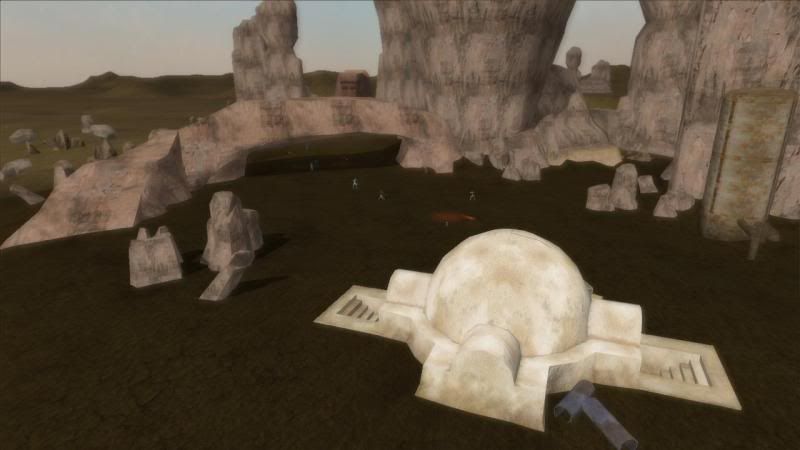
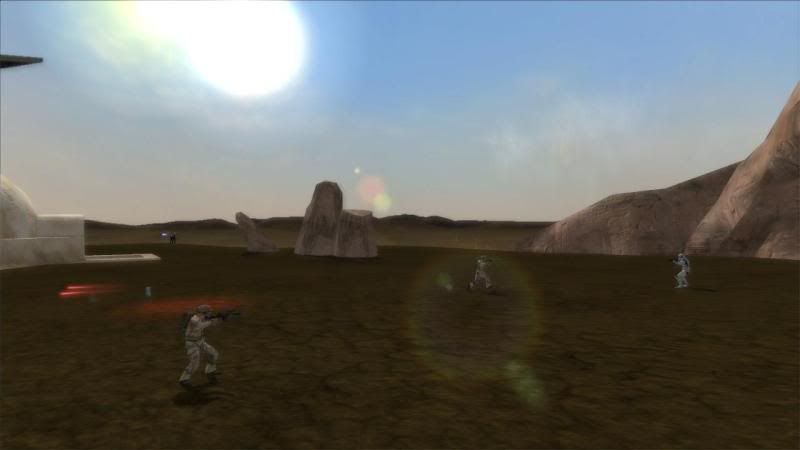
I've just converted Tatooine from BF1, but the terrain color is too dark and I haven't been able to make it lighter. Is there a way of making it more sand colored?

Example:

Image

Image

Thank's for any ideas.
User avatar
Maveritchell
Jedi Admin
Jedi Admin
Posts: 7366
Joined: Mon Aug 21, 2006 11:03 pm

Re: Tatooine: Dune Sea Terrain Color

Post by Maveritchell »

I think you want to manipulate the ColorControl parameter in your world's .fx file. Try adding this:

Code: Select all

Effect("ColorControl")
{
	PC()
	{
		GammaBrightness(0.6);
		GammaContrast(0.7);
		GammaHue(0.0);
		GammaColorBalance(0.5);
	}
	XBOX()
	{
		Enable(1);
		GammaBrightness(0.46);
		GammaContrast(0.48);
	}
}
That's the default colorcontrol effect from stock Mos Eisley; you can see that these effects were used when terrain-based maps were ported from SWBF1 to SWBF2.
User avatar
Jendo7
Sith
Sith
Posts: 1304
Joined: Wed Apr 01, 2009 6:37 pm
Location: Cambridge, England.
Contact:

Re: Tatooine: Dune Sea Terrain Color

Post by Jendo7 »

Thanks Mav, I put that code at the top of my tat1.fx file, did a manual clean and munged, but the texture color stayed the same. Do you think there might be something I've missed or have to change in zeroeditor.
AQT
Gametoast Staff
Gametoast Staff
Posts: 4910
Joined: Sat Nov 03, 2007 4:55 pm
Location: SoCal, USA

Re: Tatooine: Dune Sea Terrain Color

Post by AQT »

In Color mode, what is the color of the terrain? If it's white, nevermind then.
Post Reply

