
I am a new modder and when I tried putting a new command post onto the default map (the one you get after munging), the new cp could not be captured. I gave the proper names to all of the regions, spawn paths, and objects, as well as did the proper scripting so that the command post itself will count towards the amount of captured cps, and yet the command post still will not work. I checked the forums and FAQ to see if anything regarding this was there, but I could not find any.
What exactly must I do to fix this?
New CPs cannot be captured [Solved]
Moderator: Moderators
-
RIPJimmy
- Private Recruit
- Posts: 18
- Joined: Wed Mar 17, 2010 5:58 pm
-
lucasfart

- Sith

- Posts: 1440
- Joined: Tue Feb 24, 2009 5:32 am
- Projects :: No Mod project currently.
- xbox live or psn: No gamertag set
- Location: Australia
Re: New CPs cannot be captured
Did you remember to type the right name of the capture region into your cp's settings? Also, make sure the region is on the same layer as the cp, otherwise it won't work.
-
RIPJimmy
- Private Recruit
- Posts: 18
- Joined: Wed Mar 17, 2010 5:58 pm
Re: New CPs cannot be captured
The capture region is the right name (cp5_capture), and I did everything in the conquest layer.
Also, on a minor note, how do I undo and/or delete certain things?
Also, on a minor note, how do I undo and/or delete certain things?
-
Fiodis

- Master of the Force

- Posts: 4145
- Joined: Wed Nov 12, 2008 9:27 pm
- Projects :: Rannoch + Tientia + Tools Programming
Re: New CPs cannot be captured
Ctrl z to undo, select and then hit the delete key to delete most things.
As for the capture problem, triple-check the capture region's name, label, and the cp's capture region in its properties box. Make sure they are all the same thing, and the same case letters (in ZE upper and lower-case look somewhat similar). If that's all in accordance, post your LUA.
As for the capture problem, triple-check the capture region's name, label, and the cp's capture region in its properties box. Make sure they are all the same thing, and the same case letters (in ZE upper and lower-case look somewhat similar). If that's all in accordance, post your LUA.
-
RIPJimmy
- Private Recruit
- Posts: 18
- Joined: Wed Mar 17, 2010 5:58 pm
Re: New CPs cannot be captured
I added the proper names to the command post itself (I forgot to do that) and what regions correspond with it three times, and it still does not work.
Here is my LUA script for GCW conquest
This is the LUA for Clone conquest
Here is my LUA script for GCW conquest
Code: Select all
ScriptCB_DoFile("setup_teams")
ScriptCB_DoFile("ObjectiveConquest")

	--  Empire Attacking (attacker is always #1)
    local ALL = 2
    local IMP = 1
    --  These variables do not change
    local ATT = 1
    local DEF = 2

function ScriptPostLoad()


    --This defines the CPs.  These need to happen first
    cp1 = CommandPost:New{name = "cp1"}
    cp2 = CommandPost:New{name = "cp2"}
    cp3 = CommandPost:New{name = "cp3"}
    cp4 = CommandPost:New{name = "cp4"}
    cp5 = CommandPost:New{name = "cp5"}


    --This sets up the actual objective.  This needs to happen after cp's are defined
    conquest = ObjectiveConquest:New{teamATT = ATT, teamDEF = DEF,
                                     textATT = "game.modes.con",
                                     textDEF = "game.modes.con2",
                                     multiplayerRules = true}

    --This adds the CPs to the objective.  This needs to happen after the objective is set up
    conquest:AddCommandPost(cp1)
    conquest:AddCommandPost(cp2)
    conquest:AddCommandPost(cp3)
    conquest:AddCommandPost(cp4)
    conquest:AddCommandPost(cp5)

    conquest:Start()

    EnableSPHeroRules()

endCode: Select all
ScriptCB_DoFile("ObjectiveConquest")
ScriptCB_DoFile("setup_teams")

	--  REP Attacking (attacker is always #1)
    REP = 1;
    CIS = 2;
    --  These variables do not change
    ATT = REP;
    DEF = CIS;


function ScriptPostLoad()


    --This defines the CPs.  These need to happen first
    cp1 = CommandPost:New{name = "cp1"}
    cp2 = CommandPost:New{name = "cp2"}
    cp3 = CommandPost:New{name = "cp3"}
    cp4 = CommandPost:New{name = "cp4"}
    cp5 = CommandPost:New{name = "cp5"}


    --This sets up the actual objective.  This needs to happen after cp's are defined
    conquest = ObjectiveConquest:New{teamATT = ATT, teamDEF = DEF,
                                     textATT = "game.modes.con",
                                     textDEF = "game.modes.con2",
                                     multiplayerRules = true}

    --This adds the CPs to the objective.  This needs to happen after the objective is set up
    conquest:AddCommandPost(cp1)
    conquest:AddCommandPost(cp2)
    conquest:AddCommandPost(cp3)
    conquest:AddCommandPost(cp4)
    conquest:AddCommandPost(cp5)

    conquest:Start()

    EnableSPHeroRules()

end-
lucasfart
- Sith
- Posts: 1440
- Joined: Tue Feb 24, 2009 5:32 am
- Projects :: No Mod project currently.
- xbox live or psn: No gamertag set
- Location: Australia
Re: New CPs cannot be captured
This error has nothing to do with your cp's, although as a last resort you could try changing the capture region using the following code in your lua.
I'm unsure if i put all the quotes in the right places, but that should work if nothing else does.
Code: Select all
SetClassProperty("cp_name_here", CaptureRegion, "capture_region_name_here")-
Fiodis
- Master of the Force
- Posts: 4145
- Joined: Wed Nov 12, 2008 9:27 pm
- Projects :: Rannoch + Tientia + Tools Programming
Re: New CPs cannot be captured
I think it may be
but I'm also not 100% sure.
Anyway, Jimmy, post your error log. Sorry, we should have asked for that long before now.
(On a note, it's always best to provide the log yourself without being asked.)
Code: Select all
SetClassProperty(cp#, "CaptureRegion", "name_of_capture_region")Anyway, Jimmy, post your error log. Sorry, we should have asked for that long before now.
(On a note, it's always best to provide the log yourself without being asked.)
-
RIPJimmy
- Private Recruit
- Posts: 18
- Joined: Wed Mar 17, 2010 5:58 pm
Re: New CPs cannot be captured
Where do I put the code in the lua?
Also, what is the error log called?
Also, what is the error log called?
-
DarthD.U.C.K.

- Master of the Force
- Posts: 6027
- Joined: Wed Sep 27, 2006 11:05 am
- Location: Duckburg, Germany
Re: New CPs cannot be captured
the errorlog is created by the modtools.exe when you run your map with it, more informations about it cna be found in the everythingyouneedthread
-
linksith

- Command Sergeant Major

- Posts: 284
- Joined: Mon Jul 12, 2010 12:19 pm
- Projects :: Waaay too many projects
- xbox live or psn: me has no xbox
- Location: looking for a wifi connection
Re: New CPs cannot be captured
I made my own test map to see what could be wrong but I think that the mod tools did not find any region due to mis-spelling or putting the name in the wrong field (field being a typing box), and when you type something make sure the capitalization is the same.
Make sure you put the name of the region into the class properties box or it will not work (I put it in both just to be sure).
Also, just to be on the safe side, make sure you sink the region into the ground.
The mod tools is a nice thing to finding problems. You can find out how to get them to work in the FAQ thread (it is the fourth question). Once you run the tools open your map like you would in bf2. When you're done, you can go to the C:\ProgramFiles\LucasArts\Star Wars Battlefront II\gamedata folder and your error log will be there.
NOTE: The underlined FAQ is a link.
EDIT: By the way, I believe your LUA is fine.
Make sure you put the name of the region into the class properties box or it will not work (I put it in both just to be sure).
Hidden/Spoiler:

The mod tools is a nice thing to finding problems. You can find out how to get them to work in the FAQ thread (it is the fourth question). Once you run the tools open your map like you would in bf2. When you're done, you can go to the C:\ProgramFiles\LucasArts\Star Wars Battlefront II\gamedata folder and your error log will be there.
NOTE: The underlined FAQ is a link.
EDIT: By the way, I believe your LUA is fine.
-
RIPJimmy
- Private Recruit
- Posts: 18
- Joined: Wed Mar 17, 2010 5:58 pm
Re: New CPs cannot be captured
Ok, I added the region name to the class properties and it can now be captured!
The only problem now is that I can't capture one of the cps but the AI can. Also, I am not 100% if the spawn is working for my new command post, but that could be because I wasn't paying attention.
The only problem now is that I can't capture one of the cps but the AI can. Also, I am not 100% if the spawn is working for my new command post, but that could be because I wasn't paying attention.
-
linksith
- Command Sergeant Major
- Posts: 284
- Joined: Mon Jul 12, 2010 12:19 pm
- Projects :: Waaay too many projects
- xbox live or psn: me has no xbox
- Location: looking for a wifi connection
Re: New CPs cannot be captured
Ok, there are two documents you can use to make cps and other necessary things. They stay pretty basic for the basic things so these things should help you a lot.
There are the documents that come with the mod tools from when you install them, and then there is one of Fierfek's Battlefront guides you can get from here.
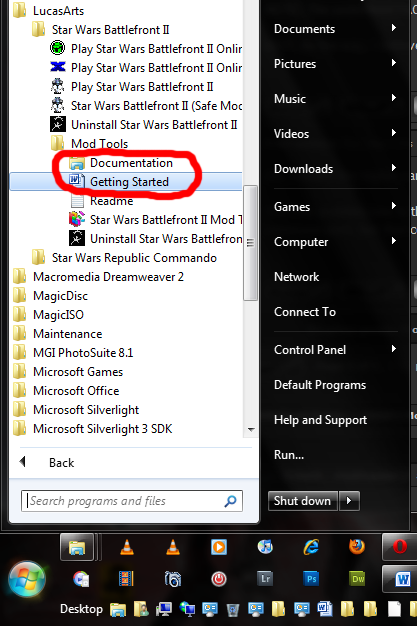
You can get to the mod tools documentation by going to "Start, All Programs, Lucas Arts, Star Wars Battlefront 2, Mod Tools", or just by looking at the picture
There are the documents that come with the mod tools from when you install them, and then there is one of Fierfek's Battlefront guides you can get from here.
You can get to the mod tools documentation by going to "Start, All Programs, Lucas Arts, Star Wars Battlefront 2, Mod Tools", or just by looking at the picture
Hidden/Spoiler:
 .
.-
RIPJimmy
- Private Recruit
- Posts: 18
- Joined: Wed Mar 17, 2010 5:58 pm
Re: New CPs cannot be captured
Ok, I just discovered the solution to the cp capturing problem. I had the region in the wrong place.
And that tutorial you showed me (not the one that came with the editor) looks fantastic. I will definitely use it to help make my map better.
Ok, this problem is solved. The Moderators can make it like that in the topic now.
And that tutorial you showed me (not the one that came with the editor) looks fantastic. I will definitely use it to help make my map better.
Ok, this problem is solved. The Moderators can make it like that in the topic now.