

How do you get LUA to work? [SOLVED]
Moderator: Moderators
-
Faceman2000

- Master Sergeant

- Posts: 173
- Joined: Tue Mar 03, 2009 7:55 am
- Projects :: No Mod project currently.
- xbox live or psn: No gamertag set
- Location: If the words above my head says, "offline", than I'm not here.
How do you get LUA to work? [SOLVED]
I have a huge problem (sorry if it's already been answered), I downloaded LUA, unzipped it, and now what? Could someone please help?
-
B.I.G_Cookie

- High General

- Posts: 839
- Joined: Sun Feb 22, 2009 4:28 pm
- Location: Frankfurt, Germany
Re: How do you get LUA to work?
Maybe this is a stupid question, but what do you mean with "I downloaded LUA" ?!
-
Frisbeetarian

- Jedi

- Posts: 1233
- Joined: Wed Sep 12, 2007 3:13 pm
Re: How do you get LUA to work?
Lua scripts can be edited using Notepad (though programs like Notepad++ can help structure you better). You don't need to download anything to get Lua to "work," the game handles that for you through the .exe.
What you probably downloaded was the source code to Lua, which I dare say, you would probably have trouble getting that to "work" .
.
What you probably downloaded was the source code to Lua, which I dare say, you would probably have trouble getting that to "work"
.-
Teancum

- Jedi Admin

- Posts: 11080
- Joined: Wed Sep 07, 2005 11:42 pm
- Projects :: No Mod project currently.
- xbox live or psn: No gamertag set
- Location: Indiana
Re: How do you get LUA to work?
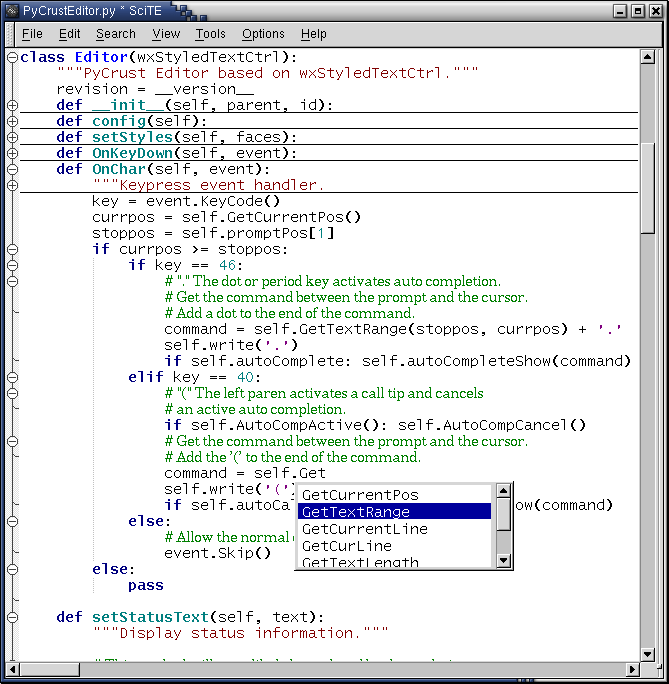
I HIGHLY recommend using SciTE to edit lua files. It's like notepad, but with programming features that are really useful, plus it's 100% free and is a really small install. I use it on occasion at work as well.
http://www.scintilla.org/SciTE.html
http://www.scintilla.org/SciTE.html
-
Fiodis

- Master of the Force

- Posts: 4145
- Joined: Wed Nov 12, 2008 9:27 pm
- Projects :: Rannoch + Tientia + Tools Programming
Re: How do you get LUA to work?
What kind of programming features are you talking about, Teancum?
-
Teancum
- Jedi Admin
- Posts: 11080
- Joined: Wed Sep 07, 2005 11:42 pm
- Projects :: No Mod project currently.
- xbox live or psn: No gamertag set
- Location: Indiana
Re: How do you get LUA to work?
It's color coded just like any great studio-based development program, as per the screen below:
Hidden/Spoiler:
-
Maveritchell

- Jedi Admin
- Posts: 7366
- Joined: Mon Aug 21, 2006 11:03 pm
Re: How do you get LUA to work?
Looks like a neat program, although my IDE of choice for LUA remains LUAEdit. It's always best to have some program more user-friendly than notepad for editing scripts.Teancum wrote:It's color coded just like any great studio-based development program, as per the screen below:
Hidden/Spoiler:
-
Teancum
- Jedi Admin
- Posts: 11080
- Joined: Wed Sep 07, 2005 11:42 pm
- Projects :: No Mod project currently.
- xbox live or psn: No gamertag set
- Location: Indiana
Re: How do you get LUA to work?
Yep, I'd actually recommend Mav's program to most users. Having debugging for the LUA scripts before you ever run SWBF2 is always good.
-
Fiodis
- Master of the Force
- Posts: 4145
- Joined: Wed Nov 12, 2008 9:27 pm
- Projects :: Rannoch + Tientia + Tools Programming
Re: How do you get LUA to work?
I might take this chance to point out that Notepad ++ is also somewhat color-coded.
-
Faceman2000
- Master Sergeant
- Posts: 173
- Joined: Tue Mar 03, 2009 7:55 am
- Projects :: No Mod project currently.
- xbox live or psn: No gamertag set
- Location: If the words above my head says, "offline", than I'm not here.
Re: How do you get LUA to work?
Thanks guys. You've all been really helpful. This topic can be locked. 
-
[RDH]Zerted

- Gametoast Staff

- Posts: 2982
- Joined: Sun Feb 26, 2006 7:36 am
- Projects :: Bos Wars AI - a RTS game
- xbox live or psn: No gamertag set
- Location: USA
- Contact:
Re: How do you get LUA to work?
SciTE, Notepad++, and LuaEdit. All work fine. Try them all out and keep the one you like best.
I used LuaEdit then moved to Eclipse when working on the v1.3 patch. However, Eclipse is super overkill for what you need (syntax highlighting/coloring). I don't recommend using it.
The mod tools come with everything you need to run your Lua scripts inside the game. You don't run the scripts as separate programs, but as part of your map.
Locked.
I used LuaEdit then moved to Eclipse when working on the v1.3 patch. However, Eclipse is super overkill for what you need (syntax highlighting/coloring). I don't recommend using it.
The mod tools come with everything you need to run your Lua scripts inside the game. You don't run the scripts as separate programs, but as part of your map.
Locked.