
Okay so I've gotten to the point where I created a msh and am now in the process of enveloping it to my custom skeleton.
I watched a couple tutorials on how to do the weights and I can honestly say I don't really get it. It seems like just a bunch of guess work, is there something that I'm missing?
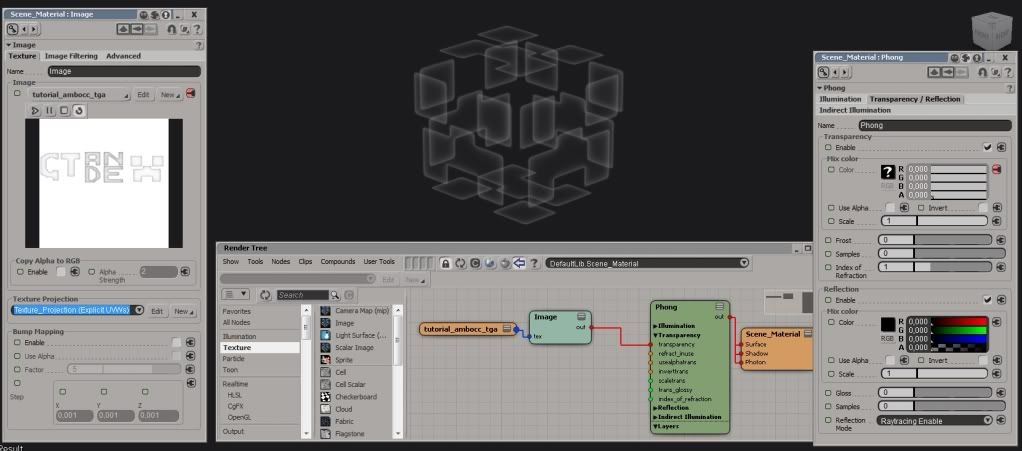
Also in XSI how would I make it so that something can transparent? I used the local properties but it did nothing. I tried using what the XSI help said but it also did nothing. I'm not talking about transparency for swbf2, I'm talking about something that will be rendered in XSI.
Enveloping Character Help
Moderator: Moderators
-
CalvaryCptMike
- Captain

- Posts: 476
- Joined: Sat Feb 19, 2011 3:10 pm
- Projects :: Nothing--absolutely nothing
- Location: Freed by alien robots, now living on Mars
- Contact:
-
DarthD.U.C.K.

- Master of the Force

- Posts: 6027
- Joined: Wed Sep 27, 2006 11:05 am
- Location: Duckburg, Germany
Re: Enveloping Character Help
first: so you basically say you understood nothing and ask what you are missing? an explanation cant get mor comprehensible than a videotutorial. youll have to give us a bit more than that, what part of the process exactly dont you understand?
second: search for "transparency" (if you dont want to use the tutorial "How to make objects transparent" in the xsi faq thread)
second: search for "transparency" (if you dont want to use the tutorial "How to make objects transparent" in the xsi faq thread)
-
naru1305

- Major General

- Posts: 657
- Joined: Fri Jan 07, 2011 4:57 pm
- Location: Germany
- Contact:
Re: Enveloping Character Help
it would be good if you try first to envelope a unit to the normal unit template, before you start with a custom skeleton. so that you get practise in enveloping.
if you want to see how the stock ep2 trooper is enveloped, have a look on the unit template, go to view and check the "weight points" entry.
so you can see how this unit is enveloped. this might help you, but you must tell us what you don´t understand exactly, so that we can help you
if you want to see how the stock ep2 trooper is enveloped, have a look on the unit template, go to view and check the "weight points" entry.
so you can see how this unit is enveloped. this might help you, but you must tell us what you don´t understand exactly, so that we can help you
-
ANDEWEGET

- Ancient Force

- Posts: 1266
- Joined: Tue Apr 01, 2008 8:42 am
- Location: Germany
- Contact:
Re: Enveloping Character Help
The concept of weighting is pretty straightforward actually.
You have a skeleton, which consists of bones(just like it actually is in the "real" world).
Then you have your model(which would be your skin for example).
Weighting is the part where you assign the points of your model(could be atoms of your skin, only way less)to the bones they should move with. From now on its just pure logic. The skin of your forearm moves with the bone of your forearm. So you select all the points from your forearm and give them 100% weight on the forearm bone.
Sometimes you of course still have to do some guesswork to get the best result, especially in joint areas(shoulders, wrists, knees etc).
You have a skeleton, which consists of bones(just like it actually is in the "real" world).
Then you have your model(which would be your skin for example).
Weighting is the part where you assign the points of your model(could be atoms of your skin, only way less)to the bones they should move with. From now on its just pure logic. The skin of your forearm moves with the bone of your forearm. So you select all the points from your forearm and give them 100% weight on the forearm bone.
Sometimes you of course still have to do some guesswork to get the best result, especially in joint areas(shoulders, wrists, knees etc).
-
CalvaryCptMike
- Captain
- Posts: 476
- Joined: Sat Feb 19, 2011 3:10 pm
- Projects :: Nothing--absolutely nothing
- Location: Freed by alien robots, now living on Mars
- Contact:
Re: Enveloping Character Help
Okay, this was what I was really looking for, thanks. I know what the weights do and the videos made enough sense but whenever I actually tried it it always turned out funny. ( also I tried some stuff with the stock skeleton instead of just the custom one with the same results )ANDEWEGET wrote:From now on its just pure logic. The skin of your forearm moves with the bone of your forearm. So you select all the points from your forearm and give them 100% weight on the forearm bone.
Sometimes you of course still have to do some guesswork to get the best result, especially in joint areas(shoulders, wrists, knees etc).
-
DarthD.U.C.K.
- Master of the Force
- Posts: 6027
- Joined: Wed Sep 27, 2006 11:05 am
- Location: Duckburg, Germany
Re: Enveloping Character Help
really, we cant see what happens on your end of the internet. if you want us to help you describe exactly where what "turned out funny"DarthD.U.C.K. wrote:youll have to give us a bit more than that,
-
CalvaryCptMike
- Captain
- Posts: 476
- Joined: Sat Feb 19, 2011 3:10 pm
- Projects :: Nothing--absolutely nothing
- Location: Freed by alien robots, now living on Mars
- Contact:
Re: Enveloping Character Help
Sorry, I meant that it the weights turn out "odd". I think you should know what I mean, the weights are all messed up and when I went to fix them it didn't help. My point though wasn't to describe the problem it was just to say that I did try it with the stock skeleton like naru1305 suggested.DarthD.U.C.K. wrote:really, we cant see what happens on your end of the internet. if you want us to help you describe exactly where what "turned out funny"DarthD.U.C.K. wrote:youll have to give us a bit more than that,
EDIT: @duck
Also the search wouldn't let me view more than one page, I clicked next and it said: "You cannot use search at this time, try again later."CavalryCaptMike wrote:I'm not talking about transparency for swbf2, I'm talking about something that will be rendered in XSI.
Last edited by CalvaryCptMike on Wed Aug 24, 2011 2:23 pm, edited 1 time in total.
-
DarthD.U.C.K.
- Master of the Force
- Posts: 6027
- Joined: Wed Sep 27, 2006 11:05 am
- Location: Duckburg, Germany
Re: Enveloping Character Help
when you apply the enveloping (deform-envelope-set envelope. make sure to set the maximum number of deformers to 1, battlefront cant handle any more. you will always have to reweight the points, automatically they are never assigned perfectly. you can test the weighting by rotating the bones in xsi. if you dont like how a point moves, reassign it to another bone. this way you shouldnt get any unexpected weird enveloping ingame.
-
naru1305
- Major General
- Posts: 657
- Joined: Fri Jan 07, 2011 4:57 pm
- Location: Germany
- Contact:
Re: Enveloping Character Help
first it is "Naru1305" not 1234CalvaryCptMike wrote:naru1234 suggested.

on topic: did you freeze the model before enveloping (so the model has rotation and transform 0,0,0 and scale 1,1,1)?
and for the custom skeleton, did you scale it via the propertypage? otherwise it wont work.
-
ANDEWEGET
- Ancient Force
- Posts: 1266
- Joined: Tue Apr 01, 2008 8:42 am
- Location: Germany
- Contact:
Re: Enveloping Character Help
If you didnt solve the transparency "problem", heres how you(I) do it inside XSI:
And the accompanying picture:
Hidden/Spoiler:
Hidden/Spoiler:
-
CalvaryCptMike
- Captain
- Posts: 476
- Joined: Sat Feb 19, 2011 3:10 pm
- Projects :: Nothing--absolutely nothing
- Location: Freed by alien robots, now living on Mars
- Contact:
Re: Enveloping Character Help
I froze the transforms, I knew enough to do that. I scaled the custom skeleton via the property page, I read that in a topic only a few down the list from this one.naru1305 wrote:first it is "Naru1305" not 1234CalvaryCptMike wrote:naru1305 suggested.
on topic: did you freeze the model before enveloping (so the model has rotation and transform 0,0,0 and scale 1,1,1)?
and for the custom skeleton, did you scale it via the property page? otherwise it wont work.
@ANDEWGET Thank you!