How to create models in XSI and other 3D applications and make them work in Battlefront 1 & 2. Post models, tips for application usage and share anything XSI, 3DMax, SketchUp, etc.
I figured I would just show you guys one of the things I have been working on lately:
Hidden/Spoiler:
Mega Terrains! I've also done the calculations; This terrain has less impact on performance than a Zero Engine created terrain of the same size by 2.4 fps on average. It also looks much, much better to boot! It's made up of many pieces, all stitched together by being given the same position in Zero Editor. I also tried it being all one huge object and that worked just as well.
I could post this workflow if the interest is there. It's pretty similar to one that some of you guys that lurk Polycount may have seen.
The Nasal Abyss wrote:Mega Terrains! I've also done the calculations; This terrain has less impact on performance than a Zero Engine created terrain of the same size by 2.4 fps on average. It also looks much, much better to boot! It's made up of many pieces, all stitched together by being given the same position in Zero Editor. I also tried it being all one huge object and that worked just as well.
It looks good, but I don't think you're giving Zero terrain enough credit. Your mountains look great at a distance (due to the fact that they're much more structurally correct than ZE mountains), and I might recommend your method for setting up a map where you don't get to the ground. However, for any ground-based map, Zero's terrain looks a lot better up close, and it supports things necessary to make most terrains work well (like foliage).
Sidebar: I wouldn't recommend using the same origin, though. Use uniform origin spacing, because if you keep the same origin, you'll start running into LOD issues if you want to reduce visibility distance at all.
The Nasal Abyss wrote:Mega Terrains! I've also done the calculations; This terrain has less impact on performance than a Zero Engine created terrain of the same size by 2.4 fps on average. It also looks much, much better to boot! It's made up of many pieces, all stitched together by being given the same position in Zero Editor. I also tried it being all one huge object and that worked just as well.
It looks good, but I don't think you're giving Zero terrain enough credit. Your mountains look great at a distance (due to the fact that they're much more structurally correct than ZE mountains), and I might recommend your method for setting up a map where you don't get to the ground. However, for any ground-based map, Zero's terrain looks a lot better up close, and it supports things necessary to make most terrains work well (like foliage).
Sidebar: I wouldn't recommend using the same origin, though. Use uniform origin spacing, because if you keep the same origin, you'll start running into LOD issues if you want to reduce visibility distance at all.
I guess I did forget to mention that this wasn't meant to be a terrain used for a ground based map. It was just something cool to try out to see If I could make the edges of my maps a bit more interesting.
The only qualms that I have with Zero's terrain are that it is low resolution, it doesn't support height maps, and it isn't able to have bump maps applied. it being low resolution is my biggest qualm. Though, the best modders make their maps and stuff to use what they have got to it's full potential, and not try to shoehorn in methods that end up not working well anyway.
The Nasal Abyss wrote:The only qualms that I have with Zero's terrain are that it is low resolution,
In addition to supporting a detail map, res on ZE terrain is controlled by a LOD "patches" option that lets you decide how tiled (and consequently how detailed up close) your terrain is going to be. Any other detail is controlled by the texture resolution.
The Nasal Abyss wrote:The only qualms that I have with Zero's terrain are that it is low resolution,
In addition to supporting a detail map, res on ZE terrain is controlled by a LOD "patches" option that lets you decide how tiled (and consequently how detailed up close) your terrain is going to be. Any other detail is controlled by the texture resolution.
Indeed. A good example of that, the terrain in this map. You can download the newest beta to take a peek at the terrain. It could even be better than that as well, like Mav said: Any other detail is controlled by the texture resolution.
I was using the wrong term I guess; I was commenting on the lack of tessellation on the terrain "model" itself. Each terrain face is around 4 times bigger than a unit, which makes small mounds and accurate terrain build-up around medium sized objects impossible. In terms of texture resolution, I know that you can go as high as you want. (because that is how textures work)
The Nasal Abyss wrote:Each terrain face is around 4 times bigger than a unit, which makes small mounds and accurate terrain build-up around medium sized objects impossible.
That's why some stock models have terrain modeled onto them. Perhaps you could also do the same with custom models?
Still way too many for something that is so small on screen, the barrel should only be 8 sided and the trigger is totally unnecessary since the characters fingers will more than likely just clip through it.








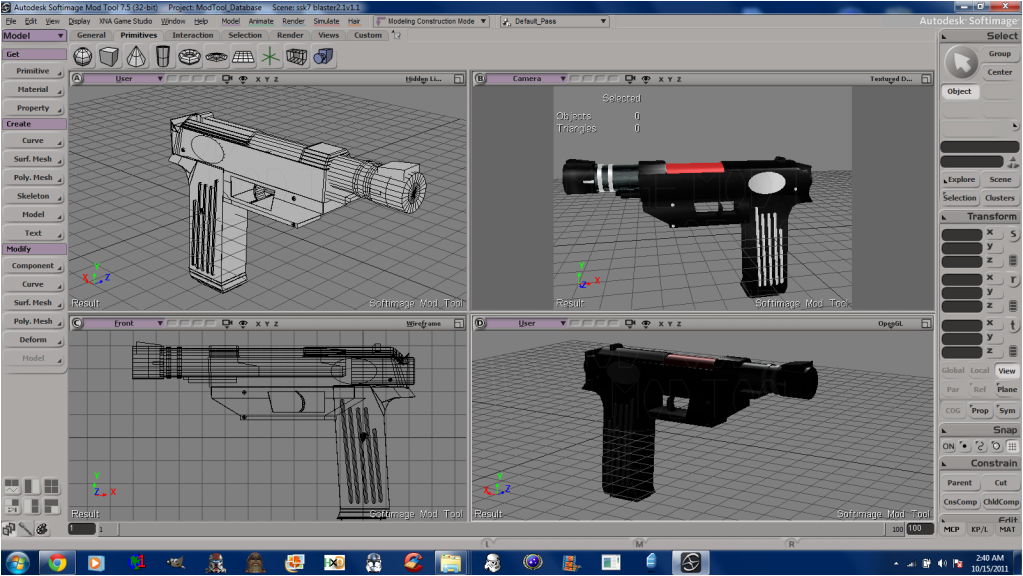



 Tri count: 1530