
I know you can transfer all objects of a layer to another but is it possible to shift individual things?
(My map is a little cluttered, hard to find what I'm looking for.)
Moving a single object from one layer to another
Moderator: Moderators
-
Darth_Z13
- Jedi High Council

- Posts: 2275
- Joined: Sat Jun 17, 2006 9:51 am
- xbox live or psn: Xanthius Wylon
- Location: Canada
RE: Moving a single object from one layer to another
I don't know about what you're saying but if you wanna find an object, select it in the list and press 'i'.
-
FragMe!
- Gametoast Staff

- Posts: 2244
- Joined: Sat May 13, 2006 12:34 am
- Projects :: Not sure keep changing my mind.
- xbox live or psn: No gamertag set
- Location: Origin name GT_FragMe
- Contact:
RE: Moving a single object from one layer to another
You could try doing it in multiselect, save group then load group onto a new layer then go back and delete the originals
you will have to try and realign them on the load but it will move them over in relative position as to each other
Welcome back BTW
you will have to try and realign them on the load but it will move them over in relative position as to each other
Welcome back BTW
-
xwingguy
RE: Moving a single object from one layer to another
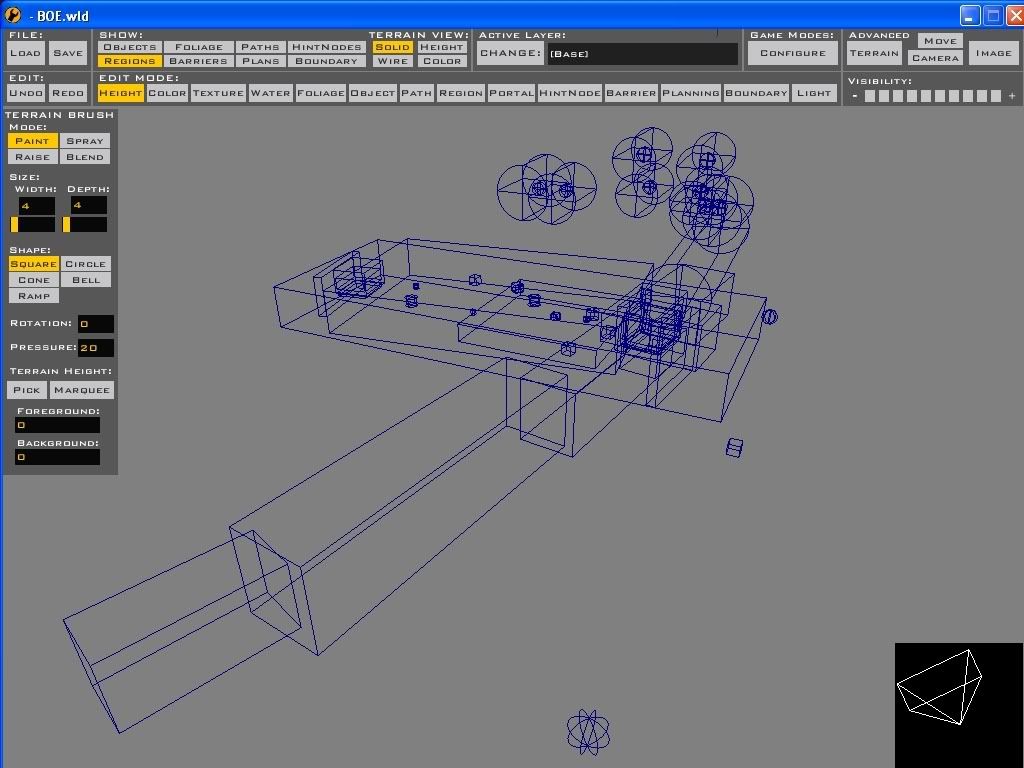
Any way of moving regions? Cuz this is my problem:
thx for the welcome
thx for the welcome
-
Penguin
- Jedi Admin

- Posts: 2541
- Joined: Sun Mar 05, 2006 12:00 am
- Location: Australia
RE: Moving a single object from one layer to another
just select the objects you want to move and then go into change layer and click on move data or what ever it was called again.
I don't think you can move regions in ZE but you might want to try looking in the file for regions with notepad and seeing if you can change the layer for those regions, if that doesn't work then you'll have to delete and replace them in ZE
I don't think you can move regions in ZE but you might want to try looking in the file for regions with notepad and seeing if you can change the layer for those regions, if that doesn't work then you'll have to delete and replace them in ZE
-
FragMe!
- Gametoast Staff
- Posts: 2244
- Joined: Sat May 13, 2006 12:34 am
- Projects :: Not sure keep changing my mind.
- xbox live or psn: No gamertag set
- Location: Origin name GT_FragMe
- Contact:
RE: Moving a single object from one layer to another
Actually yes if you are adventurous  this is assuming those regions are all on one layer (I am assuming base) and you want to move them all.
Create a new layer, save then exit. It will have created a new file with the layer name.rgn
Now here is the fun part, copy the BOE.rgn file somewhere save (now is also a good time to back up the entire map)
Restart ZE and delete all the regions, once again assuming it is one the base layer. Save and exit.
Find the new layer name.rgn and delete it. Go to the BOE.rgn file you copied to somewhere safe and just for the sake of argument
copy and paste it in the same directory so you get a file named copy of BOE.RGN now rename this to the new layer name.rgn and copy
it back over to the world folder. Open ZE and check the regions they should be there.
I have done similar things moving layers between maps and it works, but once again I stress make a back up (I burned myself once never again)
If the regions in question are on different layers other than the base layer, but still all one one layer, the procedure is the same just find the layer in question's .rgn file.
Hope that helps
this is assuming those regions are all on one layer (I am assuming base) and you want to move them all.Create a new layer, save then exit. It will have created a new file with the layer name.rgn
Now here is the fun part, copy the BOE.rgn file somewhere save (now is also a good time to back up the entire map)
Restart ZE and delete all the regions, once again assuming it is one the base layer. Save and exit.
Find the new layer name.rgn and delete it. Go to the BOE.rgn file you copied to somewhere safe and just for the sake of argument
copy and paste it in the same directory so you get a file named copy of BOE.RGN now rename this to the new layer name.rgn and copy
it back over to the world folder. Open ZE and check the regions they should be there.
I have done similar things moving layers between maps and it works, but once again I stress make a back up (I burned myself once never again)
If the regions in question are on different layers other than the base layer, but still all one one layer, the procedure is the same just find the layer in question's .rgn file.
Hope that helps
-
MasterYoda91
RE: Moving a single object from one layer to another
On the topic of regions, how do you get the "leaving battlefield" region?
-
Jawa_Killer
- Brigadier General

- Posts: 629
- Joined: Thu Jun 23, 2005 6:06 am
- Projects :: No Mod project currently.
- xbox live or psn: No gamertag set
RE: Moving a single object from one layer to another
thats no region that's a boundary.......! look in the everything you need thread......and because of moving regions.....just copy the region files and rename them for the specific layer......as ZE saves all it's coordnits and paths and whatever in simple text files.......in fact nothing different what penguin said 