Tatooine: Outpost (Released)

Working on a new map? Have a new mod out for swbf2?! Post an announcement of the up-coming release here.

Moderator: Moderators

Post Reply
User avatar
Jendo7
Sith
Sith
Posts: 1304
Joined: Wed Apr 01, 2009 6:37 pm
Location: Cambridge, England.
Contact:

Re: Tatooine: Outpost (Night sky added to Hunt mode p11)

Post by Jendo7 »

Vuler wrote:Well, I was actually thinking of adding sky like the one on Bespin: Cloud City to Conquest, but well, I could be a bit more clear. However, the sky which you have added to the Hunt mode (I believe it's from BF2 Naboo) fits Anakin vs. Tuskens perfectly! Great job! :thumbs:
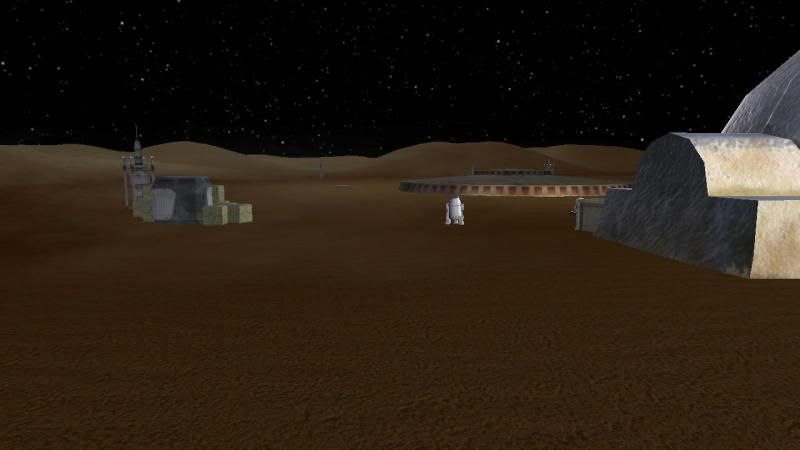
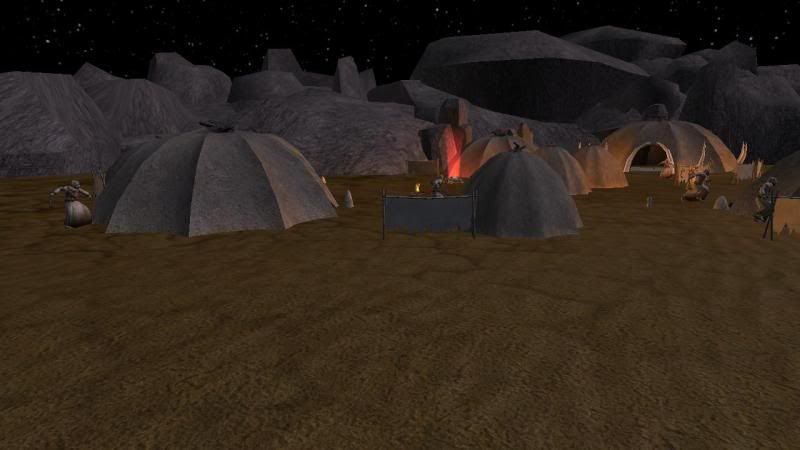
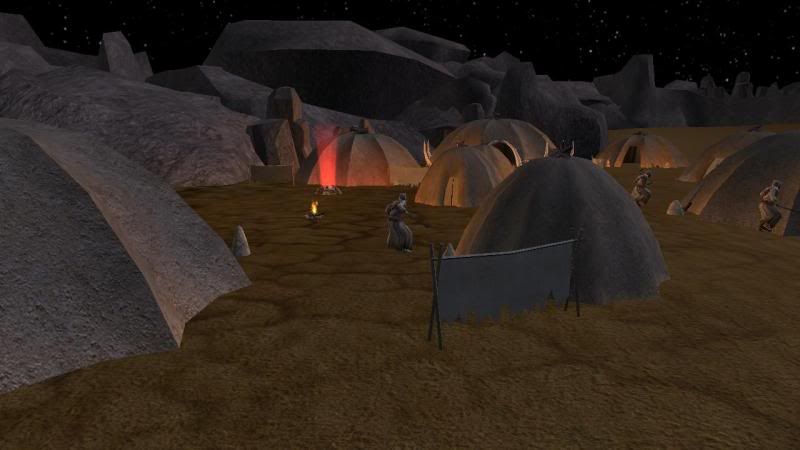
Thank you, and I actually did add the Bespin sky but due to the same reason that sky_216 just gave, you can't really darken the ground by using lighting alone, so it didn't really look very good against the Bespin sky. The only way I could have done it, would have been to darken the ground in the editor, but then it would be too dark for the day time.
Lephenix_dor wrote:That's nice , but for me the night ones are too bright , the ground should be more dark , and the units too .
Thanks, and again the same reason as sky_216 gave above. Also, the units using the Naboo lighting effects in the second sky are actually quite dark, as it's only the camp fires that lighten them.
Last edited by Jendo7 on Tue Feb 22, 2011 8:31 am, edited 2 times in total.
Lephenix

Re: Tatooine: Outpost (Night sky added to Hunt mode p11)

Post by Lephenix »

Sky_216 wrote:
Lephenix_dor wrote:That's nice , but for me the night ones are too bright , the ground should be more dark , and the units too .
Can't really fix that....ground isn't affected by lighting except on high quality lighting, which also tends to makes ground colour much darker under most lighting.
Ah ok , that's why it works for me , all is on high exept shadows .
User avatar
naru1305
Major General
Major General
Posts: 657
Joined: Fri Jan 07, 2011 4:57 pm
Games I'm Playing :: SWBF2
Location: Germany
Contact:

Re: Tatooine: Outpost (Night sky added to Hunt mode p11)

Post by naru1305 »

Nice update, i like it :faint:
go on for it :thumbs:
modmaster13
General
General
Posts: 777
Joined: Wed Aug 18, 2010 4:23 pm
Games I'm Playing :: COD SWBF
xbox live or psn: KrypticcElementt
Location: Twitter @_KrypticElement
Contact:

Re: Tatooine: Outpost (Night sky added to Hunt mode p11)

Post by modmaster13 »

Awesome update! :thumbs: :thumbs: :thumbs:
User avatar
Maveritchell
Jedi Admin
Jedi Admin
Posts: 7366
Joined: Mon Aug 21, 2006 11:03 pm

Re: Tatooine: Outpost (Night sky added to Hunt mode p11)

Post by Maveritchell »

Sky_216 wrote:
Lephenix_dor wrote:That's nice , but for me the night ones are too bright , the ground should be more dark , and the units too .
Can't really fix that....ground isn't affected by lighting except on high quality lighting, which also tends to makes ground colour much darker under most lighting.
There are actually two ways to address this problem.
1) Since you are presumably loading in different .lvl files containing each of your skies, you can simply pack the ground texture with those additional files and vary the ground texture based on the sky.
2) You can use a shadowmap to darken the ground texture:
forums/viewtopic.php?p=378465#p378465
User avatar
Jendo7
Sith
Sith
Posts: 1304
Joined: Wed Apr 01, 2009 6:37 pm
Location: Cambridge, England.
Contact:

Re: Tatooine: Outpost (Night sky added to Hunt mode p11)

Post by Jendo7 »

The thing is, I'm actually loading my skies from one sky.lvl file, which I know isn't very efficient as they are being loaded randomely, but I'm only using one sky for all the modes apart from hunt, which uses the night sky. I realize It does seem pointless loading the same sky randomely when there's no need but I didn't realize you could do it another way. So my code looks like this:
Hidden/Spoiler:
WeatherMode = math.random(1,2)
weather()


function weather()
if WeatherMode == 1 then
ReadDataFile("dc:TJW\\sky.lvl", "tat")
elseif WeatherMode == 2 then
ReadDataFile("dc:TJW\\sky.lvl", "tat")
end

end
then "nab" instead of "tat" for the hunt mode.

Anyway, thanks for telling me how to do it Mav, although it does seem a bit complicated to me at the moment but I'm sure it isn't really. Also, as I'm only doing one night sky for one mode, do you think it's worth the extra effort.
User avatar
Maveritchell
Jedi Admin
Jedi Admin
Posts: 7366
Joined: Mon Aug 21, 2006 11:03 pm

Re: Tatooine: Outpost (Night sky added to Hunt mode p11)

Post by Maveritchell »

Jendo7 wrote:Anyway, thanks for telling me how to do it Mav, although it does seem a bit complicated to me at the moment but I'm sure it isn't really. Also, as I'm only doing one night sky for one mode, do you think it's worth the extra effort.
I've done it before, and would do it again, so of course I think it's worth the effort. I don't think it's particularly complicated, but the call you make on it for your map shouldn't be based on what other people think things are worth - it should be based on whether you think it's worth the effort.
User avatar
Jendo7
Sith
Sith
Posts: 1304
Joined: Wed Apr 01, 2009 6:37 pm
Location: Cambridge, England.
Contact:

Re: Tatooine: Outpost (Night sky added to Hunt mode p11)

Post by Jendo7 »

Thanks, you are absolutely right. I am quite happy with the way it is, so I think I will leave it for now, but I may try and do it for a later version.

Edit: Update

Until I'm able to make the ground darker for hunt mode only, I've decided to resort back to a day sky. I realise I'm contradicting myself, but if people would still like to see a night sky for hunt mode, I can give it a random day/night cycle, the only problem being the ground will be too light for the night skydome. Or I could scrap the Anakin v Tusken idea completely, and do something else.
User avatar
Sky_216
Droid Pilot Assassin
Posts: 2086
Joined: Mon Feb 13, 2006 3:28 am
Projects :: No Mod project currently.
Games I'm Playing :: I have not listed any games yet
xbox live or psn: No gamertag set

Re: Tatooine: Outpost (Night sky added to Hunt mode p11)

Post by Sky_216 »

Maveritchell wrote:
Sky_216 wrote:
Lephenix_dor wrote:That's nice , but for me the night ones are too bright , the ground should be more dark , and the units too .
Can't really fix that....ground isn't affected by lighting except on high quality lighting, which also tends to makes ground colour much darker under most lighting.
There are actually two ways to address this problem.
1) Since you are presumably loading in different .lvl files containing each of your skies, you can simply pack the ground texture with those additional files and vary the ground texture based on the sky.
2) You can use a shadowmap to darken the ground texture:
forums/viewtopic.php?p=378465#p378465
Never got the second one to work but the 1st one....wow...thats so simple, and it should work perfectly. :thumbs:
User avatar
Anakin
Master of the Force
Master of the Force
Posts: 4817
Joined: Sat Sep 19, 2009 11:37 am
Projects :: RC Side Mod - Remastered - SWBF3 Legacy
Location: Mos Espa (germany)

Re: Tatooine: Outpost

Post by Anakin »

really really really nice update.

but i don't see a different between the both night skys
User avatar
Jendo7
Sith
Sith
Posts: 1304
Joined: Wed Apr 01, 2009 6:37 pm
Location: Cambridge, England.
Contact:

Re: Tatooine: Outpost

Post by Jendo7 »

It's not the skies, it's the lighting that is different. Anyway, I'm scraping one of the night skies, and just using the one with the naboo lighting.
User avatar
Anakin
Master of the Force
Master of the Force
Posts: 4817
Joined: Sat Sep 19, 2009 11:37 am
Projects :: RC Side Mod - Remastered - SWBF3 Legacy
Location: Mos Espa (germany)

Re: Tatooine: Outpost

Post by Anakin »

sounds good
User avatar
Jendo7
Sith
Sith
Posts: 1304
Joined: Wed Apr 01, 2009 6:37 pm
Location: Cambridge, England.
Contact:

Re: Tatooine: Outpost

Post by Jendo7 »

Thanks Anakin :)
Sky_216 wrote:
Maveritchell wrote:
Sky_216 wrote:
Lephenix_dor wrote:That's nice , but for me the night ones are too bright , the ground should be more dark , and the units too .

Can't really fix that....ground isn't affected by lighting except on high quality lighting, which also tends to makes ground colour much darker under most lighting.
There are actually two ways to address this problem.
1) Since you are presumably loading in different .lvl files containing each of your skies, you can simply pack the ground texture with those additional files and vary the ground texture based on the sky.
2) You can use a shadowmap to darken the ground texture:
forums/viewtopic.php?p=378465#p378465
Never got the second one to work but the 1st one....wow...thats so simple, and it should work perfectly. :thumbs:
You know what I've just figured this out, and I'm doing it now. I'll update the post once I've done it. Thank you Sky and Mav :D


Edit: I have darkened the ground for hunt only, but am having a bit of trouble as dark squares are showing on the terrain. I'll keep trying though.


Edit 2: I'm going to have to abandon this idea unfortunately. I've tried blending the terrain in ze, both colours and textures to no avail, I even deleted some textures in ze for the night time ground texture. Unless there is something I've done wrong when loading the extra terrain file in the sky2.lvl, I'm afraid I'll have to use the original terrain texture.
User avatar
Sky_216
Droid Pilot Assassin
Posts: 2086
Joined: Mon Feb 13, 2006 3:28 am
Projects :: No Mod project currently.
Games I'm Playing :: I have not listed any games yet
xbox live or psn: No gamertag set

Re: Tatooine: Outpost

Post by Sky_216 »

Jendo7 wrote:Thanks Anakin :)
Sky_216 wrote:
Maveritchell wrote:
Sky_216 wrote:
Lephenix_dor wrote:That's nice , but for me the night ones are too bright , the ground should be more dark , and the units too .
Can't really fix that....ground isn't affected by lighting except on high quality lighting, which also tends to makes ground colour much darker under most lighting.
There are actually two ways to address this problem.
1) Since you are presumably loading in different .lvl files containing each of your skies, you can simply pack the ground texture with those additional files and vary the ground texture based on the sky.
2) You can use a shadowmap to darken the ground texture:
forums/viewtopic.php?p=378465#p378465
Never got the second one to work but the 1st one....wow...thats so simple, and it should work perfectly. :thumbs:
You know what I've just figured this out, and I'm doing it now. I'll update the post once I've done it. Thank you Sky and Mav :D


Edit: I have darkened the ground for hunt only, but am having a bit of trouble as dark squares are showing on the terrain. I'll keep trying though.


Edit 2: I'm going to have to abandon this idea unfortunately. I've tried blending the terrain in ze, both colours and textures to no avail, I even deleted some textures in ze for the night time ground texture. Unless there is something I've done

wrong when loading the extra terrain file in the sky2.lvl, I'm afraid I'll have to use the original terrain texture.
Try loading the actual textures rather than a different terrain file. As in make different (darker?) versions of the same textures (same names) and load them along with the night time sky/fx.
User avatar
Jendo7
Sith
Sith
Posts: 1304
Joined: Wed Apr 01, 2009 6:37 pm
Location: Cambridge, England.
Contact:

Re: Tatooine: Outpost

Post by Jendo7 »

Thank you Sky, that did it. :D :thumbs:
Hidden/Spoiler:
Image

Image

Image
Last edited by Jendo7 on Thu Feb 24, 2011 6:10 am, edited 1 time in total.
User avatar
sim-al2
2nd Lieutenant
2nd Lieutenant
Posts: 412
Joined: Mon Jul 06, 2009 10:26 pm
Projects :: Mapping on occasion
Games I'm Playing :: SWBFII + MW4 + SC4
Location: In the cockpit of some vehicle...

Re: Tatooine: Outpost

Post by sim-al2 »

Wow that lighting is absolutely fabulous! :o
kinetosimpetus
Imperial Systems Expert
Posts: 2381
Joined: Wed Mar 25, 2009 4:15 pm
Projects :: A secret project
Games I'm Playing :: Warframe STO

Re: Tatooine: Outpost

Post by kinetosimpetus »

:thumbs: Good job!
User avatar
Marvel4
Rebel Colonel
Rebel Colonel
Posts: 556
Joined: Mon Jun 21, 2010 12:57 pm
Projects :: Marvel4s BF1 Conversion Pack + Era Mod

Re: Tatooine: Outpost

Post by Marvel4 »

sim-al2 wrote:Wow that lighting is absolutely fabulous! :o
Yes, it looks faboost! :thumbs:
Lephenix

Re: Tatooine: Outpost

Post by Lephenix »

Awesome , much better :thumbs: .
User avatar
Anakin
Master of the Force
Master of the Force
Posts: 4817
Joined: Sat Sep 19, 2009 11:37 am
Projects :: RC Side Mod - Remastered - SWBF3 Legacy
Location: Mos Espa (germany)

Re: Tatooine: Outpost

Post by Anakin »

sim-al2 wrote:Wow that lighting is absolutely fabulous! :o
:yes:

can you add some smoke above the fire
Post Reply