
I have a model I'm using, and I want to have two versions. One young, one old.
However, I can't get each skin to load, it's always either both young or both old. I know I could fix this with the override texture line, but I'm not sure how to use that. Help?
Using two skins [SOLVED]
Moderator: Moderators
-
CressAlbane
- Master Bounty Hunter

- Posts: 1519
- Joined: Fri Dec 18, 2009 8:02 am
- Projects :: CTF Arenas
- Location: ¿uoıʇɐɔoן ʎɯ sıɥʇ sı
Using two skins [SOLVED]
Last edited by CressAlbane on Mon May 17, 2010 4:42 pm, edited 1 time in total.
-
Darth_Spiderpig
- Sith Master

- Posts: 2631
- Joined: Fri Mar 27, 2009 10:23 am
- Projects :: Something cool...
- xbox live or psn: Has no xbox....Yup
- Location: Does whatever a Spiderpig does
- Contact:
Re: Using two skins
If the model is override texture capable, add this to your units odfs:
Code: Select all
OverrideTexture = "old"Code: Select all
OverrideTexture = "young"-
AgentSmith_#27

- Rebel Warrant Officer

- Posts: 302
- Joined: Thu Feb 11, 2010 3:10 pm
- Projects :: No Projects I am ready to unveil
- xbox live or psn: No gamertag set
- Location: Zeroeditor
- Contact:
Re: Using two skins
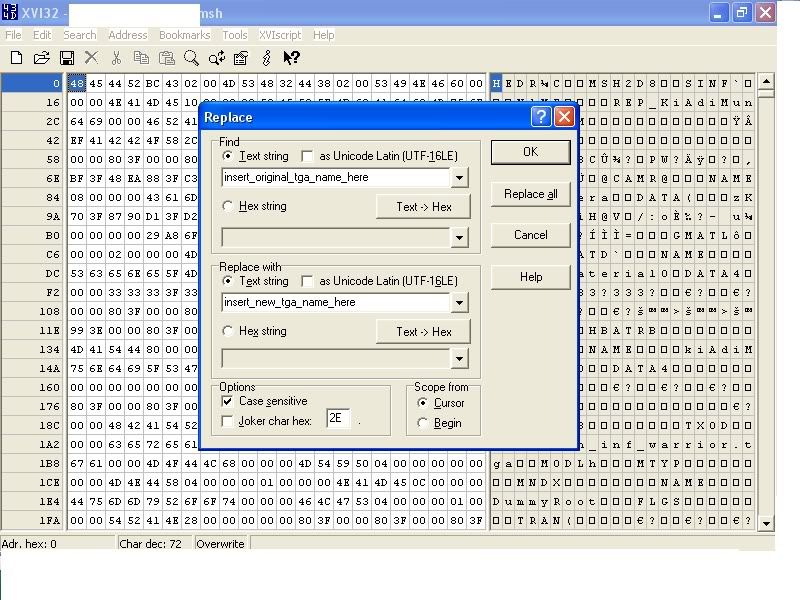
Aha! I just had this problem yesterday! For convenience's sake I'll post the tut from the FAQ thread here:
Now, in case you don't get the hex editing deal I'll make it simple for you, as I had a teeny bit of trouble myself:
1. Download, install, and/or open up XVI32.
2. Open up the msh file you need to hex-edit.
3. Press ctrl+r, and it should look like this:
4. Press replace all, hit OK, save and close.
Hidden/Spoiler:
1. Download, install, and/or open up XVI32.
2. Open up the msh file you need to hex-edit.
3. Press ctrl+r, and it should look like this:
Hidden/Spoiler:
-
Deviss
- Master of the Force

- Posts: 3772
- Joined: Tue Aug 12, 2008 7:59 pm
- Projects :: Clone Wars Extended
Re: Using two skins
AgentSmith_#27 wrote:Aha! I just had this problem yesterday! For convenience's sake I'll post the tut from the FAQ thread here:Hidden/Spoiler:
Now, in case you don't get the hex editing deal I'll make it simple for you, as I had a teeny bit of trouble myself:
1. Download, install, and/or open up XVI32.
2. Open up the msh file you need to hex-edit.
3. Press ctrl+r, and it should look like this:
Hidden/Spoiler:
he want use overridetexture (1 model) no 2 models XD
-
AgentSmith_#27
- Rebel Warrant Officer
- Posts: 302
- Joined: Thu Feb 11, 2010 3:10 pm
- Projects :: No Projects I am ready to unveil
- xbox live or psn: No gamertag set
- Location: Zeroeditor
- Contact:
Re: Using two skins
Deviss wrote:he want use overridetexture (1 model) no 2 models XD
Rekubot wrote:Can't you just use the OverrideTexture line in the soldier's ODF file for this?
Darth_Spiderpig wrote:If the model is override texture capable
I'd think then it'd be better to learn how to do it in a way that should work 100% of the time, as opposed to something that would work maybe 50%Teancum wrote:
Yes, but only about 1/2 the player models are set up to work with OverrideTexture. The model had to be exported right to do it.
I'm not sure what you mean Deviss, but the post I quoted explains how to do the same thing that Override Texture does, albeit taking a little longer, but I've never heard of it not working.
Could be wrong though, I'm just a newbie compared you guys

-
DarthD.U.C.K.

- Master of the Force
- Posts: 6027
- Joined: Wed Sep 27, 2006 11:05 am
- Location: Duckburg, Germany
Re: Using two skins
override_texture only works on some models, to find out if it works for your model first look if the ,msh has a msh.option.
then open it with a texteditor and look for a "keepmaterial override_texture". if its not there or the model ha sno msh.option file, the odf-line wont work and you have to use the tutorial quoted above
then open it with a texteditor and look for a "keepmaterial override_texture". if its not there or the model ha sno msh.option file, the odf-line wont work and you have to use the tutorial quoted above
-
CressAlbane
- Master Bounty Hunter
- Posts: 1519
- Joined: Fri Dec 18, 2009 8:02 am
- Projects :: CTF Arenas
- Location: ¿uoıʇɐɔoן ʎɯ sıɥʇ sı
Re: Using two skins
Uh oh.
That's bad, I don't have a hex editor. Google, here I come...
AFTER A FEW MINUTES OF WORK: Okay, I chose the second option and now, Mshveiwer won't even open the file. Stackoverflow or something?
That's bad, I don't have a hex editor. Google, here I come...
AFTER A FEW MINUTES OF WORK: Okay, I chose the second option and now, Mshveiwer won't even open the file. Stackoverflow or something?
Last edited by CressAlbane on Mon May 17, 2010 3:22 pm, edited 1 time in total.
-
theultimat
- Lieutenant General

- Posts: 679
- Joined: Sun Apr 13, 2008 1:39 pm
- Location: UK
Re: Using two skins
XVI32 is the one recommended in the FAQ thread, and has always worked perfectly for me.CressAlbane wrote:Uh oh.
That's bad, I don't have a hex editor. Google, here I come...
-
CressAlbane
- Master Bounty Hunter
- Posts: 1519
- Joined: Fri Dec 18, 2009 8:02 am
- Projects :: CTF Arenas
- Location: ¿uoıʇɐɔoן ʎɯ sıɥʇ sı
Re: Using two skins
Above post edited.
-
AgentSmith_#27
- Rebel Warrant Officer
- Posts: 302
- Joined: Thu Feb 11, 2010 3:10 pm
- Projects :: No Projects I am ready to unveil
- xbox live or psn: No gamertag set
- Location: Zeroeditor
- Contact:
Re: Using two skins
What was the second option? make sure when you rename the TGA+MSH it has the same # of characters, and that you make any changes with hex editor.CressAlbane wrote:Uh oh.
That's bad, I don't have a hex editor. Google, here I come...
AFTER A FEW MINUTES OF WORK: Okay, I chose the second option and now, Mshveiwer won't even open the file. Stackoverflow or something?
-
CressAlbane
- Master Bounty Hunter
- Posts: 1519
- Joined: Fri Dec 18, 2009 8:02 am
- Projects :: CTF Arenas
- Location: ¿uoıʇɐɔoן ʎɯ sıɥʇ sı
Re: Using two skins
aha!
Eureka, it works.
I thought the XVI32 was another method, didn't realize it was just an easier hex-edit. (Duh.)
*Thanks you for your help*
Eureka, it works.
I thought the XVI32 was another method, didn't realize it was just an easier hex-edit. (Duh.)
*Thanks you for your help*