
How do I customize kill messages.
Moderator: Moderators
-
Ace_Azzameen_5
- Jedi

- Posts: 1119
- Joined: Sat Apr 23, 2005 8:52 pm
- Projects :: No Mod project currently.
- xbox live or psn: No gamertag set
How do I customize kill messages.
I think it was in the T/I vs Couch movie, I noticed a customized kill message, where KILLED was replaced by PWNED. Was this movie editing or are there some files I can edit to do the same? OR, is this a setting that is munged with maps, and is not global?
-
Saturn_V
- Emperor's Hand
- Posts: 487
- Joined: Sun Dec 26, 2004 12:11 pm
- Projects :: No Mod project currently.
- xbox live or psn: No gamertag set
- Contact:
RE: How do I customize kill messages.
It wasn't any fancy "Hollywood magic" type movie editing, I used the language tool to edit the kill message to say "pwned". Best mod I ever did, lol. Easiest way is to do it on a map by map basis. Have a look on Psych0fred's board for the list of localisation keys.
-
Rippentuck
RE: How do I customize kill messages.
Hey Saturn,
How do you get into these localization strings? I'm trying to remove the word "the" from the captured CP message for example, "The Empire has captured THE command post"). Can ya give me an idea how to do it?
Rip
How do you get into these localization strings? I'm trying to remove the word "the" from the captured CP message for example, "The Empire has captured THE command post"). Can ya give me an idea how to do it?
Rip
-
MutantMonkey
RE: How do I customize kill messages.
I really want to know about the "THE command post" issue aswell, if ne1 ever gives u an answer Rippentuck - can u let me know. Thanx.
-
Saturn_V
- Emperor's Hand
- Posts: 487
- Joined: Sun Dec 26, 2004 12:11 pm
- Projects :: No Mod project currently.
- xbox live or psn: No gamertag set
- Contact:
1. Download the localisation string list from Psych0fred's board.
2. Open it in a word processor and search for what you want (eg, search for captured)
3. Use the Localize button in BFBuilder to launch the Localize tool to add the scopes and keys for whatever you want to change.
Right click to get a menu to add a scope or a key. The key is the last part of the string, which you type a name for in the box in the middle (ie, not the comments box).
So for the CP "The", a quick search for captured shows:
game.infomsg.captured "%s captured The %s"
game is a Scope.
infomsg is a scope.
captured is a key.
"%s captured The %s" is the string displayed, so change it to %s captured %s
Then change the corresponding key for losing a CP (game.infomsg.lost)
2. Open it in a word processor and search for what you want (eg, search for captured)
3. Use the Localize button in BFBuilder to launch the Localize tool to add the scopes and keys for whatever you want to change.
Right click to get a menu to add a scope or a key. The key is the last part of the string, which you type a name for in the box in the middle (ie, not the comments box).
So for the CP "The", a quick search for captured shows:
game.infomsg.captured "%s captured The %s"
game is a Scope.
infomsg is a scope.
captured is a key.
"%s captured The %s" is the string displayed, so change it to %s captured %s
Then change the corresponding key for losing a CP (game.infomsg.lost)
Last edited by Saturn_V on Sat Jun 11, 2005 6:50 pm, edited 1 time in total.
-
Qdin
- Old School Staff
- Posts: 2059
- Joined: Wed Feb 23, 2005 9:54 am
- Projects :: No Mod project currently.
- xbox live or psn: No gamertag set
 WOW!!! you are FANTASTIC!!!
  man, there is NOTHING like learning from the best
-
Rippentuck
Hey Saturn,
Believe it or not I never saw your reply about this until today. I've read it and I'm still a bit cloudy. Where do you actually go in the game to change the text? Yes, I see the localization strings on Fred's page, but where are the strings in the game itself, so I can go there and change it?
Rip
Believe it or not I never saw your reply about this until today. I've read it and I'm still a bit cloudy. Where do you actually go in the game to change the text? Yes, I see the localization strings on Fred's page, but where are the strings in the game itself, so I can go there and change it?
Rip
-
SteveK14
- Old School Staff
- Posts: 405
- Joined: Sat Mar 05, 2005 3:59 pm
- Projects :: No Mod project currently.
- xbox live or psn: No gamertag set
- Location: USA
- Contact:
-
Saturn_V
- Emperor's Hand
- Posts: 487
- Joined: Sun Dec 26, 2004 12:11 pm
- Projects :: No Mod project currently.
- xbox live or psn: No gamertag set
- Contact:
Rends made a great tute on how he did the bounty hunter localization too:
index.php?name=PNphpBB2&file=viewtopic&t=971
index.php?name=PNphpBB2&file=viewtopic&t=971
-
Rippentuck
Thanks for the replies guys, but I'm not sure I'm making my question clear enough. I'm not simply trying to rename CPs. Let try putting it this way:
What do I do with the localization strings that I can read from Fred's site? I can certainly read them and edit them, but how do I get the changes into the game? That's my question. Yes, I know it involves the localization tool, lol. But I can't find any menu for editing the word "the" out of the capture text as Saturn explained in that earlier post. That's what I'm trying to do. Rends' tutorial doesn't say anything about it.
Rip
What do I do with the localization strings that I can read from Fred's site? I can certainly read them and edit them, but how do I get the changes into the game? That's my question. Yes, I know it involves the localization tool, lol. But I can't find any menu for editing the word "the" out of the capture text as Saturn explained in that earlier post. That's what I'm trying to do. Rends' tutorial doesn't say anything about it.
Rip
-
SteveK14
- Old School Staff
- Posts: 405
- Joined: Sat Mar 05, 2005 3:59 pm
- Projects :: No Mod project currently.
- xbox live or psn: No gamertag set
- Location: USA
- Contact:
-
Saturn_V
- Emperor's Hand
- Posts: 487
- Joined: Sun Dec 26, 2004 12:11 pm
- Projects :: No Mod project currently.
- xbox live or psn: No gamertag set
- Contact:
the localisation string,
game.infomsg.captured "%s captured The %s"
breaks down as
scope.scope.key "<string>"
%s is a placeholder for information fed to the string by the game engine depending on what's happened.
So you right click in the left hand pane, add a root level scope and name it game. Right click on that, create another scope, call it infomsg, then rc on that and create a key, name it captured. The key level of the tree is where you type your required text into the text box in the middle. Select the key and enter the text you want to see in the game in to the middle text box (the comments box changes to match the middel box, it seems), in this case
%s captured %s
This removes "The" from the CP capture message, so if you have a CP called The Barracks (like in the default setup), you'll see the game is now saying <team> captured Barracks, so you can rename the CP to The Barracks to correct it.
Now you'll want to add the complementary message string for losing the CP, searching the string list you'll see
game.infomsg.lost "%s lost The %s"
You already have the scope game, and you already have the scope infomsg, so create a new key under infomsg and call it lost. In the text box enter
%s lost %s
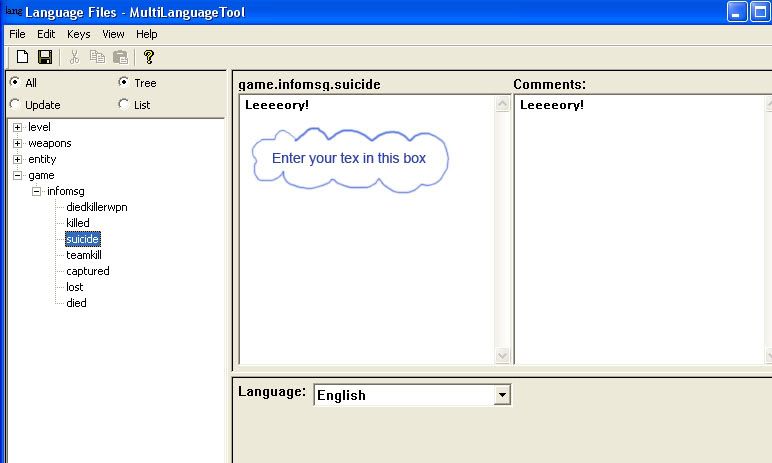
Here's a pic of the tree setup for a bunch of the death messages:
game.infomsg.captured "%s captured The %s"
breaks down as
scope.scope.key "<string>"
%s is a placeholder for information fed to the string by the game engine depending on what's happened.
So you right click in the left hand pane, add a root level scope and name it game. Right click on that, create another scope, call it infomsg, then rc on that and create a key, name it captured. The key level of the tree is where you type your required text into the text box in the middle. Select the key and enter the text you want to see in the game in to the middle text box (the comments box changes to match the middel box, it seems), in this case
%s captured %s
This removes "The" from the CP capture message, so if you have a CP called The Barracks (like in the default setup), you'll see the game is now saying <team> captured Barracks, so you can rename the CP to The Barracks to correct it.
Now you'll want to add the complementary message string for losing the CP, searching the string list you'll see
game.infomsg.lost "%s lost The %s"
You already have the scope game, and you already have the scope infomsg, so create a new key under infomsg and call it lost. In the text box enter
%s lost %s
Here's a pic of the tree setup for a bunch of the death messages:
-
Rippentuck
Saturn,
Thank you! This is just what I was looking for.
There is a problem though. I did what you said (added scope/scope/key), and in the pane where you have "Leeeory" I put in the name of the CP (Luna's Rest). I saved and munged, tried it in game. Now whenever any CP is captured, the text that pops up just says "Luna's Rest" and nothing else, as if this is what it will say for every lost/captured CP. So obviously I can't just put in the name of the CP in the text, I know I need to add a capture text. The problem then, is how to confine all this to that one CP. I want this CP to say "Empire (or Rebels) captured Luna's Rest," but I wanted the text for the other CPs to remain as it was before. Is that possible? What do I need to do further?
Hope you can help. I'll tinker with it in the meantime.
Rip
EDIT:
Hey Saturn, I got it working. Seems I wasn't following your instructions closely enough (duh). The CP texts now work as they should. Thank you so much for taking the time and trouble to help!
Thank you! This is just what I was looking for.
There is a problem though. I did what you said (added scope/scope/key), and in the pane where you have "Leeeory" I put in the name of the CP (Luna's Rest). I saved and munged, tried it in game. Now whenever any CP is captured, the text that pops up just says "Luna's Rest" and nothing else, as if this is what it will say for every lost/captured CP. So obviously I can't just put in the name of the CP in the text, I know I need to add a capture text. The problem then, is how to confine all this to that one CP. I want this CP to say "Empire (or Rebels) captured Luna's Rest," but I wanted the text for the other CPs to remain as it was before. Is that possible? What do I need to do further?
Hope you can help. I'll tinker with it in the meantime.
Rip
EDIT:
Hey Saturn, I got it working. Seems I wasn't following your instructions closely enough (duh). The CP texts now work as they should. Thank you so much for taking the time and trouble to help!
Last edited by Rippentuck on Sun Jun 12, 2005 11:56 am, edited 1 time in total.
-
DeadEdJ
You dont put the name of the CP. For what you want to do, you need to put text which says
and %s will be replaced automatically with Rebels etc. and then Command Post etc, to give "Rebels captured Command Post".
This will apply to all CP captures, so you will have to name all except Luna's Rest with a "the" in front.
Meanwhile, I've been messing around with the F5 to F12 commands, to make them more "proper". Eg, F10, "WOULD YOU BE SO KIND AS TO DISPENSE ME SOME AMMUNITION, OLD CHAP?". [/color]
Code: Select all
%s captured %sThis will apply to all CP captures, so you will have to name all except Luna's Rest with a "the" in front.
Meanwhile, I've been messing around with the F5 to F12 commands, to make them more "proper". Eg, F10, "WOULD YOU BE SO KIND AS TO DISPENSE ME SOME AMMUNITION, OLD CHAP?".
[/color]-
Rippentuck
Ed,
I got it working, thanks. Sometimes you read the first few sentences of someone's instructions, a light bulb immediately clicks on :idea:, and you go try something while you completely forget that there's more instructions. <shakes head>
Yeah it does sound like maybe I could mess with other things now that I get the basic idea of the localization strings. I assume it works in the same format (scope.scope.key)? If so lots of things could be changed. :twisted:
Rip
I got it working, thanks. Sometimes you read the first few sentences of someone's instructions, a light bulb immediately clicks on :idea:, and you go try something while you completely forget that there's more instructions.
<shakes head>Yeah it does sound like maybe I could mess with other things now that I get the basic idea of the localization strings. I assume it works in the same format (scope.scope.key)? If so lots of things could be changed. :twisted:
Rip
-
Leviathan
- Missing Jedi Admin
- Posts: 3277
- Joined: Fri Nov 12, 2004 2:54 pm
- Projects :: No Mod project currently.
- xbox live or psn: No gamertag set
