Vehicles won't show up in MP [Solved]

In this forum you will find and post information regarding the modding of Star Wars Battlefront 2. DO NOT POST MOD IDEAS/REQUESTS.

Moderator: Moderators

Post Reply
User avatar
General_Nate
Lieutenant General
Lieutenant General
Posts: 689
Joined: Sun Jun 28, 2009 4:01 pm
Projects :: None because BFII is not working
Games I'm Playing :: Minecraft
xbox live or psn: No gamertag set
Location: 127.0.0.1

Vehicles won't show up in MP [Solved]

Post by General_Nate »

As if I don't have enough problems already, I have a new one. (yay)

I placed some speeders in ZE just like any other object. It works great in SP, but not at all in MP.

Thanks for any responses! :P
User avatar
AgentSmith_#27
Rebel Warrant Officer
Posts: 302
Joined: Thu Feb 11, 2010 3:10 pm
Projects :: No Projects I am ready to unveil
Games I'm Playing :: SWBF2-MW2-Madden 08
xbox live or psn: No gamertag set
Location: Zeroeditor
Contact:

Re: Vehicles won't show up in MP

Post by AgentSmith_#27 »

I also have this problem, I've seen some other maps with the problem also. If the answer doesn't exist yet we may have to work together on this to solve it.
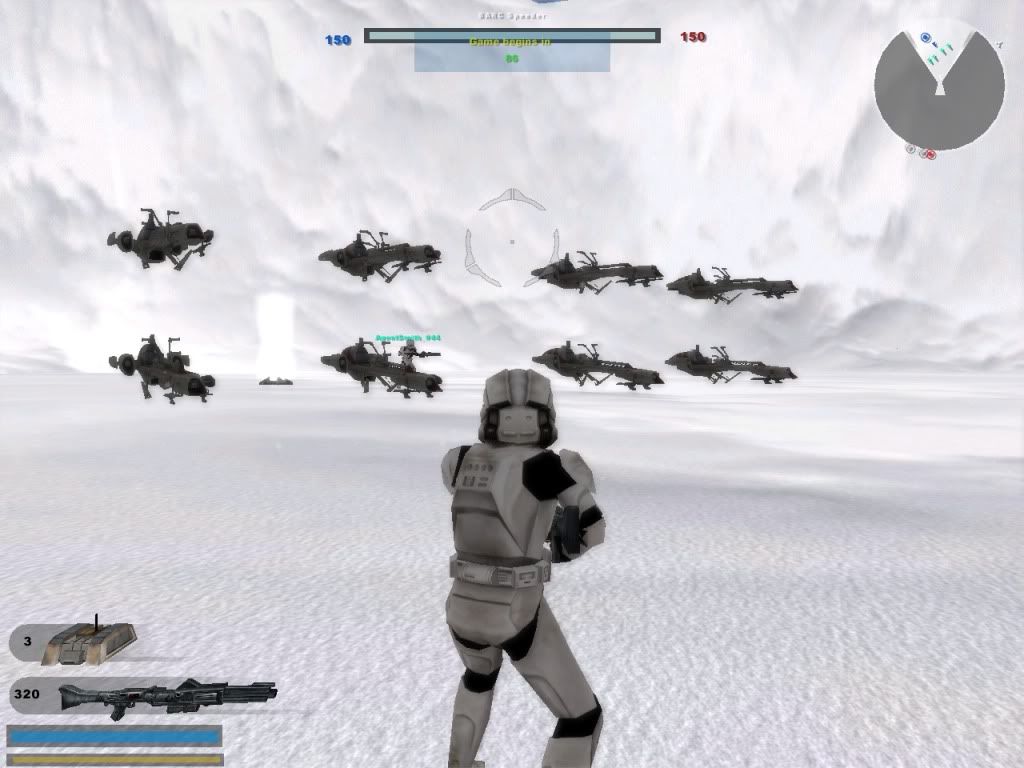
My vehicles are Barc Speeders and this is how they show up in multiplayer:
Hidden/Spoiler:
Image
That's during warmup, you can drive them in warmup time. After warmup the bottom half disappears. (note, the top half doesn't appear if you are the host, it is solid for everyone else but not drivable. I have a few Ideas and if they work out I will post back here... hopefully we can get this worked out.
User avatar
General_Nate
Lieutenant General
Lieutenant General
Posts: 689
Joined: Sun Jun 28, 2009 4:01 pm
Projects :: None because BFII is not working
Games I'm Playing :: Minecraft
xbox live or psn: No gamertag set
Location: 127.0.0.1

Re: Vehicles won't show up in MP

Post by General_Nate »

Did you use Vehicle spawns?
User avatar
AgentSmith_#27
Rebel Warrant Officer
Posts: 302
Joined: Thu Feb 11, 2010 3:10 pm
Projects :: No Projects I am ready to unveil
Games I'm Playing :: SWBF2-MW2-Madden 08
xbox live or psn: No gamertag set
Location: Zeroeditor
Contact:

Re: Vehicles won't show up in MP

Post by AgentSmith_#27 »

General_Nate wrote:Did you use Vehicle spawns?

:yes: they actually work great in singleplayer, just like yours, they just disappear after warmups in multiplayer

I've done extensive barrier work on my map, and after a certain # of barriers it causes ai to stop moving and so far whenever I add planning it crashes, I might throw in the towel and delete all the barriers just to see what happens...

Btw, what kind of speeders are you using?
User avatar
Teancum
Jedi Admin
Jedi Admin
Posts: 11080
Joined: Wed Sep 07, 2005 11:42 pm
Projects :: No Mod project currently.
Games I'm Playing :: Destiny
xbox live or psn: No gamertag set
Location: Indiana

Re: Vehicles won't show up in MP

Post by Teancum »

Post your lua (incidentally, it's almost always a good idea to post your lua).
User avatar
AgentSmith_#27
Rebel Warrant Officer
Posts: 302
Joined: Thu Feb 11, 2010 3:10 pm
Projects :: No Projects I am ready to unveil
Games I'm Playing :: SWBF2-MW2-Madden 08
xbox live or psn: No gamertag set
Location: Zeroeditor
Contact:

Re: Vehicles won't show up in MP

Post by AgentSmith_#27 »

I'll post mine just because it sounds like Nate and I have the same problem
(also I need a fix desperately)
Hidden/Spoiler:
--
-- Copyright (c) 2005 Pandemic Studios, LLC. All rights reserved.
--

-- load the gametype script
ScriptCB_DoFile("ObjectiveConquest")
ScriptCB_DoFile("setup_teams")

-- REP Attacking (attacker is always #1)
REP = 1;
CIS = 2;
-- These variables do not change
ATT = REP;
DEF = CIS;


function ScriptPostLoad()


--This defines the CPs. These need to happen first
cp1 = CommandPost:New{name = "cp1"}
cp2 = CommandPost:New{name = "cp2"}
cp3 = CommandPost:New{name = "cp3"}
cp4 = CommandPost:New{name = "cp4"}


--This sets up the actual objective. This needs to happen after cp's are defined
conquest = ObjectiveConquest:New{teamATT = ATT, teamDEF = DEF,
textATT = "game.modes.con",
textDEF = "game.modes.con2",
multiplayerRules = true}

--This adds the CPs to the objective. This needs to happen after the objective is set up
conquest:AddCommandPost(cp1)
conquest:AddCommandPost(cp2)
conquest:AddCommandPost(cp3)
conquest:AddCommandPost(cp4)

conquest:Start()

EnableSPHeroRules()

end


---------------------------------------------------------------------------
-- FUNCTION: ScriptInit
-- PURPOSE: This function is only run once
-- INPUT:
-- OUTPUT:
-- NOTES: The name, 'ScriptInit' is a chosen convention, and each
-- mission script must contain a version of this function, as
-- it is called from C to start the mission.
---------------------------------------------------------------------------
function ScriptInit()

ReadDataFile("ingame.lvl")


SetMaxFlyHeight(30)
SetMaxPlayerFlyHeight (30)

SetMemoryPoolSize ("ClothData",20)
SetMemoryPoolSize ("Combo",50) -- should be ~ 2x number of jedi classes
SetMemoryPoolSize ("Combo::State",650) -- should be ~12x #Combo
SetMemoryPoolSize ("Combo::Transition",650) -- should be a bit bigger than #Combo::State
SetMemoryPoolSize ("Combo::Condition",650) -- should be a bit bigger than #Combo::State
SetMemoryPoolSize ("Combo::Attack",550) -- should be ~8-12x #Combo
SetMemoryPoolSize ("Combo::DamageSample",6000) -- should be ~8-12x #Combo::Attack
SetMemoryPoolSize ("Combo::Deflect",100) -- should be ~1x #combo

ReadDataFile("sound\\yav.lvl;yav1cw")
ReadDataFile("SIDE\\\\snw.lvl",
"snw_inf_wampa")
ReadDataFile("SIDE\\rep.lvl",
"rep_inf_ep3_rifleman",
"rep_inf_ep3_rocketeer",
"rep_inf_ep3_engineer",
"rep_inf_ep3_sniper",
"rep_inf_ep3_officer",
"rep_inf_ep3_jettrooper",
"rep_hover_fightertank",
"rep_hero_anakin",
"rep_hover_barcspeeder")
ReadDataFile("SIDE\\cis.lvl",
"cis_inf_rifleman",
"cis_inf_rocketeer",
"cis_inf_engineer",
"cis_inf_sniper",
"cis_inf_officer",
"cis_inf_droideka",
"cis_hero_darthmaul",
"cis_hover_aat")


ReadDataFile("SIDE\\tur.lvl",
"tur_bldg_laser",
"tur_bldg_tower")

SetupTeams{
rep = {
team = REP,
units = 20,
reinforcements = 150,
soldier = { "rep_inf_ep3_rifleman",9, 25},
assault = { "rep_inf_ep3_rocketeer",1, 4},
engineer = { "rep_inf_ep3_engineer",1, 4},
sniper = { "rep_inf_ep3_sniper",1, 4},
officer = {"rep_inf_ep3_officer",1, 4},
special = { "rep_inf_ep3_jettrooper",1, 4},

},
cis = {
team = CIS,
units = 20,
reinforcements = 150,
soldier = { "cis_inf_rifleman",9, 25},
assault = { "cis_inf_rocketeer",1, 4},
engineer = { "cis_inf_engineer",1, 4},
sniper = { "cis_inf_sniper",1, 4},
officer = {"cis_inf_officer",1, 4},
special = { "cis_inf_droideka",1, 4},
}
}
SetTeamName (3, "wampas")
AddUnitClass (3, "snw_inf_wampa", 10,15)
SetUnitCount (3, 8)
AddAIGoal(3, "Deathmatch", 100)

SetTeamAsEnemy(ATT,3)
SetTeamAsEnemy(3,ATT)
SetTeamAsEnemy(DEF,3)
SetTeamAsEnemy(3,DEF)

SetHeroClass(CIS, "cis_hero_darthmaul")
SetHeroClass(REP, "rep_hero_anakin")


-- Level Stats
-- ClearWalkers()
AddWalkerType(0, 4) -- special -> droidekas
AddWalkerType(1, 0) -- 1x2 (1 pair of legs)
AddWalkerType(2, 0) -- 2x2 (2 pairs of legs)
AddWalkerType(3, 0) -- 3x2 (3 pairs of legs)
local weaponCnt = 1024
SetMemoryPoolSize("Aimer", 75)
SetMemoryPoolSize("AmmoCounter", weaponCnt)
SetMemoryPoolSize("BaseHint", 1024)
SetMemoryPoolSize("EnergyBar", weaponCnt)
SetMemoryPoolSize("EntityCloth", 32)
SetMemoryPoolSize("EntityFlyer", 32)
SetMemoryPoolSize("EntityHover", 32)
SetMemoryPoolSize("EntityLight", 200)
SetMemoryPoolSize("EntitySoundStream", 4)
SetMemoryPoolSize("EntitySoundStatic", 32)
SetMemoryPoolSize("MountedTurret", 32)
SetMemoryPoolSize("Navigator", 128)
SetMemoryPoolSize("Obstacle", 1024)
SetMemoryPoolSize("PathNode", 1024)
SetMemoryPoolSize("SoundSpaceRegion", 64)
SetMemoryPoolSize("TreeGridStack", 1024)
SetMemoryPoolSize("UnitAgent", 128)
SetMemoryPoolSize("UnitController", 128)
SetMemoryPoolSize("Weapon", weaponCnt)

SetSpawnDelay(10.0, 0.25)
--ReadDataFile("dc:ARM\\ARM.lvl", "ARM_conquest")
ReadDataFile("dc:ARM\\ARM.lvl", "ARM_conquest")
SetDenseEnvironment("false")


-- Sound

SetSoundEffect("ScopeDisplayZoomIn", "binocularzoomin")
SetSoundEffect("ScopeDisplayZoomOut", "binocularzoomout")

voiceSlow = OpenAudioStream("sound\\global.lvl", "rep_unit_vo_slow")
AudioStreamAppendSegments("sound\\global.lvl", "cis_unit_vo_slow", voiceSlow)
AudioStreamAppendSegments("sound\\global.lvl", "global_vo_slow", voiceSlow)

voiceQuick = OpenAudioStream("sound\\global.lvl", "rep_unit_vo_quick")
AudioStreamAppendSegments("sound\\global.lvl", "cis_unit_vo_quick", voiceQuick)

OpenAudioStream("sound\\global.lvl", "cw_music")
-- OpenAudioStream("sound\\global.lvl", "global_vo_quick")
-- OpenAudioStream("sound\\global.lvl", "global_vo_slow")
OpenAudioStream("sound\\yav.lvl", "yav1")
OpenAudioStream("sound\\yav.lvl", "yav1_emt")

SetBleedingVoiceOver(REP, REP, "rep_off_com_report_us_overwhelmed", 1)
SetBleedingVoiceOver(REP, CIS, "rep_off_com_report_enemy_losing", 1)
SetBleedingVoiceOver(CIS, REP, "cis_off_com_report_enemy_losing", 1)
SetBleedingVoiceOver(CIS, CIS, "cis_off_com_report_us_overwhelmed", 1)

SetOutOfBoundsVoiceOver(2, "cisleaving")
SetOutOfBoundsVoiceOver(1, "repleaving")

SetAmbientMusic(REP, 1.0, "rep_yav_amb_start", 0,1)
SetAmbientMusic(REP, 0.8, "rep_yav_amb_middle", 1,1)
SetAmbientMusic(REP, 0.2, "rep_yav_amb_end", 2,1)
SetAmbientMusic(CIS, 1.0, "cis_yav_amb_start", 0,1)
SetAmbientMusic(CIS, 0.8, "cis_yav_amb_middle", 1,1)
SetAmbientMusic(CIS, 0.2, "cis_yav_amb_end", 2,1)

SetVictoryMusic(REP, "rep_yav_amb_victory")
SetDefeatMusic (REP, "rep_yav_amb_defeat")
SetVictoryMusic(CIS, "cis_yav_amb_victory")
SetDefeatMusic (CIS, "cis_yav_amb_defeat")

SetSoundEffect("ScopeDisplayZoomIn", "binocularzoomin")
SetSoundEffect("ScopeDisplayZoomOut", "binocularzoomout")
--SetSoundEffect("BirdScatter", "birdsFlySeq1")
--SetSoundEffect("WeaponUnableSelect", "com_weap_inf_weaponchange_null")
--SetSoundEffect("WeaponModeUnableSelect", "com_weap_inf_modechange_null")
SetSoundEffect("SpawnDisplayUnitChange", "shell_select_unit")
SetSoundEffect("SpawnDisplayUnitAccept", "shell_menu_enter")
SetSoundEffect("SpawnDisplaySpawnPointChange", "shell_select_change")
SetSoundEffect("SpawnDisplaySpawnPointAccept", "shell_menu_enter")
SetSoundEffect("SpawnDisplayBack", "shell_menu_exit")


--OpeningSateliteShot
AddCameraShot(0.908386, -0.209095, -0.352873, -0.081226, -45.922508, -19.114113, 77.022636);

AddCameraShot(-0.481173, 0.024248, -0.875181, -0.044103, 14.767292, -30.602322, -144.506851);
AddCameraShot(0.999914, -0.012495, -0.004416, -0.000055, 1.143253, -33.602314, -76.884430);
AddCameraShot(0.839161, 0.012048, -0.543698, 0.007806, 19.152437, -49.802273, 24.337317);
AddCameraShot(0.467324, 0.006709, -0.883972, 0.012691, 11.825212, -49.802273, -7.000720);
AddCameraShot(0.861797, 0.001786, -0.507253, 0.001051, -11.986043, -59.702248, 23.263165);
AddCameraShot(0.628546, -0.042609, -0.774831, -0.052525, 20.429928, -48.302277, 9.771714);
AddCameraShot(0.765213, -0.051873, 0.640215, 0.043400, 57.692474, -48.302277, 16.540724);
AddCameraShot(0.264032, -0.015285, -0.962782, -0.055734, -16.681797, -42.902290, 129.553268);
AddCameraShot(-0.382320, 0.022132, -0.922222, -0.053386, 20.670977, -42.902290, 135.513001);
end
User avatar
AceMastermind
Gametoast Staff
Gametoast Staff
Posts: 3285
Joined: Mon Aug 21, 2006 6:23 am
Contact:

Re: Vehicles won't show up in MP

Post by AceMastermind »

General_Nate wrote:I placed some speeders in ZE just like any other object. It works great in SP, but not at all in MP
Perhaps you should try spawning them rather than placing them as objects and see if it makes a difference.

@AgentSmith_#27
I don't know how General_Nate feels about you hijacking his topic but you already have an ongoing discussion here:
http://www.gametoast.com/forums/viewtop ... 27&t=22439
It'll be best to keep it in your own topic.
User avatar
AgentSmith_#27
Rebel Warrant Officer
Posts: 302
Joined: Thu Feb 11, 2010 3:10 pm
Projects :: No Projects I am ready to unveil
Games I'm Playing :: SWBF2-MW2-Madden 08
xbox live or psn: No gamertag set
Location: Zeroeditor
Contact:

Re: Vehicles won't show up in MP

Post by AgentSmith_#27 »

AceMastermind wrote:
General_Nate wrote:I placed some speeders in ZE just like any other object. It works great in SP, but not at all in MP
Perhaps you should try spawning them rather than placing them as objects and see if it makes a difference.

@AgentSmith_#27
I don't know how General_Nate feels about you hijacking his topic but you already have an ongoing discussion here:
http://www.gametoast.com/forums/viewtop ... 27&t=22439
It'll be best to keep it in your own topic.

Oh I'm sorry... Since my topic was first, and (unless I'm mistaken) we have the same problem, I thought it would be wise to combine information and not have two different threads with the same problem floating around at the top of the modding forum :spam: ...
User avatar
General_Nate
Lieutenant General
Lieutenant General
Posts: 689
Joined: Sun Jun 28, 2009 4:01 pm
Projects :: None because BFII is not working
Games I'm Playing :: Minecraft
xbox live or psn: No gamertag set
Location: 127.0.0.1

Re: Vehicles won't show up in MP

Post by General_Nate »

Hey guys! I tried vehicle spawns and it works!

Thanks, can be solved!
User avatar
AgentSmith_#27
Rebel Warrant Officer
Posts: 302
Joined: Thu Feb 11, 2010 3:10 pm
Projects :: No Projects I am ready to unveil
Games I'm Playing :: SWBF2-MW2-Madden 08
xbox live or psn: No gamertag set
Location: Zeroeditor
Contact:

Re: Vehicles won't show up in MP

Post by AgentSmith_#27 »

General_Nate wrote:Hey guys! I tried vehicle spawns and it works!

Thanks, can be solved!

Hey that's great! Congratulations! Now if only I can get mine to work
Post Reply