

Summary at Bottom, if you can't stand my narrative.

*EDIT* Clarified summary, added my Java script under the photo.
Anyway, you may have read a few months back about my method for animating objects (and Vehicles/players[sorta]) using LUA script. (basically A Frame-long looping timer and SetEntityMatrix.) It was all well and good in that it made it a bit easier for some types of movement to be animated, and overcame the limited number of key frames in the traditional ZE animator.
CUT But I had other plans. You may be familiar with my age old project Acezuraize. (commenced 2006, releases in: 2007, lost to busted HD :2008, HD decides that it does get along with its replacement control board after all: 2009...) It was originally intended as a race map, but I added every other mode there was, including Zerted's custom modes, at points, and an extensive Conquest+Objectives+CoolStuff Campaign. Now it is mostly a semi-ugly, code-mod-a-copia map. I managed to get the Race mode functional with scripting based off of Maveritchel's work, but its a little boring without opponents. So I programmed some. Sort of.
THE CHASE SCENE
That LUA animation work I did this winter met up with a work-around that allowed you to perform math on Matrixes. When you get a Matrix in LUA, you can't do anything with it but store it and use it for SetEntityMatrix or CreateMatrix. So, I grabbed the matrixes before hand, so to speak. I laid out a way to store data for position in LUA:
Code: Select all
LUALocationPoints = {}
    PointOne = {}          -- create the matrix
    for i=1,100	do --100 rows of lua point
      LUALocationPoints[i] = {}     -- create a new row
      for j=1,6 do --six columns (to represent x y z x rotation y rotation z rotation
        LUALocationPoints[i][j] = 0
      end
    end

--This six numbers represent values 2-7 in the CreateMatrix Function, Special Radian Rotation and the Reference matrix are absent

--Point 1:
LUALocationPoints[1][1] = 0.000000
LUALocationPoints[1][2] = 0.000000
LUALocationPoints[1][3] = 0.000000
LUALocationPoints[1][4] = 283.022247
LUALocationPoints[1][5] = 0.000001
LUALocationPoints[1][6] = 457.61010
Code: Select all
CreateMatrix(0,LUALocationPoints[1][1], LUALocationPoints[1][2], LUALocationPoints[1][3], LUALocationPoints[1][4], LUALocationPoints[1][5], LUALocationPoints[1][6], GetEntityMatrix("ZeroPoint"))
This meant I could enter a whole tonne of points to create a virtual path for my Racer 'AI' to follow, and use math.rand to make it so they do it at different speeds on slightly different, and even randomly branching paths.
But I've hit some snags.
One I managed to fix. That is the fact that it is a PAIN IN THE
 to copy and paste 6 individual numbers from (NumberOfNodes x2) lines in a .pth file. So I wrote a Java app to do it for me. And I hadn't programmed in ages so even this simple thing was a minor headache.
Hidden/Spoiler:
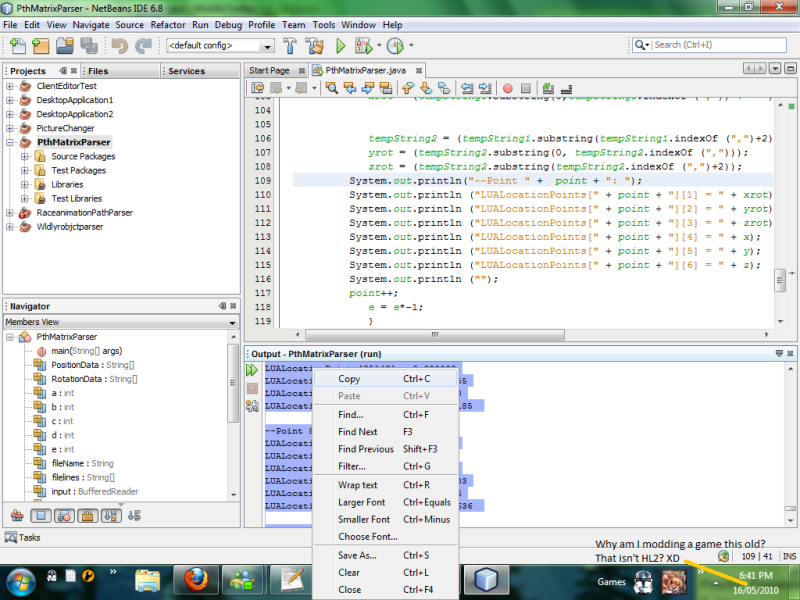
[code]
package pthmatrixparser;
import java.io.*;
/**
*
* @author Ace Asz
*/
public class PthMatrixParser {
static String filelines[] = new String [1500];
static String PositionData [] = new String [1500];//line 10
static String RotationData [] = new String [1500];//line 10
static String fileName, line, tempString1, tempString2;
static String xrot, yrot, zrot, x, y, z;
static BufferedReader input;
static int a = 0;
static int b = 0;
static int c = 0;//line 15
static int d = 0;
static int e = -1;
static int point = 1;
/**
* @param args the command line arguments
*/
public static void main(String[] args)throws IOException {
fileName = "C:\\ACE_racepath.PTH";
line = "";
//name of file to be opened
//declare buffered reader - it allows us to read text files
input = new BufferedReader (new FileReader (fileName));
while (line != null) //as long as the line has a word
{
line = input.readLine (); //read the line
filelines [a] = line; //store the line in the element 'a' in the array
//if (line.length > 0)//prevents java from taking the index of a null line
if (line != null)
{
if (line.indexOf("Position") > -1)//if the line contains "object"
{
PositionData [d] = line;//then add it to the array "objects"
d++;
c++;
}
if (line.indexOf("Rotation") > -1)//if the line contains "object"
{
RotationData [d] = line;//then add it to the array "objects"
d++;
c++;
}
}
a++; //increase a by 1 (prevents overwriting elements)
}
input.close (); //close the text file IMPORTANT!!!!
//re-set value of variable IMPORTANT
/*System.out.println("Original File");
for (b = 0; b < (a-1); b++)
{
System.out.println (filelines );
}*/
d = 0;
//System.out.println ("Lines with Position Data and Rotation Data in them:");
//for (d = 0; d < c; d++)
//{
// if (e == -1)
// {
// System.out.println (PositionData [d]);
// e = e*-1;
// }
// else
// {
// System.out.println (RotationData [d]);
// e = e*-1;
// }
//}
e = -1;
System.out.println ("");
System.out.println ("Coordinates:");
System.out.println ();
for (d = 0; d < c; d++)
{
if (e == -1)
{
x = (PositionData [d].substring((PositionData [d].indexOf ("(")+1),(PositionData [d].indexOf (",")-1)) + " ");
tempString1 = (PositionData [d].substring((PositionData [d].indexOf (",")+2),(PositionData [d].indexOf (";") -1)) + " ");
y = (tempString1.substring(0,tempString1.indexOf (",")) + " ");
tempString1 = (PositionData [d].substring((PositionData [d].indexOf (",")+2),(PositionData [d].indexOf (";") -1)) + " ");
z = (tempString1.substring((tempString1.indexOf (",")+2)) + " ");
e = e*-1;
}
else
{
tempString1 = (RotationData [d].substring((RotationData [d].indexOf (",")+2),(RotationData [d].indexOf (";") -1)) + " ");
xrot = (tempString1.substring(0,tempString1.indexOf (",")) + " ");
tempString2 = (tempString1.substring(tempString1.indexOf (",")+2));
yrot = (tempString2.substring(0, tempString2.indexOf (",")));
zrot = (tempString2.substring(tempString2.indexOf (",")+2));
System.out.println("--Point " + point + ": ");
System.out.println ("LUALocationPoints[" + point + "][1] = " + xrot);
System.out.println ("LUALocationPoints[" + point + "][2] = " + yrot);
System.out.println ("LUALocationPoints[" + point + "][3] = " + zrot);
System.out.println ("LUALocationPoints[" + point + "][4] = " + x);
System.out.println ("LUALocationPoints[" + point + "][5] = " + y);
System.out.println ("LUALocationPoints[" + point + "][6] = " + z);
System.out.println ("");
point++;
e = e*-1;
}
}
System.out.println ("");
}
}
[/code]
(Don't worry, I haven't invested TOO much time in this...)
Anyway, here's the part where I explain why I am making a WIP thread for this, besides that it is awesome. (If you don't believe me, then :maulsaber: ) It turns out that this little experiment has largely been a surprising success. Except for this:
Hidden/Spoiler:
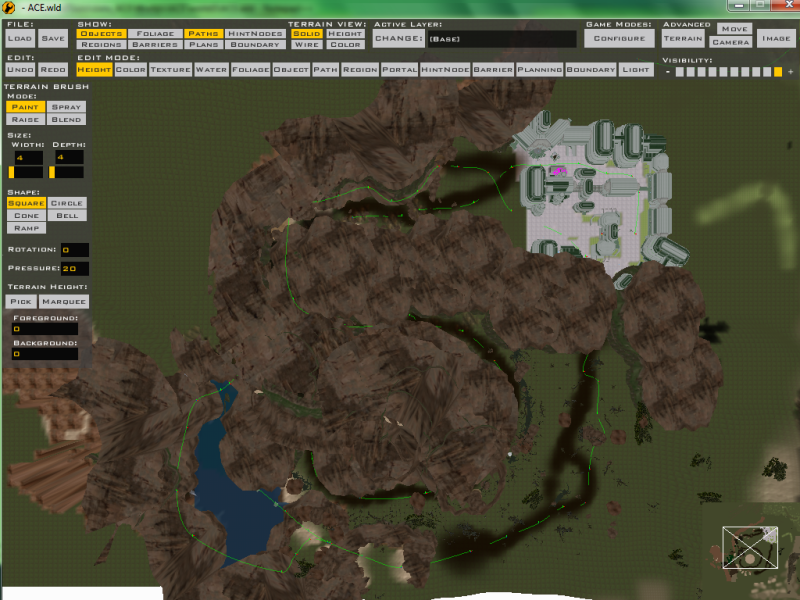
The virtual path isn't oriented correctly, or worse, its not being followed in the correct order. Observe the Bespin tower vs the path points. I'd like help in the form of fresh minds to take a look at (probably run) my code to see why.

Hidden/Spoiler:
[code]
LUALocationPoints = {}
PointOne = {} -- create the matrix
for i=1,100 do --100 rows of lua point
LUALocationPoints = {} -- create a new row
for j=1,6 do --six columns (to represent x y z x rotation y rotation z rotation
LUALocationPoints[j] = 0
end
end
--This six numbers represent values 2-7 in the CreateMatrix Function, Special Radian Rotation and the Reference matrix are absent
--Point 1:
LUALocationPoints[1][1] = 0.000000
LUALocationPoints[1][2] = 0.000000
LUALocationPoints[1][3] = 0.000000
LUALocationPoints[1][4] = 283.022247
LUALocationPoints[1][5] = 0.000001
LUALocationPoints[1][6] = 457.61010
--Point 2:
LUALocationPoints[2][1] = 0.000000
LUALocationPoints[2][2] = 0.000000
LUALocationPoints[2][3] = 0.000000
LUALocationPoints[2][4] = 376.578217
LUALocationPoints[2][5] = 0.000000
LUALocationPoints[2][6] = 465.88913
--Point 3:
LUALocationPoints[3][1] = 0.000000
LUALocationPoints[3][2] = 0.000000
LUALocationPoints[3][3] = 0.000000
LUALocationPoints[3][4] = 413.593018
LUALocationPoints[3][5] = 0.000000
LUALocationPoints[3][6] = 449.83267
--Point 4:
LUALocationPoints[4][1] = 0.000000
LUALocationPoints[4][2] = 0.000000
LUALocationPoints[4][3] = 0.000000
LUALocationPoints[4][4] = 419.836304
LUALocationPoints[4][5] = 0.000000
LUALocationPoints[4][6] = 395.38201
--Point 5:
LUALocationPoints[5][1] = 0.000000
LUALocationPoints[5][2] = 0.000000
LUALocationPoints[5][3] = 0.000000
LUALocationPoints[5][4] = 442.031769
LUALocationPoints[5][5] = 0.000000
LUALocationPoints[5][6] = 333.53460
--Point 6:
LUALocationPoints[6][1] = 0.000000
LUALocationPoints[6][2] = 0.000000
LUALocationPoints[6][3] = 0.000000
LUALocationPoints[6][4] = 438.327515
LUALocationPoints[6][5] = 0.000000
LUALocationPoints[6][6] = 248.15860
--Point 7:
LUALocationPoints[7][1] = 0.000000
LUALocationPoints[7][2] = 0.000000
LUALocationPoints[7][3] = 0.000000
LUALocationPoints[7][4] = 434.212341
LUALocationPoints[7][5] = 0.000000
LUALocationPoints[7][6] = 184.95797
--Point 8:
LUALocationPoints[8][1] = 0.000000
LUALocationPoints[8][2] = 0.000000
LUALocationPoints[8][3] = 0.000000
LUALocationPoints[8][4] = 353.462677
LUALocationPoints[8][5] = 0.000000
LUALocationPoints[8][6] = 100.65515
--Point 9:
LUALocationPoints[9][1] = 0.000000
LUALocationPoints[9][2] = 0.000000
LUALocationPoints[9][3] = 0.000000
LUALocationPoints[9][4] = 336.273041
LUALocationPoints[9][5] = 1.409971
LUALocationPoints[9][6] = -20.35596
--Point 10:
LUALocationPoints[10][1] = 0.000000
LUALocationPoints[10][2] = 0.000000
LUALocationPoints[10][3] = 0.000000
LUALocationPoints[10][4] = 323.874939
LUALocationPoints[10][5] = -0.321567
LUALocationPoints[10][6] = -57.42618
--Point 11:
LUALocationPoints[11][1] = 0.000000
LUALocationPoints[11][2] = 0.000000
LUALocationPoints[11][3] = 0.000000
LUALocationPoints[11][4] = 319.148499
LUALocationPoints[11][5] = 1.322924
LUALocationPoints[11][6] = -167.04922
--Point 12:
LUALocationPoints[12][1] = 0.000000
LUALocationPoints[12][2] = 0.000000
LUALocationPoints[12][3] = 0.000000
LUALocationPoints[12][4] = 276.732117
LUALocationPoints[12][5] = 0.024262
LUALocationPoints[12][6] = -288.07141
--Point 13:
LUALocationPoints[13][1] = 0.000000
LUALocationPoints[13][2] = 0.000000
LUALocationPoints[13][3] = 0.000000
LUALocationPoints[13][4] = 187.228851
LUALocationPoints[13][5] = 2.692170
LUALocationPoints[13][6] = -329.97863
--Point 14:
LUALocationPoints[14][1] = 0.000000
LUALocationPoints[14][2] = 0.000000
LUALocationPoints[14][3] = 0.000000
LUALocationPoints[14][4] = 100.159424
LUALocationPoints[14][5] = 1.089711
LUALocationPoints[14][6] = -292.01306
--Point 15:
LUALocationPoints[15][1] = 0.000000
LUALocationPoints[15][2] = 0.000000
LUALocationPoints[15][3] = 0.000000
LUALocationPoints[15][4] = 78.195084
LUALocationPoints[15][5] = 1.288867
LUALocationPoints[15][6] = -201.24499
--Point 16:
LUALocationPoints[16][1] = 0.000000
LUALocationPoints[16][2] = 0.000000
LUALocationPoints[16][3] = 0.000000
LUALocationPoints[16][4] = 59.354065
LUALocationPoints[16][5] = 0.963373
LUALocationPoints[16][6] = -84.64901
--Point 17:
LUALocationPoints[17][1] = 0.000000
LUALocationPoints[17][2] = 0.000000
LUALocationPoints[17][3] = 0.000000
LUALocationPoints[17][4] = 96.523758
LUALocationPoints[17][5] = 0.553417
LUALocationPoints[17][6] = -40.15289
--Point 18:
LUALocationPoints[18][1] = 0.000000
LUALocationPoints[18][2] = 0.000000
LUALocationPoints[18][3] = 0.000000
LUALocationPoints[18][4] = 77.537888
LUALocationPoints[18][5] = 1.613748
LUALocationPoints[18][6] = -16.15483
--Point 19:
LUALocationPoints[19][1] = 0.000000
LUALocationPoints[19][2] = 0.000000
LUALocationPoints[19][3] = 0.000000
LUALocationPoints[19][4] = 61.186287
LUALocationPoints[19][5] = 0.950061
LUALocationPoints[19][6] = 76.62510
--Point 20:
LUALocationPoints[20][1] = 0.000000
LUALocationPoints[20][2] = 0.000000
LUALocationPoints[20][3] = 0.000000
LUALocationPoints[20][4] = -4.762239
LUALocationPoints[20][5] = 0.495810
LUALocationPoints[20][6] = 145.29576
--Point 21:
LUALocationPoints[21][1] = 0.000000
LUALocationPoints[21][2] = 0.000000
LUALocationPoints[21][3] = 0.000000
LUALocationPoints[21][4] = -102.713394
LUALocationPoints[21][5] = 0.359543
LUALocationPoints[21][6] = 195.42596
--Point 22:
LUALocationPoints[22][1] = 0.000000
LUALocationPoints[22][2] = 0.000000
LUALocationPoints[22][3] = 0.000000
LUALocationPoints[22][4] = -226.234192
LUALocationPoints[22][5] = 5.404127
LUALocationPoints[22][6] = 139.74130
--Point 23:
LUALocationPoints[23][1] = 0.000000
LUALocationPoints[23][2] = 0.000000
LUALocationPoints[23][3] = 0.000000
LUALocationPoints[23][4] = -306.583679
LUALocationPoints[23][5] = 0.000000
LUALocationPoints[23][6] = -5.22055
--Point 24:
LUALocationPoints[24][1] = 0.000000
LUALocationPoints[24][2] = 0.000000
LUALocationPoints[24][3] = 0.000000
LUALocationPoints[24][4] = -317.754272
LUALocationPoints[24][5] = 0.000000
LUALocationPoints[24][6] = -150.54983
--Point 25:
LUALocationPoints[25][1] = 0.000000
LUALocationPoints[25][2] = 0.000000
LUALocationPoints[25][3] = 0.000000
LUALocationPoints[25][4] = -285.086914
LUALocationPoints[25][5] = -10.385271
LUALocationPoints[25][6] = -236.32872
--Point 26:
LUALocationPoints[26][1] = 0.000000
LUALocationPoints[26][2] = 0.000000
LUALocationPoints[26][3] = 0.000000
LUALocationPoints[26][4] = -235.945923
LUALocationPoints[26][5] = -24.219515
LUALocationPoints[26][6] = -259.76470
--Point 27:
LUALocationPoints[27][1] = 0.000000
LUALocationPoints[27][2] = 0.000000
LUALocationPoints[27][3] = 0.000000
LUALocationPoints[27][4] = -173.810028
LUALocationPoints[27][5] = -34.216011
LUALocationPoints[27][6] = -261.73443
--Point 28:
LUALocationPoints[28][1] = 0.000000
LUALocationPoints[28][2] = 0.000000
LUALocationPoints[28][3] = 0.000000
LUALocationPoints[28][4] = -111.097649
LUALocationPoints[28][5] = -25.086514
LUALocationPoints[28][6] = -251.08120
--Point 29:
LUALocationPoints[29][1] = 0.000000
LUALocationPoints[29][2] = 0.000000
LUALocationPoints[29][3] = 0.000000
LUALocationPoints[29][4] = -91.585938
LUALocationPoints[29][5] = -23.635384
LUALocationPoints[29][6] = -220.77482
--Point 30:
LUALocationPoints[30][1] = 0.000000
LUALocationPoints[30][2] = 0.000000
LUALocationPoints[30][3] = 0.000000
LUALocationPoints[30][4] = -39.106453
LUALocationPoints[30][5] = -15.395015
LUALocationPoints[30][6] = -199.21777
--Point 31:
LUALocationPoints[31][1] = 0.000000
LUALocationPoints[31][2] = 0.000000
LUALocationPoints[31][3] = 0.000000
LUALocationPoints[31][4] = 14.801650
LUALocationPoints[31][5] = -10.134123
LUALocationPoints[31][6] = -209.58587
--Point 32:
LUALocationPoints[32][1] = 0.000000
LUALocationPoints[32][2] = 0.000000
LUALocationPoints[32][3] = 0.000000
LUALocationPoints[32][4] = 17.853550
LUALocationPoints[32][5] = -7.535734
LUALocationPoints[32][6] = -250.99517
--Point 33:
LUALocationPoints[33][1] = 0.000000
LUALocationPoints[33][2] = 0.000000
LUALocationPoints[33][3] = 0.000000
LUALocationPoints[33][4] = -6.410461
LUALocationPoints[33][5] = -6.568787
LUALocationPoints[33][6] = -276.56121
--Point 34:
LUALocationPoints[34][1] = 0.000000
LUALocationPoints[34][2] = 0.000000
LUALocationPoints[34][3] = 0.000000
LUALocationPoints[34][4] = -59.709972
LUALocationPoints[34][5] = -8.196197
LUALocationPoints[34][6] = -298.83361
--Point 35:
LUALocationPoints[35][1] = 0.000000
LUALocationPoints[35][2] = 0.000000
LUALocationPoints[35][3] = 0.000000
LUALocationPoints[35][4] = -61.723091
LUALocationPoints[35][5] = 0.867523
LUALocationPoints[35][6] = -349.68512
--Point 36:
LUALocationPoints[36][1] = 0.000000
LUALocationPoints[36][2] = 0.000000
LUALocationPoints[36][3] = 0.000000
LUALocationPoints[36][4] = -66.493866
LUALocationPoints[36][5] = 13.559672
LUALocationPoints[36][6] = -429.31488
--Point 37:
LUALocationPoints[37][1] = 0.000000
LUALocationPoints[37][2] = 0.000000
LUALocationPoints[37][3] = 0.000000
LUALocationPoints[37][4] = -178.703094
LUALocationPoints[37][5] = 0.036946
LUALocationPoints[37][6] = -437.53692
--Point 38:
LUALocationPoints[38][1] = 0.000000
LUALocationPoints[38][2] = 0.000000
LUALocationPoints[38][3] = 0.000000
LUALocationPoints[38][4] = -204.057816
LUALocationPoints[38][5] = 2.281365
LUALocationPoints[38][6] = -441.55969
--Point 39:
LUALocationPoints[39][1] = 0.000000
LUALocationPoints[39][2] = 0.000000
LUALocationPoints[39][3] = 0.000000
LUALocationPoints[39][4] = -250.108566
LUALocationPoints[39][5] = 5.559190
LUALocationPoints[39][6] = -419.34185
--Point 40:
LUALocationPoints[40][1] = 0.000000
LUALocationPoints[40][2] = 0.000000
LUALocationPoints[40][3] = 0.000000
LUALocationPoints[40][4] = -324.732513
LUALocationPoints[40][5] = 66.889847
LUALocationPoints[40][6] = -301.78430
--Point 41:
LUALocationPoints[41][1] = 0.000000
LUALocationPoints[41][2] = 0.000000
LUALocationPoints[41][3] = 0.000000
LUALocationPoints[41][4] = -367.067657
LUALocationPoints[41][5] = 63.316341
LUALocationPoints[41][6] = -254.73806
--Point 42:
LUALocationPoints[42][1] = 0.000000
LUALocationPoints[42][2] = 0.000000
LUALocationPoints[42][3] = 0.000000
LUALocationPoints[42][4] = -392.205505
LUALocationPoints[42][5] = 69.368683
LUALocationPoints[42][6] = -207.03448
--Point 43:
LUALocationPoints[43][1] = 0.000000
LUALocationPoints[43][2] = 0.000000
LUALocationPoints[43][3] = 0.000000
LUALocationPoints[43][4] = -419.608978
LUALocationPoints[43][5] = 68.107071
LUALocationPoints[43][6] = -140.76886
--Point 44:
LUALocationPoints[44][1] = 0.000000
LUALocationPoints[44][2] = 0.000000
LUALocationPoints[44][3] = 0.000000
LUALocationPoints[44][4] = -444.548950
LUALocationPoints[44][5] = 67.964058
LUALocationPoints[44][6] = -59.66763
--Point 45:
LUALocationPoints[45][1] = 0.000000
LUALocationPoints[45][2] = 0.000000
LUALocationPoints[45][3] = 0.000000
LUALocationPoints[45][4] = -435.159668
LUALocationPoints[45][5] = 9.191442
LUALocationPoints[45][6] = 92.35434
--Point 46:
LUALocationPoints[46][1] = 0.000000
LUALocationPoints[46][2] = 0.000000
LUALocationPoints[46][3] = 0.000000
LUALocationPoints[46][4] = -402.012695
LUALocationPoints[46][5] = 8.062954
LUALocationPoints[46][6] = 172.60788
--Point 47:
LUALocationPoints[47][1] = 0.000000
LUALocationPoints[47][2] = 0.000000
LUALocationPoints[47][3] = 0.000000
LUALocationPoints[47][4] = -373.794342
LUALocationPoints[47][5] = 2.340534
LUALocationPoints[47][6] = 244.65789
--Point 48:
LUALocationPoints[48][1] = 0.000000
LUALocationPoints[48][2] = 0.000000
LUALocationPoints[48][3] = 0.000000
LUALocationPoints[48][4] = -337.347168
LUALocationPoints[48][5] = 2.247941
LUALocationPoints[48][6] = 298.06622
--Point 49:
LUALocationPoints[49][1] = 0.000000
LUALocationPoints[49][2] = 0.000000
LUALocationPoints[49][3] = 0.000000
LUALocationPoints[49][4] = -327.886475
LUALocationPoints[49][5] = 0.549346
LUALocationPoints[49][6] = 346.03906
--Point 50:
LUALocationPoints[50][1] = 0.000000
LUALocationPoints[50][2] = 0.000000
LUALocationPoints[50][3] = 0.000000
LUALocationPoints[50][4] = -250.923492
LUALocationPoints[50][5] = 2.394804
LUALocationPoints[50][6] = 355.86688
--Point 51:
LUALocationPoints[51][1] = 0.000000
LUALocationPoints[51][2] = 0.000000
LUALocationPoints[51][3] = 0.000000
LUALocationPoints[51][4] = -196.850769
LUALocationPoints[51][5] = 0.000000
LUALocationPoints[51][6] = 368.27041
--Point 52:
LUALocationPoints[52][1] = 0.000000
LUALocationPoints[52][2] = 0.000000
LUALocationPoints[52][3] = 0.000000
LUALocationPoints[52][4] = -177.322510
LUALocationPoints[52][5] = 1.618879
LUALocationPoints[52][6] = 389.79577
--Point 53:
LUALocationPoints[53][1] = 0.000000
LUALocationPoints[53][2] = 0.000000
LUALocationPoints[53][3] = 0.000000
LUALocationPoints[53][4] = -124.961655
LUALocationPoints[53][5] = 3.489887
LUALocationPoints[53][6] = 373.56451
--Point 54:
LUALocationPoints[54][1] = 0.000000
LUALocationPoints[54][2] = 0.000000
LUALocationPoints[54][3] = 0.000000
LUALocationPoints[54][4] = -52.341270
LUALocationPoints[54][5] = 0.018566
LUALocationPoints[54][6] = 375.34301
--Point 55:
LUALocationPoints[55][1] = 0.000000
LUALocationPoints[55][2] = 0.000000
LUALocationPoints[55][3] = 0.000000
LUALocationPoints[55][4] = -30.424145
LUALocationPoints[55][5] = 0.563761
LUALocationPoints[55][6] = 343.43853
--Point 56:
LUALocationPoints[56][1] = 0.000000
LUALocationPoints[56][2] = 0.000000
LUALocationPoints[56][3] = 0.000000
LUALocationPoints[56][4] = 30.764595
LUALocationPoints[56][5] = 0.000000
LUALocationPoints[56][6] = 364.37811
--Point 57:
LUALocationPoints[57][1] = 0.000000
LUALocationPoints[57][2] = 0.000000
LUALocationPoints[57][3] = 0.000000
LUALocationPoints[57][4] = 90.792587
LUALocationPoints[57][5] = 0.000000
LUALocationPoints[57][6] = 384.92620
--Point 58:
LUALocationPoints[58][1] = 0.000000
LUALocationPoints[58][2] = 0.000000
LUALocationPoints[58][3] = 0.000000
LUALocationPoints[58][4] = 186.591537
LUALocationPoints[58][5] = 0.000000
LUALocationPoints[58][6] = 386.04748
--Point 59:
LUALocationPoints[59][1] = 0.000000
LUALocationPoints[59][2] = 0.000000
LUALocationPoints[59][3] = 0.000000
LUALocationPoints[59][4] = 230.878021
LUALocationPoints[59][5] = 0.429876
LUALocationPoints[59][6] = 349.09527
--Point 60:
LUALocationPoints[60][1] = 0.000000
LUALocationPoints[60][2] = 0.000000
LUALocationPoints[60][3] = 0.000000
LUALocationPoints[60][4] = 282.328247
LUALocationPoints[60][5] = 0.368921
LUALocationPoints[60][6] = 293.90274
--Point 61:
LUALocationPoints[61][1] = 0.000000
LUALocationPoints[61][2] = 0.000000
LUALocationPoints[61][3] = 0.000000
LUALocationPoints[61][4] = 335.146576
LUALocationPoints[61][5] = 0.000000
LUALocationPoints[61][6] = 183.56851
--Point 62:
LUALocationPoints[62][1] = 0.000000
LUALocationPoints[62][2] = 0.000000
LUALocationPoints[62][3] = 0.000000
LUALocationPoints[62][4] = 420.524933
LUALocationPoints[62][5] = 9.221782
LUALocationPoints[62][6] = 129.94102
--Point 63:
LUALocationPoints[63][1] = 0.000000
LUALocationPoints[63][2] = 0.000000
LUALocationPoints[63][3] = 0.000000
LUALocationPoints[63][4] = 425.136780
LUALocationPoints[63][5] = 35.930534
LUALocationPoints[63][6] = 61.92621
--Point 64:
LUALocationPoints[64][1] = 0.000000
LUALocationPoints[64][2] = 0.000000
LUALocationPoints[64][3] = 0.000000
LUALocationPoints[64][4] = 422.350861
LUALocationPoints[64][5] = 52.645359
LUALocationPoints[64][6] = 18.46855
--Point 65:
LUALocationPoints[65][1] = 0.000000
LUALocationPoints[65][2] = 0.000000
LUALocationPoints[65][3] = 0.000000
LUALocationPoints[65][4] = 367.035675
LUALocationPoints[65][5] = 56.584049
LUALocationPoints[65][6] = -24.03871
--Point 66:
LUALocationPoints[66][1] = 0.000000
LUALocationPoints[66][2] = 0.000000
LUALocationPoints[66][3] = 0.000000
LUALocationPoints[66][4] = 345.486481
LUALocationPoints[66][5] = 56.998985
LUALocationPoints[66][6] = -79.71548
--Point 67:
LUALocationPoints[67][1] = 0.000000
LUALocationPoints[67][2] = 0.000000
LUALocationPoints[67][3] = 0.000000
LUALocationPoints[67][4] = 375.124756
LUALocationPoints[67][5] = 58.026245
LUALocationPoints[67][6] = -128.63613
--Point 68:
LUALocationPoints[68][1] = 0.000000
LUALocationPoints[68][2] = 0.000000
LUALocationPoints[68][3] = 0.000000
LUALocationPoints[68][4] = 357.256805
LUALocationPoints[68][5] = 57.384277
LUALocationPoints[68][6] = -191.06051
--Point 69:
LUALocationPoints[69][1] = 0.000000
LUALocationPoints[69][2] = 0.000000
LUALocationPoints[69][3] = 0.000000
LUALocationPoints[69][4] = 344.397095
LUALocationPoints[69][5] = 54.788452
LUALocationPoints[69][6] = -239.11734
--Point 70:
LUALocationPoints[70][1] = 0.000000
LUALocationPoints[70][2] = 0.000000
LUALocationPoints[70][3] = 0.000000
LUALocationPoints[70][4] = 347.473938
LUALocationPoints[70][5] = 61.968491
LUALocationPoints[70][6] = -256.69207
--Point 71:
LUALocationPoints[71][1] = 0.000000
LUALocationPoints[71][2] = 0.000000
LUALocationPoints[71][3] = 0.000000
LUALocationPoints[71][4] = 348.971985
LUALocationPoints[71][5] = 62.504784
LUALocationPoints[71][6] = -273.05038
--Point 72:
LUALocationPoints[72][1] = 0.000000
LUALocationPoints[72][2] = 0.000000
LUALocationPoints[72][3] = 0.000000
LUALocationPoints[72][4] = 331.752380
LUALocationPoints[72][5] = 56.392105
LUALocationPoints[72][6] = -294.16131
--Point 73:
LUALocationPoints[73][1] = 0.000000
LUALocationPoints[73][2] = 0.000000
LUALocationPoints[73][3] = 0.000000
LUALocationPoints[73][4] = 132.173615
LUALocationPoints[73][5] = 57.286842
LUALocationPoints[73][6] = -287.37457
--Point 74:
LUALocationPoints[74][1] = 0.000000
LUALocationPoints[74][2] = 0.000000
LUALocationPoints[74][3] = 0.000000
LUALocationPoints[74][4] = 74.612587
LUALocationPoints[74][5] = 55.515602
LUALocationPoints[74][6] = -177.32600
--Point 75:
LUALocationPoints[75][1] = 0.000000
LUALocationPoints[75][2] = 0.000000
LUALocationPoints[75][3] = 0.000000
LUALocationPoints[75][4] = 70.094971
LUALocationPoints[75][5] = 58.202667
LUALocationPoints[75][6] = -96.01835
--Point 76:
LUALocationPoints[76][1] = 0.000000
LUALocationPoints[76][2] = 0.000000
LUALocationPoints[76][3] = 0.000000
LUALocationPoints[76][4] = 27.387470
LUALocationPoints[76][5] = 63.494934
LUALocationPoints[76][6] = -71.13843
--Point 77:
LUALocationPoints[77][1] = 0.000000
LUALocationPoints[77][2] = 0.000000
LUALocationPoints[77][3] = 0.000000
LUALocationPoints[77][4] = -24.898558
LUALocationPoints[77][5] = 74.569138
LUALocationPoints[77][6] = -390.66601
--Point 78:
LUALocationPoints[78][1] = 0.000000
LUALocationPoints[78][2] = 0.000000
LUALocationPoints[78][3] = 0.000000
LUALocationPoints[78][4] = -48.402004
LUALocationPoints[78][5] = 76.605301
LUALocationPoints[78][6] = -416.21347
--Point 79:
LUALocationPoints[79][1] = 0.000000
LUALocationPoints[79][2] = 0.000000
LUALocationPoints[79][3] = 0.000000
LUALocationPoints[79][4] = -60.292660
LUALocationPoints[79][5] = 91.715317
LUALocationPoints[79][6] = -429.96484
--Point 80:
LUALocationPoints[80][1] = 0.000000
LUALocationPoints[80][2] = 0.000000
LUALocationPoints[80][3] = 0.000000
LUALocationPoints[80][4] = -82.444397
LUALocationPoints[80][5] = 89.253624
LUALocationPoints[80][6] = -479.43203
--Point 81:
LUALocationPoints[81][1] = 0.000000
LUALocationPoints[81][2] = 0.000000
LUALocationPoints[81][3] = 0.000000
LUALocationPoints[81][4] = -141.395386
LUALocationPoints[81][5] = 81.549232
LUALocationPoints[81][6] = -503.77108
--Point 82:
LUALocationPoints[82][1] = 0.000000
LUALocationPoints[82][2] = 0.000000
LUALocationPoints[82][3] = 0.000000
LUALocationPoints[82][4] = -277.430450
LUALocationPoints[82][5] = 80.711731
LUALocationPoints[82][6] = -524.19744
--Point 83:
LUALocationPoints[83][1] = 0.000000
LUALocationPoints[83][2] = 0.000000
LUALocationPoints[83][3] = 0.000000
LUALocationPoints[83][4] = -371.525879
LUALocationPoints[83][5] = 81.392197
LUALocationPoints[83][6] = -490.98352
--Point 84:
LUALocationPoints[84][1] = 0.000000
LUALocationPoints[84][2] = 0.000000
LUALocationPoints[84][3] = 0.000000
LUALocationPoints[84][4] = -448.692963
LUALocationPoints[84][5] = 80.614647
LUALocationPoints[84][6] = -307.19604
--Point 85:
LUALocationPoints[85][1] = 0.000000
LUALocationPoints[85][2] = 0.000000
LUALocationPoints[85][3] = 0.000000
LUALocationPoints[85][4] = -409.539185
LUALocationPoints[85][5] = 85.353790
LUALocationPoints[85][6] = -276.40155
--Point 86:
LUALocationPoints[86][1] = 0.000000
LUALocationPoints[86][2] = 0.000000
LUALocationPoints[86][3] = 0.000000
LUALocationPoints[86][4] = -386.189636
LUALocationPoints[86][5] = 64.380066
LUALocationPoints[86][6] = -251.48703
--Point 87:
LUALocationPoints[87][1] = 5.000005
LUALocationPoints[87][2] = 4.000004
LUALocationPoints[87][3] = 3.000003
LUALocationPoints[87][4] = -390.396301
LUALocationPoints[87][5] = 68.379745
LUALocationPoints[87][6] = -212.80773
--Testing Purposes: 'Draw 'ghosts' of object' at all keyframes
print("Deploying Test Markers")
numba = 1
while numba > 88 do
ObjectName = "Ghost"..numba
CreateEntity("bes2_bldg_large_tower", CreateMatrix(0,LUALocationPoints[numba][1], LUALocationPoints[numba][2], LUALocationPoints[numba][3], LUALocationPoints[numba][4], LUALocationPoints[numba][5], LUALocationPoints[numba][6], GetEntityMatrix("ZeroPoint")), ObjectName)
end
print("Markers Deployed")
--rate = 0.001
rate = 0.05
a = rate
Keyframe = 1
NextKeyframe = 2
function MatrixTween(Matrix1, Matrix2) --TO DO: when objects matrix equals matrix 2, set matrix 2 as matrix one, get a new matrix 2
MatTwResult = {}
MatTwResult[1] = (Matrix2[1] - Matrix1[1])*a
MatTwResult[2] = (Matrix2[2] - Matrix1[2])*a
MatTwResult[3] = (Matrix2[3] - Matrix1[3])*a
MatTwResult[4] = (Matrix2[4] - Matrix1[4])*a
MatTwResult[5] = (Matrix2[5] - Matrix1[5])*a
MatTwResult[6] = (Matrix2[6] - Matrix1[6])*a
print(" ")
print("Matrix Subtraction Result")
print(" "..MatTwResult[1].." "..MatTwResult[2].." "..MatTwResult[3].." "..MatTwResult[4].." "..MatTwResult[5].." "..MatTwResult[6].." ")
print(" ")
--animation speed, determine distance between points (points are basically position vectors)
Distance = ((Matrix2[1] - Matrix1[1])^2 + (Matrix2[2] - Matrix1[2])^2 + (Matrix2[3] - Matrix1[3])^2 + (Matrix2[4] - Matrix1[4])^2 + (Matrix2[5] - Matrix1[5])^2 + (Matrix2[6] - Matrix1[6])^2)^(-0.5)
--Speed = Distance/Time
--TravelTime = Speed/Distance Time is in 60th of seconds, to mark value of A*100?
end
CreateTimer("FrameRate")
SetTimerValue("FrameRate", 0.016666666666666667)
--SetTimerValue("FrameRate", 0.5)
OnTimerElapse(
function(timer)
--SetTimerValue("FrameRate", 0.5)
SetTimerValue("FrameRate", 0.016666666666666667)
if a <= 1 then
print("a is <1")
a = a + rate -- initial value and this value are equal (0.001) and the smaller they are, the smoother the animation and more tweens
else
print("a is 1 or bigger")
Keyframe = Keyframe + 1
NextKeyframe = NextKeyframe + 1 --(should also = KeyFrame + 1)
print("Moved to next keyframe. Keyframe ="..Keyframe..", nextkeyframe ="..NextKeyframe..".")
Origin = nil
Origin = CreateMatrix(0,LUALocationPoints[Keyframe][1], LUALocationPoints[Keyframe][2], LUALocationPoints[Keyframe][3], LUALocationPoints[Keyframe][4], LUALocationPoints[Keyframe][5], LUALocationPoints[Keyframe][6], GetEntityMatrix("ZeroPoint"))
print("Origin Set")
a = 0
--if Keyframe == 2 then
--rate = 0.001
--end
end
StartTimer("FrameRate")
--Calculate AI tween positions and move
MatrixTween(LUALocationPoints[Keyframe],LUALocationPoints[NextKeyframe])
SetEntityMatrix("GiantChessPiece", CreateMatrix(0,MatTwResult[1], MatTwResult[2], MatTwResult[3], MatTwResult[4], MatTwResult[5], MatTwResult[6], Origin)) -- Will need one of these sets of lines (setentitymatrix and MatrixTween) per AI, currently set to player vehicle as test
MatTwResult = nil
end,
"FrameRate"
)
[/code]
LUALocationPoints = {}
PointOne = {} -- create the matrix
for i=1,100 do --100 rows of lua point
LUALocationPoints = {} -- create a new row
for j=1,6 do --six columns (to represent x y z x rotation y rotation z rotation
LUALocationPoints[j] = 0
end
end
--This six numbers represent values 2-7 in the CreateMatrix Function, Special Radian Rotation and the Reference matrix are absent
--Point 1:
LUALocationPoints[1][1] = 0.000000
LUALocationPoints[1][2] = 0.000000
LUALocationPoints[1][3] = 0.000000
LUALocationPoints[1][4] = 283.022247
LUALocationPoints[1][5] = 0.000001
LUALocationPoints[1][6] = 457.61010
--Point 2:
LUALocationPoints[2][1] = 0.000000
LUALocationPoints[2][2] = 0.000000
LUALocationPoints[2][3] = 0.000000
LUALocationPoints[2][4] = 376.578217
LUALocationPoints[2][5] = 0.000000
LUALocationPoints[2][6] = 465.88913
--Point 3:
LUALocationPoints[3][1] = 0.000000
LUALocationPoints[3][2] = 0.000000
LUALocationPoints[3][3] = 0.000000
LUALocationPoints[3][4] = 413.593018
LUALocationPoints[3][5] = 0.000000
LUALocationPoints[3][6] = 449.83267
--Point 4:
LUALocationPoints[4][1] = 0.000000
LUALocationPoints[4][2] = 0.000000
LUALocationPoints[4][3] = 0.000000
LUALocationPoints[4][4] = 419.836304
LUALocationPoints[4][5] = 0.000000
LUALocationPoints[4][6] = 395.38201
--Point 5:
LUALocationPoints[5][1] = 0.000000
LUALocationPoints[5][2] = 0.000000
LUALocationPoints[5][3] = 0.000000
LUALocationPoints[5][4] = 442.031769
LUALocationPoints[5][5] = 0.000000
LUALocationPoints[5][6] = 333.53460
--Point 6:
LUALocationPoints[6][1] = 0.000000
LUALocationPoints[6][2] = 0.000000
LUALocationPoints[6][3] = 0.000000
LUALocationPoints[6][4] = 438.327515
LUALocationPoints[6][5] = 0.000000
LUALocationPoints[6][6] = 248.15860
--Point 7:
LUALocationPoints[7][1] = 0.000000
LUALocationPoints[7][2] = 0.000000
LUALocationPoints[7][3] = 0.000000
LUALocationPoints[7][4] = 434.212341
LUALocationPoints[7][5] = 0.000000
LUALocationPoints[7][6] = 184.95797
--Point 8:
LUALocationPoints[8][1] = 0.000000
LUALocationPoints[8][2] = 0.000000
LUALocationPoints[8][3] = 0.000000
LUALocationPoints[8][4] = 353.462677
LUALocationPoints[8][5] = 0.000000
LUALocationPoints[8][6] = 100.65515
--Point 9:
LUALocationPoints[9][1] = 0.000000
LUALocationPoints[9][2] = 0.000000
LUALocationPoints[9][3] = 0.000000
LUALocationPoints[9][4] = 336.273041
LUALocationPoints[9][5] = 1.409971
LUALocationPoints[9][6] = -20.35596
--Point 10:
LUALocationPoints[10][1] = 0.000000
LUALocationPoints[10][2] = 0.000000
LUALocationPoints[10][3] = 0.000000
LUALocationPoints[10][4] = 323.874939
LUALocationPoints[10][5] = -0.321567
LUALocationPoints[10][6] = -57.42618
--Point 11:
LUALocationPoints[11][1] = 0.000000
LUALocationPoints[11][2] = 0.000000
LUALocationPoints[11][3] = 0.000000
LUALocationPoints[11][4] = 319.148499
LUALocationPoints[11][5] = 1.322924
LUALocationPoints[11][6] = -167.04922
--Point 12:
LUALocationPoints[12][1] = 0.000000
LUALocationPoints[12][2] = 0.000000
LUALocationPoints[12][3] = 0.000000
LUALocationPoints[12][4] = 276.732117
LUALocationPoints[12][5] = 0.024262
LUALocationPoints[12][6] = -288.07141
--Point 13:
LUALocationPoints[13][1] = 0.000000
LUALocationPoints[13][2] = 0.000000
LUALocationPoints[13][3] = 0.000000
LUALocationPoints[13][4] = 187.228851
LUALocationPoints[13][5] = 2.692170
LUALocationPoints[13][6] = -329.97863
--Point 14:
LUALocationPoints[14][1] = 0.000000
LUALocationPoints[14][2] = 0.000000
LUALocationPoints[14][3] = 0.000000
LUALocationPoints[14][4] = 100.159424
LUALocationPoints[14][5] = 1.089711
LUALocationPoints[14][6] = -292.01306
--Point 15:
LUALocationPoints[15][1] = 0.000000
LUALocationPoints[15][2] = 0.000000
LUALocationPoints[15][3] = 0.000000
LUALocationPoints[15][4] = 78.195084
LUALocationPoints[15][5] = 1.288867
LUALocationPoints[15][6] = -201.24499
--Point 16:
LUALocationPoints[16][1] = 0.000000
LUALocationPoints[16][2] = 0.000000
LUALocationPoints[16][3] = 0.000000
LUALocationPoints[16][4] = 59.354065
LUALocationPoints[16][5] = 0.963373
LUALocationPoints[16][6] = -84.64901
--Point 17:
LUALocationPoints[17][1] = 0.000000
LUALocationPoints[17][2] = 0.000000
LUALocationPoints[17][3] = 0.000000
LUALocationPoints[17][4] = 96.523758
LUALocationPoints[17][5] = 0.553417
LUALocationPoints[17][6] = -40.15289
--Point 18:
LUALocationPoints[18][1] = 0.000000
LUALocationPoints[18][2] = 0.000000
LUALocationPoints[18][3] = 0.000000
LUALocationPoints[18][4] = 77.537888
LUALocationPoints[18][5] = 1.613748
LUALocationPoints[18][6] = -16.15483
--Point 19:
LUALocationPoints[19][1] = 0.000000
LUALocationPoints[19][2] = 0.000000
LUALocationPoints[19][3] = 0.000000
LUALocationPoints[19][4] = 61.186287
LUALocationPoints[19][5] = 0.950061
LUALocationPoints[19][6] = 76.62510
--Point 20:
LUALocationPoints[20][1] = 0.000000
LUALocationPoints[20][2] = 0.000000
LUALocationPoints[20][3] = 0.000000
LUALocationPoints[20][4] = -4.762239
LUALocationPoints[20][5] = 0.495810
LUALocationPoints[20][6] = 145.29576
--Point 21:
LUALocationPoints[21][1] = 0.000000
LUALocationPoints[21][2] = 0.000000
LUALocationPoints[21][3] = 0.000000
LUALocationPoints[21][4] = -102.713394
LUALocationPoints[21][5] = 0.359543
LUALocationPoints[21][6] = 195.42596
--Point 22:
LUALocationPoints[22][1] = 0.000000
LUALocationPoints[22][2] = 0.000000
LUALocationPoints[22][3] = 0.000000
LUALocationPoints[22][4] = -226.234192
LUALocationPoints[22][5] = 5.404127
LUALocationPoints[22][6] = 139.74130
--Point 23:
LUALocationPoints[23][1] = 0.000000
LUALocationPoints[23][2] = 0.000000
LUALocationPoints[23][3] = 0.000000
LUALocationPoints[23][4] = -306.583679
LUALocationPoints[23][5] = 0.000000
LUALocationPoints[23][6] = -5.22055
--Point 24:
LUALocationPoints[24][1] = 0.000000
LUALocationPoints[24][2] = 0.000000
LUALocationPoints[24][3] = 0.000000
LUALocationPoints[24][4] = -317.754272
LUALocationPoints[24][5] = 0.000000
LUALocationPoints[24][6] = -150.54983
--Point 25:
LUALocationPoints[25][1] = 0.000000
LUALocationPoints[25][2] = 0.000000
LUALocationPoints[25][3] = 0.000000
LUALocationPoints[25][4] = -285.086914
LUALocationPoints[25][5] = -10.385271
LUALocationPoints[25][6] = -236.32872
--Point 26:
LUALocationPoints[26][1] = 0.000000
LUALocationPoints[26][2] = 0.000000
LUALocationPoints[26][3] = 0.000000
LUALocationPoints[26][4] = -235.945923
LUALocationPoints[26][5] = -24.219515
LUALocationPoints[26][6] = -259.76470
--Point 27:
LUALocationPoints[27][1] = 0.000000
LUALocationPoints[27][2] = 0.000000
LUALocationPoints[27][3] = 0.000000
LUALocationPoints[27][4] = -173.810028
LUALocationPoints[27][5] = -34.216011
LUALocationPoints[27][6] = -261.73443
--Point 28:
LUALocationPoints[28][1] = 0.000000
LUALocationPoints[28][2] = 0.000000
LUALocationPoints[28][3] = 0.000000
LUALocationPoints[28][4] = -111.097649
LUALocationPoints[28][5] = -25.086514
LUALocationPoints[28][6] = -251.08120
--Point 29:
LUALocationPoints[29][1] = 0.000000
LUALocationPoints[29][2] = 0.000000
LUALocationPoints[29][3] = 0.000000
LUALocationPoints[29][4] = -91.585938
LUALocationPoints[29][5] = -23.635384
LUALocationPoints[29][6] = -220.77482
--Point 30:
LUALocationPoints[30][1] = 0.000000
LUALocationPoints[30][2] = 0.000000
LUALocationPoints[30][3] = 0.000000
LUALocationPoints[30][4] = -39.106453
LUALocationPoints[30][5] = -15.395015
LUALocationPoints[30][6] = -199.21777
--Point 31:
LUALocationPoints[31][1] = 0.000000
LUALocationPoints[31][2] = 0.000000
LUALocationPoints[31][3] = 0.000000
LUALocationPoints[31][4] = 14.801650
LUALocationPoints[31][5] = -10.134123
LUALocationPoints[31][6] = -209.58587
--Point 32:
LUALocationPoints[32][1] = 0.000000
LUALocationPoints[32][2] = 0.000000
LUALocationPoints[32][3] = 0.000000
LUALocationPoints[32][4] = 17.853550
LUALocationPoints[32][5] = -7.535734
LUALocationPoints[32][6] = -250.99517
--Point 33:
LUALocationPoints[33][1] = 0.000000
LUALocationPoints[33][2] = 0.000000
LUALocationPoints[33][3] = 0.000000
LUALocationPoints[33][4] = -6.410461
LUALocationPoints[33][5] = -6.568787
LUALocationPoints[33][6] = -276.56121
--Point 34:
LUALocationPoints[34][1] = 0.000000
LUALocationPoints[34][2] = 0.000000
LUALocationPoints[34][3] = 0.000000
LUALocationPoints[34][4] = -59.709972
LUALocationPoints[34][5] = -8.196197
LUALocationPoints[34][6] = -298.83361
--Point 35:
LUALocationPoints[35][1] = 0.000000
LUALocationPoints[35][2] = 0.000000
LUALocationPoints[35][3] = 0.000000
LUALocationPoints[35][4] = -61.723091
LUALocationPoints[35][5] = 0.867523
LUALocationPoints[35][6] = -349.68512
--Point 36:
LUALocationPoints[36][1] = 0.000000
LUALocationPoints[36][2] = 0.000000
LUALocationPoints[36][3] = 0.000000
LUALocationPoints[36][4] = -66.493866
LUALocationPoints[36][5] = 13.559672
LUALocationPoints[36][6] = -429.31488
--Point 37:
LUALocationPoints[37][1] = 0.000000
LUALocationPoints[37][2] = 0.000000
LUALocationPoints[37][3] = 0.000000
LUALocationPoints[37][4] = -178.703094
LUALocationPoints[37][5] = 0.036946
LUALocationPoints[37][6] = -437.53692
--Point 38:
LUALocationPoints[38][1] = 0.000000
LUALocationPoints[38][2] = 0.000000
LUALocationPoints[38][3] = 0.000000
LUALocationPoints[38][4] = -204.057816
LUALocationPoints[38][5] = 2.281365
LUALocationPoints[38][6] = -441.55969
--Point 39:
LUALocationPoints[39][1] = 0.000000
LUALocationPoints[39][2] = 0.000000
LUALocationPoints[39][3] = 0.000000
LUALocationPoints[39][4] = -250.108566
LUALocationPoints[39][5] = 5.559190
LUALocationPoints[39][6] = -419.34185
--Point 40:
LUALocationPoints[40][1] = 0.000000
LUALocationPoints[40][2] = 0.000000
LUALocationPoints[40][3] = 0.000000
LUALocationPoints[40][4] = -324.732513
LUALocationPoints[40][5] = 66.889847
LUALocationPoints[40][6] = -301.78430
--Point 41:
LUALocationPoints[41][1] = 0.000000
LUALocationPoints[41][2] = 0.000000
LUALocationPoints[41][3] = 0.000000
LUALocationPoints[41][4] = -367.067657
LUALocationPoints[41][5] = 63.316341
LUALocationPoints[41][6] = -254.73806
--Point 42:
LUALocationPoints[42][1] = 0.000000
LUALocationPoints[42][2] = 0.000000
LUALocationPoints[42][3] = 0.000000
LUALocationPoints[42][4] = -392.205505
LUALocationPoints[42][5] = 69.368683
LUALocationPoints[42][6] = -207.03448
--Point 43:
LUALocationPoints[43][1] = 0.000000
LUALocationPoints[43][2] = 0.000000
LUALocationPoints[43][3] = 0.000000
LUALocationPoints[43][4] = -419.608978
LUALocationPoints[43][5] = 68.107071
LUALocationPoints[43][6] = -140.76886
--Point 44:
LUALocationPoints[44][1] = 0.000000
LUALocationPoints[44][2] = 0.000000
LUALocationPoints[44][3] = 0.000000
LUALocationPoints[44][4] = -444.548950
LUALocationPoints[44][5] = 67.964058
LUALocationPoints[44][6] = -59.66763
--Point 45:
LUALocationPoints[45][1] = 0.000000
LUALocationPoints[45][2] = 0.000000
LUALocationPoints[45][3] = 0.000000
LUALocationPoints[45][4] = -435.159668
LUALocationPoints[45][5] = 9.191442
LUALocationPoints[45][6] = 92.35434
--Point 46:
LUALocationPoints[46][1] = 0.000000
LUALocationPoints[46][2] = 0.000000
LUALocationPoints[46][3] = 0.000000
LUALocationPoints[46][4] = -402.012695
LUALocationPoints[46][5] = 8.062954
LUALocationPoints[46][6] = 172.60788
--Point 47:
LUALocationPoints[47][1] = 0.000000
LUALocationPoints[47][2] = 0.000000
LUALocationPoints[47][3] = 0.000000
LUALocationPoints[47][4] = -373.794342
LUALocationPoints[47][5] = 2.340534
LUALocationPoints[47][6] = 244.65789
--Point 48:
LUALocationPoints[48][1] = 0.000000
LUALocationPoints[48][2] = 0.000000
LUALocationPoints[48][3] = 0.000000
LUALocationPoints[48][4] = -337.347168
LUALocationPoints[48][5] = 2.247941
LUALocationPoints[48][6] = 298.06622
--Point 49:
LUALocationPoints[49][1] = 0.000000
LUALocationPoints[49][2] = 0.000000
LUALocationPoints[49][3] = 0.000000
LUALocationPoints[49][4] = -327.886475
LUALocationPoints[49][5] = 0.549346
LUALocationPoints[49][6] = 346.03906
--Point 50:
LUALocationPoints[50][1] = 0.000000
LUALocationPoints[50][2] = 0.000000
LUALocationPoints[50][3] = 0.000000
LUALocationPoints[50][4] = -250.923492
LUALocationPoints[50][5] = 2.394804
LUALocationPoints[50][6] = 355.86688
--Point 51:
LUALocationPoints[51][1] = 0.000000
LUALocationPoints[51][2] = 0.000000
LUALocationPoints[51][3] = 0.000000
LUALocationPoints[51][4] = -196.850769
LUALocationPoints[51][5] = 0.000000
LUALocationPoints[51][6] = 368.27041
--Point 52:
LUALocationPoints[52][1] = 0.000000
LUALocationPoints[52][2] = 0.000000
LUALocationPoints[52][3] = 0.000000
LUALocationPoints[52][4] = -177.322510
LUALocationPoints[52][5] = 1.618879
LUALocationPoints[52][6] = 389.79577
--Point 53:
LUALocationPoints[53][1] = 0.000000
LUALocationPoints[53][2] = 0.000000
LUALocationPoints[53][3] = 0.000000
LUALocationPoints[53][4] = -124.961655
LUALocationPoints[53][5] = 3.489887
LUALocationPoints[53][6] = 373.56451
--Point 54:
LUALocationPoints[54][1] = 0.000000
LUALocationPoints[54][2] = 0.000000
LUALocationPoints[54][3] = 0.000000
LUALocationPoints[54][4] = -52.341270
LUALocationPoints[54][5] = 0.018566
LUALocationPoints[54][6] = 375.34301
--Point 55:
LUALocationPoints[55][1] = 0.000000
LUALocationPoints[55][2] = 0.000000
LUALocationPoints[55][3] = 0.000000
LUALocationPoints[55][4] = -30.424145
LUALocationPoints[55][5] = 0.563761
LUALocationPoints[55][6] = 343.43853
--Point 56:
LUALocationPoints[56][1] = 0.000000
LUALocationPoints[56][2] = 0.000000
LUALocationPoints[56][3] = 0.000000
LUALocationPoints[56][4] = 30.764595
LUALocationPoints[56][5] = 0.000000
LUALocationPoints[56][6] = 364.37811
--Point 57:
LUALocationPoints[57][1] = 0.000000
LUALocationPoints[57][2] = 0.000000
LUALocationPoints[57][3] = 0.000000
LUALocationPoints[57][4] = 90.792587
LUALocationPoints[57][5] = 0.000000
LUALocationPoints[57][6] = 384.92620
--Point 58:
LUALocationPoints[58][1] = 0.000000
LUALocationPoints[58][2] = 0.000000
LUALocationPoints[58][3] = 0.000000
LUALocationPoints[58][4] = 186.591537
LUALocationPoints[58][5] = 0.000000
LUALocationPoints[58][6] = 386.04748
--Point 59:
LUALocationPoints[59][1] = 0.000000
LUALocationPoints[59][2] = 0.000000
LUALocationPoints[59][3] = 0.000000
LUALocationPoints[59][4] = 230.878021
LUALocationPoints[59][5] = 0.429876
LUALocationPoints[59][6] = 349.09527
--Point 60:
LUALocationPoints[60][1] = 0.000000
LUALocationPoints[60][2] = 0.000000
LUALocationPoints[60][3] = 0.000000
LUALocationPoints[60][4] = 282.328247
LUALocationPoints[60][5] = 0.368921
LUALocationPoints[60][6] = 293.90274
--Point 61:
LUALocationPoints[61][1] = 0.000000
LUALocationPoints[61][2] = 0.000000
LUALocationPoints[61][3] = 0.000000
LUALocationPoints[61][4] = 335.146576
LUALocationPoints[61][5] = 0.000000
LUALocationPoints[61][6] = 183.56851
--Point 62:
LUALocationPoints[62][1] = 0.000000
LUALocationPoints[62][2] = 0.000000
LUALocationPoints[62][3] = 0.000000
LUALocationPoints[62][4] = 420.524933
LUALocationPoints[62][5] = 9.221782
LUALocationPoints[62][6] = 129.94102
--Point 63:
LUALocationPoints[63][1] = 0.000000
LUALocationPoints[63][2] = 0.000000
LUALocationPoints[63][3] = 0.000000
LUALocationPoints[63][4] = 425.136780
LUALocationPoints[63][5] = 35.930534
LUALocationPoints[63][6] = 61.92621
--Point 64:
LUALocationPoints[64][1] = 0.000000
LUALocationPoints[64][2] = 0.000000
LUALocationPoints[64][3] = 0.000000
LUALocationPoints[64][4] = 422.350861
LUALocationPoints[64][5] = 52.645359
LUALocationPoints[64][6] = 18.46855
--Point 65:
LUALocationPoints[65][1] = 0.000000
LUALocationPoints[65][2] = 0.000000
LUALocationPoints[65][3] = 0.000000
LUALocationPoints[65][4] = 367.035675
LUALocationPoints[65][5] = 56.584049
LUALocationPoints[65][6] = -24.03871
--Point 66:
LUALocationPoints[66][1] = 0.000000
LUALocationPoints[66][2] = 0.000000
LUALocationPoints[66][3] = 0.000000
LUALocationPoints[66][4] = 345.486481
LUALocationPoints[66][5] = 56.998985
LUALocationPoints[66][6] = -79.71548
--Point 67:
LUALocationPoints[67][1] = 0.000000
LUALocationPoints[67][2] = 0.000000
LUALocationPoints[67][3] = 0.000000
LUALocationPoints[67][4] = 375.124756
LUALocationPoints[67][5] = 58.026245
LUALocationPoints[67][6] = -128.63613
--Point 68:
LUALocationPoints[68][1] = 0.000000
LUALocationPoints[68][2] = 0.000000
LUALocationPoints[68][3] = 0.000000
LUALocationPoints[68][4] = 357.256805
LUALocationPoints[68][5] = 57.384277
LUALocationPoints[68][6] = -191.06051
--Point 69:
LUALocationPoints[69][1] = 0.000000
LUALocationPoints[69][2] = 0.000000
LUALocationPoints[69][3] = 0.000000
LUALocationPoints[69][4] = 344.397095
LUALocationPoints[69][5] = 54.788452
LUALocationPoints[69][6] = -239.11734
--Point 70:
LUALocationPoints[70][1] = 0.000000
LUALocationPoints[70][2] = 0.000000
LUALocationPoints[70][3] = 0.000000
LUALocationPoints[70][4] = 347.473938
LUALocationPoints[70][5] = 61.968491
LUALocationPoints[70][6] = -256.69207
--Point 71:
LUALocationPoints[71][1] = 0.000000
LUALocationPoints[71][2] = 0.000000
LUALocationPoints[71][3] = 0.000000
LUALocationPoints[71][4] = 348.971985
LUALocationPoints[71][5] = 62.504784
LUALocationPoints[71][6] = -273.05038
--Point 72:
LUALocationPoints[72][1] = 0.000000
LUALocationPoints[72][2] = 0.000000
LUALocationPoints[72][3] = 0.000000
LUALocationPoints[72][4] = 331.752380
LUALocationPoints[72][5] = 56.392105
LUALocationPoints[72][6] = -294.16131
--Point 73:
LUALocationPoints[73][1] = 0.000000
LUALocationPoints[73][2] = 0.000000
LUALocationPoints[73][3] = 0.000000
LUALocationPoints[73][4] = 132.173615
LUALocationPoints[73][5] = 57.286842
LUALocationPoints[73][6] = -287.37457
--Point 74:
LUALocationPoints[74][1] = 0.000000
LUALocationPoints[74][2] = 0.000000
LUALocationPoints[74][3] = 0.000000
LUALocationPoints[74][4] = 74.612587
LUALocationPoints[74][5] = 55.515602
LUALocationPoints[74][6] = -177.32600
--Point 75:
LUALocationPoints[75][1] = 0.000000
LUALocationPoints[75][2] = 0.000000
LUALocationPoints[75][3] = 0.000000
LUALocationPoints[75][4] = 70.094971
LUALocationPoints[75][5] = 58.202667
LUALocationPoints[75][6] = -96.01835
--Point 76:
LUALocationPoints[76][1] = 0.000000
LUALocationPoints[76][2] = 0.000000
LUALocationPoints[76][3] = 0.000000
LUALocationPoints[76][4] = 27.387470
LUALocationPoints[76][5] = 63.494934
LUALocationPoints[76][6] = -71.13843
--Point 77:
LUALocationPoints[77][1] = 0.000000
LUALocationPoints[77][2] = 0.000000
LUALocationPoints[77][3] = 0.000000
LUALocationPoints[77][4] = -24.898558
LUALocationPoints[77][5] = 74.569138
LUALocationPoints[77][6] = -390.66601
--Point 78:
LUALocationPoints[78][1] = 0.000000
LUALocationPoints[78][2] = 0.000000
LUALocationPoints[78][3] = 0.000000
LUALocationPoints[78][4] = -48.402004
LUALocationPoints[78][5] = 76.605301
LUALocationPoints[78][6] = -416.21347
--Point 79:
LUALocationPoints[79][1] = 0.000000
LUALocationPoints[79][2] = 0.000000
LUALocationPoints[79][3] = 0.000000
LUALocationPoints[79][4] = -60.292660
LUALocationPoints[79][5] = 91.715317
LUALocationPoints[79][6] = -429.96484
--Point 80:
LUALocationPoints[80][1] = 0.000000
LUALocationPoints[80][2] = 0.000000
LUALocationPoints[80][3] = 0.000000
LUALocationPoints[80][4] = -82.444397
LUALocationPoints[80][5] = 89.253624
LUALocationPoints[80][6] = -479.43203
--Point 81:
LUALocationPoints[81][1] = 0.000000
LUALocationPoints[81][2] = 0.000000
LUALocationPoints[81][3] = 0.000000
LUALocationPoints[81][4] = -141.395386
LUALocationPoints[81][5] = 81.549232
LUALocationPoints[81][6] = -503.77108
--Point 82:
LUALocationPoints[82][1] = 0.000000
LUALocationPoints[82][2] = 0.000000
LUALocationPoints[82][3] = 0.000000
LUALocationPoints[82][4] = -277.430450
LUALocationPoints[82][5] = 80.711731
LUALocationPoints[82][6] = -524.19744
--Point 83:
LUALocationPoints[83][1] = 0.000000
LUALocationPoints[83][2] = 0.000000
LUALocationPoints[83][3] = 0.000000
LUALocationPoints[83][4] = -371.525879
LUALocationPoints[83][5] = 81.392197
LUALocationPoints[83][6] = -490.98352
--Point 84:
LUALocationPoints[84][1] = 0.000000
LUALocationPoints[84][2] = 0.000000
LUALocationPoints[84][3] = 0.000000
LUALocationPoints[84][4] = -448.692963
LUALocationPoints[84][5] = 80.614647
LUALocationPoints[84][6] = -307.19604
--Point 85:
LUALocationPoints[85][1] = 0.000000
LUALocationPoints[85][2] = 0.000000
LUALocationPoints[85][3] = 0.000000
LUALocationPoints[85][4] = -409.539185
LUALocationPoints[85][5] = 85.353790
LUALocationPoints[85][6] = -276.40155
--Point 86:
LUALocationPoints[86][1] = 0.000000
LUALocationPoints[86][2] = 0.000000
LUALocationPoints[86][3] = 0.000000
LUALocationPoints[86][4] = -386.189636
LUALocationPoints[86][5] = 64.380066
LUALocationPoints[86][6] = -251.48703
--Point 87:
LUALocationPoints[87][1] = 5.000005
LUALocationPoints[87][2] = 4.000004
LUALocationPoints[87][3] = 3.000003
LUALocationPoints[87][4] = -390.396301
LUALocationPoints[87][5] = 68.379745
LUALocationPoints[87][6] = -212.80773
--Testing Purposes: 'Draw 'ghosts' of object' at all keyframes
print("Deploying Test Markers")
numba = 1
while numba > 88 do
ObjectName = "Ghost"..numba
CreateEntity("bes2_bldg_large_tower", CreateMatrix(0,LUALocationPoints[numba][1], LUALocationPoints[numba][2], LUALocationPoints[numba][3], LUALocationPoints[numba][4], LUALocationPoints[numba][5], LUALocationPoints[numba][6], GetEntityMatrix("ZeroPoint")), ObjectName)
end
print("Markers Deployed")
--rate = 0.001
rate = 0.05
a = rate
Keyframe = 1
NextKeyframe = 2
function MatrixTween(Matrix1, Matrix2) --TO DO: when objects matrix equals matrix 2, set matrix 2 as matrix one, get a new matrix 2
MatTwResult = {}
MatTwResult[1] = (Matrix2[1] - Matrix1[1])*a
MatTwResult[2] = (Matrix2[2] - Matrix1[2])*a
MatTwResult[3] = (Matrix2[3] - Matrix1[3])*a
MatTwResult[4] = (Matrix2[4] - Matrix1[4])*a
MatTwResult[5] = (Matrix2[5] - Matrix1[5])*a
MatTwResult[6] = (Matrix2[6] - Matrix1[6])*a
print(" ")
print("Matrix Subtraction Result")
print(" "..MatTwResult[1].." "..MatTwResult[2].." "..MatTwResult[3].." "..MatTwResult[4].." "..MatTwResult[5].." "..MatTwResult[6].." ")
print(" ")
--animation speed, determine distance between points (points are basically position vectors)
Distance = ((Matrix2[1] - Matrix1[1])^2 + (Matrix2[2] - Matrix1[2])^2 + (Matrix2[3] - Matrix1[3])^2 + (Matrix2[4] - Matrix1[4])^2 + (Matrix2[5] - Matrix1[5])^2 + (Matrix2[6] - Matrix1[6])^2)^(-0.5)
--Speed = Distance/Time
--TravelTime = Speed/Distance Time is in 60th of seconds, to mark value of A*100?
end
CreateTimer("FrameRate")
SetTimerValue("FrameRate", 0.016666666666666667)
--SetTimerValue("FrameRate", 0.5)
OnTimerElapse(
function(timer)
--SetTimerValue("FrameRate", 0.5)
SetTimerValue("FrameRate", 0.016666666666666667)
if a <= 1 then
print("a is <1")
a = a + rate -- initial value and this value are equal (0.001) and the smaller they are, the smoother the animation and more tweens
else
print("a is 1 or bigger")
Keyframe = Keyframe + 1
NextKeyframe = NextKeyframe + 1 --(should also = KeyFrame + 1)
print("Moved to next keyframe. Keyframe ="..Keyframe..", nextkeyframe ="..NextKeyframe..".")
Origin = nil
Origin = CreateMatrix(0,LUALocationPoints[Keyframe][1], LUALocationPoints[Keyframe][2], LUALocationPoints[Keyframe][3], LUALocationPoints[Keyframe][4], LUALocationPoints[Keyframe][5], LUALocationPoints[Keyframe][6], GetEntityMatrix("ZeroPoint"))
print("Origin Set")
a = 0
--if Keyframe == 2 then
--rate = 0.001
--end
end
StartTimer("FrameRate")
--Calculate AI tween positions and move
MatrixTween(LUALocationPoints[Keyframe],LUALocationPoints[NextKeyframe])
SetEntityMatrix("GiantChessPiece", CreateMatrix(0,MatTwResult[1], MatTwResult[2], MatTwResult[3], MatTwResult[4], MatTwResult[5], MatTwResult[6], Origin)) -- Will need one of these sets of lines (setentitymatrix and MatrixTween) per AI, currently set to player vehicle as test
MatTwResult = nil
end,
"FrameRate"
)
[/code]
Thread Summary:
LUA Code and the Java program which helps write it designed to get Objects to follow a ZeroEditor Path and other points around a map. Code runs, but Object moves along erratic or mirrored/inverted path. WIP.







