
I would like to use the effect "smoke billow.fx" for my map I am currently working on.
The effect is from Geonosis and is attached to the derelict technounion ship.
I wanted to make it a standalone effect prop like the "hoth_prop_effect" (which is an untextured cube emitting steam).
I am not an XSI modeller.
I already tried changing the hoth_prop_effect.odf by simply attaching the smoke billow effect to the designated hard point and renaming it (and the msh) but it didn´t work.
So does anyone have an idea if this is possible without XSI, and if so, how to do this?
Thanks in advance, del.
Is it possible to detach effects from objects?
Moderator: Moderators
-
Kyross
RE: Is it possible to detach effects from objects?
I'm actually not sure.
But that's only because I'm too tired to understand what's going on.
But that's only because I'm too tired to understand what's going on.
-
CarbineImpulse
RE: Is it possible to detach effects from objects?
I should think so. When you tried to ammend the hoth_prop_effect.odf (cloud I assume) did you change the texture called to underlitesmoke2.tga (the texture used by smoke_billow.fx) and then copy the texture across to your worlds MSH folder along with the correct hoth msh etc? it'd probably be easier to change the hoth_prop_cloud effect and ammend it to your needs, then place it where you wish using Zeroeditor. You shouldn't need to use XSI if I understand your problem correctly.
-
Lord-Bandu
RE: Is it possible to detach effects from objects?
u could use the tusken camp and just hide the camp under ground .
-
Saturn_V
- Emperor's Hand
- Posts: 487
- Joined: Sun Dec 26, 2004 12:11 pm
- Projects :: No Mod project currently.
- xbox live or psn: No gamertag set
- Contact:
RE: Is it possible to detach effects from objects?
The hoth_effect prop can be made to work with the smoke effect, no need for XSI; you have already got the right idea, it's done by editing the odf. Make sure everything is named correctly and you have copied all the required assets to the right folders.
You should need hoth_effect.msh, hoth_effect.odf, smoke_billow.fx and underlitesmoke2.tga
If you don't want to (or for aesthetic map reasons, can't) hide the cube under the ground or inside some geometry, you can create an option file for hoth_effect.msh and scale it down so it is as good as invisible (search the forum if you are not familiar with scaling in option files).
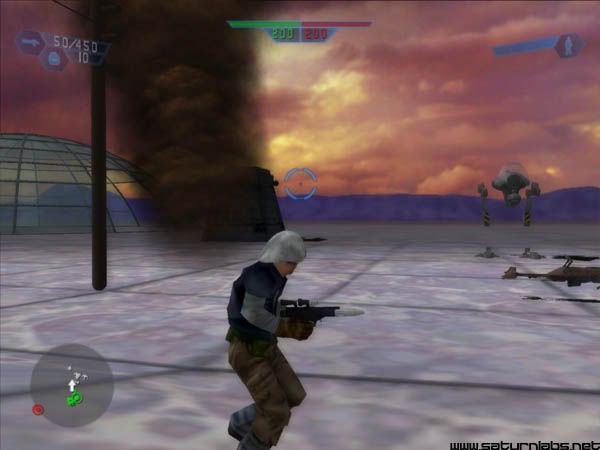
Here is the smoke effect attached to a scaled-down hoth_effect prop.
You should need hoth_effect.msh, hoth_effect.odf, smoke_billow.fx and underlitesmoke2.tga
If you don't want to (or for aesthetic map reasons, can't) hide the cube under the ground or inside some geometry, you can create an option file for hoth_effect.msh and scale it down so it is as good as invisible (search the forum if you are not familiar with scaling in option files).
Here is the smoke effect attached to a scaled-down hoth_effect prop.
-
d3linqu3nt
Thank you Saturn V,
it is actually quite easy. The reason why it didn´t work in the first attempt was because i had renamed the odf and msh (because I also wanted to use the hoth effect), and as a result I got an untextured cube with no effect.
But I think there are enough objects with steam efects attached to so i won´t need the hoth effect.
When I just change the effect attached to the hard point and leave the name "hoth_prop_effect.odf" it actually works.
Just one other question:
The smoke effect disappears after a short time. Which means it isn´t emitting smoke anymore.
There are some lines in the smoke_billow.fx file which define life times.
Do you know which one I have to edit to make the smoke billow not disappear?
Well I will experiment around a bit.
Thank you.
it is actually quite easy. The reason why it didn´t work in the first attempt was because i had renamed the odf and msh (because I also wanted to use the hoth effect), and as a result I got an untextured cube with no effect.
But I think there are enough objects with steam efects attached to so i won´t need the hoth effect.
When I just change the effect attached to the hard point and leave the name "hoth_prop_effect.odf" it actually works.
Just one other question:
The smoke effect disappears after a short time. Which means it isn´t emitting smoke anymore.
There are some lines in the smoke_billow.fx file which define life times.
Do you know which one I have to edit to make the smoke billow not disappear?
Well I will experiment around a bit.
Thank you.
-
Saturn_V
- Emperor's Hand
- Posts: 487
- Joined: Sun Dec 26, 2004 12:11 pm
- Projects :: No Mod project currently.
- xbox live or psn: No gamertag set
- Contact:
-
BlackHawk549
 i wish saturn would release a simple test map with all of his works...as shown above....
-
Qdin
- Old School Staff
- Posts: 2059
- Joined: Wed Feb 23, 2005 9:54 am
- Projects :: No Mod project currently.
- xbox live or psn: No gamertag set
 that's what a certain mapper/modder does
  lol - try it out
  or maybe set the values to 0 - in all...? that works also some times
 -
d3linqu3nt
Yeah, I tried changing the lifetime lines, but I think they define the lifetime of the single clouds which come out of the cube.
When I remove the lines there is no smoke at all. Don´t know, but I think I somehow increased the duration of smoke coming out. But it still stops after a certain time. But that´s not that dramatic.
And the particle editor is a bit too complicated for me.
I simply don´t understand it.
But thanks all of you for your help.
When I remove the lines there is no smoke at all. Don´t know, but I think I somehow increased the duration of smoke coming out. But it still stops after a certain time. But that´s not that dramatic.
And the particle editor is a bit too complicated for me.
I simply don´t understand it.
But thanks all of you for your help.
-
Saturn_V
- Emperor's Hand
- Posts: 487
- Joined: Sun Dec 26, 2004 12:11 pm
- Projects :: No Mod project currently.
- xbox live or psn: No gamertag set
- Contact: