
Bumpmap Help

How to create models in XSI and other 3D applications and make them work in Battlefront 1 & 2. Post models, tips for application usage and share anything XSI, 3DMax, SketchUp, etc.

Moderator: Moderators

Post Reply
User avatar
elfie
Field Commander
Field Commander
Posts: 931
Joined: Fri Jan 25, 2008 8:26 pm
Games I'm Playing :: no games
xbox live or psn: no live
Location: Coruscant, Jedi Temple
Contact:

Bumpmap Help

Post by elfie »

Well, lately I've had some trouble with bumpmaps. I used meshtool 4 to give my model a bump map. I set up the .tga.option file, msh.option file that says vertexlighting, set up my bumpmap texture so it is 256x256 has a decomposed rgb and composed rgba as was posted in the topic, made my texture bright so it matched the uta1_bldg_lizardpenfloor, put it ingame on a prop and weapon model and... well the specular works great, but the bump texture appears very dark ingame despite bumping up the values and brightness of my texture(no pun intended :D ), (note: it does not appear black, only very dark) Anyway, I was curious if anyone encountered a similar problem and if so had a possible fix.

Before anyone asks, here is a screenshot of the bumpmap image from GIMP:
Hidden/Spoiler:
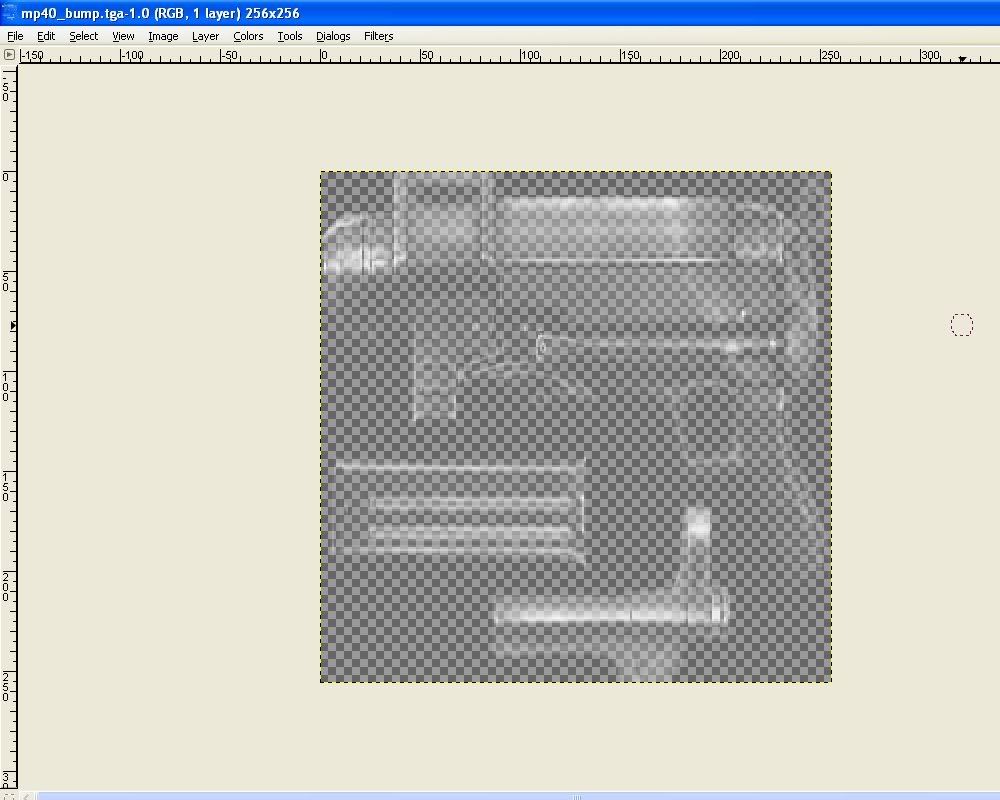
Image
But it appears nearly black ingame. Any help is greatly appreciated :D
User avatar
AceMastermind
Gametoast Staff
Gametoast Staff
Posts: 3285
Joined: Mon Aug 21, 2006 6:23 am
Contact:

Re: Bumpmap Help

Post by AceMastermind »

vertexlighting has nothing to do with bump mapping, let's see your bump texture with the alpha channel hidden.
Have a look at any bump mapped object in the assets and follow the same setup.
User avatar
DarthD.U.C.K.
Master of the Force
Master of the Force
Posts: 6027
Joined: Wed Sep 27, 2006 11:05 am
Location: Duckburg, Germany

Re: Bumpmap Help

Post by DarthD.U.C.K. »

first of all, this bumpmap is pretty useless, it should contain height-informations (black-low and white-high) and nothing more. it will have nearly no effect using the normale texture as bumpmap (although most of the shipped bumpmaps do it that way which is extremely inefficient)

second: the bumpmap becomes both specular and bumpmap input which will make all dark parts of the bumpmap dark ingame

and third: the bumpmap will begood visible ingame only when the light comes from a good angle
User avatar
Maveritchell
Jedi Admin
Jedi Admin
Posts: 7366
Joined: Mon Aug 21, 2006 11:03 pm

Re: Bumpmap Help

Post by Maveritchell »

If you want to see what your bumpmap is doing, and it alone, it'd be best to disable vertex lighting on your model (remove the munge parameter from the .option file).
User avatar
DarthD.U.C.K.
Master of the Force
Master of the Force
Posts: 6027
Joined: Wed Sep 27, 2006 11:05 am
Location: Duckburg, Germany

Re: Bumpmap Help

Post by DarthD.U.C.K. »

what does vertexlighting actually do?
i havent seen any difference between non- and vertex-lit objects and its not needed for glow..
User avatar
Maveritchell
Jedi Admin
Jedi Admin
Posts: 7366
Joined: Mon Aug 21, 2006 11:03 pm

Re: Bumpmap Help

Post by Maveritchell »

DarthD.U.C.K. wrote:what does vertexlighting actually do?
i havent seen any difference between non- and vertex-lit objects and its not needed for glow..
It's a determinant for how world lighting affects objects (only non-static lighting affects vertex-lit objects). You can read a little more about it in the BF2_lighting doc.
User avatar
elfie
Field Commander
Field Commander
Posts: 931
Joined: Fri Jan 25, 2008 8:26 pm
Games I'm Playing :: no games
xbox live or psn: no live
Location: Coruscant, Jedi Temple
Contact:

Re: Bumpmap Help

Post by elfie »

Okay, thanks so much for the help, increasing the contrast seemed to make a huge difference. I still have one big question though. Is there a way to assign every texture a bumpamp through the meshtool? And if so, how would i order the index numbers, by using a comma like 0, 1, 2, 3 etc. or is there another way i'm supposed to do it?
User avatar
DarthD.U.C.K.
Master of the Force
Master of the Force
Posts: 6027
Joined: Wed Sep 27, 2006 11:05 am
Location: Duckburg, Germany

Re: Bumpmap Help

Post by DarthD.U.C.K. »

you can apply a bumpmap on every material (/=texture) the bumpmapname will be texturename_bump
this name is auto-generatd by meshtool but you should be ableto change it cia hexediting
User avatar
Maveritchell
Jedi Admin
Jedi Admin
Posts: 7366
Joined: Mon Aug 21, 2006 11:03 pm

Re: Bumpmap Help

Post by Maveritchell »

elfie wrote:Okay, thanks so much for the help, increasing the contrast seemed to make a huge difference. I still have one big question though. Is there a way to assign every texture a bumpamp through the meshtool? And if so, how would i order the index numbers, by using a comma like 0, 1, 2, 3 etc. or is there another way i'm supposed to do it?
As far as I know, you can only add flags to one material at a time, not the whole set of them at once.
User avatar
elfie
Field Commander
Field Commander
Posts: 931
Joined: Fri Jan 25, 2008 8:26 pm
Games I'm Playing :: no games
xbox live or psn: no live
Location: Coruscant, Jedi Temple
Contact:

Re: Bumpmap Help

Post by elfie »

DarthD.U.C.K. wrote:you can apply a bumpmap on every material (/=texture) the bumpmapname will be texturename_bump
this name is auto-generatd by meshtool but you should be ableto change it cia hexediting
Sorry Duck, forgive me if I am being a total idiot, but I don't really understand what you mean by /=texutre. I put / in after I did command bumpmap in the tool, but then the program went all spazy. I also tried seperating each texture with a / but that also made the program spaz out. Could you please tell me what the command is for applying it to each texture? Like I said, I'm sorry if I am just not understanding what you are saying.
Also Mav- when I try and enter another material index number in the tool to a mesh file that already has a bumpap on a texture, the program spits out an unchanged file.
Btw, thanks for replying guys.
User avatar
DarthD.U.C.K.
Master of the Force
Master of the Force
Posts: 6027
Joined: Wed Sep 27, 2006 11:05 am
Location: Duckburg, Germany

Re: Bumpmap Help

Post by DarthD.U.C.K. »

sorry, i didnt understand your question correctly at first
you cant bumpmap all materials at once
you have run meshtool once for every material
User avatar
elfie
Field Commander
Field Commander
Posts: 931
Joined: Fri Jan 25, 2008 8:26 pm
Games I'm Playing :: no games
xbox live or psn: no live
Location: Coruscant, Jedi Temple
Contact:

Re: Bumpmap Help

Post by elfie »

DarthD.U.C.K. wrote:sorry, i didnt understand your question correctly at first
you cant bumpmap all materials at once
you have run meshtool once for every material
Oh okay I think I've got it now. :yes: What confused me was the size of the file moved up one KB when I added the first bumpmap texture, but then stayed the same when I added more textures onto it. However, when I opened the file up in a hexeditor, I still got wall_bump.tga and railing_bump.tga etc. You said I would need to rename the files, but it seems they already were the correct name when I checked.
Post Reply

