
I had the exact same problem as the OP. Disabling my sound driver, and restricting the game to 1 core allowed the game to run, and allowed me to play the maps that came with the game. However, I was not able to play the mod maps, as for some mod maps, the game would CTD at the same place it used to, for some other mod maps, the game would CTD a little while into the loading, while even fewer would load, but would be unplayable (there would be no map and attempting to spawn would bring you back to the spawn screen).[RDH]Zerted wrote:Try disabling your sound card drivers and running the game on only one CPU core.
Win7 and BF2 issue - updated, please help! [Solved]
Moderator: Moderators
-
calc0000
- Posts: 2
- Joined: Sat Jan 02, 2010 5:19 pm
Re: Win7 and BF2 issue - updated, please help!
-
Fiodis

- Master of the Force

- Posts: 4145
- Joined: Wed Nov 12, 2008 9:27 pm
- Projects :: Rannoch + Tientia + Tools Programming
Re: Win7 and BF2 issue - updated, please help!
As I have very little computer knowledge, could you describe how to disable the sound card drivers and one of the CPU cores? And to calc: as in the previous sentence, I have little computer hardware/software knowledge, but that sounds odd, more like a problem with the game than the setup. Addon maps crashed? If the stock ones ran then those ought to as well, shouldn't they?
-
calc0000
- Posts: 2
- Joined: Sat Jan 02, 2010 5:19 pm
Re: Win7 and BF2 issue - updated, please help!
You're right. Interestingly enough, I didn't think of that. I'll have to test it on an XP machine sometime.Fiodis wrote:As I have very little computer knowledge, could you describe how to disable the sound card drivers and one of the CPU cores? And to calc: as in the previous sentence, I have little computer hardware/software knowledge, but that sounds odd, more like a problem with the game than the setup. Addon maps crashed? If the stock ones ran then those ought to as well, shouldn't they?
To disable the sound card driver, go to Control Panel -> Device Manager. Expand Sound, video and game controllers, right click everything you have in there, and select Disable. As for the one core (which I have not found to change anything), after the game starts open up task manager, right click battlefrontII.exe*32 in the process list, click Set Affinity, and uncheck all but one core.
Also, I have a copy of BF2 1.0 with conversion pack 2.2 installed, and it works fine on Win7. Any string associated with the mod doesn't display correctly, but I can deal with that.
-
Fiodis
- Master of the Force
- Posts: 4145
- Joined: Wed Nov 12, 2008 9:27 pm
- Projects :: Rannoch + Tientia + Tools Programming
Re: Win7 and BF2 issue - updated, please help!
Yes! I disabled the sound cards (but not the two CPUs) and it works! 
Previously I had just unplugged my speakers...I see now that's not what they meant when they said to turn off sound.
However, I would like to play with sound. I searched the forums and found this:
Previously I had just unplugged my speakers...I see now that's not what they meant when they said to turn off sound.
However, I would like to play with sound. I searched the forums and found this:
Well, my Win7 has no quickbar, so I just launched the sound box from the Control panel. I see a "recording" tab, assume that's recording devices, and click it. I right-click, and show disabled devices is already checked. Then I'm stuck. How do I enable stereo mix?Windows 7 Fix.
Right Click on the sound icon in the quickbar.
Go to recording devices and left click.
Right click anywhere in the main box and check show disable devices.
Enable stero mix
Your game should work with sound now.
-
501st_commander
- Master Bounty Hunter

- Posts: 1570
- Joined: Wed Dec 10, 2008 7:48 pm
Re: Win7 and BF2 issue - updated, please help!
Fiodis wrote:How do I enable stereo mix?
Hidden/Spoiler:
-
Fiodis
- Master of the Force
- Posts: 4145
- Joined: Wed Nov 12, 2008 9:27 pm
- Projects :: Rannoch + Tientia + Tools Programming
Re: Win7 and BF2 issue - updated, please help!
Hidden/Spoiler:
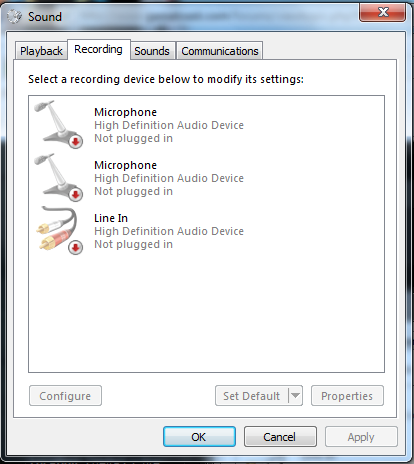
-
501st_commander
- Master Bounty Hunter
- Posts: 1570
- Joined: Wed Dec 10, 2008 7:48 pm
Re: Win7 and BF2 issue - updated, please help!
woah, thats odd...
make sure you have the Realtek HD Audio Manager
make sure you have the Realtek HD Audio Manager
-
Fiodis
- Master of the Force
- Posts: 4145
- Joined: Wed Nov 12, 2008 9:27 pm
- Projects :: Rannoch + Tientia + Tools Programming
Re: Win7 and BF2 issue - updated, please help!
How do I make sure I have the Realtek Audio Manage? For that matter, what is the Realtek Audio Manager for?
EDIT - I downloaded and installed this. Specifically, I downloaded the one that said Vista, Windows7 Driver(32/64 bits) Driver only (Executable file). No change was apparent in the sound control box.
EDIT 2 - Could it be that my motherboard doesn't have the necessary hardware for the Realtek HD audio manager? If that's the case, can I run sound without the audio manager? I do have one HD audio manager listed under my sound devices in the device manager, it's just not Realtek. The driver details say it's published by Microsoft. How can I edit the sound settings to be compatable with BF2 using that sound manager?
EDIT 3 - I looked up the one I have and apparently it has no sterio mix option whatsoever. Can I still run BF2 with sound?
EDIT - I downloaded and installed this. Specifically, I downloaded the one that said Vista, Windows7 Driver(32/64 bits) Driver only (Executable file). No change was apparent in the sound control box.
EDIT 2 - Could it be that my motherboard doesn't have the necessary hardware for the Realtek HD audio manager? If that's the case, can I run sound without the audio manager? I do have one HD audio manager listed under my sound devices in the device manager, it's just not Realtek. The driver details say it's published by Microsoft. How can I edit the sound settings to be compatable with BF2 using that sound manager?
EDIT 3 - I looked up the one I have and apparently it has no sterio mix option whatsoever. Can I still run BF2 with sound?
-
Wonderboy

- Chief Warrant Officer

- Posts: 353
- Joined: Sun Jul 12, 2009 12:54 pm
- Projects :: Making apples into applesauce
- Location: Eastern South Dakota
Re: Win7 and BF2 issue - updated, please help!
I am also running BF2 on Win7 64bit, and have the same problem. I have disable the sound card driver, but it doesn't do anything. I am not sure what you mean by the task manager because i cannot find it when the game starts.
-
Fiodis
- Master of the Force
- Posts: 4145
- Joined: Wed Nov 12, 2008 9:27 pm
- Projects :: Rannoch + Tientia + Tools Programming
Re: Win7 and BF2 issue - updated, please help!
Wonderboy - Control Panel\All Control Panel Items, you should see something called the Device Manager there in that list. Not Task Manager, that's something completely different.
-
Wonderboy
- Chief Warrant Officer
- Posts: 353
- Joined: Sun Jul 12, 2009 12:54 pm
- Projects :: Making apples into applesauce
- Location: Eastern South Dakota
Re: Win7 and BF2 issue - updated, please help!
I have been into the device manager and diabled my sound card drives but i wanted to know how to run with one core. I don't get where the task manager is after the game starts.calc0000 wrote:You're right. Interestingly enough, I didn't think of that. I'll have to test it on an XP machine sometime.Fiodis wrote:As I have very little computer knowledge, could you describe how to disable the sound card drivers and one of the CPU cores? And to calc: as in the previous sentence, I have little computer hardware/software knowledge, but that sounds odd, more like a problem with the game than the setup. Addon maps crashed? If the stock ones ran then those ought to as well, shouldn't they?
To disable the sound card driver, go to Control Panel -> Device Manager. Expand Sound, video and game controllers, right click everything you have in there, and select Disable. As for the one core (which I have not found to change anything), after the game starts open up task manager, right click battlefrontII.exe*32 in the process list, click Set Affinity, and uncheck all but one core.
Also, I have a copy of BF2 1.0 with conversion pack 2.2 installed, and it works fine on Win7. Any string associated with the mod doesn't display correctly, but I can deal with that.
-
Fiodis
- Master of the Force
- Posts: 4145
- Joined: Wed Nov 12, 2008 9:27 pm
- Projects :: Rannoch + Tientia + Tools Programming
Re: Win7 and BF2 issue - updated, please help!
You don't need to make it run with one core. At least, I didn't have to.
-
MercuryNoodles
- Jedi

- Posts: 1003
- Joined: Sun Mar 12, 2006 7:16 pm
- Projects :: Space - Boarding Action
- xbox live or psn: No gamertag set
Re: Win7 and BF2 issue - updated, please help!
Taskmanager = ctrl+alt+deleteWonderboy wrote: I have been into the device manager and diabled my sound card drives but i wanted to know how to run with one core. I don't get where the task manager is after the game starts.
In older versions of Windows, you're sent straight to it, but in Vista it gives you a menu first, and the bottom option should be labelled "Task Manager". I'm not sure about Win7, but it shouldn't be much different.
-
501st_commander
- Master Bounty Hunter
- Posts: 1570
- Joined: Wed Dec 10, 2008 7:48 pm
Re: Win7 and BF2 issue - updated, please help!
win7 is the same.MercuryNoodles wrote:In older versions of Windows, you're sent straight to it, but in Vista it gives you a menu first, and the bottom option should be labelled "Task Manager". I'm not sure about Win7, but it shouldn't be much different.
-
Wonderboy
- Chief Warrant Officer
- Posts: 353
- Joined: Sun Jul 12, 2009 12:54 pm
- Projects :: Making apples into applesauce
- Location: Eastern South Dakota
Re: Win7 and BF2 issue - updated, please help!
Fiodis, i am assuming under sound in the device manager you have 2 options: ATI hi definition audio device and VIA High definition audio. What i did was only disabled the ATI High Definition Audio device. Then i went to the sound manager for recording devices. there you should see VIA High Definition Audio stereo mix. Then you should enable this. After doing this i was able to play with sound. If this doesnt work, try disabled all but one core. i hope this works for you
oh and one more thing. at the home screen of swbf2 go to options, audio, and select your mixer config as software. doing all this allowed me to play the game with sound.
oh and one more thing. at the home screen of swbf2 go to options, audio, and select your mixer config as software. doing all this allowed me to play the game with sound.
-
Fiodis
- Master of the Force
- Posts: 4145
- Joined: Wed Nov 12, 2008 9:27 pm
- Projects :: Rannoch + Tientia + Tools Programming
Re: Win7 and BF2 issue - updated, please help!
I only have one option under the sound tab in the device manager: "High Definition Audio Device".
-
BigG00001
- Recruit Womprat Killer
- Posts: 10
- Joined: Sat Sep 26, 2009 4:49 am
Re: Win7 and BF2 issue - updated, please help!
sorry if Im resurrecting the post;
but I had another Idea that you could try (though you'd have to ask your local computer geek about it..)
I was thinking that you could perhaps try Dual Booting your Computer, so you have 2 Operating systems on it (Win 7 and eg. XP),
It has the advantage, that you then still have a fully hardware supported system; and dont have to bother about compatability modes.
That way you could mod with xp and then play the game itself under Windows 7...
although, Im not too sure how friendly windows xp is about installing on a device with another os, without reformating the Harddisk.. or having to remove the boot partition..
As I said, its a bit technical..(sorry!)
but I had another Idea that you could try (though you'd have to ask your local computer geek about it..)
I was thinking that you could perhaps try Dual Booting your Computer, so you have 2 Operating systems on it (Win 7 and eg. XP),
It has the advantage, that you then still have a fully hardware supported system; and dont have to bother about compatability modes.
That way you could mod with xp and then play the game itself under Windows 7...
although, Im not too sure how friendly windows xp is about installing on a device with another os, without reformating the Harddisk.. or having to remove the boot partition..
As I said, its a bit technical..(sorry!)
-
Fiodis
- Master of the Force
- Posts: 4145
- Joined: Wed Nov 12, 2008 9:27 pm
- Projects :: Rannoch + Tientia + Tools Programming
Re: Win7 and BF2 issue - updated, please help!
I've already gotten the game to work; it's just that I need to scrounge up a better sound card. Btw, when people switch hard drives, do they usually switch sound cards as well? Because this is the same computer I used to use, just with a new hard drive, so it ought to have the same sound card as it used to....right?
-
MercuryNoodles
- Jedi
- Posts: 1003
- Joined: Sun Mar 12, 2006 7:16 pm
- Projects :: Space - Boarding Action
- xbox live or psn: No gamertag set
Re: Win7 and BF2 issue - updated, please help!
That shouldn't be necessary. All you should really need to do is make sure your drivers (especially the soundcard and motherboard drivers, in this case) are installed, and up to date.
