Need some lighting help [Solved]

In this forum you will find and post information regarding the modding of Star Wars Battlefront 2. DO NOT POST MOD IDEAS/REQUESTS.

Moderator: Moderators

Post Reply
User avatar
destos
Chief Warrant Officer
Posts: 349
Joined: Sat Sep 22, 2007 10:37 pm

Need some lighting help [Solved]

Post by destos »

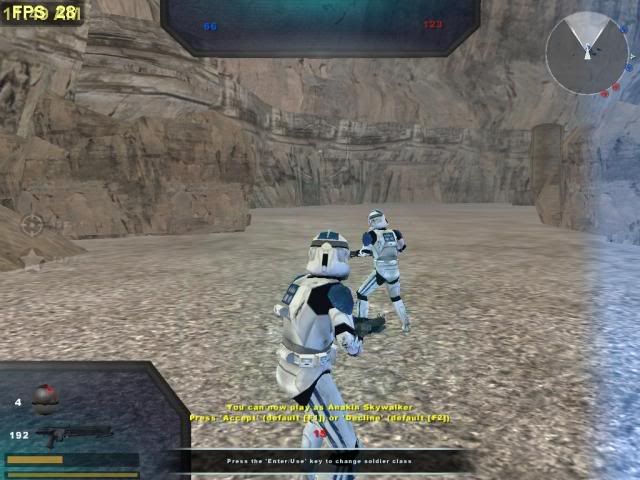
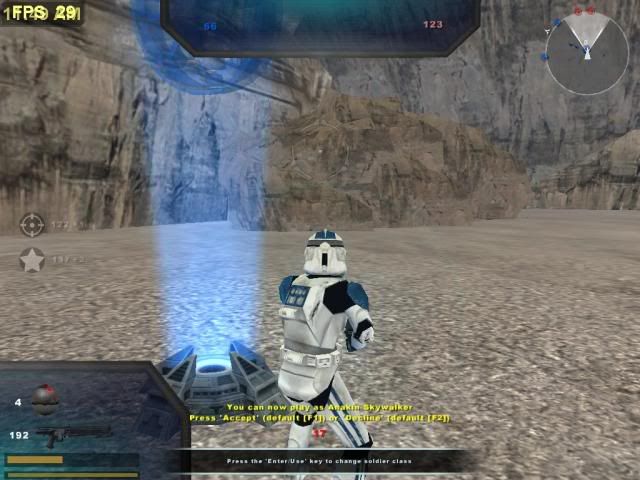
im making a tatooine map but so far even after changing the ambient colors from grey to a very whitish yellow, my map is still looking grey and foggy like yavin any ideas on how to make it more bright and yellowish instead of grey? or atleast help the map look like theres acctually burning suns over head

heres some pics of the map color situation so far, and yes i know i havent change the default sky yet, but im working on it as we speak
Hidden/Spoiler:
Image
Image
.
FragMe!
Gametoast Staff
Gametoast Staff
Posts: 2244
Joined: Sat May 13, 2006 12:34 am
Projects :: Not sure keep changing my mind.
Games I'm Playing :: F1 and SWBF
xbox live or psn: No gamertag set
Location: Origin name GT_FragMe
Contact:

Re: need some lighting help

Post by FragMe! »

In ZE lighting on the right hand side change the values for the top and bottom colors to something yellowish. You may or may not need to add a directional light but that is really for if you want the illusion of the sun in the sky and casting shadows etc.
User avatar
destos
Chief Warrant Officer
Posts: 349
Joined: Sat Sep 22, 2007 10:37 pm

Re: need some lighting help

Post by destos »

i did that... but how would i add the sun effect? what would i type into the directional light to acheive this?

also i think i found my first problem out... i 4got to remove the fog.... =P
FragMe!
Gametoast Staff
Gametoast Staff
Posts: 2244
Joined: Sat May 13, 2006 12:34 am
Projects :: Not sure keep changing my mind.
Games I'm Playing :: F1 and SWBF
xbox live or psn: No gamertag set
Location: Origin name GT_FragMe
Contact:

Re: need some lighting help

Post by FragMe! »

You must on the left side Place a directional light, position it in the sky where you get the effect you want or approximate location of the sun. Call the new light Sun then on the left side enter Sun into the Directional Light 1 box. Have a look at Yavin1 as an example.
YaNkFaN
Field Commander
Field Commander
Posts: 943
Joined: Sat Dec 13, 2008 8:17 am

Re: need some lighting help

Post by YaNkFaN »

also not sure if you're asking this or not but you can add a physical sun to your map by editing the .sky file i believe the section is called "SunInfo" or something along those lines take a look at yavin's .sky file. Doing that will place a bright colored sort of sun in your map but I don't think it will cast any lights in order to do that you need to do what frag said above with directionals

FragMe!
Gametoast Staff
Gametoast Staff
Posts: 2244
Joined: Sat May 13, 2006 12:34 am
Projects :: Not sure keep changing my mind.
Games I'm Playing :: F1 and SWBF
xbox live or psn: No gamertag set
Location: Origin name GT_FragMe
Contact:

Re: need some lighting help

Post by FragMe! »

For what YaNkFaN was talking about have a look at TAT2 world .fx file it has the sun flares in there.
User avatar
destos
Chief Warrant Officer
Posts: 349
Joined: Sat Sep 22, 2007 10:37 pm

Re: need some lighting help

Post by destos »

i got my map bright and shining like i was hoping =D thanks guys
FragMe!
Gametoast Staff
Gametoast Staff
Posts: 2244
Joined: Sat May 13, 2006 12:34 am
Projects :: Not sure keep changing my mind.
Games I'm Playing :: F1 and SWBF
xbox live or psn: No gamertag set
Location: Origin name GT_FragMe
Contact:

Re: need some lighting help

Post by FragMe! »

What? No bright and shiny pictures :(

Glad to hear you got it working the way you wanted.
User avatar
destos
Chief Warrant Officer
Posts: 349
Joined: Sat Sep 22, 2007 10:37 pm

Re: need some lighting help

Post by destos »

ull see the pics soon enough =P just wait for it in the wip forums should be there in about id say mabytoday or tommorow at least...
Post Reply