Model showcase thread
Moderator: Moderators
-
Galactic_Marine

- Command Sergeant Major

- Posts: 297
- Joined: Sat Oct 14, 2006 8:47 pm
- Projects :: No Mod project currently.
- xbox live or psn: No gamertag set
-
Snork

- Lieutenant General

- Posts: 669
- Joined: Thu Jun 07, 2007 3:34 pm
- xbox live or psn: No gamertag set
- Contact:

-
minilogoguy18

- Master Bounty Hunter

- Posts: 1512
- Joined: Wed Nov 09, 2005 11:12 pm
- Projects :: No Mod project currently.
- xbox live or psn: No gamertag set
-
Galactic_Marine
- Command Sergeant Major
- Posts: 297
- Joined: Sat Oct 14, 2006 8:47 pm
- Projects :: No Mod project currently.
- xbox live or psn: No gamertag set
-
minilogoguy18
- Master Bounty Hunter
- Posts: 1512
- Joined: Wed Nov 09, 2005 11:12 pm
- Projects :: No Mod project currently.
- xbox live or psn: No gamertag set
-
Galactic_Marine
- Command Sergeant Major
- Posts: 297
- Joined: Sat Oct 14, 2006 8:47 pm
- Projects :: No Mod project currently.
- xbox live or psn: No gamertag set
-
Snork
- Lieutenant General
- Posts: 669
- Joined: Thu Jun 07, 2007 3:34 pm
- xbox live or psn: No gamertag set
- Contact:
-
Galactic_Marine
- Command Sergeant Major
- Posts: 297
- Joined: Sat Oct 14, 2006 8:47 pm
- Projects :: No Mod project currently.
- xbox live or psn: No gamertag set
-
minilogoguy18
- Master Bounty Hunter
- Posts: 1512
- Joined: Wed Nov 09, 2005 11:12 pm
- Projects :: No Mod project currently.
- xbox live or psn: No gamertag set
-
AceMastermind

- Gametoast Staff

- Posts: 3285
- Joined: Mon Aug 21, 2006 6:23 am
- Contact:
Jango's pistol from AotC
I didn't hold anything back while making this, because I didn't really care about the polycount being high, but I think this is probably my best work yet, and i'm not really into making weapons, but i've always thought that Jango's pistol from AotC was cool, so I made one.
Jango's pistol:

Jango's pistol:
-
Galactic_Marine
- Command Sergeant Major
- Posts: 297
- Joined: Sat Oct 14, 2006 8:47 pm
- Projects :: No Mod project currently.
- xbox live or psn: No gamertag set
-
minilogoguy18
- Master Bounty Hunter
- Posts: 1512
- Joined: Wed Nov 09, 2005 11:12 pm
- Projects :: No Mod project currently.
- xbox live or psn: No gamertag set
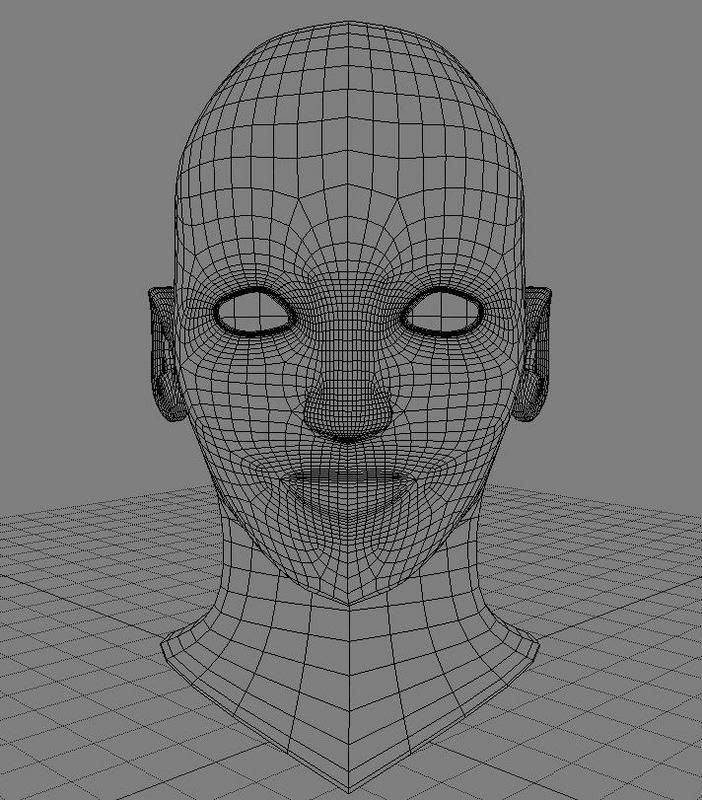
well you DEFINITELY need to knock back the polygons, thiers way too many and its just gonna make it hard to work and edit. you can get rid of some of the edge loops by going into edge select mode and right clicking and choosing select edgeloop (around corners) and manually delete them or just build a new model over the existing following the same polyflow. even in next gen video games the poly limits artists aim for is around 7k for the ENTIRE model, your head looks to be a lil less than half that, which is way too much. if you want to get into high detail character modeling build fairly low poly base meshes and bring them into programs such as ZBrush or Mudbox and subdivide them and sculpt the detail onto them later using the high res model as a normal map for the low res.
also ace, howd you get your viewport background blue? i forgot what menu its in and i wanted to change mine.
also ace, howd you get your viewport background blue? i forgot what menu its in and i wanted to change mine.
-
Galactic_Marine
- Command Sergeant Major
- Posts: 297
- Joined: Sat Oct 14, 2006 8:47 pm
- Projects :: No Mod project currently.
- xbox live or psn: No gamertag set
Well, I'm not really planning to put this ingame, and actually, I started with a fairly low-poly model, and then subdivided. What I showed you was the finished product. The model which I created by hand looks like this:
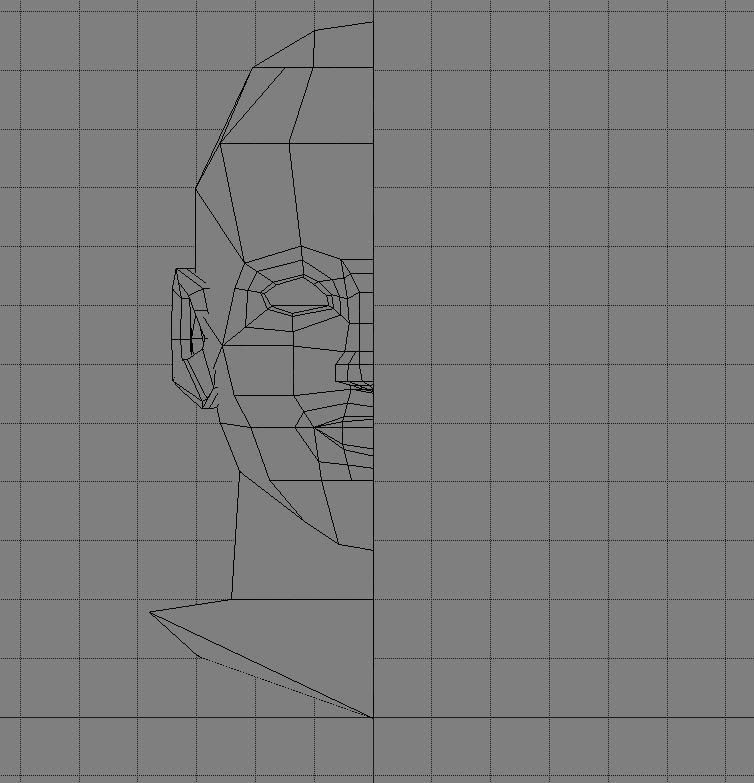
after I subdivide this, I mirror the model and merge the two meshes. Most of the changes I will make to the model will happen in the low-poly state, and will show up later in subdivides form.
after I subdivide this, I mirror the model and merge the two meshes. Most of the changes I will make to the model will happen in the low-poly state, and will show up later in subdivides form.
-
AceMastermind
- Gametoast Staff
- Posts: 3285
- Joined: Mon Aug 21, 2006 6:23 am
- Contact:
Changing the viewport background color
Click on the camera icon at the top of any viewport then scroll down to and select "Scene Colors", then click on the "Geometry Views" tab, and you can customize your background, grid and viewport colors.minilogoguy18 wrote:also ace, howd you get your viewport background blue? i forgot what menu its in and i wanted to change mine.
I grew extremely tired of the default background and had to do something else, plus it allows me to see flaws a little easier because I do most of my modeling in shaded view and the geometry always blended in with the background.
-
Penguin
- Jedi Admin

- Posts: 2541
- Joined: Sun Mar 05, 2006 12:00 am
- Location: Australia
-
AceMastermind
- Gametoast Staff
- Posts: 3285
- Joined: Mon Aug 21, 2006 6:23 am
- Contact:
Response to comment on Jango's pistol
Thanks, but I still need to go back and tweak the slots on the barrel, weld some more points on the handle and pre triangulate the trigger and then I think i'm done with the geometry.Penguin wrote:Very nice model ace, highly detailed and accurate, although i've never seen a picture of the wester 34 with the thing on the bottom of the handle grip.
Here is one of the pics that I used for reference, with that piece on the bottom:
*this is only a reference pic*
I need to make a chrome texture that looks like the picture and then it'll be complete.
-
Caleb1117
- 2008 Most Original Avatar
- Posts: 3096
- Joined: Sun Aug 20, 2006 5:55 pm
- Projects :: No Mod project currently.
- xbox live or psn: No gamertag set
- Location: X-Fire: caleb1117 ಠ_ಠ
I've been working on some more KotOR models:

I nice classic KotOR canister.
I made a open, and closed one.
Although, I'm worried that ingame, If you look inside it, you'll just see out. like being inside a building model.
And if that is the case, I'm gonna have to find an easy way of adding some innner "faces" So you don't see right through it.
I nice classic KotOR canister.
I made a open, and closed one.
Although, I'm worried that ingame, If you look inside it, you'll just see out. like being inside a building model.
And if that is the case, I'm gonna have to find an easy way of adding some innner "faces" So you don't see right through it.
-
Murdocr
@Caleb': To easily add faces to the inside, do the following:
1) Select the edges around the top of the cylinder shape.
2) Press ctrl+D to duplicate the edges.
3) use the scale tool to scale them in slightly along the X and Z axis.
4) Press Ctrl+D again to duplicate once more.
5) Drag these new edges down on the Y axis, until it reaches the bottom of the canister.
If all goes well and i didn't miss out any steps, you should have some nice faces inside the canister
EDIT: an easy way to select edges such as the ones on the top of the cylinder is to use the loop selection. To do this, you must be in the raycast edge selection mode. Then Left click on one edge. then middle click on another edge to loop select all the edges at the top of the cylinder
1) Select the edges around the top of the cylinder shape.
2) Press ctrl+D to duplicate the edges.
3) use the scale tool to scale them in slightly along the X and Z axis.
4) Press Ctrl+D again to duplicate once more.
5) Drag these new edges down on the Y axis, until it reaches the bottom of the canister.
If all goes well and i didn't miss out any steps, you should have some nice faces inside the canister
EDIT: an easy way to select edges such as the ones on the top of the cylinder is to use the loop selection. To do this, you must be in the raycast edge selection mode. Then Left click on one edge. then middle click on another edge to loop select all the edges at the top of the cylinder
-
AceMastermind
- Gametoast Staff
- Posts: 3285
- Joined: Mon Aug 21, 2006 6:23 am
- Contact:
How to select an edge loop in XSI
You can also press alt+MMB to select a single edge loop or you can select multiple edge loops by holding shift+alt+MMB.
-
Caleb1117
- 2008 Most Original Avatar
- Posts: 3096
- Joined: Sun Aug 20, 2006 5:55 pm
- Projects :: No Mod project currently.
- xbox live or psn: No gamertag set
- Location: X-Fire: caleb1117 ಠ_ಠ